
The best USB wireless audio adapter depends on what you want to connect: a Windows computer, a gaming console, or a stereo with an AUX input. The UGREEN USB-C adapter is best suited to sending audio from compatible devices to Bluetooth headphones, while the Szyafei receiver adds wireless playback to an AUX-equipped stereo. For Windows PCs, the UGREEN Bluetooth 6.0 dongle offers a newer Bluetooth version, and the TP-Link UB500 supports a wider list of Windows versions.
| Product | Best suited for | Connection role |
|---|---|---|
| UGREEN USB Bluetooth 6.0 Adapter | Newer Windows PCs | Adds Bluetooth to a PC |
| TP-Link UB500 | Windows 7 through 11 PCs | Adds Bluetooth to a PC |
| UGREEN USB-C Audio Adapter | PS5, Switch, and compatible computers | Transmits audio to Bluetooth headphones |
| Szyafei USB Bluetooth Audio Receiver | AUX-equipped stereo systems | Receives audio from a Bluetooth device |
| UGREEN Bluetooth 5.3 Adapter | Windows 8.1 through 11 PCs | Adds Bluetooth to a PC |
UGREEN USB-C Bluetooth Audio Adapter

Best for: Sending sound from a compatible USB-C device, such as a PS5, Switch, or computer, to Bluetooth headphones or speakers. Unlike a general-purpose PC Bluetooth dongle, this adapter is described as an audio transmitter and does not add Bluetooth data functions.
UGREEN lists support for aptX Low Latency, aptX Adaptive Low Latency, aptX Adaptive High Quality, aptX HD, and SBC. Indicator lights show operating status. The adapter is designed for use without drivers or software, and its listed compatibility includes Windows and macOS. The product description says Linux and PS4 are not supported.
Why it was selected: It directly addresses the common need to use wireless headphones with a USB-C audio source, including specified gaming devices. Its low-latency codec options may suit gaming or video when the headphones support the same codec.
Limitation: The headphones must support the selected codec to use it, and the adapter is not compatible with PS4 according to the listing. Check the source device’s port and compatibility before choosing it.
Szyafei USB Bluetooth AUX Audio Receiver

Best for: Adding wireless audio playback to a home stereo, portable speaker, or other sound system with a 3.5 mm AUX input. This model works in the opposite direction from a PC Bluetooth transmitter: a phone or other Bluetooth source sends audio to the receiver, which connects to the sound system through AUX.
The adapter uses a USB port for power and a 3.5 mm cable for the audio connection. The listing describes a plug-and-play setup in which the Bluetooth device pairs with “YET-M1.” It also mentions support for multiple phones and compatibility with home theater systems, speakers, and karaoke players when they have the required AUX connection.
Why it was selected: It is the most relevant option for people who want to stream phone audio through existing AUX-equipped speakers without replacing the stereo.
Limitation: It requires both USB power and a 3.5 mm AUX input. The listing specifically says the car audio part is not compatible, so do not assume it will work with a vehicle’s USB port or car audio system.
UGREEN USB Bluetooth 6.0 PC Adapter

Best for: Windows users who want to add Bluetooth connectivity to a desktop or laptop and prefer a dongle listed with Bluetooth 6.0. UGREEN says it supports Windows 11, Windows 10, and Windows 8.1, with plug-and-play use on those systems.
The adapter supports EDR and BLE, and the listing states backward compatibility with Bluetooth 5.4 and 5.3. It can connect up to five different types of Bluetooth devices at once, including examples such as a mouse, keyboard, phone, and headphones. If multiple audio devices of the same type are connected, only one can play music at a time.
Why it was selected: It is a direct fit for buyers seeking a general-purpose Bluetooth adapter for a supported Windows PC. Its stated device capacity is useful for people connecting several kinds of peripherals alongside audio gear.
Limitation: The listed operating systems are Windows 11, 10, and 8.1. The product information does not establish support for macOS, Linux, or other versions, so confirm your operating system before buying.
TP-Link UB500 Bluetooth USB Adapter
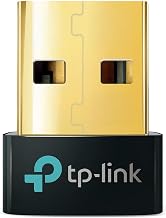
Best for: Buyers who need a small Bluetooth adapter for a Windows PC and want support listed for Windows 7 as well as Windows 8.1, 10, and 11. TP-Link describes the UB500 as a nano-design dongle for desktops and laptops, with support for devices such as keyboards and mice.
The adapter uses Bluetooth 5.4 with EDR and BLE and is backward compatible with several earlier Bluetooth versions, from 5.3 through 1.1. TP-Link states that it can provide up to twice the data-transfer speed and four times the coverage compared with Bluetooth 4.0. Those comparisons are manufacturer claims; actual performance can depend on the connected devices and surroundings.
Why it was selected: It is a useful comparison to the Windows-focused UGREEN dongles, particularly for people whose PC runs Windows 7 or who value the stated backward compatibility.
Limitation: The listed operating systems are Windows versions, not macOS or Linux. Although the adapter is described as suitable for smooth audio streaming, check that it meets your specific audio-device and computer requirements.
UGREEN Bluetooth 5.3 USB Adapter

Best for: People adding Bluetooth to a Windows 11, 10, or 8.1 desktop or laptop. The listing says no driver installation is required for those systems and names headphones, speakers, mice, keyboards, and printers among possible devices.
This adapter uses Bluetooth 5.3 BR+EDR. UGREEN says it can connect up to five different types of Bluetooth devices at once, such as a mouse, keyboard, phone, and headphones. When two audio devices of the same type are connected, only one can play music at a time.
Why it was selected: It is a straightforward Windows PC option for buyers who want one dongle to connect audio gear and other Bluetooth peripherals. It also offers a clear operating-system list and stated multi-device support.
Limitation: The product does not support Windows 7, Linux, or macOS according to the listing. Choose another option if one of those is your computer’s operating system.
Buying Guide: How To Choose A USB Wireless Audio Adapter
“USB wireless audio adapter” can describe two different products. A USB Bluetooth dongle for a computer adds Bluetooth connectivity so the PC can communicate with headphones, speakers, or other peripherals. A USB-powered audio receiver connects to an existing sound system and receives music sent from a phone. A USB audio transmitter sends sound from a source device to Bluetooth headphones. Identify the signal direction first.
Do you need a transmitter, receiver, or PC Bluetooth dongle?
- Choose a PC Bluetooth dongle if a Windows computer needs Bluetooth for headphones, speakers, or peripherals. The UGREEN PC adapters and TP-Link UB500 are in this category.
- Choose a transmitter if a USB-C source, such as a listed gaming device or computer, needs to send sound to Bluetooth headphones. The UGREEN USB-C audio adapter is designed for this use.
- Choose a receiver if a phone should send audio to a stereo or speaker with a 3.5 mm AUX input. The Szyafei model uses AUX for audio and USB for power.
Which operating system or port does your device require?
Check the adapter’s listed operating systems before purchase. The UGREEN Bluetooth 5.3 and 6.0 PC adapters list Windows 11, 10, and 8.1. The TP-Link UB500 lists Windows 11, 10, 8.1, and 7. The UGREEN USB-C transmitter lists Windows and macOS, but not Linux. It also says it is not compatible with PS4. For the Szyafei receiver, verify that the sound system has an AUX input and that a suitable USB port is available for power.
Does the adapter support the audio features you want?
For low-latency audio, check both ends of the connection. The UGREEN USB-C adapter lists aptX Low Latency and other aptX options, but the headphones must support the same standard to use it. A general PC Bluetooth dongle may add Bluetooth connectivity, but the supplied product information does not specify support for those codecs. Do not assume that a newer Bluetooth version alone guarantees a particular codec or low-latency performance.
How many devices will you connect?
The two UGREEN PC adapters state that they support up to five different types of Bluetooth devices at once. The Bluetooth 5.3 model clarifies that only one device of the same audio type can play music when multiple speakers or headphones are connected. Consider whether you need to connect audio equipment along with input devices such as a keyboard and mouse, and check the adapter’s stated limits.
What should you check before connecting an older stereo?
Confirm that the stereo has a 3.5 mm AUX input, not just a USB port. On the Szyafei receiver, USB supplies power while AUX carries the audio signal. A USB port on a stereo does not automatically mean it can accept audio from every Bluetooth adapter. Also check whether the intended use is home audio or car audio; the Szyafei listing excludes the car audio part.
Frequently Asked Questions
Can a USB Bluetooth adapter connect wireless headphones to a PC?
Yes, if the adapter supports the computer’s operating system and the headphones use compatible Bluetooth functions. The UGREEN PC adapters and TP-Link UB500 are listed for supported Windows computers. Check the operating-system requirements before connecting.
Is a USB Bluetooth receiver the same as a transmitter?
No. A receiver accepts audio from a Bluetooth source, such as a phone, and sends it to a connected sound system. A transmitter sends audio from a source device to Bluetooth headphones or speakers. Choose based on which device should send the audio.
Can the Szyafei adapter work with a stereo that has no AUX input?
The listing describes an AUX connection for audio. It does not establish compatibility with a stereo that lacks a 3.5 mm AUX input, so this model is not the right choice for that setup based on the provided information.
Will these adapters work with macOS or Linux?
Compatibility varies by model. The UGREEN USB-C audio adapter lists Windows and macOS but excludes Linux. The UGREEN PC Bluetooth adapters specify supported Windows versions, and the UGREEN Bluetooth 5.3 model explicitly excludes macOS and Linux. The TP-Link listing names Windows versions. Verify the individual model’s support rather than assuming all USB Bluetooth adapters work across systems.
Does the UGREEN USB-C adapter work with PS4?
No. Its product information says it is not compatible with PS4. The listing names PS5, Switch, and compatible Windows or macOS computers instead.