
The best headphone microphone for a PC depends on your connection, comfort needs, and main use. The Logitech H390 is a straightforward USB choice for calls, while the Logitech H111 suits computers with a 3.5 mm audio jack. JIAMQISHI offers USB and 3.5 mm connection options, and the AOC headset emphasizes a lightweight fit for long sessions. For gaming-focused audio, the EKSA E1000 adds advertised 7.1 surround sound and a noise-reducing microphone.
| Headset | Best For | Connection or Standout Feature |
|---|---|---|
| Logitech H390 | Everyday calls and meetings | USB-A, inline controls |
| JIAMQISHI USB Headset | Flexible connection needs | USB and 3.5 mm listed |
| Logitech H111 | Computers with a 3.5 mm jack | Rotating microphone boom |
| AOC USB Headset | Lightweight home-office use | USB, listed weight of 5 ounces |
| EKSA E1000 | PC gaming and voice chat | USB, advertised 7.1 surround sound |
Logitech H390 USB Headset

The Logitech H390 is best for people who want a wired USB-A headset for routine PC calls, meetings, and general listening. Its listed features include fine-tuned drivers for digital stereo sound and a rotating noise-canceling microphone boom. The boom can be moved out of the way when it is not needed.
Inline controls on the cable provide access to volume adjustment and call mute without requiring a separate control panel. That makes the H390 a practical choice for remote work or online classes where muting quickly is useful. Its USB-A connection is a clear fit for a computer with an available USB-A port.
- Best for: Users who want USB connectivity and convenient inline mute and volume controls.
- Why it was selected: The feature set combines a microphone, stereo audio, and simple cable controls for common PC tasks.
- Keep in mind: This model uses USB-A, so check the ports on your computer before choosing it.
JIAMQISHI USB Headset
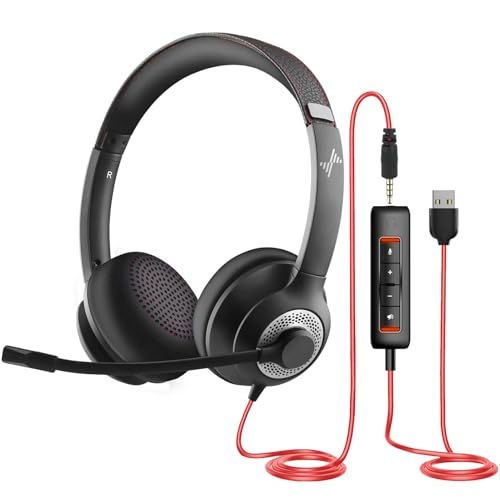
The JIAMQISHI headset is best for buyers looking for a wired headset that lists both USB and 3.5 mm connections. Its product information describes a unidirectional boom microphone with 270-degree positioning, intended to pick up the wearer’s voice while reducing unwanted background sounds. The microphone can be worn on either side, according to the listing.
Comfort features include an adjustable headband and soft protein memory foam earpads. The listed 40 mm driver and built-in audio sound card are presented for calls, music, movies, and gaming. These details make the headset a flexible option for mixed work and entertainment use.
- Best for: Buyers who want connection options and a microphone that can be repositioned for left- or right-side use.
- Why it was selected: The combination of a flexible boom, adjustable fit, and listed USB-plus-3.5 mm connection is useful for varied setups.
- Keep in mind: Confirm the connection requirements for your specific computer and intended use before purchasing.
Logitech H111 3.5 mm Headset

The Logitech H111 is best for users whose PC has a 3.5 mm audio jack and who prefer a simple wired headset. Its listed features include stereo sound and a noise-canceling microphone intended to reduce room noise during internet calls. The rotating microphone boom can be positioned on the left or right side.
Compared with the USB-A H390, the H111 is the better match when a 3.5 mm connection is the priority. The rotating boom also offers a basic way to move the microphone when not in use. It is a straightforward option for calls, music, movies, and games without the listed inline control features of the H390.
- Best for: People who need a 3.5 mm headset with a repositionable microphone.
- Why it was selected: It provides the essential combination of stereo audio and a noise-reducing mic in a simple wired design.
- Keep in mind: The listed connection is 3.5 mm, not USB; check that your PC has a suitable audio jack.
AOC USB Headset With Microphone

The AOC USB headset is best for people prioritizing a lightweight headset for home-office calls, online classes, and meetings. The product listing describes a noise-canceling microphone and wired USB connection. A wired connection avoids reliance on a wireless link, while the built-in audio sound card is listed as part of its audio setup.
The headset is listed at 5 ounces and includes breathable protein memory foam ear cushions and an adjustable, retractable headband. These details may appeal to users who wear a headset for extended periods. The listing also describes use for studying, music, and gaming, so it can serve more than one everyday purpose.
- Best for: Buyers seeking a lightweight USB headset with comfort-focused listed features.
- Why it was selected: Its stated weight, adjustable headband, and noise-canceling mic address common needs for long computer sessions.
- Keep in mind: It is a wired USB model, so it is not the choice for someone specifically seeking a wireless headset or 3.5 mm connection.
EKSA E1000 USB Gaming Headset

The EKSA E1000 is best for PC gamers who want a USB headset with gaming-oriented sound features and a microphone for voice chat. The listing describes driver-free 7.1 surround sound, a built-in USB audio chip, and 50 mm magnetic neodymium drivers. It also specifies a 120-degree adjustable microphone with noise reduction.
The product information lists compatibility with PC systems running Windows 7, 8, and 10, as well as PS4 and PS5 consoles and laptops with a USB audio port. It explicitly says the headset is not compatible with game controllers. This makes the connection details especially important for console buyers.
- Best for: PC players who want USB audio and an adjustable microphone for in-game communication.
- Why it was selected: It offers gaming-focused listed features that distinguish it from general-purpose meeting headsets.
- Keep in mind: It is not compatible with game controllers, and the listed surround-sound feature is aimed at gaming use.
Buying Guide: How to Choose a PC Headset With a Microphone
Which connection does your computer support?
Check your PC’s available ports before comparing sound or comfort features. The Logitech H390 and AOC headset use USB, while the Logitech H111 is listed with a 3.5 mm audio jack. The JIAMQISHI listing names USB and 3.5 mm options. The EKSA E1000 uses USB and specifies a USB audio port for listed devices.
Do not assume every port or adapter works the same way. If your computer has limited ports, confirm that the headset’s connection matches the ports you can use. A USB headset may be convenient when you want a direct digital connection, while a 3.5 mm model is appropriate when that is the available audio connection.
Do you need a noise-reducing microphone?
A microphone described as noise-canceling or noise-reducing is designed to limit distracting background sound, but the specific features differ by model. For example, the H390 has a rotating noise-canceling mic, the H111 lists a noise-canceling microphone, and the EKSA includes an adjustable noise-reduction microphone. Choose a boom that can sit near your mouth and adjust to your preferred side.
For frequent meetings, also consider whether you need a quick mute control. The H390 lists inline volume and mute controls. Other products may have different controls, so check the product details rather than assuming that every wired headset includes a cable mute switch.
What fit is suitable for long sessions?
For long workdays, look at headband adjustment, ear-cushion material, and the headset’s listed weight. The AOC headset is listed at 5 ounces and has an adjustable retractable headband with breathable memory foam cushions. The JIAMQISHI listing also describes an adjustable headband and protein memory foam earpads. These features can help narrow your choices, though personal comfort varies.
On-ear and over-ear designs can feel different, and the products in this selection do not all describe their fit in the same way. If you wear glasses or are sensitive to pressure, review the fit information carefully and take breaks during extended use.
Is the headset mainly for calls, classes, or gaming?
For routine calls and meetings, prioritize clear voice pickup, a convenient mute method, and a connection your computer supports. The Logitech H390 is a practical call-oriented USB option, while the H111 is a simple 3.5 mm alternative. The AOC and JIAMQISHI models list features aimed at calls and longer computer use.
For gaming, consider whether the headset has features designed for that activity. The EKSA E1000 lists 7.1 surround sound and a microphone for voice chat. If you intend to use a gaming headset with a console controller, check compatibility closely; the E1000 listing specifically excludes game controllers.
What should you compare before buying?
- Connection: Match USB or 3.5 mm to your PC’s available ports.
- Microphone: Compare boom adjustability and listed noise-reduction features.
- Controls: Look for inline mute and volume controls if you use them often.
- Comfort: Compare adjustable headbands, cushion materials, and listed weight.
- Primary use: Choose a call-focused model for meetings or a gaming-focused model for game audio and chat.
- Compatibility: Confirm the exact computer or console connection requirements before ordering.
Frequently Asked Questions
What is the best connection for a PC headset microphone?
There is no single best connection for every PC. USB is a direct choice for computers with an available USB port, while 3.5 mm is suitable when the computer has a compatible audio jack. Match the headset connection to your equipment.
Does a noise-canceling headset microphone remove all background noise?
No. A noise-canceling or noise-reducing microphone is intended to minimize unwanted sound, but the listed feature does not guarantee that all background noise will disappear. Microphone placement and the surrounding environment also matter.
Which headset is best for online meetings?
The Logitech H390 is a suitable meeting option for users who want USB-A connectivity and inline mute and volume controls. The AOC headset is another option for people who prioritize a lightweight design and USB connection.
Which option works with a 3.5 mm audio jack?
The Logitech H111 is listed with a 3.5 mm audio jack. The JIAMQISHI product name also lists USB and 3.5 mm connection options, so check the precise configuration before buying.
Is a gaming headset suitable for work calls?
It can be, if its microphone and connection meet your needs. The EKSA E1000 includes a microphone for communication, but its listed features focus on gaming, and it is not compatible with game controllers.
Should I choose a wired headset for PC calls?
A wired headset can provide a direct connection without relying on a wireless link. Choose one if you prefer a cable and your computer has the required port. Consider cable controls and cable placement as part of your setup.