
The best amp for a gaming headset depends on whether you need a standalone desktop DAC, gaming-focused sound processing, or a headset with amplification built in. The Fosi Audio K5 Pro is best for flexible wired connections and headphone adjustment; the Fosi Audio C3 is aimed at PC players who want footstep enhancement and virtual surround. SteelSeries’ Arctis Pro + GameDAC combines a headset and dedicated DAC/amp, while the Aveek DAC-200 offers multiple audio inputs and three-band EQ.
| Product | Best for | Key feature |
|---|---|---|
| Fosi Audio K5 Pro | Wired headset connections | Multiple inputs and bass/treble controls |
| Fosi Audio C3 | FPS gaming on PC | StepSense and virtual 7.1 surround |
| SteelSeries Arctis Pro + GameDAC | A bundled headset and DAC/amp | Hi-Res audio and positional cues |
| Aveek DAC-200 | Multi-source desktop setups | Five inputs and three-band EQ |
| Turtle Beach Stealth 500 | Wireless headset users | Amplified drivers and wireless audio |
Fosi Audio K5 Pro: Best for Wired Headsets
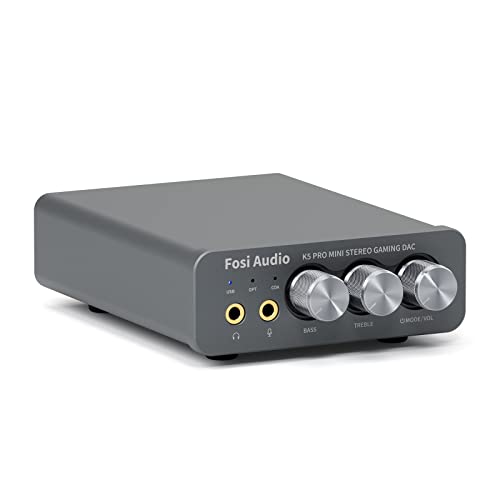
The K5 Pro is a compact DAC and headphone amplifier for gamers who want a separate desktop audio device rather than a new headset. It accepts USB-C, optical, and coaxial input, then provides 3.5 mm AUX and RCA outputs. Its controls include a combined power and volume knob, plus bass and treble adjustment.
Best for: Players using wired headphones who want more connection options and physical sound controls. The listed 3.5 mm headphone and microphone interface supports headphones from 16 to 300 ohms, and the device is described for PS5, computers, Mac, and active speakers.
Why it was selected: It combines a headphone amp, DAC, mic input, and multiple digital inputs in one unit. That makes it a useful comparison point for buyers choosing between a basic USB adapter and a more configurable desktop setup.
Limitation: The audio source must connect through the USB-A/C port for the stated phone compatibility. Check the connection type and headset plug requirements before buying.
Fosi Audio C3: Best for PC FPS Audio

The Fosi Audio C3 is a USB DAC amp designed around gaming features. Its StepSense Footstep Radar is intended to bring enemy movement forward while balancing gunfire and explosions. It also offers native 7.1 surround sound with HRTF processing through a stereo headset, which is designed to provide positional audio.
Best for: PC players who want gaming-specific processing instead of a general-purpose amp. The listed 320 mW × 2 output is specified for 16–300-ohm headphones, and the product also supports PS5, Switch, laptops, and headsets.
Why it was selected: It directly addresses common FPS priorities: hearing movement, locating sounds, and controlling headphone output. Its high-resolution DAC specifications also make it relevant to buyers who use the same headset for music and movies.
Limitation: The feature list does not specify the exact connection setup or explain which functions work on every listed platform. Confirm platform and software support for the features you plan to use.
SteelSeries Arctis Pro + GameDAC: Best Bundled Setup

This SteelSeries package pairs a wired gaming headset with a dedicated DAC and amp, making it a straightforward option for buyers who do not already own a headset. The listed features include a certified Hi-Res audio system, premium speaker drivers, and DTS surround sound intended to provide accurate positional cues.
Best for: Gamers who want a coordinated headset-and-DAC package for PC or PlayStation rather than selecting components separately. Its ClearCast bidirectional microphone is described as offering studio-quality voice clarity and background-noise cancellation.
Why it was selected: Unlike standalone desktop amps, this is a complete gaming audio setup with a microphone and positional audio features. It also makes sense for shoppers who want a dedicated DAC included with the headset.
Limitation: The product information says optimal PS5 compatibility requires disabling Sony 3D Audio and raising the default volume to 100%. Buyers should be prepared to change those console settings.
Aveek DAC-200: Best for Multiple Audio Sources
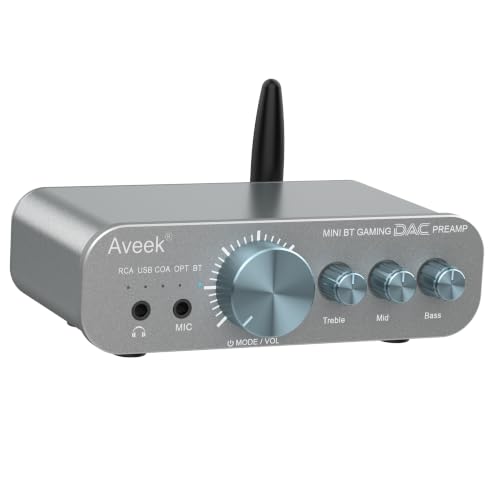
The Aveek DAC-200 combines a gaming DAC, headphone amplifier, and audio preamp. It has five listed input types: Bluetooth, USB, optical, coaxial, and RCA. Its front-panel three-band EQ lets users adjust bass, midrange, and treble independently for game sound, dialogue, music, or movies.
Best for: Desktop users who switch between several audio sources and want one device to manage them. The listed sources include PC, Mac, PS5, TV, smartphones, tablets, and CD players, subject to compatible connections.
Why it was selected: Its broad input selection and three-band EQ distinguish it from simpler headset amps. It may suit a desk where gaming, music listening, and other home audio use share the same equipment.
Limitation: The supplied information does not state a headphone impedance range or output power. If you have demanding headphones, verify that the amp’s output is appropriate before choosing it.
Turtle Beach Stealth 500: Best Amplified Wireless Headset

The Stealth 500 takes a different approach: instead of adding a separate amp to a headset, it is a wireless headset with amplified 40 mm drivers. It uses low-latency 2.4 GHz wireless and Bluetooth 5.2, and its listed features include variable mic monitoring, EQ presets, memory foam cushions, and a flip-to-mute microphone.
Best for: Players who prefer a wireless headset and do not want a separate desktop DAC/amp and wired headphone connection. The product is listed for PS5, PS4, PC, and mobile use.
Why it was selected: It provides an alternative for shoppers whose main goal is amplified gaming audio without adding a standalone box to the desk. Its wireless connections also provide more flexibility than a traditional wired amp setup.
Limitation: This is a complete wireless headset, not a standalone amplifier for a headset you already own. Choose a separate DAC/amp instead if you want to keep using your current wired headphones.
Buying Guide: How to Choose an Amp for a Gaming Headset
Do you need a standalone amp or a headset with built-in amplification?
A standalone DAC/amp is the better fit when you already own wired headphones and want to add a desktop control unit, microphone input, or different audio connections. Models such as the Fosi K5 Pro and C3 are examples of this approach. A headset with amplification built in is simpler if you are shopping for both the headphones and the audio system at once.
Consider whether you want to replace your headset or improve the setup you already use. A bundled product such as the Arctis Pro + GameDAC includes both a headset and a DAC/amp. The Turtle Beach Stealth 500 is a wireless headset with amplified drivers, rather than an add-on amp for another pair of headphones.
Which connections does your console or computer support?
Match the amp’s inputs to the audio outputs available on your gaming device. USB, optical, coaxial, RCA, and Bluetooth are not interchangeable; the source and amp must have a compatible connection path. The K5 Pro lists USB-C, optical, and coaxial inputs, while the Aveek DAC-200 lists five input types, including Bluetooth and RCA.
For console use, check the exact connection instructions and feature support for the console model. A product may be advertised for a platform while particular settings or audio effects require extra configuration. For example, the Arctis Pro + GameDAC listing specifies PS5 audio-setting changes for optimal compatibility.
How much headphone output do you need?
Check the impedance and output information for both the headphones and the amp. A headphone’s impedance is one factor in determining whether an amp can drive it adequately, but the product details should be checked rather than assuming every amp suits every headset. The K5 Pro lists support for 16–300-ohm headphones through its 3.5 mm interface, and the C3 lists the same impedance range for its output.
If your headphone model has a high impedance or you are uncertain about its requirements, look for clear output specifications and consult the headphone manufacturer’s guidance. Do not assume that a higher number in a DAC specification alone guarantees better results with a particular headset.
Do you want positional audio or adjustable sound?
Gaming-focused processing can be useful when your priority is locating footsteps, vehicles, or other in-game cues. The C3 lists StepSense and virtual 7.1 surround with HRTF processing. The Arctis Pro + GameDAC lists DTS surround sound. These processing options are distinct from simply increasing volume, and results can depend on the game, platform, and settings.
For a more general sound adjustment, look at the available EQ controls. The K5 Pro offers bass and treble adjustment, while the Aveek DAC-200 adds a midrange control. More controls can help tailor audio, but they are not essential if you prefer a fixed sound profile.
Will you use the microphone through the amp?
Some gaming amps include a microphone connection, which can help keep wired headset audio and voice input in one desktop setup. The K5 Pro lists a microphone interface. Check that the headset’s plug arrangement matches the device: a headset with a combined audio-and-mic plug may need a different connection arrangement from separate headphone and microphone plugs.
If microphone clarity matters, compare the headset microphone features as well as the amp. The Arctis Pro package lists a bidirectional ClearCast microphone with background-noise cancellation. An amp cannot be assumed to improve a microphone unless its listed features support that function.
Are wireless convenience or desk controls more important?
A wireless headset can reduce cable clutter and may combine amplification, microphone monitoring, and EQ presets in one product. The Stealth 500 lists 2.4 GHz wireless and Bluetooth 5.2. A desktop DAC/amp is usually more relevant when you want physical controls, wired headphone output, or connections for multiple sources.
Think about how you play and where the equipment will sit. A compact, wired desktop amp may be convenient at a fixed PC setup, while a wireless headset may suit someone who wants to move between supported devices. Confirm platform compatibility and connection details before selecting either type.
Frequently Asked Questions
What does a gaming headset amp do?
A gaming headset amp supplies headphone output, and a DAC/amp also converts digital audio from a compatible source. Depending on the model, it may add volume controls, EQ, microphone input, or gaming audio processing. The available functions vary by product.
Does every gaming headset need an amplifier?
No. An amp is not automatically necessary for every headset. Consider one if your current setup lacks enough output, you need additional connection options, or you want features such as physical EQ controls or gaming-focused processing.
Can I use a DAC/amp with PS5?
Some listed products are designed for PS5, including the Fosi K5 Pro, Fosi C3, and Arctis Pro + GameDAC. Check the required connection and settings for the specific device. The Arctis Pro + GameDAC listing, for example, calls for PS5 audio-setting changes for optimal compatibility.
Is virtual 7.1 surround sound the same as a physical surround headset?
No. The Fosi C3 describes virtual 7.1 sound with HRTF processing through a stereo headset. That is audio processing rather than a claim that the headset contains multiple physical speakers for each direction.
Can I connect a wireless headset to a separate headphone amp?
Not necessarily. A standalone headphone amp is generally intended for a compatible wired headphone connection. A wireless headset may use its own amplification and connection system, so check its design and ports before pairing it with a separate amp.