
A USB mixer with 48V phantom power can connect a compatible condenser microphone while sending audio to a computer. The FIFINE AmpliGame SC3 is best suited to gaming and streaming setups, while the Rockville RockMix 2BT is a compact option for buyers who want two-channel mixing and Bluetooth. The four- and five-channel models are better for users who need more input capacity or live-sound features. Compare the listed connections and controls before choosing.
| Product | Best For | Listed Features |
|---|---|---|
| FIFINE AmpliGame SC3 | Gaming, streaming, and podcasting | USB plug-and-play, XLR preamp, 48V phantom power, mute, monitoring, voice changer, RGB |
| 4 Channel USB Mixer Board | Live shows and multi-source setups | Four channels, USB, 48V phantom power |
| Rockville RockMix 2BT | Compact recording and podcast setups | Two channels, USB interface, Bluetooth, XLR/TRS inputs, EQ |
| W IN-MIX 4 Channel Mixer | Studio and live sound use | Four channels, Bluetooth, USB recording, 48V phantom power |
| Depusheng 5 Channel Mixer | Users seeking more inputs and built-in effects | Five-channel input, DSP effects, USB, Bluetooth, 48V phantom power |
FIFINE AmpliGame SC3 Gaming Audio Mixer

The FIFINE AmpliGame SC3 is best for streamers, gamers, and podcasters who want a USB-connected mixer with controls aimed at voice production. Its listed features include an XLR preamp, 48V phantom power, a mute button, monitoring, a voice changer, RGB lighting, and USB plug-and-play operation for PC.
The XLR preamp and phantom-power feature make it a candidate for a compatible condenser microphone. The mute and monitoring controls are useful when a user needs to manage their voice during a live session. Its voice-changing and RGB features also distinguish it from more conventional recording-focused mixers.
- Choose this if: gaming or streaming controls matter alongside microphone input and USB connectivity.
- Better for: a single creator’s desk setup than a larger, multi-channel live sound arrangement.
- Limitation: the provided product details specify PC use; confirm the exact operating-system support and connection needs before buying.
Four-Channel USB Mixer Board
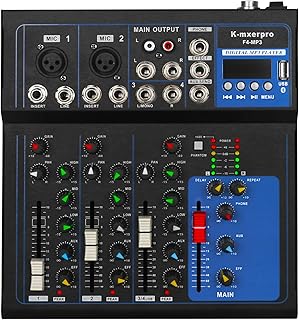
This four-channel USB mixer board is best for buyers who need more than a simple one-microphone interface and want a mixer described for live shows, streaming, recording, music, and karaoke. Its name lists four channels, USB audio, and 48V phantom power. That combination may suit a setup that needs multiple input positions, provided the actual input types and routing meet the user’s needs.
Having four channels can offer more room for combining sources than the two-channel Rockville model in this guide. The listing also identifies live performance and streaming as intended uses, making it relevant to users who want one device for different audio activities.
- Choose this if: four-channel capacity and USB audio are central requirements.
- Best for: comparing basic multi-input needs for karaoke, streaming, or live sound.
- Limitation: the supplied product details do not specify connector types, channel-by-channel controls, or computer compatibility. Check the full listing before matching microphones and other equipment.
Rockville RockMix 2BT USB Mixer

The Rockville RockMix 2BT is best for a compact podcast or recording setup that needs two-channel mixing, USB connectivity, and Bluetooth. The product name lists XLR/TRS inputs, +48V phantom power, a two-band EQ, RCA outputs, a headphone output, USB bus power, and Mac/PC support.
Its stated XLR/TRS inputs make it worth considering when the setup includes microphone or line-level sources that use those connections. Bluetooth 5.0 is also listed, as are headphone monitoring and RCA outputs. Buyers should still check the product documentation for the intended use of each connection and how the mixer routes audio.
- Choose this if: you want a two-channel mixer with USB, Bluetooth, and listed Mac/PC support.
- Better for: smaller recording or podcast rigs than users who need four or five input channels.
- Limitation: two channels may not provide enough input capacity for a larger group or multi-source performance.
W IN-MIX Professional Four-Channel Mixer

The W IN-MIX is best for buyers looking for a four-channel mixer described for studio and live sound use. Its listed features include Bluetooth, USB recording, and 48V phantom power. The product name also identifies DJ, karaoke, and streaming as intended applications.
Compared with a two-channel option, four channels may be more suitable when a setup needs to accommodate several sound sources. USB recording and Bluetooth are listed features, but the provided details do not explain the precise recording workflow or Bluetooth audio direction. Confirm those functions in the product information if they affect your setup.
- Choose this if: you want four channels and the listing’s combination of USB recording and Bluetooth.
- Best for: buyers considering one mixer for studio-style work, karaoke, DJ use, or streaming.
- Limitation: the supplied details do not identify input connector types or computer operating-system support.
Depusheng Five-Channel Digital FX Mixer

The Depusheng mixer is best for buyers who want a five-channel input interface and listed digital effects. Its product name specifies a 256-bit DSP, USB, Bluetooth, computer recording, and 48V phantom power. It is described for PC recording, live streaming, podcasting, DJ use, and karaoke.
The five-channel input count gives this model the highest stated channel capacity among the products in this guide. Its DSP and USB and Bluetooth features may appeal to users looking for several built-in functions in one console. Check the full specifications to understand the available inputs, effect controls, and USB routing before purchasing.
- Choose this if: the five-channel input count and listed DSP effects fit your intended setup.
- Better for: users comparing a broader feature set than a basic two-channel mixer offers.
- Limitation: the supplied details do not explain the effect selection or provide connector-by-connector specifications.
Buying Guide: How To Choose A USB Phantom Power Mixer
What does 48V phantom power do?
Phantom power supplies electrical power to compatible microphones through an audio connection. A mixer listing 48V phantom power may be appropriate for a condenser microphone that requires that voltage. It does not mean every microphone needs phantom power. Check the microphone’s manual, connector requirements, and the mixer’s instructions before switching phantom power on.
How many channels do you need?
Count the audio sources you expect to use at the same time, then allow for any planned additions. A two-channel mixer such as the Rockville is aimed at smaller setups. The four-channel models provide more stated channel capacity, while the Depusheng lists five input channels. Channel count alone does not reveal the number or type of microphone inputs, so verify the detailed input layout.
Which connections should you check?
Match the mixer’s inputs to your microphone and other sources. XLR is commonly used for microphone connections, while TRS and RCA connections may serve other audio roles. The Rockville listing explicitly names XLR/TRS inputs and RCA outputs. The other supplied product names provide less connector detail, so consult their complete specifications rather than assuming they have a particular port.
Do you need USB recording or USB computer audio?
USB descriptions can refer to different functions, including computer audio, recording, or power. The FIFINE is described as USB plug-and-play for PC, the W IN-MIX as offering USB recording, and the Rockville as a USB interface that is USB bus powered. Confirm whether the mixer can send the channels you need to your computer and whether the computer is supported.
Would Bluetooth be useful?
Bluetooth appears in the Rockville, W IN-MIX, and Depusheng product names. It can be relevant when a setup needs a wireless audio source, but the provided descriptions do not state the exact signal direction or supported Bluetooth workflows. Check the product documentation to confirm whether Bluetooth is an input, an output, or both before relying on it.
Which controls matter for streaming or live use?
For a voice-focused stream, a mute button and monitoring can be practical, as listed for the FIFINE SC3. For broader sound adjustment, the Rockville lists a two-band EQ, while the Depusheng lists DSP effects. Decide which controls are essential and compare their operation in the manufacturer’s information. Features such as RGB lighting or voice changing may be useful to some creators but are not required for phantom-powered microphone use.
How should you compare power and portability?
Look for explicit power details rather than inferring them from the word USB. The Rockville is described as USB bus powered, but the supplied details do not state the power method for every other mixer. If you plan to move the mixer between a desk and a live setup, confirm its power requirements, physical dimensions, and included accessories in the full listing.
Frequently Asked Questions
Can a USB mixer power a condenser microphone?
Yes, if the mixer specifically provides phantom power and the microphone requires compatible phantom power. Confirm the microphone’s voltage requirement and connection type before use.
Does every microphone need 48V phantom power?
No. Only use phantom power when the microphone’s instructions call for it. Check both the microphone manual and mixer guidance to avoid incorrect setup.
Can I use a USB phantom-power mixer for streaming?
Some products in this guide are described for streaming, including the FIFINE SC3, the four-channel USB mixer board, the W IN-MIX, and the Depusheng. Check computer support and USB audio routing for the specific model.
Is a four-channel mixer better than a two-channel mixer?
It is better when you need more input capacity. A two-channel model may be sufficient for a smaller setup. Choose based on the number and type of sources you need to connect, not channel count alone.
Does Bluetooth replace a USB connection?
No. Bluetooth and USB are separate features and may serve different purposes. Verify the Bluetooth signal direction and the mixer’s USB functions in the product specifications.