
The right converter depends on the direction of your audio signal: most products listed here send audio from HDMI to optical, while some connect a TV’s HDMI ARC/eARC port to an optical audio system. For a TV with ARC/eARC and an older optical sound system, the VPFET eARC extractor is a clearly specified option; for a streaming device or game console feeding an optical receiver, the VPFET HDMI Audio Extractor is the better match. Check the direction and port requirements before choosing.
| Product | Best suited for | Key distinction |
|---|---|---|
| 192KHz HDMI eARC/ARC to Optical Coaxial Audio Converter | TVs with ARC/eARC and optical or coaxial audio equipment | ARC/eARC-to-optical/coaxial direction, as stated in its name |
| VPFET HDMI eARC Audio Extractor | TV audio routed to optical or coaxial equipment | Supports TV ARC/eARC and up to 192 kHz |
| VPFET HDMI Audio Extractor | HDMI source devices and optical or 3.5 mm audio equipment | Offers 2.0, 5.1, and pass modes |
| DNXB HDMI eARC to Optical Audio Adapter | ARC/eARC TVs and optical audio systems | Optical output and included 6.6-foot cable |
| Neoteck ARC/eARC Audio Extractor | TV ARC/eARC audio connections | Product name specifies ARC/eARC-to-optical extraction |
192KHz HDMI eARC/ARC to Optical Coaxial Audio Converter

This model is a candidate for a television that sends audio through HDMI ARC or eARC and an audio system that accepts optical or coaxial digital input. Its name identifies both the ARC/eARC connection and the two output types, making it relevant to buyers looking to connect TV audio to older home audio equipment.
- Best for: People comparing ARC/eARC-to-optical or coaxial converters for a television and external audio system.
- Why it was selected: It is explicitly described as an ARC/eARC-to-optical and coaxial converter, matching the TV-to-audio-system connection direction.
- Check before buying: The supplied product details do not specify supported audio formats, setup instructions, or whether both outputs can be used at once. Confirm those requirements with the seller if they matter to your setup.
VPFET HDMI eARC Audio Extractor

The VPFET eARC extractor takes audio from a TV’s ARC/eARC port and provides optical and coaxial outputs. The manufacturer lists support for sampling rates up to 24-bit/192 kHz. It is intended for TV apps and audio devices such as speakers, amplifiers, or headphones connected through an appropriate external audio system.
- Best for: A TV with an ARC/eARC port and an optical- or coaxial-input audio system.
- Why it was selected: Its stated TV-only ARC/eARC input and dual digital outputs make its intended role clear, and the listed 192 kHz support is useful to buyers comparing high-sampling-rate specifications.
- Important limitation: The listing says it supports only the HDTV ARC/eARC port and does not support other HDMI devices. It also states “No CEC,” so it is not the right choice if CEC control is required.
VPFET HDMI Audio Extractor
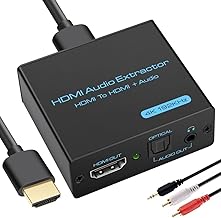
Unlike the ARC/eARC models, this VPFET extractor takes audio from an HDMI source and sends it to an optical or 3.5 mm audio connection. It lists three modes: 2.0-channel, 5.1-channel, and pass-through. The manufacturer specifies optical output for DTS 5.1 and 3.5 mm output for PCM 2.0.
- Best for: A separate HDMI source connected to an optical receiver or 3.5 mm stereo equipment.
- Why it was selected: It offers both digital optical and analog 3.5 mm outputs, plus selectable audio modes, for buyers whose source is not a TV ARC/eARC port.
- Important limitation: The listing says TVs are not supported as the input source and the unit does not support ARC/eARC. It also lists a maximum of 4K at 30 Hz and HDCP 1.4, says some named streaming devices and consoles support only 1080p with this product, and does not support 7.1-channel audio.
DNXB HDMI eARC to Optical Audio Adapter

This DNXB adapter is designed to carry audio from a TV’s HDMI ARC/eARC interface to an optical audio system. Its listed cable length is 6.6 feet, and the description specifies plug-and-play setup without software. The manufacturer says it is intended for TVs with an ARC or eARC interface and audio equipment with an optical input.
- Best for: Buyers who want a direct TV ARC/eARC-to-optical connection and need a stated cable length.
- Why it was selected: The connection direction, optical output, and intended TV and audio-system ports are described in the product details.
- Important limitation: It is not presented as a general HDMI source extractor. Choose another type if you need to extract audio from a streaming box, console, or other HDMI source that is not connected through the TV’s ARC/eARC port.
Neoteck ARC/eARC Audio Extractor

The Neoteck product name identifies it as an ARC/eARC audio extractor and specifies HDMI ARC audio to optical extraction. That makes it relevant to a buyer seeking to route television audio to an optical-input sound system. The product information provided for this comparison does not include additional feature details.
- Best for: Shoppers looking for an ARC/eARC-to-optical product to compare with other TV audio adapters.
- Why it was selected: Its name directly matches the TV ARC audio-to-optical use case.
- Check before buying: The supplied details do not confirm supported formats, sampling rates, included cables, or setup requirements. Verify those specifications if your equipment depends on a particular format or configuration.
Buying Guide: How to Choose a Digital Audio Converter
Product names can make these devices sound interchangeable, but the direction of conversion is the most important distinction. A TV ARC/eARC-to-optical adapter receives audio from a compatible TV port and sends it to an optical audio system. A standard HDMI audio extractor receives an HDMI signal from a source device and separates audio for an optical or analog output. These are different connection paths.
Does your TV have an ARC or eARC port?
Choose an ARC/eARC-to-optical adapter if you want audio from a TV to reach an optical-input receiver, soundbar, amplifier, or other audio equipment. The TV must have a port labeled ARC or eARC, and the adapter must be designed for that connection. A general HDMI extractor may not accept a TV as its source; the VPFET HDMI Audio Extractor listing specifically says TVs and ARC/eARC are not supported.
Are you connecting a streaming device or game console?
If the HDMI source is a separate device, look for an extractor that accepts HDMI input from a source and provides the output your audio system needs. Confirm the supported video resolution and copy-protection specification as well as audio output types. The VPFET extractor lists HDMI 1.4, HDCP 1.4, and up to 4K at 30 Hz, with a note that certain named devices and consoles support only 1080p through this product.
Which output does your audio system use?
- Optical/Toslink: Choose a model with an optical output and verify that the receiving device has an optical input.
- Coaxial digital: Select a converter that explicitly lists coaxial output if this is the input available on your audio equipment.
- 3.5 mm analog: Use an extractor with a 3.5 mm output if your audio equipment accepts that connection. Check the supported channel mode; the VPFET HDMI extractor lists PCM 2.0 for its 3.5 mm output.
What audio format and channel count do you need?
Match the converter’s supported audio modes to the formats accepted by the receiving equipment. The VPFET HDMI extractor lists 2.0-channel, 5.1-channel, and pass modes, specifies DTS 5.1 for optical output, and says it does not support 7.1 channels. The VPFET eARC model lists support up to 24-bit/192 kHz. Do not assume that every converter supports the same sample rates, surround formats, or channel counts; check the individual product specifications.
Will the converter control devices through CEC?
CEC can matter to people who want to control connected equipment through device-control features. The VPFET eARC listing explicitly says “No CEC.” If CEC behavior is important, check the product documentation and your TV and audio-system settings before purchase. Do not assume a converter passes control signals just because it carries audio.
How can you troubleshoot no audio?
- Confirm that you selected the correct converter type: ARC/eARC-to-optical for TV ARC/eARC audio, or HDMI extraction for a separate source.
- Check that the TV or source is connected to the specified input and that the receiving audio device uses the matching output type.
- For the VPFET HDMI extractor, select the mode that corresponds to the output: 2.0CH for 3.5 mm, or 5.1CH for optical as specified in its listing. The listing also recommends pass mode if there is no audio or video in the first two modes.
- Review the source’s audio output settings and select a format supported by the converter and receiving equipment.
Frequently Asked Questions
Is an HDMI ARC-to-optical adapter the same as an HDMI audio extractor?
No. An ARC/eARC-to-optical adapter takes audio from a compatible TV ARC/eARC port. A standard HDMI audio extractor takes an HDMI signal from a source device and separates its audio. Check the input connection before choosing.
Can I connect a TV to the VPFET HDMI Audio Extractor?
The product listing says TVs are not supported as the input source and that the extractor does not support ARC or eARC. For TV audio from an ARC/eARC port, choose a product specifically designed for that connection.
Do these converters send optical audio into an HDMI port?
The products listed here are described mainly as HDMI ARC/eARC-to-optical adapters or HDMI-to-optical extractors. They are not established by the supplied product details as optical-to-HDMI converters. Verify signal direction carefully if your goal is to feed an optical source into an HDMI input.
Does 192 kHz support guarantee every audio format will work?
No. A listed sampling rate does not establish support for every codec, channel layout, or connected device. Check the converter’s format details and the audio capabilities of the source and receiver.
Can an optical output carry 7.1-channel audio?
Do not assume it can. The VPFET HDMI extractor listing explicitly says it does not support 7.1 channels. Check each converter’s supported channel configurations and the receiving system’s requirements.