
The right high-speed duplicator depends on what you need to copy: cassette audio, CDs, or DVDs. The Pyle dual cassette deck is the closest match for copying audio tapes, while PlexCopier’s standalone towers duplicate optical discs without a computer. The automatic tape cutter is for preparing tape or film to a chosen length, not copying recorded content, so it suits a different task.
| Product | Best For | Copying Method |
|---|---|---|
| Pyle PT659DU Dual Cassette Deck | Cassette-to-cassette audio dubbing | Normal or high-speed dubbing |
| PlexCopier 1-to-1 Tower | One-at-a-time CD or DVD duplication | Standalone optical disc copying |
| PlexCopier 1-to-3 Tower | Small batches of CD or DVD copies | Standalone optical disc copying |
| PlexCopier 1-to-5 Tower | Higher-volume CD or DVD copying | Standalone optical disc copying |
| Automatic Tape Feeder and Cutter | Cutting tape or film to length | Automatic material feeding and cutting |
Pyle PT659DU Dual Cassette Tape Deck
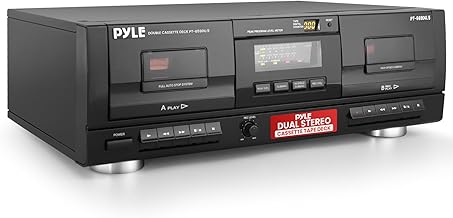
Best for: People who want to copy recorded audio from one cassette to another. Among these options, this is the direct choice for cassette tape duplication.
The dual-deck system supports direct cassette dubbing at normal or high speed. Both decks can play tapes, but only deck B is identified as the recording and dubbing deck. It supports standard and CrO2 tapes, and includes recording-level and gain controls. An auto-stop function provides additional control when a tape reaches its end.
The included USB cable can connect the deck to a computer for transferring cassette music to MP3 files. The listed features specify PC and Mac support.
- Choose this if cassette audio copying and digitizing are your main tasks.
- Limitation: High-speed dubbing is faster than normal dubbing, but the product information does not state an exact copy-speed multiplier.
PlexCopier 1-to-1 CD DVD Tower

Best for: Users who need to make one optical-disc copy at a time without running duplication from a computer. This is a standalone CD and DVD copier, not a cassette or magnetic tape duplicator.
The tower operates without a PC and supports up to 24x DVD writing and 52x CD-R writing, subject to the product’s stated default speed caps for selected media. It also supports M-Disc. The listed features describe an option to create copy-protected DVD Video copies from an original master using OptoDisc MID media.
Its 1-to-1 format makes it a better fit for occasional or small-volume duplication than for producing several discs simultaneously. The stated write speeds are maximums; actual operation may use lower caps depending on the media.
- Choose this if standalone operation and single-disc output meet your needs.
- Limitation: It does not offer the multi-disc output capacity of the 1-to-3 or 1-to-5 towers.
PlexCopier 1-to-3 CD DVD Tower

Best for: Users who need to duplicate optical discs to multiple targets in a batch. Its 1-to-3 configuration offers more simultaneous output capacity than the 1-to-1 model while remaining smaller in stated duplication capacity than the 1-to-5 tower.
This standalone tower requires no PC for operation. It supports M-Disc and lists maximum write speeds of up to 24x for DVD and 52x for CD-R, with default maximum caps for selected media. Its product features also describe copy-protected DVD Video copying from an original master using OptoDisc MID media.
Consider the number of copies you typically need per run: the 1-to-3 layout is intended for batches of up to three target discs per duplication cycle, based on its model designation.
- Choose this if you want a middle-ground option between single-copy and higher-capacity towers.
- Limitation: It is for CD and DVD media, not audio cassette tapes.
PlexCopier 1-to-5 CD DVD Tower

Best for: Users who need to produce more optical-disc copies per run than the 1-to-1 or 1-to-3 towers provide. Its 1-to-5 arrangement is the highest stated simultaneous output capacity among the listed disc duplicators.
The system works as a standalone duplicator, so a computer is not required for operation. Listed capabilities include M-Disc support, maximum writing speeds of up to 24x for DVD and 52x for CD-R, and copy-protected DVD Video copying from an original master using OptoDisc MID media. The product notes that speed caps may vary by selected media.
For a buyer comparing these towers, this model prioritizes the number of target discs over a smaller footprint or lower output count. Check that your intended content and media match the product’s supported disc formats and copy-protection conditions.
- Choose this if higher-volume CD or DVD duplication is more important than copying only one or a few discs.
- Limitation: Its higher disc capacity does not make it a tape-to-tape audio duplicator.
Automatic Tape Feeder and Cutter

Best for: Workstations that need repeated lengths of tape, film, foil, or similar material cut automatically. It is included because “tape duplicator” can refer to tape-handling equipment, but it does not duplicate audio or recorded content.
The unit supports automatic feeding at a listed speed of 200 mm per second and can hold two rolls for synchronized cutting. Its digital settings cover cut lengths from 5 mm to 999 mm and tape widths from 6 mm to 60 mm. Six memory presets can store repeated lengths. The listed material range includes packaging, masking, double-sided, and acetate tapes, as well as protective films and foils.
Choose this if your goal is to prepare consistent material lengths rather than make copies of a recording.
- Limitation: It cuts and feeds material; it is not a cassette deck or CD/DVD copier.
Buying Guide: How to Choose a High-Speed Duplicator
What kind of tape or media are you copying?
Start by identifying the source and destination. For recorded cassette audio, choose a cassette deck with a recording deck and a stated dubbing function. For CDs or DVDs, use an optical-disc duplicator. A tape cutter handles physical materials such as adhesive tape or protective film; it does not transfer recorded content.
This distinction matters because products described as “high speed” can refer to different operations. A cassette deck’s high-speed mode is for cassette dubbing. A disc tower’s speed rating refers to optical-disc writing. A feeder’s speed describes how quickly material moves through its cutting mechanism.
How many copies do you need per run?
Compare the duplicator’s source-to-target configuration. A 1-to-1 tower suits one target disc at a time. The 1-to-3 and 1-to-5 models are more appropriate when you need several disc copies in a batch. More output positions can reduce the need to repeat individual cycles, but they do not change the type of media the machine supports.
For cassette copying, the Pyle model offers normal- and high-speed dubbing between its decks. Its listed features say that only deck B records or dubs. If you need to make many cassette copies, check the deck arrangement and workflow carefully before choosing.
Do you need a computer?
The PlexCopier towers are described as standalone devices, so they do not require a PC for duplication. The Pyle deck can connect by USB to a computer for transferring music to MP3 files. Choose based on whether your priority is independent copying, digital conversion, or both.
Which speed details should you compare?
Use the speed information that applies to your format. The PlexCopier towers list maximum speeds of up to 24x DVD and 52x CD-R, with media-dependent default caps. The Pyle deck offers normal and high-speed cassette dubbing but does not provide a numerical multiplier in the supplied information. The tape cutter lists a feed speed of 200 mm per second, which is not a recording-copy speed.
Do media support and copy protection matter?
For disc duplication, check the supported format and media requirements. The PlexCopier product descriptions list M-Disc support and describe copy-protected DVD Video copying using OptoDisc MID media from an original master. Those details do not apply to cassette duplication. For tape cutting, verify that the material type, width, and desired cut length fall within the listed ranges.
Which option is best for digitizing old recordings?
The Pyle deck is the listed product that supports transferring cassette music to MP3 on a computer through USB. The disc towers copy CDs and DVDs, while the automatic cutter prepares physical material. Select the device that matches the original format rather than relying on the broad word “duplicator.”
Frequently Asked Questions
What is the best product here for duplicating cassette tapes?
The Pyle PT659DU is the direct choice for cassette-to-cassette dubbing. It offers normal and high-speed copy modes, and its listed features identify deck B as the recording and dubbing deck.
Can a CD or DVD duplicator copy cassette tapes?
No. The PlexCopier towers are designed for CD and DVD duplication. They do not replace a cassette deck for copying recorded audio tapes.
Which PlexCopier tower makes the most copies at once?
The 1-to-5 model has the highest stated output capacity among the listed PlexCopier towers. The other options are 1-to-3 and 1-to-1.
Does the tape cutter duplicate recorded content?
No. It feeds and cuts tape and other listed materials to selected lengths. It is not an audio or disc duplicator.
Can the Pyle cassette deck convert tapes to MP3?
Its listed features say it can connect to a PC or Mac by USB to transfer cassette music to MP3 files on the computer.
Are the stated maximum disc speeds guaranteed for every disc?
No. The product information describes the listed speeds as maximums and notes default caps for selected media. The actual cap depends on the media used.