
The best Cisco-compatible wireless headset depends on your exact phone model and how you take calls. The INNOTALK is the clearest match for several listed Cisco desk phones and includes remote call answering. The Leitner LH570 is better for people who need both a desk-phone and computer connection. The Plantronics CS540 suits desk-phone users seeking a convertible, single-ear design, while the Yealink and Sarevile options are worth considering only after confirming how they connect to your Cisco phone.
| Headset | Best for | Connection or compatibility note |
|---|---|---|
| INNOTALK Wireless Headset | Specific Cisco desk phones and remote call control | Lists compatible Cisco models and a remote hookswitch device |
| Leitner LH570 | Desk-phone and computer users | Claims compatibility with Cisco and other office phones; uses DECT, not Bluetooth |
| Plantronics CS540 | Desk-centric workers wanting a convertible headset | Connects to desk phones; verify compatibility with your Cisco model |
| Yealink WH63E2 | Users prioritizing DECT range and noise reduction | Listed UC platform support does not confirm Cisco desk-phone support |
| Sarevile Bluetooth Headset | Computer or Bluetooth calling | Cisco desk-phone compatibility is not specified |
INNOTALK Wireless Headset For Cisco Phones

Best for: Office workers using one of the Cisco models listed by the manufacturer who want to answer or end calls while away from the desk. This package includes a wireless headset and a remote hookswitch device.
The listed compatible models include Cisco 6945, 7821, 7841, 7861, 7942G, 7945G, 7962G, 7965G, 7975G, 8811, 8841, and 8845. Its digital noise-canceling microphone is described as filtering ambient noise, and digital voice processing is intended to support clear calls. The product listing states a wireless roaming radius of up to 300 feet and remote call answering and ending.
Why it was selected: It provides the most specific Cisco model list in this selection, which makes it the strongest starting point for buyers who know their phone model.
Check before buying: Confirm that your exact Cisco model and phone setup support the included remote hookswitch function. The listing says this is for Cisco phones, not computer phones.
Leitner LH570 Dual-Connectivity DECT Headset

Best for: People who divide their work between a compatible office phone and a computer. The LH570 offers dual connectivity, letting users switch between desk-phone and computer audio with a button.
Leitner states that the headset works with leading VoIP and desk-phone brands, including Cisco, Polycom, Yealink, Avaya, and Mitel. It is also described as supporting Microsoft Teams, Zoom, and other online meeting software. The connection technology is DECT rather than Bluetooth, which is important when choosing a headset for a mobile phone or other Bluetooth device.
Why it was selected: Its stated Cisco and office-phone compatibility, plus its computer connection, make it a flexible option for mixed phone and meeting workflows.
Check before buying: The manufacturer explicitly warns that this is not a Bluetooth headset and is not compatible with cell phones or other Bluetooth devices. Confirm connection requirements for your particular Cisco phone.
Plantronics CS540 Convertible Desk-Phone Headset
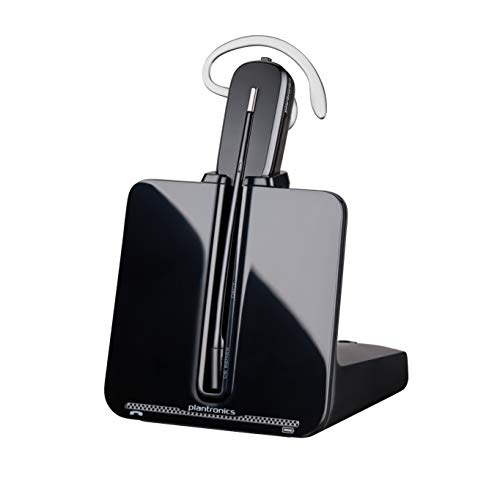
Best for: Desk-centric workers who want a lightweight-style, single-ear headset with multiple wearing options. The listing describes the CS540 as convertible, with three wearing styles, and intended for use with desk phones.
The headset connects to desk phones through the included cable. Its noise-canceling microphone is designed to help reduce background noise picked up during calls. A single-ear design leaves one ear uncovered, which may suit workers who need to hear colleagues or office sounds while speaking on the phone.
Why it was selected: It is a desk-phone-focused wireless model with wearing-style flexibility, making it relevant to office users considering Cisco phone accessories.
Check before buying: The supplied details do not name specific Cisco models or confirm compatibility with every Cisco phone. Check the phone’s headset connection requirements before selecting it.
Yealink WH63E2 DECT Wireless Headset

Best for: Buyers who prioritize a single-ear convertible design, DECT range, and noise-reducing microphone features. Yealink lists up to eight hours of talk time and a DECT range of up to 607 feet.
The WH63E2 is described as having two noise-canceling microphones and a noise-reduction algorithm. Its listed platform compatibility includes Microsoft Teams, Zoom, Google, RingCentral, Genesys, 8×8, 3CX, and others. Those software and unified-communications listings may be useful for computer calling, but they do not establish compatibility with a Cisco desk phone.
Why it was selected: Its office-focused DECT design and call features make it a possible candidate for Cisco users with a separate, supported connection or computer-based calling setup.
Check before buying: Cisco desk-phone compatibility is not stated in the supplied product details. Verify both the phone connection and any required accessories before purchase.
Sarevile Bluetooth Headset With USB Dongle

Best for: Users who need a single-ear headset for Bluetooth or computer calls, rather than a confirmed direct connection to a Cisco desk phone. The package includes a USB dongle, and the listing describes Bluetooth 5.2 connectivity.
The headset has an environmental-noise-canceling microphone, a mute button, an adjustable headband, and a memory-foam ear cushion. The listing claims up to 50 hours of talk time and 200 hours of standby. It also cautions users to insert the dongle securely and avoid interference from other signals.
Why it was selected: Its USB dongle and work-call features may suit computer-based calling in an office where Cisco phones are also used.
Check before buying: The supplied details do not identify Cisco desk-phone models or confirm direct Cisco compatibility. Do not assume that a Bluetooth headset or computer dongle will connect to a Cisco phone without checking the phone’s supported connection method.
Buying Guide: How To Choose A Cisco-Compatible Wireless Headset
“Cisco compatible” can mean different things: a headset may connect directly to a Cisco desk phone, work through a separate computer running calling software, or simply be used in an office where Cisco phones are present. These are not interchangeable setups. Start with the headset’s exact connection method and your phone’s model number rather than relying on a broad compatibility claim.
Does the headset list your Cisco phone model?
Check the complete model number, including any letters or suffixes. The INNOTALK listing names several Cisco models, including selected 7800, 7900, and 8800 series phones. That list is a useful starting point, but it should not be treated as confirmation for other models. If a headset says only “desk phone compatible,” ask the seller or manufacturer whether it supports your exact Cisco phone.
Also check whether the phone requires a particular cable, adapter, or remote hookswitch device. Remote answering and ending calls can depend on the headset and phone connection, not only on the wireless headset itself.
Do you need a desk-phone connection, a computer connection, or both?
Choose a desk-phone-focused headset if calls are handled through a physical Cisco phone. If your calls take place on a computer, confirm that the headset supports the computer’s connection method and the calling application. For people who use both, a dual-connectivity model such as the Leitner LH570 may be more practical, provided its connection setup matches the devices in use.
A headset’s support for Teams, Zoom, or another meeting platform does not automatically mean it connects to a Cisco desk phone. Platform support and physical phone compatibility are separate questions.
What is the difference between DECT and Bluetooth?
DECT is a wireless technology commonly used for office headsets, while Bluetooth is widely used with computers and mobile devices. The Leitner LH570 listing specifically says it uses DECT and is not a Bluetooth headset. The Plantronics CS540 is described as connecting to desk phones through an included cable. The Sarevile model is listed as Bluetooth 5.2 and includes a USB dongle.
Do not choose based on the word “wireless” alone. Verify what the base, cable, or dongle connects to, and whether that connection is supported by the Cisco phone or computer you intend to use.
How much movement do you need during calls?
Wireless range matters if you move around an office while talking. The INNOTALK listing states a 300-foot roaming radius, and Yealink lists a DECT range of up to 607 feet. These are product claims, not guarantees of the same usable range in every building. Walls, interference, and the placement of connected equipment can affect practical performance.
If you remain at your desk, range may be less important than easy call answering, microphone positioning, comfort, and a reliable connection to the phone.
Which headset style and microphone features fit your work?
Single-ear headsets can keep one ear open to nearby conversations. Convertible designs offer more than one way to wear a headset, as listed for the Plantronics CS540 and Yealink WH63E2. For noisy workplaces, compare microphone features: INNOTALK and Yealink describe noise-canceling microphones, while Sarevile lists environmental noise cancellation. These descriptions indicate intended features but do not establish identical performance.
Consider mute controls as well. A physical mute button may be useful for frequent pauses, but confirm where muting works. Some controls operate only with certain connected devices or calling software.
What should you confirm before ordering?
- Write down the complete Cisco phone model and check it against the headset’s stated compatibility list.
- Confirm whether the headset connects by cable, DECT base, Bluetooth, USB dongle, or a remote hookswitch accessory.
- Check whether remote call answering and ending are supported for your phone configuration.
- For computer use, verify operating-system and calling-platform needs with the product information or manufacturer.
- Review limitations, especially when a model is not Bluetooth or does not list Cisco phone compatibility.
When compatibility information is incomplete, treat the headset as unconfirmed for direct Cisco desk-phone use. A model may still be suitable for computer calls, but that is a different use case.
Frequently Asked Questions
What is the most clearly listed Cisco-compatible headset here?
The INNOTALK wireless headset is the most specifically documented for Cisco desk phones in this selection. Its listing names multiple Cisco models and describes an included remote hookswitch device. Confirm that your exact phone model and setup are supported.
Will any Bluetooth headset work with a Cisco desk phone?
No. Bluetooth support should not be assumed. Check whether the Cisco phone supports the headset’s connection method or requires a compatible adapter, base, or accessory.
Can I use the Leitner LH570 with a cell phone?
The listing says the LH570 uses DECT, not Bluetooth, and is not compatible with cell phones or other Bluetooth devices. It is described for office phones and computers.
Does Teams or Zoom compatibility confirm Cisco phone compatibility?
No. Teams or Zoom support relates to software-based calling, while Cisco desk-phone compatibility depends on the phone model and connection setup. Confirm both separately if you use both systems.
Which option is designed for desk-phone and computer use?
The Leitner LH570 is listed with dual connectivity between an office phone and a computer, with a button to switch between them. Verify the required connections for your Cisco phone before choosing it.
What should I check if I need to answer calls away from my desk?
Look for explicit remote call-answering support and confirm that it works with your Cisco model. The INNOTALK listing includes a remote hookswitch device and describes remote answering and ending calls, subject to phone compatibility.