
The best multimedia computer speaker system depends on how much bass, output, and input flexibility you need. The Klipsch ProMedia 2.1 is best for buyers prioritizing THX-certified sound and a larger subwoofer; the Cyber Acoustics CA-3908 suits listeners seeking higher listed output; and the CA-3610 offers a useful balance of power and desktop controls. The Logitech Z313 is a simpler compact option, while the CA-3090 is a lower-output 2.1 system with straightforward controls.
| System | Best For | Listed Power |
|---|---|---|
| Klipsch ProMedia 2.1 | Movies, music, and gaming with THX-certified audio | Not specified in the supplied features |
| Cyber Acoustics CA-3908 | Higher listed output and room-filling sound | 92W peak, 46W RMS |
| Cyber Acoustics CA-3610 | Desktop listening with accessible bass and volume controls | 62W peak, 30W RMS |
| Logitech Z313 | Simple 2.1 setup with a compact subwoofer | 25W RMS |
| Cyber Acoustics CA-3090 | Basic 2.1 computer audio with separate bass adjustment | 18W peak, 9W RMS |
Klipsch ProMedia 2.1 THX Speaker System

The Klipsch ProMedia 2.1 pairs two satellite speakers with a side-firing, ported 6.5-inch subwoofer. Its listed features include THX certification, Klipsch MicroTractrix horn technology, and two-way satellites with 3-inch midrange drivers. The design is intended to provide clear audio and a full bass response for gaming, movies, and music.
Best for: Buyers who want a 2.1 system focused on cinematic and entertainment listening. The THX certification and larger subwoofer distinguish it from the more basic compact systems in this list. Choose it if you value the described speaker and subwoofer configuration over a stated power figure; the supplied product details do not list wattage.
Limitation: Its larger subwoofer may require more desk or floor space than compact-subwoofer alternatives. The available features also do not specify input options or control placement, so check the current listing if those details matter to your setup.
Cyber Acoustics CA-3908 2.1 Speaker System
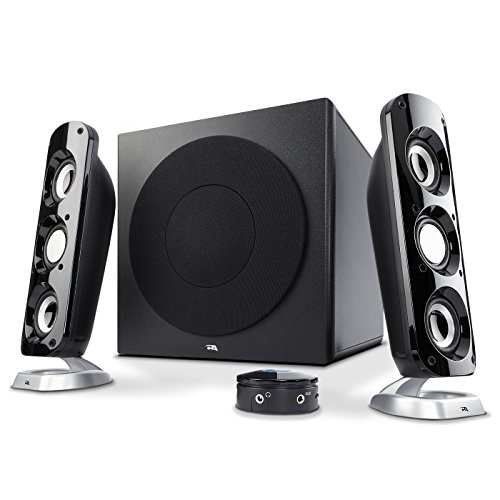
The CA-3908 is the highest-output system in this selection by its listed figures: 92 watts peak and 46 watts RMS. It combines a ported, side-firing 6.5-inch subwoofer with satellite speakers using dual 2-inch drivers and a passive radiator system. A control pod provides volume and bass adjustments, a 3.5mm auxiliary input, and a headphone jack.
Best for: Buyers who want higher listed output and a convenient way to adjust bass and volume. The 3.5mm input and headphone jack are useful when connecting a device with an analog audio output or listening privately. The product details list use with computers, laptops, game systems, tablets, and smartphones that have a suitable 3.5mm connection.
Limitation: The larger 6.5-inch subwoofer may not suit a very small desk or room. Cyber Acoustics recommends setting the source volume between 65% and 80%, then adjusting the speaker system volume; this may require fine-tuning for different devices.
Cyber Acoustics CA-3610 Multimedia Speakers

The CA-3610 delivers 62 watts peak and 30 watts RMS through a 2.1 speaker arrangement. Each satellite has dual 2-inch titanium drivers, and the system includes a 5.25-inch down-firing subwoofer with a tuned port. Its control pod includes volume and bass adjustments, a 3.5mm auxiliary input, and a headphone jack.
Best for: Desktop users who want more listed output than the CA-3090 while keeping practical listening controls close at hand. The auxiliary input is intended for devices with a 3.5mm audio connection, and the listed use cases include computers, laptops, game systems, tablets, and smartphones with a suitable output.
Limitation: The supplied features describe analog 3.5mm connectivity, not Bluetooth or USB audio. Choose another system if wireless playback or a single USB audio connection is an essential requirement. Its subwoofer also needs a place under or beside the desk.
Logitech Z313 2.1 Multimedia Speaker System

The Logitech Z313 is a 2.1 speaker system with 25 watts RMS output, a compact subwoofer, and a convenient control pod. The separate subwoofer adds a bass channel beyond what a pair of basic stereo speakers provides, while the control pod gives users an accessible way to operate the system.
Best for: Buyers seeking a straightforward computer speaker setup with a compact subwoofer and a simple control pod. It is a better fit for everyday desktop listening than for shoppers whose top priority is the highest listed power in this comparison. The 25-watt RMS figure provides a clear comparison point with the two Cyber Acoustics models.
Limitation: The supplied feature list does not state an auxiliary input, headphone jack, or Bluetooth support. Confirm the connection details on the current product listing if you need to connect several devices or use headphones directly through the speaker controls.
Cyber Acoustics CA-3090 2.1 Speaker System

The CA-3090 is a compact-style 2.1 system with 18 watts peak power and 9 watts RMS. Its listed components include a ported, side-firing 4-inch poly-carbon subwoofer and two satellite speakers with 2-inch drivers. A control pod handles power and volume, while a separate bass control is located on the subwoofer.
Best for: Buyers who want basic 2.1 sound and separate control over bass without choosing a higher-output system. Compared with the CA-3908 and CA-3610, its listed power is lower and its subwoofer is smaller, making it a reasonable fit for users who do not need the stronger output figures of those models.
Limitation: Its 9-watt RMS output is the lowest among the selected systems. Avoid choosing it if high output is your main priority. Because its bass control is on the subwoofer rather than the control pod, changing bass may require reaching the subwoofer.
Buying Guide: How To Choose A Multimedia Computer Speaker System
Do you need a 2.1 speaker system?
A 2.1 system has two main speakers and a separate subwoofer. This arrangement is useful when you want a dedicated bass component for music, games, or movies. The subwoofer takes up additional space, so measure the area under or beside your desk before choosing a model. If desk space is limited, a system with a compact subwoofer, such as the Logitech Z313 or CA-3090, may be easier to place than one with a 6.5-inch subwoofer.
Consider how you listen. Speech, video calls, and everyday computer audio may not require a large subwoofer. Action games, music with prominent low frequencies, and movie soundtracks can make bass adjustment more important. A separate bass control, available on the CA-3908 and CA-3610 control pods, gives users a direct way to adjust low-frequency emphasis.
How should you compare speaker power?
Check whether a product lists RMS power, peak power, or both. RMS and peak figures describe different power measures and should not be treated as interchangeable. For example, the CA-3908 lists 92 watts peak and 46 watts RMS, while the CA-3610 lists 62 watts peak and 30 watts RMS. The CA-3090 lists 18 watts peak and 9 watts RMS, and the Logitech Z313 lists 25 watts RMS.
These figures help compare stated specifications, but they do not tell the whole story of sound quality or how a system will perform in every room. Also consider speaker drivers, subwoofer size, room dimensions, listening distance, and the controls available. The Klipsch system’s supplied details emphasize THX certification and speaker design rather than listing a power figure.
Which connections and controls matter?
Start by checking the audio output on your computer or other source. A 3.5mm auxiliary input is useful for devices with a matching headphone or line output. The CA-3908 and CA-3610 list a 3.5mm input and headphone jack. The CA-3090 lists a control pod for power and volume, with bass adjustment on the subwoofer. The Logitech Z313 features a control pod, but the supplied details do not specify its input types.
Do not assume that every computer speaker connects by USB, supports Bluetooth, or offers multiple inputs. If you need wireless playback, USB audio, or a headphone connection, verify those specific details for the exact model before buying. The listed CA-3908 and CA-3610 features describe 3.5mm connectivity; they do not claim Bluetooth support.
How much desk and room space should you plan for?
Measure space for the satellites, control pod, cables, and subwoofer. A subwoofer may sit on the floor or beside a desk, depending on the available layout and the manufacturer’s guidance. The CA-3908 and Klipsch ProMedia both list 6.5-inch subwoofers; the CA-3610 lists a 5.25-inch subwoofer, and the CA-3090 lists a 4-inch model. These dimensions describe the subwoofer driver, not the full cabinet footprint.
For a small workspace, consider whether the system’s bass output and cabinet size suit the room. A larger subwoofer may be useful for listeners who want stronger bass, but it can be inconvenient when floor space is limited. Keep cables and controls reachable so routine volume adjustments do not require moving the speakers.
Should you prioritize sound features or simplicity?
For entertainment-focused listening, the Klipsch ProMedia’s THX certification, horn technology, and 6.5-inch subwoofer are notable listed features. For output and control options, the CA-3908 combines 46 watts RMS with bass and volume controls, an auxiliary input, and a headphone jack. The CA-3610 offers 30 watts RMS with a smaller listed subwoofer and similar control features.
For a simpler setup, the Logitech Z313 provides 25 watts RMS, a compact subwoofer, and a control pod. The CA-3090 has lower listed power but includes separate bass adjustment on the subwoofer. Compare the features that match your routine rather than choosing from wattage alone.
Frequently Asked Questions
What is a multimedia computer speaker system?
It is a speaker setup designed to play audio from a computer and, depending on its inputs, other devices. A 2.1 system includes two satellite speakers and a subwoofer for a separate bass channel.
Which system in this list has the highest listed power?
The Cyber Acoustics CA-3908 has the highest stated output among these selections, at 92 watts peak and 46 watts RMS. Power figures alone do not establish overall sound quality.
Which speaker system has the most compact listed subwoofer?
The CA-3090 lists a 4-inch subwoofer, while the Logitech Z313 describes its subwoofer as compact without giving a driver size in the supplied features. Cabinet dimensions are not provided here, so check the product listing if exact placement measurements are important.
Which options include a headphone jack?
The supplied features list a headphone jack for the Cyber Acoustics CA-3908 and CA-3610. The available details for the other selected systems do not confirm one.
Can these speakers connect to a phone or game system?
The CA-3908 and CA-3610 list 3.5mm auxiliary inputs and identify compatible uses that include phones and game systems with a suitable audio output. Check the connection requirements of your specific device before choosing a system.
Is RMS power the same as peak power?
No. RMS and peak power are different specifications. Compare RMS figures with RMS figures and peak figures with peak figures, rather than treating the numbers as equivalent.