
The best external USB sound card for laptop recording depends on the connection you need: the SABRENT and UGREEN adapters suit basic microphone input and headphone output, while the StarTech and Cubilux models add multichannel connections. These are compact USB audio adapters, not full-featured studio recording interfaces. The biaze adapter is a flexible option when you need a single headset-style connection. Check your microphone’s plug and recording needs before choosing.
| Product | Best For | Key Recording Connection |
|---|---|---|
| SABRENT AU-MMSA | Simple two-jack setup | Separate mono mic input and stereo output |
| StarTech ICUSBAUDIO7D | Multichannel audio connections | Stereo microphone input and line-in |
| UGREEN USB Sound Card | Plug-and-play stereo use | 3.5 mm headphone and microphone connections |
| biaze USB Audio Adapter | Headset and mic flexibility | TRS connection with listening and speaking support |
| Cubilux 7.1 USB Sound Card | Recording plus surround outputs | Line-in and stereo mic input |
SABRENT USB External Stereo Sound Card Adapter

The SABRENT AU-MMSA is a straightforward choice for recording with a separate 3.5 mm microphone while monitoring through headphones or powered speakers. Its USB Type-A connection supplies power, and the adapter is designed to work without drivers or external power. It is a USB Audio Device Class 1.0 device, so a compatible computer can recognize it as a standard audio input and output.
- Best for: Laptop users who need a basic mono microphone input and stereo headphone output.
- Why it was selected: Its separate, clearly designated microphone and headphone jacks make it easy to connect common 3.5 mm audio devices.
- Recording note: Select the adapter as the laptop’s input device after connecting it.
- Limitation: It is stereo, not surround sound, and does not support a four-pole headset plug in its separate-jack arrangement. It also does not power passive speakers.
Choose this if your microphone has its own 3.5 mm plug and you want a simple way to add audio connections. Avoid it if you need a combo headset jack, multichannel recording, or the controls and inputs of a studio interface.
StarTech 7.1 USB Audio Adapter
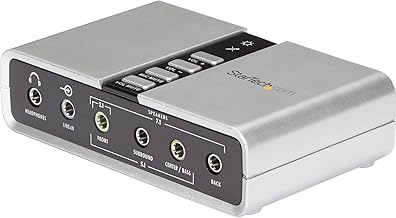
The StarTech ICUSBAUDIO7D is better suited to users who need more than a basic stereo adapter. It supports 2-channel, 5.1, and 7.1 output through 3.5 mm connections, as well as a headphone port, line-in, and stereo microphone input. For recording, the dedicated mic and line inputs offer connection choices for compatible analog audio sources.
- Best for: Laptop users who want recording inputs alongside multichannel playback connections.
- Why it was selected: It lists both line-in and stereo microphone inputs, plus support for several output channel configurations.
- Audio details: Analog playback and recording support 44.1 kHz and 48 kHz. SPDIF digital output supports 48 kHz playback; optical input passthrough supports up to two-channel audio at 48 kHz.
- Limitation: Its range of outputs may be unnecessary if you only need one microphone input and stereo headphones. The listed sampling-rate support is not equivalent to a dedicated studio interface’s feature set.
Choose this if multichannel playback and multiple analog connection types matter as much as basic recording. If you only need a compact stereo input and output, a simpler adapter may be easier to set up.
UGREEN USB Sound Card Adapter

The UGREEN adapter is a practical pick for someone who wants a plug-and-play USB audio connection for a laptop. Its listed features include a built-in DAC, noise reduction, and support up to 16-bit/48 kHz. The product is described as requiring no driver or external power, which keeps setup simple for everyday stereo audio tasks.
- Best for: Buyers seeking a basic USB sound adapter for headphone and microphone use.
- Why it was selected: It combines a stated 16-bit/48 kHz specification with plug-and-play operation and a compact USB-to-3.5 mm format.
- Recording note: Use the microphone connection as the input device in your recording or communication software.
- Limitation: The supplied information does not specify advanced recording controls, multiple input channels, or studio-interface features. Confirm the plug type required by your microphone before ordering.
Choose this if straightforward setup and standard-resolution recording are your priorities. It is not the best fit if your workflow requires several simultaneous inputs, detailed input controls, or high channel counts.
biaze USB Audio Adapter

The biaze adapter is designed for listening and speaking through USB, with a 3.5 mm connection and support for CTIA-standard jacks and Android earphones. Its listed compatibility includes Windows, Mac OS X, Linux, Chromebook, Raspberry Pi, and PS4 and PS5. The built-in DAC is specified for audio up to 16-bit/48 kHz.
- Best for: Laptop users who want a compact adapter for a compatible headset, microphone, and headphone setup.
- Why it was selected: Its listed support for listening and speaking, CTIA connections, and several operating systems makes it a flexible everyday option.
- Recording note: The product description identifies microphone input and headphone output functions; set the adapter as the appropriate audio device on your computer.
- Limitation: It is a stereo USB sound adapter, not a multichannel recording system. Confirm that your headset’s plug standard matches the adapter’s supported connection.
Choose this if you use a compatible single-plug headset or need an adapter for everyday voice recording and playback. Consider another model if you need separate, clearly identified inputs for multiple recording sources.
Cubilux 7.1 USB Surround Sound Card

The Cubilux 7.1 adapter stands out for combining line-in and stereo microphone input with several output options. Its full aluminum alloy housing is described as helping isolate electronic interference. The headphone output supports listed resolutions from 44.1 kHz/16-bit to 384 kHz/24-bit, while 5.1 and 7.1 surround audio is specified up to 48 kHz.
- Best for: Users who want mic and line inputs with multichannel surround output in one USB device.
- Why it was selected: Its listed inputs support more than a basic headphone-and-mic adapter, and its output options cover stereo and surround applications.
- Recording note: The product lists stereo mic input and line-in; choose the connection that matches your source.
- Limitation: The 384 kHz/24-bit specification applies to headphone output, not the 7.1 surround mode, which is listed up to 48 kHz. It is not described as a dedicated studio interface.
Choose this if you need both recording inputs and surround output. If your only goal is simple voice recording, its additional channel options may not be necessary.
Buying Guide: Choosing A USB Sound Card For Laptop Recording
Do you need a sound card or a recording interface?
A USB sound card adapter adds or replaces basic audio input and output connections. It can suit voice calls, simple voiceovers, and recording from a compatible 3.5 mm microphone. A studio recording interface is a different category of equipment, typically chosen for more demanding recording workflows. These listed products do not specify features such as microphone preamps, phantom power, or XLR inputs, so do not assume they can connect professional microphones directly.
Which input should you choose: microphone or line-in?
Choose a microphone input for a compatible mic-level source. Choose line-in when the audio source provides a line-level signal and the adapter includes that connection. The StarTech and Cubilux models specifically list line-in, while the SABRENT lists a mono microphone input. Check the source’s output and the adapter’s input type before connecting them; the two are not automatically interchangeable.
Does your microphone use a separate plug or a headset plug?
Check whether your microphone has a dedicated 3.5 mm plug, or whether your headset combines microphone and headphone signals in one four-pole plug. The SABRENT explicitly does not support a four-pole headset in its two-jack setup. The biaze adapter lists CTIA and Android earphone support. Confirm the connector standard and jack arrangement for any model before buying.
How much audio quality do you need?
Compare the stated sampling-rate and bit-depth specifications, but interpret them carefully. UGREEN and biaze list support up to 16-bit/48 kHz. StarTech lists 44.1 kHz and 48 kHz for analog recording and playback. Cubilux lists higher headphone-output capability, but its 5.1 and 7.1 surround support is up to 48 kHz. These figures alone do not establish recording quality for every microphone or application.
Is multichannel audio useful for your setup?
For a basic voice recording with headphones, stereo input and output are usually the relevant functions. Choose StarTech or Cubilux when you specifically need their listed multichannel output options as well as recording connections. Remember that surround playback capability does not mean the adapter records multiple microphones or multichannel input.
Will it work with your laptop?
Check your laptop’s available USB port and operating system, and verify that the product supports the setup you intend to use. A USB-A adapter needs a suitable USB-A connection or an appropriate separate adapter. Plug-and-play claims do not remove the need to select the USB device as the input or output in your computer and recording application.
Frequently Asked Questions
Can an external USB sound card record audio on a laptop?
Yes. A USB sound card with a microphone or line input can provide an audio input for compatible recording software. Select the adapter as the recording input and confirm that the source’s plug and signal type match the input.
Is a USB sound card the same as a USB recording interface?
No. A basic USB sound card usually adds simple audio connections. A recording interface is intended for more specialized recording needs. The product details here do not list XLR inputs or phantom power, so verify requirements before connecting a professional microphone.
Can I connect a headset with one 3.5 mm plug?
It depends on the adapter. The SABRENT uses separate headphone and microphone jacks and explicitly does not support a four-pole headset plug in that arrangement. The biaze adapter lists CTIA-standard jack support. Check the headset’s plug standard and the product’s connection details.
Which option is best for basic voice recording?
The SABRENT, UGREEN, or biaze adapter may suit basic recording, depending on your microphone connection. SABRENT has a separate mono microphone input; UGREEN is described as plug-and-play with support up to 16-bit/48 kHz; biaze lists listening and speaking support and CTIA compatibility.
Does 7.1 surround sound mean I can record seven channels?
No. A 7.1 output specification describes supported playback channels. It does not by itself indicate seven recording inputs. Check the product’s stated input connections and channel capabilities separately.