
A 2-way Toslink switch lets you connect two optical audio sources to one receiver, soundbar, or other optical input, then choose which source to hear. The cooidea 2×1 is the closest match for buyers who want automatic switching; the BlueRigger and LiNKFOR models offer more inputs with manual selection. If you need to send one source to two audio devices instead, choose a splitter—not a switch.
| Product | Configuration | Best For |
|---|---|---|
| cooidea Optical Switcher | 2 inputs, 1 output | Automatic source switching |
| BlueRigger Toslink Switch | 3 inputs, 1 output | Remote or manual selection |
| LiNKFOR Toslink Switch | 4 inputs, 1 output | Several optical sources |
| J-Tech Digital Matrix | 4 inputs, 2 outputs | Flexible routing to two outputs |
| Adoreen Optical Splitter | 1 input, 2 outputs | One source connected to two devices |
cooidea 2-In-1-Out Optical Audio Switcher

Best for: Buyers who want to connect two optical sources to one audio device and prefer automatic source selection. This is the most direct match for a 2-way optical audio switch.
The cooidea switcher is a 2-input, 1-output Toslink device with auto-switching. Its listed features say it detects an active audio channel and switches when a device is muted or powered off, so it may suit a setup where sources are not changed by remote or front-panel controls.
It supports sampling rates up to 192kHz/24-bit and lists LPCM 2.0, DTS, Dolby-AC3, and 5.1 surround formats. The product description also states that its signal retiming supports transmission up to 130 feet when used with a standard optical cable meeting the stated loss specification.
Limitation: Automatic switching may not suit users who want to choose a source manually regardless of device activity. Check how the switching behavior fits your source devices before buying.
BlueRigger 3-In-1 Toslink Switch

Best for: People with three optical sources, such as a gaming console, television, and another player, who want to select one source for a single audio output. It provides one more input than a basic 2-way switch.
The BlueRigger is a 3-in-1 optical switch with both an IR remote and a manual switch button. Its listed formats include LPCM 2.0, DTS, Dolby-AC3, Dolby Digital, and DTS 5.1, with support up to 192kHz/24-bit. It has a metal housing and is described as using an IC chipset for stable transmission.
Limitation: This model does not support auto-switching. The listing says it needs a power cable for optimal performance and includes a cable but not a power adapter. It also advises keeping Toslink cables shorter than 50 feet.
LiNKFOR 4-In-1 Optical Switch

Best for: A home entertainment setup with four optical sources feeding one receiver or soundbar. Choose it when a two-input switch would leave you short on connections.
The LiNKFOR is a 4-in-1 switch that routes one of four optical signals to a single Toslink receiving device. The product includes a 3-foot optical cable and lists support for LPCM 2.0, DTS, and Dolby-AC3 at 96kHz. Its listed maximum transmission distance is up to 130 feet when using optical cable with loss under 0.2dB per meter.
Limitation: The stated formats and sample rate are narrower than those listed for some other switches in this guide. The product description specifically says it does not support Dolby Digital Plus or Dolby TrueHD 7.1 over optical.
J-Tech Digital 4×2 Optical Matrix Switch

Best for: Users who need to route several optical sources to two optical outputs. Unlike a basic 2-in-1-out switch, this matrix provides four inputs and two outputs, with routing options for either output or both simultaneously.
The J-Tech Digital matrix supports SPDIF/Toslink connections and lists compatibility with digital audio formats including Dolby Digital 5.1. Its key distinction is routing flexibility: a source can be sent to either output or to both outputs at once. That makes it worth considering for a system with more than one receiving device.
Limitation: This is a larger routing solution than needed for a simple two-source, one-output setup. The supplied product details do not specify additional format support or switching controls, so verify those requirements with the product information before choosing it.
Adoreen Active Toslink Splitter
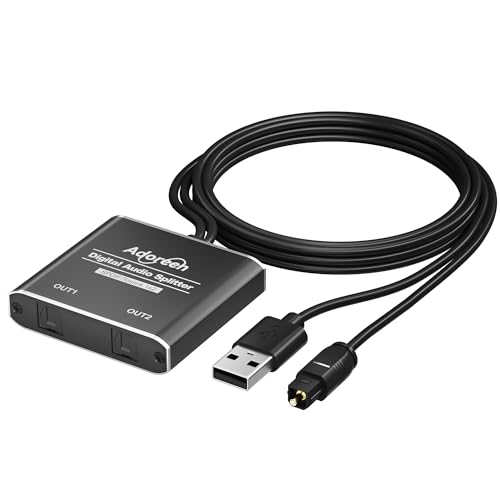
Best for: Buyers who need the reverse of a 2-way switch: one optical source feeding two audio outputs. This is a splitter, not a two-input selector, but it can be relevant when “two-way” means two outputs rather than two sources.
The Adoreen is an active 1-in-2-out optical splitter with a built-in distribution chip. It is USB-powered and lists support for PCM 2.0, Dolby 5.1, and DTS 5.1. Its description says it is plug-and-play and does not require drivers.
Limitation: It is unidirectional and cannot select between two inputs. It requires USB power and does not support 7.1 formats such as Dolby TrueHD, according to the provided product information.
Buying Guide: How to Choose a Toslink Switch
Do you need a switch or a splitter?
Check the direction of the connections before choosing a device. A switch typically takes multiple inputs and sends one selected source to a single output. For example, a 2×1 switch connects two devices to one soundbar or receiver. A splitter takes one input and distributes it to multiple outputs. A 1×2 splitter connects one source to two receiving devices.
These devices are not interchangeable. A splitter does not usually let you choose between two sources, and a switch does not provide multiple simultaneous outputs unless its design specifically supports them. Read the input and output counts in the product name and description rather than relying on words such as “two-way.”
How many optical sources do you need to connect?
Count the devices that need to send audio through Toslink. A 2×1 switch is sufficient for two sources. Choose a 3×1 or 4×1 model if you have more sources or want spare inputs for a future device. A matrix such as the J-Tech 4×2 is designed for more complex routing, with multiple inputs and two outputs.
Also check that the audio output on each source and the input on the receiving device are both optical Toslink. A device with only HDMI, RCA, or another connection type will need a different solution or suitable conversion equipment.
Would automatic or manual switching work better?
Automatic switching can reduce the need to press a button when the active source changes. The cooidea model lists auto-switching based on source activity. This is useful when the connected devices reliably become active or inactive in the way the switch expects.
Manual switching is more predictable when you want direct control over the selected input. The BlueRigger lists IR remote and front-button operation, while the LiNKFOR product details describe a four-input selector. Check the product listing for the exact control method if remote operation is important.
Which audio formats and sample rates should you check?
Match the switch’s listed formats to the formats used by your source and audio system. The products in this guide list combinations of LPCM or PCM stereo, DTS, Dolby-AC3, and 5.1-channel audio. Their stated sample-rate limits also differ, so compare those specifications if your equipment outputs high-resolution audio.
Do not assume that an optical connection carries every surround format. The provided product information for LiNKFOR and Adoreen specifically excludes certain advanced 7.1 formats. If your setup depends on a format that is not listed, confirm support before buying and consider whether another connection type is needed.
Do you need power, a remote, or extra cables?
Some optical switches need a power connection, and some include a remote or optical cable. The BlueRigger listing says a power cable is included but a power adapter is not. The LiNKFOR listing includes a 3-foot optical cable. The Adoreen splitter requires USB power. Check what is included and whether your setup has the necessary power source and cable lengths.
For longer cable runs, follow the distance limits stated by the product maker and use a cable that meets the stated requirements. The cooidea and LiNKFOR descriptions cite transmission distances up to 130 feet under specified cable conditions, while BlueRigger recommends cables shorter than 50 feet. Those specifications should not be treated as universal guarantees for every cable or installation.
What should you do if there is no sound?
First, confirm that the source is connected to an input and the audio system is connected to the output. Fully insert the Toslink connectors, select the correct switch input, and check that the source is set to output an audio format supported by both the switch and the receiving device. If the switch requires power, verify that it is powered as directed.
If you are choosing a replacement or adding a switch to an existing system, note the source device, receiving device, number of inputs, desired audio format, and cable distance. These details make it easier to distinguish a suitable 2×1 switch from a multi-input selector or a splitter.
Frequently Asked Questions
What does a 2-in-1-out optical audio switch do?
It connects two Toslink audio sources to one optical audio input and lets you select which source sends audio to the receiving device.
Is a Toslink switch the same as an optical splitter?
No. A switch selects one of multiple inputs for one output. A splitter distributes one input to multiple outputs.
Can I use a 3-in-1 switch for only two sources?
Yes. A 3-in-1 switch provides an extra input, although you should check its power, control, and audio-format requirements.
Will an optical switch support Dolby 5.1?
Some products listed here specify Dolby Digital or DTS 5.1 support. Confirm that the source, switch, and receiving device all support the format you plan to use.
Does an optical switch improve sound quality?
A switch routes the optical audio signal; it does not inherently improve the source recording or audio system. Choose one with listed support for your required formats and a suitable connection layout.