
The best rear DVD player for a car depends on whether you need one screen or two, battery power, HDMI input, or easy disc loading. The DESOBRY 10.5-inch player is best for single-screen use and quick disc changes; the WONNIE 12-inch dual system suits families who want battery-powered screens; and the GOnavidio dual player is a better fit for HDMI-connected devices when car power is available.
| Product | Best For | Standout Feature |
|---|---|---|
| DESOBRY 10.5-inch | One viewer and simple disc loading | Auto-loading disc slot and HDMI input |
| WONNIE 12-inch dual | Two viewers and travel flexibility | Two screens and rechargeable battery |
| GOnavidio 10.1-inch dual | Two viewers using HDMI sources | Dual screens and 1080P HDMI input |
| WONNIE 12-inch single | One viewer wanting a larger screen | 1080P display and HDMI input/output |
| WONNIE 10-inch dual | Two viewers needing battery playback | Up to five hours of separate playback |
DESOBRY 10.5-Inch Auto-Loading DVD Player
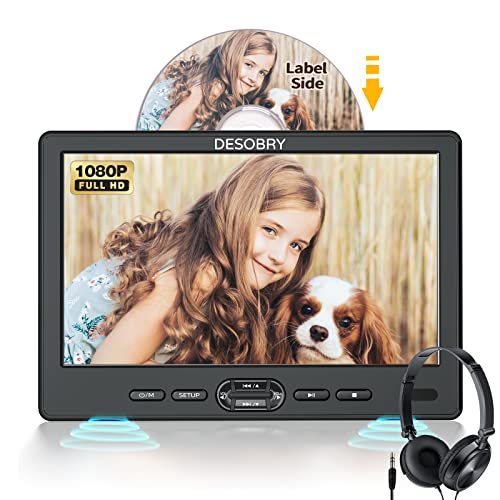
The DESOBRY is a single-screen rear-seat DVD player with a suction-type disc slot that automatically loads a disc. Its last-memory function resumes playback from the previous stopping point, which can reduce setup between stops on a trip.
Best for: Families who need one screen, want straightforward disc changes, or plan to connect another device through HDMI. The player accepts a range of CD and DVD formats and supports USB or SD playback for listed media files. It also offers AV input and output, including the option to sync video to another screen.
Connection note: HDMI input can accept video from compatible devices, but the product information advises confirming that a phone supports HDMI output. It does not play Blu-ray discs, and its disc slot is designed for standard 12-centimeter discs.
WONNIE 12-Inch Dual DVD Players

This WONNIE set includes two 12-inch players. Each screen can play a different movie, or the units can be connected with the included AV cable to show the same movie. The product listing describes a rechargeable battery lasting up to five hours, as well as mounting brackets intended to help keep the screens secure on bumpy roads.
Best for: Families with two backseat viewers who may want separate entertainment or a shared movie. Each unit has built-in stereo speakers and a headphone jack, and the volume can be adjusted using the remote controls.
Format limitation: The listed USB support is limited to FAT32 drives up to 32GB and video resolution up to 720×576 pixels. The player does not support Blu-ray, MP4, or Bluetooth, so check the formats of your media before choosing it.
GOnavidio 10.1-Inch Dual DVD Player

The GOnavidio system pairs two screens for shared or independent viewing. An AV cable connects the players to show the same movie, while each player can also play different content. Its HDMI input supports video up to 1080P from compatible devices, and the suction-style disc slot is designed to load a disc in about three seconds.
Best for: Backseat passengers who want two screens and may use an HDMI-connected source such as a compatible phone, computer, or game console. The quick-loading disc design is useful when changing discs from the front seat or letting passengers manage their own media.
Power limitation: This set has no internal battery and must be used with the car charger. Choose a battery-powered model instead if you need to use the screens away from vehicle power.
WONNIE 12-Inch 1080P Headrest DVD Player

This single-screen WONNIE player has a 12-inch display with a listed 1920×1080 resolution. It includes two mounting-bracket options and two headrest straps, and its clamshell design allows disc changes without removing the player from its mount.
Best for: One backseat viewer who prefers a larger display and wants HDMI input for a compatible external source. HDMI and AV outputs can also send playback to a television or projector, according to the product details. The package includes a car charger and AC adapter.
Power limitation: This model does not have a built-in battery, so it needs a power connection during use. It is a better match for vehicle-powered viewing than for use away from the car.
WONNIE 10-Inch Dual DVD Players
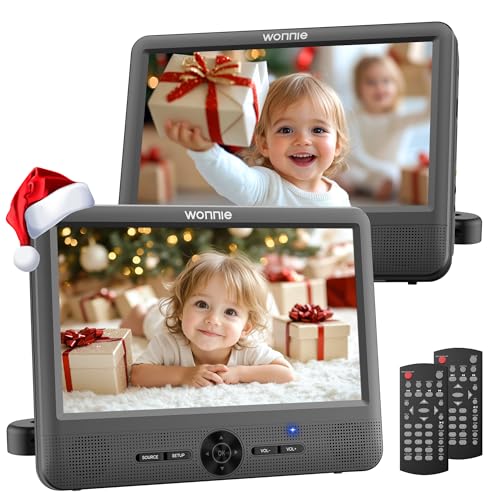
This two-player set lets passengers watch different movies or connect the screens by AV cable for shared viewing. Each player has a built-in rechargeable battery rated for up to five hours of separate playback. When the two players are connected to show the same movie, the listing gives an approximate playback time of 2.5 hours.
Best for: Families who want two screens, independent viewing, and battery operation for periods when the players are not connected to the car charger. The set also includes two AC adapters, a 12V car charger, headrest mounts, and headphone jacks.
Battery note: The stated run time changes when both screens are connected to play the same movie. For longer shared viewing, plan around the listed connected-playback time rather than the separate-player figure.
Buying Guide: How To Choose A Rear DVD Player For Your Car
Start with the number of viewers, then compare power, screen size, media formats, and mounting needs. A dual-screen package is not automatically the best choice for every family: one screen may be enough for a single passenger, while two independent players can help when passengers want different movies.
Do you need one screen or two?
A single player is a simpler option when one passenger will watch or when the group is comfortable sharing one display. The DESOBRY and single-screen WONNIE are examples in this selection. A dual system is more suitable when two passengers need their own screens. Check whether it can play separate content or only mirror one source: the dual WONNIE and GOnavidio options listed here support both independent and shared playback.
Should you choose battery power or car power?
Battery-powered players can be useful during stops or when a power connection is not convenient. Battery life varies by model and use: the listed WONNIE dual systems describe up to five hours of separate playback, while one lists about 2.5 hours when connected for shared playback. Models without a built-in battery, including the GOnavidio and 12-inch single-screen WONNIE, require a power connection. Review the included adapters and the stated vehicle-power requirements before buying.
What screen size and resolution fit your needs?
A larger screen may be easier to view from farther back, but it also needs a suitable mounting position. The products here range from 10.1 to 12 inches, with the 12-inch single-screen WONNIE listing a 1920×1080 resolution. Screen size and resolution are separate specifications, so compare both rather than assuming that a larger display automatically has higher resolution.
Do you need HDMI or only DVD playback?
Choose HDMI input if you plan to connect a phone, computer, or other compatible source. Confirm that the external device can output video over HDMI; a connector alone does not guarantee compatibility. HDMI output serves a different purpose: it can send playback from the player to another display when supported. If you primarily watch discs, focus instead on disc formats, loading style, and whether the player resumes from the last stopping point.
Which file formats and discs should you check?
Compare the player’s supported formats with the discs, USB drives, or SD cards you already use. Several listed models support DVD, CD, and selected video or audio files, but support varies. Some models specify limits for USB capacity, file formats, or video resolution. Blu-ray support is not listed for these products, and some WONNIE models specifically do not support MP4. Check the product details for the exact model before preparing media.
Will the player mount securely in your car?
Check the included mounting method and whether the headrest shape and spacing in your vehicle can accommodate it. Some products include brackets, straps, or more than one installation option. The product descriptions say these are designed for most headrests, but they do not establish fit for every vehicle. Measure the available space and review the mounting hardware before purchase, especially if you plan to move the player between vehicles.
Frequently Asked Questions
Can a rear car DVD player show two different movies?
Some dual-player systems can play separate movies on each screen. The WONNIE 12-inch dual and GOnavidio systems listed above describe independent playback as well as a shared-movie mode. A single-screen player cannot provide two separate viewing screens by itself.
Can I connect my phone to a car DVD player?
Only if the player has a suitable input and the phone supports video output through the required connection. The DESOBRY and GOnavidio descriptions list HDMI input and advise checking device compatibility. Confirm the phone’s output capability and any required connection equipment before relying on it.
Do these car DVD players support Blu-ray discs?
The product details provided for the selected models do not list Blu-ray support. Some explicitly state that Blu-ray discs are not supported. Check the exact model’s format list if Blu-ray playback is essential.
Can a rear DVD player work without the car running?
A model with a built-in battery may operate without vehicle power for its stated battery life. A model without an internal battery needs a power connection. Check the manufacturer’s power instructions and avoid assuming that every player can run from its battery.
Can two screens show the same movie?
Several dual-screen models support shared playback by connecting the units with an AV cable and selecting the appropriate input or mode. The exact connection and setup differ by model, so follow its instructions. Some systems also allow each screen to play different content.