
The best touch screen entertainment system for a car depends on where passengers will use it. For rear-seat movies and apps, the Seventour 15.6-inch pair offers large displays and broad playback options, while the 14-inch AINAVI pair emphasizes screen resolution. The 10.1-inch Android 12 pair is a smaller-screen option. For drivers seeking navigation and phone integration rather than rear-seat video, the Krunia portable screen supports wireless Apple CarPlay and Android Auto.
| Product | Best suited for | Standout details |
|---|---|---|
| Seventour 15.6-inch pair | Families wanting large rear screens | Android 13, HDMI, phone mirroring |
| 10.1-inch Android 12 pair | Buyers preferring compact screens | Wi-Fi, HDMI, USB, SD card |
| Krunia 9.26-inch portable screen | Drivers seeking phone-based navigation | Wireless CarPlay and Android Auto |
| 13.5-inch headrest monitor pair | Buyers comparing memory and mirroring features | 4G RAM, 64G ROM, AirPlay |
| AINAVI 14-inch pair | Rear passengers who prioritize resolution | 2.2K display, Android 13 |
Seventour 15.6-Inch Android Headrest Monitor Pair

This pair is best for families who want large rear-seat touch screens with several ways to play content. Each monitor has a 15.6-inch IPS touch display, Android 13, and support for decoding and playing 4K video. Wi-Fi, Google Play Store, and APKPure support allow users to access apps, subject to network availability and app requirements.
For phone sharing, the system supports iOS AirPlay and Android Miracast. Its listed MyCar Link app also supports screen synchronization and mutual control. HDMI input and output, USB, and microSD card ports provide additional playback and connection choices; the listing says USB drives up to 1TB are supported.
Choose this model if screen size and multiple audio options matter. Sound can come through the built-in speakers, Bluetooth or wired headphones, or FM transmission to the car stereo. The product includes a metal mounting bracket and two power adapters. A limitation is that the large displays may be less suitable for buyers prioritizing compact screens; confirm the mounting arrangement fits your vehicle before purchase.
10.1-Inch Android 12 Headrest Monitor Pair

This 10.1-inch pair is best for shoppers who want touch-screen rear entertainment in a smaller display format. The listed Android 12 system uses Wi-Fi to access entertainment apps, and each unit is described as having 2GB RAM and 32GB ROM for storing video, pictures, and music.
Connection options include HDMI input, USB, SD cards, Bluetooth, and FM transmission. Bluetooth can connect compatible headphones or speakers, while FM can send audio to the car speakers. These options make it useful for households that want alternatives to using the monitor’s own audio output.
Choose this pair if a 10.1-inch screen better suits your space or viewing preferences than a larger headrest display. One caution in the product information is that some streaming applications may not work properly because of app-version issues; the seller says customers can contact them for updated versions. Check app availability and requirements before relying on a particular streaming service.
Krunia 9.26-Inch Wireless CarPlay Screen

The Krunia screen is best for drivers looking for a touch display for phone-connected navigation and media, rather than a pair of rear-seat movie monitors. It supports wireless Apple CarPlay and Android Auto for functions such as calls, music, and messaging. The product description names Apple Maps, Google Maps, and Waze as navigation options, including live traffic information through those services.
The listing also specifies 5G Wi-Fi and Bluetooth 5.0 and describes voice control. This makes it a different kind of car entertainment choice from Android headrest screens: it is centered on phone integration for the driver. It may suit a buyer who wants navigation and hands-free access without choosing a dedicated back-seat system.
Choose this product if your main goal is wireless CarPlay or Android Auto access on a portable screen. Avoid choosing it as a substitute for a rear-seat entertainment pair if passengers need separate displays for watching videos. The provided product details do not list screen-mounting or power specifications, so verify those details on the product page before deciding whether its installation arrangement suits your vehicle.
13.5-Inch Headrest Monitor Pair With 4GB RAM
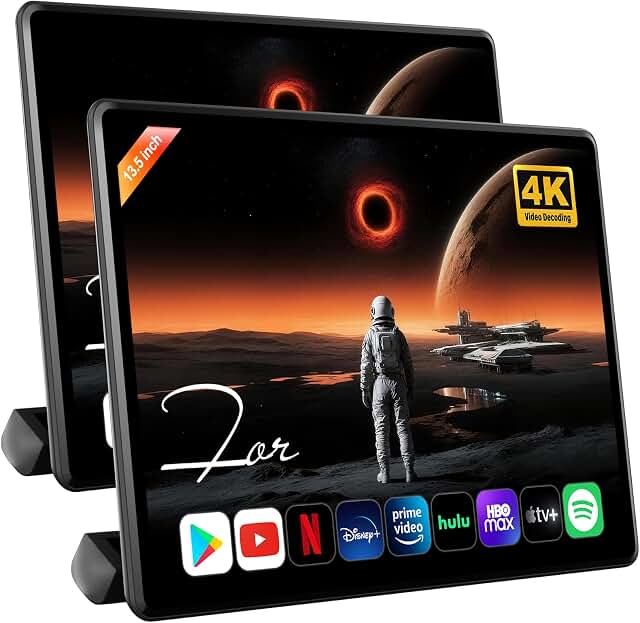
This 13.5-inch pair is best for buyers comparing rear-seat systems with stated memory capacity and phone-mirroring features. The product name lists 4GB RAM and 64GB ROM, 4K video decoding, AirPlay mirroring, and MyCar Link parental control. Those details may help shoppers who want to compare on-device storage and screen-sharing functions when selecting a headrest entertainment system.
The listed connection and update features include Wi-Fi, Bluetooth, HDMI, USB, FM, and OTA upgrades. This gives the system several stated options for connecting devices, listening to audio, or receiving updates. The product is presented as a pair of car headrest monitors, so it is intended for rear-seat entertainment rather than primarily for driver navigation.
Choose this model if the listed memory, AirPlay, and parental-control features match your priorities. The available product information does not specify the operating system, screen resolution, mounting details, or app support. Confirm those points before purchase if they are important to your setup; they should not be assumed from the product name alone.
AINAVI 14-Inch 2.2K Android Headrest Monitor Pair

This AINAVI pair is best for rear passengers who prioritize a high-resolution touch screen. Its 14-inch IPS display is listed at 2240 by 1400 resolution, described as 2.2K. The system runs Android 13 and supports dual-band 5G and 2.4GHz Wi-Fi. The product description says apps such as Netflix, YouTube, and Disney+ can be downloaded from Google Play Store or APKPure.
The product is presented as a universal-fit, dual-use system, with a metal mounting bracket and two power adapters. The listing says the monitors are compatible with more than 98% of vehicles and can also be used at home as Android tablets. That broad fit statement is the seller’s claim, so buyers should still check the mounting design and vehicle arrangement before ordering.
Choose this model if a 14-inch display and stated 2.2K resolution are more important than a larger 15.6-inch screen. The supplied product details do not list memory capacity, HDMI, USB, or audio-output options. If those connections matter for your use, verify them before purchase rather than assuming they are included.
Buying Guide: How To Choose A Car Touch Screen System
Do you need a driver display or rear-seat entertainment?
Start by identifying who will use the screen. A portable CarPlay or Android Auto display is aimed at the driver’s phone-based navigation, calls, and media. A headrest monitor pair is designed for passengers in the back seat. These are different use cases, so compare products within the category that fits your main need.
For children or multiple rear passengers, consider whether one or two screens are needed and whether they must show the same content. The listed headrest products are described as pairs, but the supplied details do not establish whether every pair can play separate content independently. Confirm this feature if independent viewing is essential.
What screen size and resolution fit your vehicle?
Screen size affects how prominent the display is and how much space it occupies. The options here range from a 10.1-inch pair to a 15.6-inch pair, with 13.5-inch and 14-inch choices between them. A larger screen may be appealing for viewing from the back seat, while a smaller display may suit buyers who prefer a less prominent setup.
Resolution is a separate comparison. The AINAVI listing states a 2240-by-1400 2.2K resolution, while the Seventour listing describes an IPS screen and 4K video decoding. Video decoding capability is not the same as the physical resolution of the panel. Check the actual screen resolution when image detail is a priority.
Which operating system and app access do you need?
Android headrest systems can offer app access through Wi-Fi, but an app’s availability and performance can depend on its current version, device support, and internet connection. The Seventour and AINAVI listings specify Android 13, while the 10.1-inch pair specifies Android 12. The 10.1-inch listing specifically cautions that certain apps may have version issues.
For phone-based use, the Krunia display lists wireless Apple CarPlay and Android Auto. These systems rely on a compatible phone and the relevant services. If a particular streaming app, navigation service, or phone-mirroring method is essential, verify that function for the exact model before buying.
How will you play content and connect devices?
Compare the inputs and storage options against the media sources you plan to use. HDMI can be useful for connecting compatible external devices, while USB or SD and microSD card slots can support local files. The Seventour listing specifies HDMI input and output, USB, and microSD. The 10.1-inch listing specifies HDMI input, USB, and SD cards. Connection availability varies by product.
Also distinguish wireless mirroring from direct app access. AirPlay and Miracast mirror a phone, while Android app access runs through the monitor’s own system. Mirroring can be useful when a desired app is not installed on the screen, but it requires a compatible device and connection method.
How should you compare audio options?
Rear-seat monitors may offer built-in speakers, headphones, Bluetooth audio, or FM transmission to the car stereo. The Seventour listing describes built-in speakers, Bluetooth and wired headphones, and FM transmission. The 10.1-inch model lists Bluetooth and FM transmission. Check which method works best for your passengers and whether you want audio isolated to headphones or shared through the vehicle speakers.
Do not assume that all models offer the same audio connections. If private listening is important, confirm that the specific product supports the headphone type you intend to use. If shared car audio is important, verify the listed transmission method and the steps required for your setup.
What should you check before installation?
Review the mounting method, power arrangements, and space available around the headrests or dashboard. Some listings describe metal brackets or included power adapters, but the exact fit can vary by vehicle. A seller’s broad compatibility claim does not replace checking the dimensions and mounting arrangement for your car.
For portable driver displays, verify how the screen attaches and receives power. The product details provided for the Krunia model do not specify those arrangements. For headrest systems, check whether the brackets work with your seat design and whether cables can be routed safely without obstructing passengers or vehicle controls.
Frequently Asked Questions
Can a car touch screen system play videos without a phone?
Some Android headrest monitors offer access to apps over Wi-Fi and storage or input ports for local or connected media. Whether a particular app or video source works depends on the model and its listed features. A phone-centered CarPlay or Android Auto screen is intended for phone integration rather than serving as an equivalent standalone Android entertainment system.
Is 4K video decoding the same as a 4K screen?
No. 4K video decoding describes the video resolution a device can process, while the screen’s physical resolution determines how many pixels it displays. Check the listed panel resolution if screen sharpness is a deciding factor.
Can rear-seat monitors connect to headphones?
Some models list Bluetooth or wired headphone support. The Seventour listing includes both options, and the 10.1-inch listing specifies Bluetooth. Check the exact product details to confirm the audio connection type you need.
Do Android headrest monitors require Wi-Fi?
Wi-Fi is needed for internet-based functions such as downloading apps or streaming online video. Local playback through supported storage ports may be possible without an internet connection, depending on the product’s inputs and file support.
Are portable CarPlay screens the same as headrest monitors?
No. A portable CarPlay screen is centered on driver-facing phone functions such as navigation and hands-free access. Headrest monitors are rear-seat displays intended for passenger entertainment. Choose based on where the screen will be used.