
The best optical digital audio to RCA option depends on whether you need a simple cable-style converter or a separate DAC with extra outputs. The AUTOUTLET is a fit for buyers seeking a 7-foot optical-to-RCA cable with listed 24-bit/192 kHz support. The eSynic is a better match for shoppers who want a clearly stated PCM-only requirement, while the PROZOR aluminum DAC offers RCA and 3.5 mm outputs. These products convert digital optical audio to analog; they do not convert RCA audio into optical output.
| Product | Best for | Key detail |
|---|---|---|
| AUTOUTLET 7-foot converter | Direct cable-style connection | Male RCA output; listed support up to 24-bit/192 kHz |
| PROZOR 7-foot cable DAC | Buyers comparing a cable-style converter | Optical-to-RCA converter; check the required format |
| Neoteck 7-foot converter | TV and disc-player setups | Male RCA output; 192 kHz appears in the product name |
| eSynic 7-foot converter | PCM-configured audio sources | PCM only; aluminum shell and status LED |
| PROZOR aluminum DAC | More than one analog output option | RCA and 3.5 mm outputs; PCM input required |
AUTOUTLET 7-Foot Optical To RCA Converter

The AUTOUTLET is a cable-style digital-to-analog converter for connecting an optical audio source to stereo RCA inputs. Its listed 7-foot cable length may suit setups where the source and amplifier are separated by several feet. The product description specifies male RCA output and an optical input, so confirm that your receiving device has matching RCA inputs before choosing it.
- Listed support includes sampling rates of 32, 44.1, 48, 96, and 192 kHz, with 24-bit input.
- The description mentions a built-in audio amplifier chip and dual-channel operational amplifier.
- It is designed for devices such as HDTVs, DVD and Blu-ray players, and game consoles.
Best for: Buyers who want a direct optical-to-RCA cable and need the listed 192 kHz and 24-bit format support. It was selected for its clearly stated input formats, male RCA output, and cable length. Caution: The supplied details do not state which encoded audio formats are supported, so check the source device’s audio settings if a connected system produces no sound.
PROZOR 7-Foot Optical To RCA Cable DAC
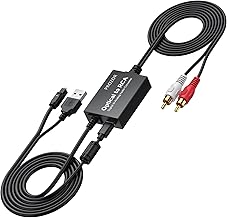
This PROZOR model is described as a 7-foot optical-to-RCA converter cable with a built-in audio amplifier chip. Its product name lists 192 kHz support and identifies uses with HDTVs, amplifiers, Blu-ray and DVD players, and PS3 and PS4 consoles. The listed connection direction is digital optical input to analog RCA output, which is the direction needed when a source with optical output must feed an amplifier or other device with RCA inputs.
Best for: Buyers looking for a cable-style DAC with the intended connection direction clearly reflected in the product name. It was selected because it matches the optical-to-RCA search need and lists common home-entertainment source types. Caution: The provided product information does not specify supported audio formats or sampling-rate details beyond the 192 kHz wording in the name. Check the full product details and set the source output to a format the converter supports before purchase.
Neoteck 7-Foot Optical To RCA Converter

The Neoteck is a 7-foot optical-to-RCA cable-style converter identified for HDTVs, set-top boxes, DVD players, and Blu-ray players. Its name describes a male output, which is relevant when the receiving equipment has RCA input jacks. The 192 kHz designation appears in the product name, making this an option to compare with other converters that advertise high-resolution digital-to-analog conversion.
Best for: Buyers connecting a TV or disc player with optical digital audio output to a stereo device with RCA inputs. It was selected because its stated device examples and male RCA connection align with those common uses. Caution: The supplied listing information does not include detailed format compatibility or setup instructions. Check whether the source can output a supported audio format and whether the receiving device accepts analog RCA input.
eSynic 7-Foot PCM Optical To RCA Adapter

The eSynic converts optical digital audio to left and right RCA analog audio. Its listing specifies a 192 kHz, 24-bit DAC, a 7-foot cable, an aluminum shell, and a status LED. The product description says it draws power from the optical port and requires no external power adapter. Its direction is one-way: optical input to RCA output.
- It supports PCM audio only, according to the product description.
- The listing says Dolby and DTS formats are not supported.
- The source must be configured to output PCM for the converter to work as intended.
Best for: Buyers whose TV, console, or other source can be set to PCM and who want the format limitation stated clearly. It was selected for its explicit setup guidance and listed status indicator. Caution: Avoid this model if the source must send Dolby or DTS audio without first changing its output format.
PROZOR Aluminum Optical DAC With RCA And 3.5mm

Unlike the cable-style options above, this PROZOR is a separate digital-to-analog converter with both RCA and 3.5 mm analog outputs. The listing says it accepts coaxial or Toslink digital PCM audio and can output to RCA and 3.5 mm simultaneously. It also lists support for sampling rates from 32 kHz through 192 kHz and 24-bit S/PDIF input.
Best for: Buyers who want an optical DAC that provides both stereo RCA and 3.5 mm output options, or who need coaxial input as well as Toslink. It was selected for its broader input and output choices compared with single-cable RCA converters. Caution: The listing requires PCM input, and it notes that TV volume should be adjusted through TV settings. This is a separate DAC rather than a single cable with male RCA ends.
Buying Guide: How To Choose An Optical-To-RCA Converter
Does your source have optical output and your stereo have RCA input?
Start by checking the ports on both devices. The source needs a digital optical output, often labeled Optical, Toslink, or Digital Audio Out. The receiving amplifier, powered speaker system, or other audio equipment needs compatible analog RCA inputs, commonly marked L and R. A converter bridges these different signal types; a passive cable alone cannot perform digital-to-analog conversion.
Confirm signal direction before ordering. These products take digital audio from an optical or, for some separate DACs, coaxial input and convert it to analog RCA output. They are not designed to take analog RCA audio and create an optical digital signal.
Should you choose a cable-style converter or a separate DAC?
A cable-style converter combines the cable and conversion hardware in one product. It can be a straightforward choice when the only required connection is optical input to RCA output. Check its length against the distance between the TV or player and the audio equipment. The models listed here describe 7 feet or 2.1 meters of cable.
A separate DAC may suit a setup that needs additional connection options. The PROZOR aluminum unit, for example, lists coaxial and Toslink inputs plus RCA and 3.5 mm outputs. That flexibility is useful only if those ports match your equipment; do not assume that every converter has the same inputs or outputs.
What audio format does the converter need?
Check the converter’s supported format and the source device’s audio-output menu. The eSynic listing explicitly supports PCM only and excludes Dolby and DTS. Its source should therefore be set to PCM. The separate PROZOR DAC also specifies PCM input. For products whose supplied details do not list formats, verify the complete product specifications rather than assuming that a 192 kHz label guarantees compatibility with every audio signal.
If you are connecting a TV, look for a digital audio output setting that lets you select PCM or stereo PCM. Menu names differ by device. If a soundbar, receiver, or television has its own audio-format restrictions, those should also be checked before buying.
How much do sampling rate and bit depth matter?
Sampling rate and bit depth describe supported digital audio input specifications. Several products in this group advertise 192 kHz and 24-bit support, but these figures do not establish that every source sends audio at that rate. The source format, converter compatibility, and receiving equipment all matter. Choose a converter based on the formats your equipment actually uses, not only the largest number in a product title.
Which physical details should you compare?
- Cable length: Measure the route between devices and allow enough slack for placement.
- Output connectors: Confirm RCA plugs versus RCA jacks and check whether the receiving device has matching inputs.
- Extra outputs: Consider a 3.5 mm output only if your setup uses that connection.
- Power and indicators: Check whether the product description states how the converter is powered and whether it includes a status light.
- Setup requirements: Look for format instructions, especially PCM-only limitations.
Frequently Asked Questions
Can I connect a TV’s optical output directly to RCA inputs?
No. Optical audio is digital, while RCA audio inputs expect an analog signal. Use an optical-to-RCA digital-to-analog converter between the TV and the RCA-equipped audio device.
Will an optical-to-RCA converter work in both directions?
No. These products convert digital optical audio to analog RCA output. They do not convert RCA analog audio into optical digital audio.
Why is there no sound after connecting the converter?
Check the optical connection, RCA input selection, and the TV or source audio-output setting. If the converter supports PCM only, set the source to PCM rather than Dolby or DTS. Also confirm that the source is sending audio through its optical output.
Does 192 kHz support mean every source will output 192 kHz audio?
No. The converter’s listed support describes a capability, not the format being sent by the source. The source and receiving system determine the audio format used in the setup.
Can I use an optical-to-RCA converter with headphones?
Only if the converter has an output that matches the headphones or a suitable headphone device. Most products listed here focus on RCA output. The separate PROZOR DAC also lists a 3.5 mm output, but check the product details and your headphone connection requirements.