
The best 4-channel DJ controller depends on whether you prioritize a club-style layout, standalone operation, creative track separation, or an affordable way to control four decks. The Pioneer DJ DDJ-FLX10 is best for hands-on track separation, while the Denon DJ SC LIVE 4 is suited to DJs who want standalone operation and built-in speakers. The AlphaTheta DDJ-GRV6 emphasizes a club-standard layout, and the Numark Mixtrack Platinum FX offers four-deck control with Serato DJ Lite. The DDJ-FLX4 is a two-channel alternative, not a true four-channel controller.
| Product | Best suited for | Key distinction |
|---|---|---|
| Pioneer DJ DDJ-FLX10 | Creative, hands-on mixing | Track separation |
| Numark Mixtrack Platinum FX | Four-deck software mixing | Jog wheel displays and performance controls |
| Denon DJ SC LIVE 4 | Computer-free DJing | Standalone operation and built-in speakers |
| AlphaTheta DDJ-GRV6 | Club-style workflow | Full-size jog wheels and Groove Circuit |
| Pioneer DJ DDJ-FLX4 | Beginners who need two decks | Simple layout and Smart Fader |
Pioneer DJ DDJ-FLX10

The Pioneer DJ DDJ-FLX10 is a four-channel controller with track separation, making it a strong option for DJs who want to work with individual parts of a track during a mix. Its listed product name specifically highlights track separation, a feature that can support more detailed transitions and creative arrangements than simply blending complete tracks.
Best for: DJs who want a four-channel setup and are interested in separating track elements as part of their performance. Choose this if creative control over mixes is a priority.
Why it stands out: Among these options, the DDJ-FLX10 is the clearest fit for a buyer whose main interest is track separation. It is also explicitly identified as a four-channel controller, which makes it relevant for layered mixes that use more than two decks.
Consideration: The supplied product information does not specify included software, computer requirements, or particular connection details. Check the current listing and manufacturer information to confirm that its workflow and setup suit your equipment before buying.
Numark Mixtrack Platinum FX

The Numark Mixtrack Platinum FX is described as a four-deck DJ controller with a three-band EQ mixer, jog wheel displays, 16 pads, two effects paddles, an audio interface, and Serato DJ Lite. Those listed controls give buyers several ways to manage deck information and add performance actions without relying only on basic fader mixing.
Best for: DJs seeking four-deck software control with visible jog wheel information and accessible performance controls. It is a practical choice to compare if you want pads and effects paddles included in the controller’s feature set.
Why it stands out: The product name identifies both the four-deck layout and Serato DJ Lite, so the software pairing is clear from the supplied information. The pads, three-band EQ, and effects paddles also make it relevant to DJs who want several hands-on controls in one unit.
Consideration: The listing specifies Serato DJ Lite, not a different Serato edition. Confirm that the included software edition supports the features and workflow you intend to use.
Denon DJ SC LIVE 4

The Denon DJ SC LIVE 4 is a standalone four-deck controller with stem separation, Wi-Fi streaming, Bluetooth, built-in speakers, and listed compatibility with Serato DJ and Virtual DJ. Its standalone designation and built-in speakers make it distinct from options presented primarily as software controllers.
Best for: DJs who want to explore a standalone setup or value built-in speakers as part of the controller. Choose this if Wi-Fi streaming, Bluetooth, or listed Serato DJ and Virtual DJ compatibility are important considerations.
Why it stands out: The SC LIVE 4 brings several different approaches together: four-deck control, stem separation, wireless features, and onboard speakers. It is the most specifically described option here for buyers considering a less computer-dependent workflow.
Consideration: The product name does not provide details about streaming-service availability, account requirements, or which functions work without a computer. Verify those specifics before relying on a particular service or setup.
AlphaTheta DDJ-GRV6
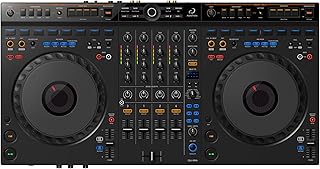
The AlphaTheta DDJ-GRV6 is a four-channel DJ controller with Groove Circuit, a club-standard layout, and full-size jog wheels. The listed software compatibility includes rekordbox and Serato DJ Pro. These details make it a useful comparison for buyers who want a familiar club-oriented arrangement and a choice of named software platforms.
Best for: DJs who prioritize a club-standard layout, full-size jog wheels, and compatibility with rekordbox or Serato DJ Pro. Choose this if those workflow details matter more than standalone operation or built-in speakers.
Why it stands out: Its product description identifies both the layout and the software options, giving buyers concrete comparison points. Groove Circuit is also a named feature for those interested in its particular performance workflow.
Consideration: The supplied details do not explain exactly what Groove Circuit does or list included software licenses. Check current product documentation to understand feature behavior and any software requirements.
Pioneer DJ DDJ-FLX4

The Pioneer DJ DDJ-FLX4 is a two-channel, two-deck controller, so it is not a four-channel substitute. It is included as a relevant alternative for beginners who may be comparing controller styles but do not yet need four-channel mixing. Its listed features include a user-friendly layout, 16 performance pads, Smart Fader, and a microphone input for livestreaming from one device.
Best for: New DJs who want an accessible two-deck controller and room to learn basic mixing before moving to a four-channel model. The listing says Smart Fader adjusts volume, bass, and BPM to help blend tracks by moving one fader.
Why it stands out: It offers a clear entry-level alternative with familiar performance controls, including Hot Cues, Pad FX, Beat Jump, and Sampler functions listed for its pads.
Consideration: Avoid this if you specifically need four-channel control. Its two-channel, two-deck design does not meet that requirement.
Buying Guide: How To Choose A 4-Channel DJ Controller
A four-channel controller gives a DJ control over four mixer channels, but that does not always mean the same thing as four physical decks or four independent music sources. Check how the manufacturer describes deck control, software support, and the intended setup. The products above use different approaches: some emphasize software control, while the Denon DJ SC LIVE 4 is described as standalone.
Do you need four channels or four decks?
Start by identifying what you mean by “four channel.” A four-channel mixer section can accommodate several audio sources, while deck control determines how many virtual or standalone decks you can operate. Product descriptions may use “four-channel” and “four-deck” differently. If your goal is to layer four tracks, confirm that the controller and its software support the deck arrangement you need.
For an explicitly four-deck product description, the Numark Mixtrack Platinum FX and Denon DJ SC LIVE 4 are clear candidates in this list. The DDJ-FLX10 and DDJ-GRV6 are described as four-channel controllers. The DDJ-FLX4 is explicitly two-channel and should not be treated as a four-channel model.
Should you choose standalone or computer-based operation?
A standalone controller may suit a DJ who wants to perform without depending on a laptop for every part of the setup. The SC LIVE 4 is specifically described as standalone and also lists built-in speakers, Wi-Fi streaming, and Bluetooth. Confirm the exact operating requirements for the music sources and services you plan to use.
For controllers that use DJ software, check software compatibility before purchase. The products here name different options: Serato DJ Lite for the Numark, rekordbox and Serato DJ Pro for the AlphaTheta, and Serato DJ and Virtual DJ compatibility for the Denon. The supplied details for the DDJ-FLX10 do not identify software, so verify its software requirements separately.
Which controls matter most for your mixing style?
Match the controller’s listed features to the techniques you expect to use. The DDJ-FLX10 highlights track separation; the SC LIVE 4 lists stem separation; the DDJ-GRV6 includes Groove Circuit; and the Numark offers jog wheel displays, 16 pads, and two effects paddles. These features address different workflows, so compare them based on how you plan to build transitions and manage tracks.
If you are learning, look at whether the layout seems understandable and whether the controller offers controls you will use regularly. The DDJ-FLX4’s Smart Fader and 16 pads may be useful for a beginner exploring two-deck mixing. However, a beginner who already needs four channels should compare four-channel models rather than choosing a two-channel controller solely for ease of use.
How important are jog wheels and layout?
Jog wheel size and layout affect the physical mixing experience, but product descriptions do not reveal every detail of feel or ergonomics. The AlphaTheta DDJ-GRV6 specifically lists full-size jog wheels and a club-standard layout. The Numark Mixtrack Platinum FX lists jog wheel displays. Consider which information and layout details matter to your performance, then confirm dimensions and control placement in the current product documentation.
What should you verify before buying?
- Software: Confirm the supported software, edition, and any required license or subscription details.
- Deck configuration: Check whether the product supports four simultaneous decks or four mixer channels in your intended setup.
- Computer requirements: Verify operating system and computer requirements when using software-based DJing.
- Music sources: For streaming or standalone use, check service availability and connection requirements.
- Connections: Confirm the inputs and outputs you need for headphones, microphones, speakers, and other equipment.
- Portability and space: Compare the controller’s dimensions and weight if you need to transport it or fit it into a specific workspace.
- Learning curve: Consider whether a two-deck controller meets your current needs or whether buying a four-channel model now is more appropriate.
Feature claims are not interchangeable. For example, track separation and stem separation are both named on products in this list, but the supplied product information does not detail their exact controls or implementation. Read the manufacturer’s current documentation before choosing based on a particular performance function.
Frequently Asked Questions
What is a 4-channel DJ controller?
A 4-channel DJ controller provides control over four mixer channels. Depending on the model and software or operating mode, those channels may be assigned to decks or other audio sources. Check the product’s deck support if you need to mix four tracks at once.
Is the Pioneer DJ DDJ-FLX4 a 4-channel controller?
No. The DDJ-FLX4 is listed as a two-channel, two-deck controller. It may suit beginners who need two-deck control, but it does not meet a requirement for four-channel mixing.
Which controller in this list is standalone?
The Denon DJ SC LIVE 4 is described as a standalone four-deck controller. Its listed features also include built-in speakers, Wi-Fi streaming, and Bluetooth. Verify the specific setup requirements for your music sources and services.
Which option lists Serato DJ Lite?
The Numark Mixtrack Platinum FX lists Serato DJ Lite. The AlphaTheta DDJ-GRV6 lists rekordbox and Serato DJ Pro compatibility, while the SC LIVE 4 lists Serato DJ and Virtual DJ compatibility.
Can a beginner use a four-channel controller?
Yes. A beginner can learn on a four-channel controller, though the extra controls may take time to understand. Buyers who only need basic two-deck mixing can consider a simpler two-channel model, while those who plan to layer more tracks may prefer to learn on a four-channel setup.
What should I compare first when choosing between models?
Compare deck and channel support, software compatibility, standalone operation, and the controls that match your mixing style. Then verify connections, computer or streaming requirements, and physical dimensions using current product documentation.