
To get audio from an HDMI source, use an HDMI audio extractor to send video to a display while routing sound to a separate speaker, soundbar, or amplifier. The VPFET model is best for buyers who need optical or 3.5mm output; the ARC models are better for extracting sound from a TV; and the J-Tech Digital option suits setups that need RCA or optical connections. Check your source, display, audio ports, and supported sound format before choosing.
| Product | Best for | Listed audio connections or features |
|---|---|---|
| VPFET HDMI Audio Extractor | Flexible audio output choices | Optical, 3.5mm AUX, HDCP, DTS 5.1, PCM |
| HDMI Audio Extractor Splitter | Basic 3.5mm audio extraction | 3.5mm; 4K at 30Hz, 3D, 1080p |
| HDMI ARC Adapter | TV ARC to stereo equipment | 3.5mm and left/right stereo audio |
| J-Tech Digital HDMI Audio Extractor | RCA or optical connections | 4K at 60Hz, ARC, RCA, optical |
| HDMI ARC Audio Extractor | ARC/eARC soundbar connections | Optical, 3.5mm, CEC volume control |
VPFET HDMI Audio Extractor
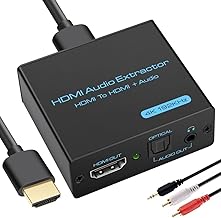
Best for: Buyers who want a choice between optical digital audio and a 3.5mm AUX connection. This HDMI-to-audio adapter is described as a 4K extractor and lists support for HDCP, digital DTS 5.1, and PCM.
Choose this model if your setup needs either an optical connection to audio equipment or a 3.5mm output for an appropriate speaker or receiver. Having both output types can make it more adaptable than an extractor that lists only one audio connection. The listed format support also makes it relevant for people checking whether a source can send multichannel DTS or PCM audio through the extractor.
Limitation: The provided product details do not specify a 4K refresh rate or explain which formats are available on each output. Confirm those details and your audio system’s format requirements before buying.
HDMI Extractor With 3.5mm Audio

Best for: Buyers who need an HDMI-to-3.5mm audio adapter for a TV, computer, game console, or other listed source. The product description names Xbox, Switch, PS3, PS4, and PS5, along with TV, PC, and sound-system use.
The listed video formats include 4K by 2K at 30Hz, 3D, and 1080p. This makes it a candidate for a setup where HDMI video continues to a display and audio is taken from the 3.5mm connection. Choose it if your receiving audio equipment has a compatible 3.5mm input and the stated video mode fits your requirements.
Limitation: The supplied details list a 30Hz 4K mode and a 3.5mm audio output, but do not mention optical or RCA outputs. Avoid this option if you specifically need those connections or a higher 4K refresh rate.
HDMI ARC Adapter for Stereo Audio

Best for: A TV-centered setup that uses HDMI ARC and sends sound to a soundbar, speaker, or amplifier with 3.5mm or left/right stereo audio connections. The product description identifies it as a 4K-at-60Hz ARC audio extractor for HDTV audio equipment.
Choose this adapter when the audio is coming from a television’s ARC connection and the receiving device accepts one of its listed analog outputs. Its 3.5mm and L/R stereo connections offer two ways to route audio, which can be useful when matching the extractor to existing equipment.
Limitation: The supplied details do not list an optical output or specify supported audio formats. Check the TV’s ARC setup and the audio device’s inputs before choosing it, especially if you require digital optical audio or a particular surround format.
J-Tech Digital HDMI Audio Extractor

Best for: Buyers whose audio equipment uses RCA or optical input and who want an extractor listing both connections. The product is described as supporting 4K at 60Hz and ARC, with compatibility language covering laptops, Blu-ray players, and gaming consoles.
Its listed audio support includes Dolby Digital, DTS, and stereo. Choose this model if those outputs and formats match your equipment, or if ARC support is important to your intended setup. The combination of RCA and optical distinguishes it from products in this group that list only a 3.5mm or stereo output.
Limitation: The supplied description does not clarify the exact audio-format behavior for each output or explain its ARC configuration. Confirm those details for your source and receiver before purchase.
HDMI ARC Audio Extractor With CEC

Best for: A TV and soundbar arrangement using ARC or eARC, particularly when the receiving equipment needs optical or 3.5mm audio. The product description lists 4K at 60Hz, CEC volume control, and support for PCM 2.0, Dolby, and DTS 5.1.
Choose this model when ARC/eARC routing is central to the setup and you want the stated CEC volume-control feature. It can also suit connections involving a DVD player or Fire TV Stick, which are named in the product description. Match the selected output and audio format to the soundbar or amplifier’s supported inputs.
Limitation: The supplied details do not explain whether every listed format works over both outputs or how CEC behaves with each device. Verify those requirements if your setup depends on a specific format or control behavior.
Buying Guide: How to Get Audio From HDMI
Do you need an extractor or an ARC adapter?
An HDMI audio extractor takes an HDMI signal and provides a separate audio output while passing video onward. It is commonly considered when a source device connects to a display but the audio must also reach separate equipment. An ARC or eARC extractor is intended for a TV connection that returns audio over the television’s HDMI ARC/eARC port.
Start by identifying where the sound originates. For a console, computer, or Blu-ray player connected directly to an extractor, look for a standard HDMI audio extractor. For audio from TV apps or devices routed through a television, check whether the TV has ARC or eARC and whether the adapter specifically supports the required connection.
Which audio output does your equipment accept?
Match the extractor’s output to the speaker, soundbar, or amplifier input. A 3.5mm connection is relevant for equipment with a compatible analog input. RCA or left/right stereo outputs suit devices with corresponding analog inputs. Optical is a digital connection, but the receiving device must have an optical input and support the audio format being sent.
- Choose 3.5mm when the receiving equipment has a compatible AUX-style input.
- Choose RCA or L/R stereo when the amplifier or speaker uses separate left and right analog inputs.
- Choose optical when both the extractor and audio device provide compatible optical connections.
- Check ARC/eARC when extracting sound from a television rather than only from a source device.
Does the video specification fit your setup?
Audio extraction should not cause you to overlook video requirements. Compare the extractor’s listed resolution and refresh rate with the source and display settings you intend to use. Among these options, listed video details range from 4K at 30Hz to 4K at 60Hz, while some descriptions also mention 1080p or 3D. A product listing that says “4K” without a refresh rate does not establish which 4K modes it supports.
Also consider the complete signal path: source, extractor, and display. If any device in the path does not support the desired video mode, the system may not deliver that mode. Check the product’s full specifications for exact resolution, refresh rate, and any other required features before ordering.
Which audio format should you check?
PCM, Dolby Digital, and DTS are not interchangeable labels. The audio source, extractor, and receiving equipment must support a format that works across the chain. If the sound system only accepts stereo PCM, a listed multichannel format may not be useful without an appropriate configuration. If you want surround sound, confirm the exact format support for the extractor’s chosen output and the receiver or soundbar.
When troubleshooting, check the source device’s audio-output setting. If an extractor or receiver produces no sound, a format mismatch can be one possible cause. Trying a supported PCM or stereo setting may help identify whether the issue involves format support, but use the settings documented for your devices.
How do you connect an HDMI audio extractor?
- Connect the HDMI source to the extractor’s HDMI input.
- Connect the extractor’s HDMI output to the display, if the model uses a separate HDMI pass-through connection.
- Connect the extractor’s audio output to a compatible soundbar, speaker, or amplifier input.
- Select the matching input on the audio device and display.
- Set the source’s audio output to a format supported by the extractor and receiving equipment.
Port labels and setup steps can differ by model, so use the included instructions for the specific device. For an ARC/eARC model, confirm which HDMI port on the television is labeled ARC or eARC and follow the product’s connection directions.
What should you check before buying?
- Source and TV ports: Identify the HDMI connections and whether the TV’s ARC/eARC feature is needed.
- Audio-device inputs: Confirm whether the sound system accepts 3.5mm, RCA, optical, or another listed connection.
- Video mode: Compare the stated resolution and refresh rate with your intended viewing or gaming setup.
- Audio format: Verify PCM, Dolby, DTS, or other format requirements across every connected device.
- Control needs: If you need volume control through the TV remote, check the listing’s CEC details and the configuration requirements.
- Included equipment: The product details provided here do not confirm which cables or power accessories are included. Review the full listing before assuming you have everything needed.
Frequently Asked Questions
Can I get audio from HDMI without an audio extractor?
Yes, if the display or source has another suitable audio output, or if the TV can send sound to an audio device through ARC/eARC or another supported connection. An extractor is useful when the existing equipment lacks a convenient compatible route.
Will an HDMI audio extractor work with a game console?
It can work when the extractor supports the console’s HDMI signal and the required video mode, and its audio output matches the receiving equipment. Check the extractor’s listed resolution, refresh rate, and audio formats against the console and display.
Is HDMI ARC the same as a regular HDMI input?
No. ARC is an audio-return feature associated with a compatible HDMI port on a TV and connected device. A standard HDMI connection carries audio and video from a source to a display, while ARC can send TV audio back to compatible audio equipment over HDMI.
Should I choose optical or 3.5mm audio?
Choose the output that matches your soundbar, speaker, or amplifier. Optical is digital, while 3.5mm is an analog connection. Confirm that both the extractor and the receiving device support the connection and the audio format you intend to use.
Why is there no sound after connecting an extractor?
Check that the source, extractor, display, and audio device are connected to the intended ports and that the correct inputs are selected. Then verify the source’s audio-output setting and make sure its format is supported by the extractor and sound system.
Can an extractor pass 4K video and separate audio?
Some models list 4K video support alongside separate audio outputs, but their supported refresh rates and modes differ. Confirm the exact specifications for the extractor and the rest of the HDMI signal path before relying on a particular 4K setting.