
The best 5.1 audio option for a TV depends on how you plan to connect it: a soundbar is designed to connect directly to a television, while a USB sound card generally connects to a computer. The Hiwill soundbar is the most TV-focused choice; the Optimal Shop adapter is a 5.1 USB option for a compatible computer-based setup. The other adapters offer 7.1 or digital-audio features that may suit home theater users, but check your TV’s ports and audio-output support before buying.
| Product | Best suited for | Key distinction |
|---|---|---|
| Hiwill Dolby Atmos Soundbar | TV owners seeking a soundbar system | 5.1 channels, eARC, HDMI input, wired subwoofer |
| Optimal Shop 6 Channel Adapter | Computer-based 5.1 audio | USB 2.0 and optical S/PDIF |
| USB External Sound Card with SPDIF | Computer users needing 5.1 or 7.1 | Aluminum body and 48 kHz sampling rate |
| StarTech 7.1 USB Audio Adapter | Users comparing digital and analog outputs | USB, SPDIF, and 3.5 mm connections |
| Cubilux 7.1 USB Surround Sound Card | Users who need line-in or microphone input | Aluminum body and listed 48–384 kHz sample-rate range |
Hiwill Dolby Atmos 5.1 Soundbar

Best for: TV owners who want a sound system made for connecting to a television rather than a USB sound card. This 5.1-channel soundbar system lists HDMI eARC, an HDMI input, 4K HDR pass-through, Bluetooth 5.3, and a wired subwoofer.
It is the clearest match in this selection for a direct TV audio upgrade. HDMI eARC can carry audio between compatible TVs and soundbars, while the additional HDMI input and pass-through feature may fit a setup with an external video source. Confirm that the TV and connected equipment support the connection and audio formats you intend to use.
Limitation: This is a soundbar system, not a sound card. Its listed features do not specify wireless surround speakers, so do not assume the rear channels are separate wireless units.
Optimal Shop 6 Channel USB Sound Card

Best for: A computer-based 5.1 setup where the computer is the source for video or audio. This USB 2.0 external adapter is described as a 6-channel 5.1 surround sound adapter and includes optical S/PDIF. The listing names Windows 10, 8, 7, and XP compatibility.
Choose this if your goal is to add 5.1 audio connections to a computer without installing an internal card. The optical output is relevant when connecting to equipment that accepts S/PDIF, but the full audio chain must support the desired surround format. This adapter is not presented as a direct TV sound card.
Limitation: The listed operating systems are Windows versions, and the product information does not establish compatibility with a TV’s USB port. Check the computer, receiver, and speaker inputs before choosing it.
USB External Sound Card With SPDIF

Best for: Computer users who want an external adapter with listed 5.1 and 7.1 channel support and a digital SPDIF connection. The product description also specifies an aluminum alloy body and a 48 kHz sampling rate.
This is a better fit than a basic stereo adapter when the computer is the audio source and the connected sound system can accept the card’s output. The external USB design is intended to add sound capability without an internal sound card. Its stated multi-channel support makes it a candidate for users comparing 5.1 and 7.1 computer audio options.
Limitation: The provided details do not identify exact TV compatibility, specific operating-system versions, or the supported connection types of a particular receiver. Verify those points before purchase; a TV USB port does not automatically make a computer sound card usable with the TV.
StarTech 7.1 USB Audio Adapter
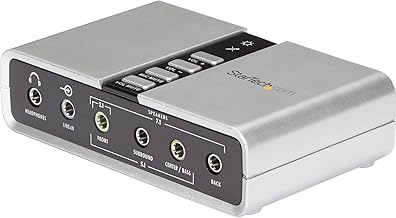
Best for: Computer users comparing a USB adapter with both digital and analog output options. The product name lists up to 7.1 surround sound, digital SPDIF, and analog 3.5 mm connections for laptop or PC use.
Choose this if your computer is the playback device and you need to compare output choices for a receiver, speaker system, or other compatible audio equipment. The combination of SPDIF and 3.5 mm connections offers a different set of connection options from an adapter described only by its optical output. The 7.1 designation may also interest buyers planning beyond a 5.1 setup.
Limitation: The supplied product information does not specify supported operating systems or detail which outputs carry discrete surround channels. Check the product documentation and destination device before relying on a particular connection for 7.1 audio.
Cubilux 7.1 USB Surround Sound Card

Best for: Laptop or PC users who need a USB sound card with listed line-in and stereo microphone inputs. The product name also identifies 7.1 surround sound support, a full aluminum alloy body, and a stated sample-rate range of 48–384 kHz.
This option stands out for buyers who want input connections as well as surround-audio capability. Line-in and stereo mic-in can matter for recording or connecting additional audio sources, while the listed sample-rate range gives audio-focused buyers a specification to compare. It is an external computer sound card, not a TV-specific audio converter.
Limitation: The supplied information does not specify TV support, exact operating-system compatibility, or which output formats and connections are included. Confirm that the adapter’s ports and software support match your setup before choosing it.
Buying Guide: How To Choose 5.1 Audio For A TV
“5.1 sound card for TV” can describe two different needs: connecting surround sound directly to a television, or adding multichannel audio to a computer that plays content on a TV. These products are not interchangeable. A soundbar is designed as a TV audio system; USB sound cards in this list are described for computers or laptops.
Do you need a sound card or a soundbar?
Choose a soundbar when the TV itself is the main source and you want an audio system that connects to the television. The Hiwill model lists HDMI eARC and an HDMI input, along with a wired subwoofer. Choose a USB sound card when a computer is the playback source and needs additional audio outputs or input connections.
A USB socket on a TV does not guarantee that it can operate a USB sound card. TVs may use USB ports for storage, power, or service functions rather than recognizing computer audio devices. Check the TV manual for supported audio outputs and USB audio-device support before selecting an adapter.
Which connections should you compare?
- HDMI eARC: Relevant when a TV and soundbar both support eARC. Check the TV’s port labeling and settings.
- Optical S/PDIF: Useful when the source and audio equipment both provide compatible optical connections. Confirm which audio formats pass through the connection.
- USB: On these sound cards, USB connects the adapter to a computer. Do not assume it connects directly to a TV for audio.
- 3.5 mm analog: The StarTech product name lists analog 3.5 mm connections. Match the output type to the receiver or speakers.
- Line-in and microphone-in: The Cubilux listing names both inputs, which may be relevant for recording or adding an audio source.
Will a 5.1 device work with 7.1 equipment?
Channel labels describe the intended speaker or audio-channel configuration, but the actual result depends on the source, adapter, software, connection, and receiver or speaker system. A product listing that says “up to 7.1” does not by itself confirm that every output carries discrete surround channels in every setup. Check the manufacturer’s specifications for channel routing and supported formats.
If you have a 5.1 speaker system, a product listing with 5.1 support is the most direct match. A 7.1 adapter may be worth considering if your computer and audio equipment support that configuration, but it is not automatically an upgrade for a 5.1 system.
What should you check before ordering?
- Identify the actual audio source: TV, laptop, desktop computer, streaming device, or game console.
- Compare the source’s available audio outputs with the adapter or soundbar’s listed inputs.
- Check whether the TV or computer can output surround sound in the format your speakers accept.
- Confirm operating-system support. The Optimal Shop listing names specific Windows versions; other product details here do not provide full operating-system lists.
- Check whether speakers connect directly to the device or require a receiver or other equipment.
- For HDMI pass-through, verify that connected devices and the TV support the relevant video and audio features.
Which option is better for a computer connected to a TV?
If the computer plays the content and sends video to the TV, a USB sound card may be relevant when you intend to route audio separately to a receiver or compatible speaker system. Confirm how the computer sends video and audio, and whether it can maintain the intended surround format. If the TV is the source for streaming apps, a TV-oriented soundbar is generally the more direct category to investigate.
Frequently Asked Questions
Can I plug a USB sound card directly into my TV?
Not necessarily. A TV’s USB port may not support USB audio devices. Check the TV manual for explicit USB audio support and consider a soundbar or audio connection designed for the TV’s available outputs.
Is the Hiwill soundbar a 5.1 sound card?
No. It is described as a 5.1-channel soundbar system with a wired subwoofer, HDMI eARC, and an HDMI input. A soundbar is an audio system, not a computer sound card.
Which listed product is designed for a direct TV audio setup?
The Hiwill soundbar is the most TV-focused option in this list because its features include HDMI eARC, HDMI input, and 4K HDR pass-through. Confirm that your TV and other equipment support the required connections.
What does SPDIF mean on a sound card?
SPDIF is a digital audio connection. The source and receiving equipment must both support a compatible SPDIF connection and audio format for it to work as intended.
Should I choose a 5.1 or 7.1 USB sound card?
Choose according to the channel configuration supported by your computer, audio software, and speakers or receiver. A 5.1 product is a direct match for a 5.1 system; 7.1 support is useful only when the rest of the setup can use it.