
The best optical-to-jack converter for most two-channel setups is a digital-to-analog converter (DAC) that accepts a Toslink optical audio signal and outputs analog 3.5mm audio. The PROZOR model with RCA and 3.5mm outputs suits buyers who want flexible connections; the Rybozen is a practical option with an optical cable and power adapter included. For a direct 6.35mm output, the ESWN DNXB is the specialized choice. These converters generally work one way: from digital optical to analog jack, not from jack to optical.
| Product | Best for | Outputs |
|---|---|---|
| PROZOR 192KHz DAC | Flexible two-channel connections | RCA and 3.5mm |
| Rybozen 192KHz DAC | Buyers who want included setup accessories | RCA and 3.5mm |
| PROZOR Optical-to-3.5mm DAC | A direct 3.5mm stereo connection | 3.5mm |
| DigitConvert 192KHz DAC | Multiple digital inputs and analog outputs | RCA and 3.5mm |
| ESWN DNXB Optical-to-6.35mm DAC | Equipment with a 1/4-inch stereo jack | 6.35mm |
PROZOR 192KHz DAC With RCA and 3.5mm
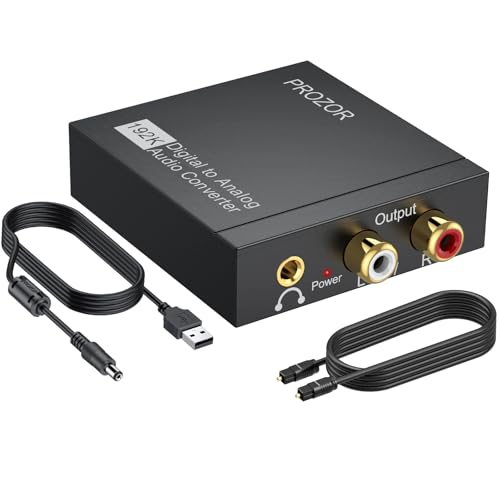
This PROZOR DAC converts digital PCM audio from Toslink optical or coaxial inputs to analog left/right RCA and 3.5mm outputs. Both output types can be used simultaneously, which is useful when the audio setup includes more than one analog connection.
Best for: Buyers who need a choice of RCA or 3.5mm output and want a converter that accepts optical and coaxial digital input. It was selected for its range of connection options and listed support for sampling rates up to 192kHz.
- Supports uncompressed two-channel PCM or LPCM, with listed rates of 32, 44.1, 48, 96, and 192kHz.
- Converts digital audio to analog; it does not provide an optical output.
- Requires the source device’s audio output to be set to PCM or LPCM.
Limitation: This model does not decode 5.1-channel audio. It is not the right choice if the source outputs only an unsupported surround format or if you need multichannel output.
Rybozen 192KHz DAC With Included Accessories

The Rybozen converter changes coaxial or Toslink optical PCM audio into analog RCA left/right and 3.5mm audio. The product listing says an optical fiber cable and power adapter are included, reducing the need to source those accessories separately.
Best for: Buyers setting up an optical connection who value having an optical cable and power adapter in the package. It is also a fit for listeners who need both RCA and 3.5mm analog output options.
- Supports two-channel uncompressed PCM or LPCM audio.
- Lists sampling-rate support at 32, 44.1, 48, 96, and 192kHz.
- Accepts coaxial or optical digital input and provides RCA and 3.5mm analog outputs.
Limitation: It is not available for 5.1-channel audio. Set the source device to PCM or LPCM before troubleshooting the converter if sound is missing or distorted.
PROZOR Optical-to-3.5mm Stereo DAC

This PROZOR model is designed to convert SPDIF digital optical audio into analog 3.5mm stereo audio. The listing describes a built-in amplifier chip and compatibility with devices such as HD TVs, game consoles, and other entertainment equipment.
Best for: Buyers who specifically need a 3.5mm stereo output and do not need RCA connections. Its direct output format makes it a focused option for connecting an optical source to equipment with a compatible analog 3.5mm input.
- Converts optical digital audio to analog 3.5mm audio.
- Includes a built-in amplifier chip, according to the product listing.
- Is described as suitable for HD TVs, game consoles, and other devices with an appropriate optical output.
Limitation: The listed features do not specify RCA outputs or the supported channel formats and sampling rates. Confirm that the source’s audio format and the receiving device’s input match your setup before choosing it.
DigitConvert 192KHz Optical and Coaxial DAC

The DigitConvert DAC accepts Toslink optical or coaxial digital PCM audio and converts it to analog RCA left/right and 3.5mm outputs. Its listed sampling rates range from 32kHz to 192kHz, and the listing identifies support for a 24-bit SPDIF input stream on the left and right channels.
Best for: Buyers whose source may use either coaxial or optical digital output and whose analog equipment accepts RCA or 3.5mm. It was selected for those multiple input and output choices.
- Converts digital audio to analog; it does not convert analog to digital.
- Lists compatibility with devices including PS3, PS4, Xbox, Blu-ray players, and home cinema systems.
- The product description states that connected audio is synchronized without delay.
Limitation: The described signal is digital PCM. Check that the source is set to a supported format rather than assuming the DAC will decode every audio format or surround signal.
ESWN DNXB Optical-to-6.35mm DAC

This converter is designed for a different jack size from the other selections: it changes Toslink digital PCM audio into analog stereo audio through a 6.35mm (1/4-inch) jack. That makes it relevant when the receiving equipment specifically uses a 1/4-inch input.
Best for: Buyers who need optical-to-6.35mm stereo conversion rather than a standard 3.5mm or RCA output. The product is included because its output directly addresses that less common connection requirement.
- Converts optical PCM audio to analog 6.35mm stereo output.
- The listing says to set the source audio output to PCM.
- The product is not designed to transfer audio from 6.35mm to optical.
Limitation: The listing notes that the TV remote’s volume buttons will not function during use. Adjust volume through the playback device or powered speakers instead.
Buying Guide: How to Choose an Optical-to-Jack Converter
Do you need optical to a jack, or jack to optical?
Check the direction of conversion before buying. These products are DACs: they take a digital signal from an optical Toslink or coaxial input and convert it into analog audio for a jack or RCA output. They do not send analog jack audio to an optical connection. If your source has a 3.5mm analog output and the receiving device requires optical digital input, these products will not perform that reverse conversion.
Which jack size does your equipment require?
Match the converter’s analog output to the receiving device’s input. A 3.5mm output is the common choice for equipment with a 3.5mm stereo input. RCA left/right outputs suit devices with separate red and white analog inputs. A 6.35mm (1/4-inch) output is appropriate only when the receiving equipment has that input. Do not assume that a 3.5mm and 6.35mm connection are interchangeable without the right cable or adapter.
Does the source output PCM or LPCM?
Confirm the audio format in the TV, game console, disc player, or other source settings. Several products in this list specify uncompressed two-channel PCM or LPCM. If the source is set to a surround or other unsupported format, the converter may not produce the expected sound. Choose PCM or LPCM when the device provides that option, and consult the product instructions if the menu labels differ.
Do you need two-channel stereo or 5.1 audio?
The PROZOR model with RCA and 3.5mm explicitly supports uncompressed two-channel audio and says it does not support 5.1 decoding or output. The Rybozen listing also states that 5.1-channel audio is not supported. For any model, verify the channel requirements rather than treating a high sampling-rate figure as proof of surround-sound decoding. Sampling rate and channel format describe different aspects of digital audio.
Should you choose optical, coaxial, or both?
Optical Toslink is the relevant input when connecting a device’s optical audio output. A model with coaxial input as well can serve setups where the source provides a coaxial digital connection. Check the source ports and converter inputs before selecting a product. A converter’s output options matter too: the PROZOR, Rybozen, and DigitConvert models listed here provide both RCA and 3.5mm outputs, while the specialized ESWN DNXB provides 6.35mm output.
What should you check if there is no sound?
- Verify that the optical cable is connected to the source’s audio output and the converter’s optical input.
- Set the source’s digital audio format to PCM or LPCM if the converter requires it.
- Confirm that the receiving device is connected to the converter’s analog output.
- Check volume on the receiving equipment. The ESWN DNXB listing specifically says the TV remote’s volume control will not work when using that converter.
Frequently Asked Questions
Can an optical-to-3.5mm converter connect a TV to wired headphones?
It can convert a TV’s digital optical audio output to analog 3.5mm audio, provided the TV outputs a supported format and the headphones or receiving equipment accept that analog connection. Check how volume is controlled, because the TV remote may not adjust the converter’s output.
Does an optical-to-jack DAC convert surround sound?
Not necessarily. Several products described here support two-channel PCM or LPCM, and the PROZOR RCA/3.5mm model and Rybozen model specify that 5.1-channel audio is unsupported. Check the exact model’s channel support and set the source accordingly.
Will the converter work in both directions?
No. The products in this guide convert digital optical or coaxial audio to analog audio. They do not convert an analog 3.5mm or 6.35mm signal into an optical digital signal.
Is 192kHz support required for a TV connection?
Not automatically. A listed maximum sampling rate describes a supported digital input rate; it does not guarantee compatibility with every source format. Confirm the TV’s output format and the converter’s supported signal requirements before buying.
Should I choose 3.5mm, RCA, or 6.35mm output?
Choose the output that matches the receiving device’s input. Select 3.5mm for a compatible stereo jack, RCA for separate left/right analog inputs, or 6.35mm for equipment with a 1/4-inch input. The right connector depends on the equipment, not on which size is generally better.