
The best 5.1 audio cable for a PC depends on the connections on both the computer and the speaker system. For a PC with three analog 3.5mm outputs and a compatible 5.1 speaker system, choose a color-coded three-cable set such as the UpperFu, Ancable, or SummitLink. For a computer that needs analog outputs, the Optimal Shop USB sound card is an adapter option. For a USB-C device and a receiver or soundbar with optical input, consider the JawoAwo USB-C-to-Toslink cable.
| Product | Best for | Connection type |
|---|---|---|
| UpperFu 5FT Cable Set | A short replacement cable set | Three 3.5mm analog cables |
| Ancable 6FT Cable Set | More cable length | Three 3.5mm analog cables |
| SummitLink Cable Set | Basic color-coded replacement | Three 3.5mm analog cables |
| Optimal Shop USB Sound Card | Adding analog outputs over USB | USB audio adapter |
| JawoAwo USB-C to Toslink | USB-C source with optical audio input | USB-C to optical digital audio |
UpperFu 5FT 5.1 Cable Set

The UpperFu is a three-cable, male-to-male 3.5mm TRS set intended as a replacement connection for Logitech 5.1 computer speakers. Its color-coded plugs help identify each cable when connecting corresponding outputs and inputs. The listed length is five feet, and the product description specifies oxygen-free copper inner wire.
Best for: A buyer replacing a missing or damaged three-cable analog set who does not need more than five feet. It was selected because the design is directly aimed at 5.1 computer speaker connections rather than a single stereo link.
Check before ordering: This is not one cable carrying all six analog channels. Confirm that the PC and speaker system use three matching 3.5mm analog connections. Avoid it if the setup uses only optical, HDMI, or USB audio.
Ancable 6FT 5.1 Replacement Cable

Ancable’s replacement set uses male-to-male 3.5mm plugs and is listed for Logitech 5.1 speaker models including the Z-5500, Z-5450, Z-5400, Z-5300, Z-906, Z-680, and X540. The listing describes oxygen-free copper inner wire and says the cables can also suit other speakers that use 3.5mm mini jacks. At six feet, it offers one more foot of reach than the UpperFu option.
Best for: Buyers who need a compatible-style replacement set and want a little more cable length. Its stated support for other 3.5mm mini-jack speakers may also suit a broader range of analog setups, provided the connectors match.
Check before ordering: The product information does not establish compatibility with every speaker using a 3.5mm jack. Match the number and type of connections at both ends; one ordinary stereo jack is not a substitute for a three-cable 5.1 connection.
SummitLink Color-Coded 5.1 Cable Set
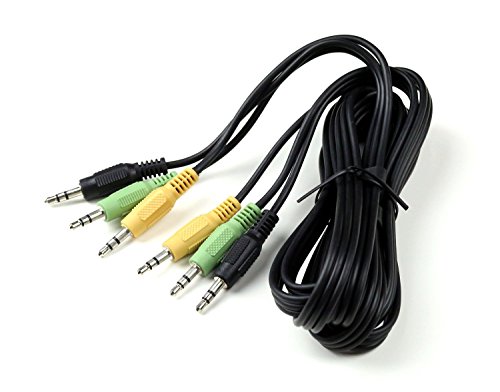
SummitLink’s listing describes a color-coded set of three male-to-male 3.5mm mini-jack cables for compatible 5.1 computer speakers. It is also described as suitable for other speakers that use 3.5mm mini jacks. Color coding can make it easier to keep the separate analog connections organized during setup.
Best for: A buyer who needs a straightforward three-cable replacement and wants color-coded connectors. It is a relevant option when the PC and speaker system both use the matching analog connection arrangement.
Check before ordering: The provided product details do not state a cable length. Confirm the listing’s current specifications and measure the distance between the PC and speakers before choosing it. Do not assume that a 3.5mm connector alone guarantees 5.1-channel compatibility.
Optimal Shop USB 5.1 Sound Card
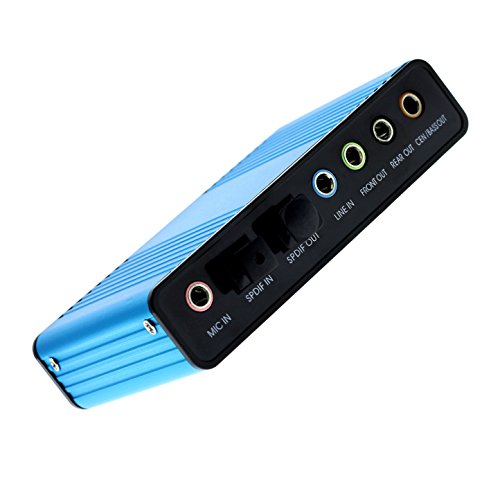
This product is a USB external sound card, not a passive audio cable. Its listed features include six-channel analog playback and digital audio functions, with support described for Windows 98, XP, 2000, Vista, and Windows 7 and 8. The listing also gives sampling-rate details for several recording and playback modes.
Best for: A buyer whose computer lacks the analog connections needed by a compatible speaker system and who wants to add audio connections through USB. It was selected because it addresses the PC-output side of a 5.1 setup, rather than simply extending an existing cable.
Check before ordering: The stated operating-system list is older and does not mention newer Windows versions. Verify operating-system support and the adapter’s actual output connections before purchase. The listing notes that digital playback can convey only left-right PCM, so do not assume its digital output provides discrete 5.1 audio.
JawoAwo USB-C to Toslink Cable

The JawoAwo is a five-foot, unidirectional cable that converts audio from a USB-C source into Toslink optical output. The listing describes compatibility with USB-C devices and audio equipment with optical inputs, including soundbars, DACs, amplifiers, AV receivers, and home theater systems. It lists support up to 24-bit/96 kHz and describes PCM stereo output.
Best for: A buyer whose PC or other source has USB-C audio output and whose receiver or soundbar has a Toslink input. Optical transmission is a different connection method from the three-cable analog sets above, so it can simplify the physical link when the connected devices support it.
Check before ordering: This cable sends audio in one direction, from USB-C to optical; it cannot send audio from Toslink back to USB-C. The listing’s PCM stereo description means buyers should verify multichannel format support rather than assume that every 5.1 source and receiver combination will deliver surround sound.
Buying Guide: How to Choose a 5.1 PC Audio Cable
A 5.1 setup has six audio channels: front left and right, center, subwoofer, and surround left and right. The cable does not create those channels by itself. The PC must provide an appropriate multichannel audio output, and the speaker system or receiver must accept the same signal type. Confirm the source, cable arrangement, and destination before selecting a product.
Does the PC have three analog audio outputs?
Many analog 5.1 computer speaker connections use three 3.5mm stereo cables, each carrying a pair of channels. In that arrangement, a color-coded three-cable set such as UpperFu, Ancable, or SummitLink is the relevant type. Check the labels or manual for the PC and speakers to confirm which jack serves each channel pair.
Do not confuse a three-cable 5.1 arrangement with a single 3.5mm stereo cable. A standard stereo connection carries two channels, not the six separate analog channels required for this kind of setup. A three-cable set is also not automatically compatible just because the plug diameter is 3.5mm.
What if the computer has no multichannel analog outputs?
An external USB sound card can add audio outputs to a computer, but the adapter must provide the connection type the speakers require. Check whether the product has six-channel analog outputs, optical output, or another format. The Optimal Shop listing describes six-channel analog playback, but its stated operating systems are older, so check support for the computer in use.
Also check the application, operating system, and audio device settings. A hardware connection alone does not guarantee that a movie, game, or music application will send a 5.1 signal. Some content is stereo, and some devices may need a multichannel output setting enabled.
When is an optical connection the better choice?
Optical Toslink can connect a computer or adapter to an AV receiver, soundbar, or other device with an optical input. It is not interchangeable with analog 3.5mm plugs. A standard optical cable such as the listed DTECH model requires an optical output on the source, while a USB-C-to-Toslink cable such as JawoAwo is intended for a USB-C source and optical input.
Before buying optical gear for 5.1, verify the audio formats supported by the source, cable or converter, and receiving device. The JawoAwo listing specifies PCM stereo output, so a buyer seeking multichannel audio should confirm that its signal format meets the needs of the entire setup.
How much cable length should you choose?
Measure the route between the PC and the speaker connections, including the path around furniture. The UpperFu set is listed at five feet, the Ancable set at six feet, and the JawoAwo cable at five feet. Leave enough slack to connect and reposition equipment, but avoid choosing a length based on guesswork. The SummitLink product details provided here do not specify a length.
What should you check before purchasing?
- Connector type: Determine whether the setup needs three 3.5mm analog cables, USB audio, or Toslink optical.
- Channel support: Confirm that both the PC output and speaker or receiver input support the desired 5.1 configuration.
- Direction: USB-C-to-optical cables may be unidirectional. Check which end is the source and which is the audio input.
- Device support: Verify the operating system and audio settings for any USB sound card or converter.
- Physical reach: Compare the listed cable length with the measured route.
For a conventional PC-to-5.1-speaker analog connection, choose a matching three-cable set. For a computer without suitable analog outputs, investigate a compatible multichannel USB sound card. For an optical receiver, use an optical connection only when the source and destination support the required signal format.
Frequently Asked Questions
Can one 3.5mm cable carry 5.1 analog audio?
A standard stereo 3.5mm cable carries two channels. The analog PC speaker systems addressed by the three-cable products use three separate connections for six channels. Check the equipment manuals because connection formats can vary.
Are the UpperFu, Ancable, and SummitLink products interchangeable?
They are all described as three-cable 3.5mm male-to-male options for compatible 5.1 speaker setups. Their listed details differ, including stated length for UpperFu and Ancable. Confirm the required connection arrangement and product specifications before substituting one for another.
Will an optical cable automatically provide 5.1 sound?
No. The source, audio settings, connection device, and receiver or speaker system must support a compatible multichannel format. A physical optical connection does not guarantee that a stereo source will become 5.1 audio.
Can I use a USB-C-to-Toslink cable with a regular USB port?
The JawoAwo product is described as USB-C to Toslink. A computer needs a compatible USB-C connection and audio output for this cable. It is not described as a standard USB-A-to-optical cable.
Is a USB sound card the same as a 5.1 cable?
No. A USB sound card is an audio adapter that can provide outputs or audio functions over USB. A cable connects compatible ports. The Optimal Shop product is an adapter, while the UpperFu, Ancable, and SummitLink products are cable sets.
What is the first thing to check when PC surround sound does not work?
Check that the PC output and speaker input use the same connection type, that the analog cables are connected to the correct jacks, and that the computer’s audio settings select multichannel output. Also confirm that the content being played contains a 5.1 audio track.