
The best USB DAC with volume control depends on your audio source and the connection you need. The HiBy D1 is best for USB-C devices and wired headphones, while the Fosi Audio Q4 is better for a desktop setup with several digital inputs and speaker outputs. For a TV with optical audio, consider the PROZOR converter. The VENTION adapter is a simple USB-to-3.5mm option, and the standalone USB knob adds convenient computer volume control without acting as a DAC.
| Product | Best For | Connections or Controls |
|---|---|---|
| HiBy Music D1 | USB-C phones and computers | USB-C, 3.5mm headphone output, volume control |
| Fosi Audio Q4 | Desktop audio and powered speakers | USB, optical, coaxial, RCA, 3.5mm |
| PROZOR Optical DAC | Optical or coaxial digital sources | Optical, coaxial, RCA, 3.5mm, volume knob |
| VENTION USB Sound Card | Headsets and everyday computer use | USB, 3.5mm, volume and mute controls |
| USB Volume Control Knob | Adjusting computer volume by hand | USB, rotary adjustment, mute or pause button |
HiBy Music D1 USB-C DAC

Best for: Listeners who want a compact USB-C DAC and 3.5mm headphone connection for a compatible phone, tablet, or computer. The HiBy D1 is selected for its direct USB-C connection, built-in volume control, and stated support for high-resolution PCM decoding.
The adapter uses a CS46L41 DAC chip and provides a 3.5mm headphone output. Its listed specifications include decoding up to 32-bit/384kHz and 65mW output power at 32 ohms. It also supports CTIA-standard headsets with microphone input, which can make it a practical choice for wired listening and headset use.
Unlike a desktop DAC with multiple inputs, the D1 is designed around a USB-C source and wired headphones. It does not list RCA or optical outputs, so choose another option if you need to connect powered speakers or a television’s optical output. Check that your device has a compatible USB-C audio connection before choosing it.
Fosi Audio Q4 DAC Headphone Amp

Best for: Desktop listeners who want to switch among USB, optical, and coaxial digital sources and use headphones or speakers. The Q4 is selected for its range of inputs and outputs, plus physical volume, bass, and treble controls.
This entry-level DAC and headphone amplifier has USB, optical, and coaxial inputs, with RCA and 3.5mm outputs. The listed headphone range is 16 to 200 ohms. It can connect to a computer, TV, speaker system, or DVD player, and the product information describes it as plug and play without driver installation.
The Q4’s bass and treble knobs allow sound adjustment alongside its volume control. That makes it a better fit for a desk or home audio setup than a pocket-size phone adapter. Its listed outputs are RCA and 3.5mm; if you specifically need a balanced headphone output or a USB-C plug built into the device, the supplied details do not indicate those features.
PROZOR Optical Digital-to-Analog Converter
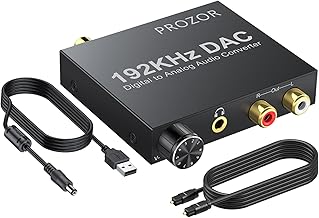
Best for: A digital source with optical or coaxial output that needs analog RCA or 3.5mm audio. This PROZOR converter is selected for its optical and coaxial inputs, analog outputs, and built-in volume knob.
It converts PCM digital audio to stereo analog output and can send audio through RCA and 3.5mm outputs simultaneously, according to the product details. The listed sampling rates include 32, 44.1, 48, 96, and 192kHz, with a stated 24-bit SPDIF incoming bit stream. The converter also has a volume control knob and is described as muting automatically when it receives a non-audio signal.
This is a better match for optical or coaxial source equipment than for a computer that needs a USB DAC. The product information says the input and output cannot be reversed, so it should not be selected when you need to convert analog audio into a digital signal. Confirm that the source outputs PCM audio, as specified, rather than assuming every digital format is supported.
VENTION USB Sound Card With Volume Control

Best for: People who need a straightforward USB-to-3.5mm audio adapter for headphones, headsets, or a microphone. It is selected for its plug-and-play setup and physical volume, microphone, and sound-switch controls.
The VENTION adapter supports stereo audio and 3.5mm earphones, headphones, headsets, and microphones. The supplied product information highlights using headphones and a microphone together with certain Mac desktop devices. Its compact design is intended to be portable, and the listing says no additional driver is required.
This is a practical choice for everyday activities such as gaming, video chats, movies, and music when a 3.5mm connection is needed. It is not described as a high-resolution DAC with published sampling-rate specifications, nor does it list optical, coaxial, or RCA connections. Choose a different product if those specific inputs or outputs matter to your setup.
USB Volume Control Knob for PC

Best for: Computer users who want a physical control for system volume without replacing their existing audio device. This knob is selected as a simple control add-on, not as a DAC: the provided product details describe volume adjustment and button functions but do not list audio conversion or headphone outputs.
The unit is described as plug and play, with no driver or software installation required. Its button can mute or pause, and holding it for eight seconds switches the button function. The product information also lists a metal shell and blue LED indicator. Listed operating-system support includes Windows versions, Mac, Android, and iOS.
Choose this if your main goal is faster computer volume adjustment and your current DAC or sound card already handles audio conversion. Avoid treating it as a standalone USB DAC or headphone amplifier; those capabilities are not stated in the supplied features. The button’s mute or pause behavior can be changed, so account for that when setting it up.
Buying Guide: How to Choose a USB DAC With Volume Control
Which input matches your source?
Start with the audio output on the device that will provide sound. A computer or phone with USB-C may suit a compact USB-C DAC such as the HiBy D1. A desktop computer that needs several digital input options may be better served by the Fosi Q4. For a TV or other source with optical or coaxial output, the PROZOR converter is the relevant type of device.
Do not assume that every product called a DAC uses the same connection. Optical and coaxial converters take digital signals from those ports; a USB DAC takes audio from USB. A USB-to-3.5mm adapter is also a different form factor from a desktop converter. Match the source connection to the product’s stated input before comparing other features.
Do you need headphone output, speaker output, or both?
For wired headphones with a 3.5mm plug, check that the DAC has a 3.5mm headphone output. The HiBy D1 and VENTION adapter list this kind of connection. For powered speakers or a stereo system, look for analog RCA outputs, which the Fosi Q4 and PROZOR list. A headphone jack and an RCA output serve different connection needs, so confirm which one your listening setup requires.
Some devices provide more than one output type, but the presence of a port does not establish that every speaker, amplifier, or headset will work in every configuration. Compare the output connector with the input connector on your headphones, speakers, or amplifier. If microphone use matters, check for explicit headset or microphone support rather than relying only on the presence of a headphone jack.
What kind of volume control do you want?
A physical knob on the audio device provides a direct way to adjust output level. The Fosi Q4 and PROZOR list built-in volume controls, while the VENTION adapter adds volume and sound-switch buttons. A standalone USB knob controls computer volume but is not listed as an audio converter. If you need both conversion and a physical volume adjustment, select a DAC that explicitly includes its own volume control.
Consider whether you want control over the DAC’s output, the computer’s system volume, or both. These controls are not necessarily interchangeable. The product descriptions identify the USB knob as controlling Windows volume when connected, while the DAC listings describe adjustment on the audio device itself.
Are sample-rate and headphone-power specifications important?
Sample-rate figures are useful for comparing stated digital audio support, but they should not be the only selection factor. The HiBy D1 lists decoding up to 32-bit/384kHz, while the PROZOR lists support up to 192kHz and 24-bit SPDIF input. A device’s maximum specification does not guarantee that a particular source or audio file will use that rate; check the full signal path.
For headphone use, note any listed output-power or impedance information. The HiBy D1 lists 65mW at 32 ohms, and the Fosi Q4 lists support for headphones from 16 to 200 ohms. These specifications help identify the intended use, but they do not replace checking the requirements of your particular headphones.
Is plug-and-play setup a priority?
The VENTION adapter, Fosi Q4, and USB volume knob are described as not requiring additional drivers or software. The HiBy D1 is described as plug and play over USB-C. A simple setup can be useful for a travel adapter or an everyday desk system, but connection requirements still matter. A device described as plug and play will not add a port your source does not have.
Which option suits a particular listener?
- For a USB-C phone or computer: Consider the HiBy D1 when you need a 3.5mm headphone output and built-in volume control.
- For a desk with multiple digital sources: Consider the Fosi Q4 for USB, optical, and coaxial inputs, along with RCA and 3.5mm outputs.
- For an optical or coaxial source: Consider the PROZOR when you need stereo analog RCA or 3.5mm output and a volume knob.
- For a basic USB headset connection: Consider the VENTION adapter when its USB-to-3.5mm format and controls match your needs.
- For a physical computer-volume control: Consider the USB knob only if your existing audio device already provides the DAC or sound-card function.
Frequently Asked Questions
What does a USB DAC with volume control do?
A USB DAC converts digital audio from a USB-connected source into an analog signal for compatible headphones, speakers, or other audio equipment. A volume control lets the listener adjust the output level on the DAC. Some USB volume knobs only control computer volume and are not DACs.
Is a USB-to-3.5mm adapter the same as a desktop DAC?
Not necessarily. A USB-to-3.5mm adapter provides a compact way to connect 3.5mm audio equipment to a USB device. A desktop DAC may offer additional inputs, RCA outputs, headphone amplification, or sound controls. Compare the listed connections and functions rather than relying on the product label alone.
Can I use an optical DAC with a USB audio source?
An optical converter requires an optical input, and a coaxial converter requires a coaxial input. The PROZOR product listed here is described for optical or coaxial digital input, not USB input. Choose a USB DAC when your source sends audio through USB.
Does a volume control knob make a device a DAC?
No. A volume knob adjusts sound level but does not, by itself, indicate that a device converts digital audio to analog. The standalone USB knob in this comparison is described as a computer volume controller, not as a DAC or headphone amplifier.
Should I choose a USB-C DAC or an optical DAC?
Choose based on the output available on your source. A USB-C DAC is appropriate for a compatible USB-C phone, tablet, or computer. An optical DAC is appropriate for equipment with an optical digital output. Check the source port and the DAC’s stated input before buying.
Can one DAC connect headphones and speakers?
Some DACs list both headphone and speaker-system outputs. The Fosi Q4 includes a 3.5mm headphone output and RCA outputs for speakers or an amplifier. Confirm that the output type matches the input on the equipment you plan to connect.