
To convert optical digital audio out to analog, use a digital-to-analog converter (DAC) with a Toslink input and RCA or 3.5mm output. The Hdiwousp is best for buyers who also need coaxial input, while the eSynic is a straightforward optical-to-RCA option. Choose the XPTSFDU if you need HDMI ARC as another input. These converters generally require the source to output PCM or LPCM audio; check your TV or device settings before connecting.
| Product | Best for | Inputs and analog outputs |
|---|---|---|
| Hdiwousp 192 kHz DAC | Optical and coaxial flexibility | Toslink/coaxial; RCA/3.5mm |
| PROZOR 192 kHz DAC | Optical or coaxial connections | Toslink/coaxial; RCA/3.5mm |
| eSynic Optical to RCA | Simple optical-to-RCA setup | Toslink; RCA |
| XPTSFDU HDMI ARC Converter | Multiple digital input types | ARC/Toslink/coaxial; RCA/3.5mm and digital outputs |
| Compact 192 kHz DAC | Small dual-input converter | Toslink/coaxial; RCA/3.5mm |
Hdiwousp 192 kHz Digital-to-Analog Converter
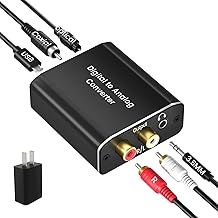
This converter accepts digital audio through either Toslink optical or coaxial input and converts it to analog left/right RCA and 3.5mm output. Its listed supported sampling rates range from 32 kHz through 192 kHz, with a 24-bit S/PDIF input. The package includes an optical cable and a power adapter, and the product is described as plug and play without driver installation.
Best for: Buyers who want both optical and coaxial input options, or who need a 3.5mm connection as well as RCA. It was selected for its flexible inputs and included optical cable. Set the source to PCM or LPCM before use.
Limitation: Conversion works in one direction only, from digital to analog. It does not convert an analog signal into digital audio.
PROZOR 192 kHz Optical and Coaxial DAC

The PROZOR accepts Toslink or coaxial digital PCM audio and provides RCA left/right and 3.5mm analog output simultaneously. The listing specifies support for sampling rates of 32, 44.1, 48, 96, and 192 kHz, plus 24-bit S/PDIF. It describes an updated amplifier chipset and dual-channel operational amplifier intended to improve output clarity and reduce distortion.
Best for: Buyers who want a dual-input DAC with two common analog output types. It is a practical choice when connecting a digital TV or player to equipment with RCA or 3.5mm analog input. The source audio format should be set to PCM.
Limitation: The listing notes that TV volume may need to be adjusted in the TV settings. This is a digital-to-analog converter, not an analog-to-digital adapter.
eSynic 192 kHz Optical-to-RCA Adapter

This eSynic model is designed for one connection path: optical digital input to RCA analog output. Its listed features include a 192 kHz, 24-bit DAC, PCM decoding, a 7-foot cable, and a status LED. The product description says it does not require external power and is intended to connect optical sources such as a TV or game console to an analog amplifier.
Best for: Buyers who need a direct optical-to-RCA connection and do not need coaxial input or a 3.5mm output. Its focused input and output make it a simple match for RCA-equipped stereo systems.
Limitation: The listing specifies PCM only and excludes Dolby and DTS formats. It also does not provide a 3.5mm analog output, so check your receiving equipment’s inputs before choosing it.
XPTSFDU HDMI ARC and Optical Audio Converter

Unlike a basic optical DAC, this converter offers HDMI ARC, Toslink optical, and coaxial input options. Its outputs include RCA, optical, coaxial, and 3.5mm AUX; a switch selects the input source. The listing gives sampling-rate support up to 192 kHz and specifies PCM for TV audio when using the optical mode.
Best for: Buyers whose setup may use different digital outputs, or who need HDMI ARC as an alternative to optical. It was selected because it supports more input and output types than the simpler DACs in this list.
Limitation: The TV’s HDMI port must support ARC, and only one input source can be selected at a time. The listing says it does not have built-in CEC, so the TV remote cannot directly adjust its volume.
Compact 192 kHz Optical and Coaxial DAC

This compact converter takes Toslink or coaxial digital PCM audio and provides RCA and 3.5mm analog outputs. Its description lists support for PCM/LPCM up to 192 kHz and 24-bit, and calls out a small aluminum housing and included storage case. The analog output options allow connection to equipment with either RCA inputs or a 3.5mm jack.
Best for: Buyers looking for both common digital inputs and both analog output types in a compact unit. It is a suitable option when space is limited or when the converter may need to be stored or moved.
Limitation: The stated conversion is for digital PCM audio. Confirm the audio source can output a supported format, and check the package contents and power requirements in the current product listing before purchase.
Buying Guide: How to Choose an Optical-to-Analog Converter
What does an optical audio converter do?
An optical-to-analog converter, also called a DAC, receives a digital audio signal through a Toslink optical cable and changes it into an analog signal. The analog output usually uses RCA connectors, a 3.5mm jack, or both. That output can feed compatible analog equipment, such as a stereo amplifier or powered speakers with the matching input.
A DAC does not amplify every signal for every purpose, and it does not reverse the conversion. If your source only has analog output and your destination needs digital input, you need an analog-to-digital converter instead.
Will the converter work with my TV?
Check whether the TV has an optical digital audio output and whether the converter has the matching optical input. Then check the TV’s audio settings. Many converters in this selection specify PCM or LPCM input, so change the digital audio output format from a surround format such as Dolby Digital to PCM when necessary.
If the TV provides HDMI ARC but not an optical connection you plan to use, the XPTSFDU is the listed option with HDMI ARC input. Its listing requires an ARC-capable HDMI port. A basic optical DAC cannot take HDMI ARC directly.
Should you choose RCA or 3.5mm output?
Match the converter’s output to the receiving device’s input. RCA left/right connectors are common on stereo amplifiers and some powered speakers. A 3.5mm AUX input is common on compact speakers and other audio equipment. Several products listed here provide both output types; the eSynic model is specified with RCA output only.
Before buying, check whether the receiving device expects a line-level input or a different connection. A converter’s 3.5mm output is not automatically the same as every headphone or microphone connection, so use the input and output labels on your equipment as a guide.
Do you need coaxial input as well as optical?
Choose a model with coaxial input if your source uses a coaxial digital audio connection or you want that option for another device. The Hdiwousp, PROZOR, and compact 192 kHz DAC list both coaxial and optical digital inputs. The eSynic is optical-only. The XPTSFDU adds HDMI ARC alongside optical and coaxial inputs.
For a single TV with an optical output, a simpler optical-only model may be enough. Extra input types are useful only when they match the equipment you intend to connect.
Does a higher sampling-rate specification guarantee compatibility?
No. A listed maximum such as 192 kHz describes a supported sampling rate; it does not guarantee that every audio format or source setting will work. Check the converter’s stated format support and the source’s output settings. In particular, the eSynic lists PCM support and excludes Dolby and DTS, while several other listed models also call for PCM or LPCM.
What else should you check before ordering?
- Signal direction: Confirm the product converts digital input to analog output, not the reverse.
- Connectors: Match the source’s digital output and the receiving device’s analog input.
- Power: Check whether the chosen unit includes or requires a power adapter. Product power arrangements differ.
- Cables: Confirm which cables are included and whether you need additional ones for your setup.
- Volume control: Check whether volume is controlled on the source, amplifier, or another device. The PROZOR and XPTSFDU listings call out volume-related limitations.
Frequently Asked Questions
Can I connect an optical TV output to RCA speakers?
Yes, if you use an optical-to-analog DAC with RCA outputs and the speakers accept RCA input. Set the TV’s digital audio output to PCM or LPCM if the converter requires it.
Can an optical converter connect directly to passive speakers?
Not necessarily. RCA and 3.5mm outputs are analog audio outputs, but passive speakers typically require an amplifier. Check the speaker’s connection requirements and use a compatible amplifier where needed.
Will these converters decode Dolby Digital or DTS?
Do not assume they will. The eSynic listing specifies PCM only and excludes Dolby and DTS. Other listed products call for PCM or LPCM. Check the specific converter’s supported formats and set the source accordingly.
Can I use an optical-to-RCA converter in reverse?
No. These products convert digital audio to analog audio. They do not convert analog RCA audio into optical digital audio.
Why is there no sound after connecting the converter?
Check that the optical cable is connected to the source output and converter input, the correct input is selected, and the analog cables go to an input on the receiving device. Then set the source’s audio output to PCM or LPCM if required and verify the volume settings.