
The best CD player with a USB connection depends on whether you want to read or burn discs on a computer, or play music through a home audio device. The Rioddas drive is best for a simple USB-A computer connection, while the Amicool and JKNJX drives add USB-C connectivity. The Gueray is a desktop music player with USB flash-drive playback, not a computer optical drive.
| Product | Best For | USB Connection Use |
|---|---|---|
| Rioddas External CD/DVD Drive | Simple computer disc access | USB-A connection to a computer |
| Amicool External DVD Drive | USB-A or USB-C computer connection | Reads and writes supported discs |
| Alronly External CD/DVD Drive | Basic reading and burning | USB-A and USB-C computer connection |
| Gueray Desktop CD Player | Home listening and USB flash playback | Plays music from a USB flash drive |
| JKNJX External CD/DVD Drive | Broad computer OS support | Integrated USB-A and USB-C cable |
Rioddas External CD/DVD Drive

The Rioddas is a USB-powered external CD/DVD drive for people who need to access discs from a computer. It is designed to connect through USB 3.0 and is backward compatible with USB 2.0. The listed features include reading and writing, plug-and-play setup, and no need for a separate power adapter or driver installation.
Best for: Buyers who want a straightforward USB-A optical drive for a laptop or desktop. It is a practical choice when the main goal is reading discs or burning supported media rather than playing CDs through a standalone home stereo.
The manufacturer lists transfer speeds up to 5Gbps and features intended to support stable data transmission. A physical eject button can release a disc even if the computer does not recognize the drive. For desktops, the product information recommends connecting directly to a high-power rear motherboard USB port.
Limitation: The provided features do not list a USB-C connection, so buyers whose computer has only USB-C ports should check their connection needs before choosing it. A different USB port may be needed if the drive is not detected immediately.
Amicool USB-A And USB-C DVD Drive

The Amicool external optical drive has both USB 3.0 and Type-C interfaces. It is intended for computer use, with listed support for reading and writing several CD and DVD formats, including DVD+R, DVD-R, CD-R, and CD-RW. The product information gives maximum speeds of 8x for DVD reading and 24x for CD reading and writing.
Best for: Buyers who want USB-A and USB-C connection options in one external drive. It is also a better fit for shoppers who want explicit information about supported disc formats and operating systems before purchase.
The drive is described as plug-and-play and compatible with Windows, Linux, and macOS. The listing says to connect it directly to the computer rather than through an unpowered hub or extension cable. Mac users are advised to insert the disc first and use VLC for media playback; Apple DVD Player is not supported according to the product information.
Limitation: It does not support Blu-ray, DVD-RAM, ChromeOS, or use with TVs, tablets, game consoles, and car stereos. Buyers should check their computer’s ports and disc format before ordering.
Alronly USB-C And USB 3.0 Drive
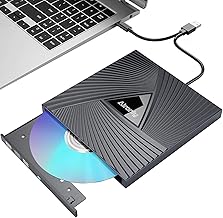
The Alronly is a portable external CD/DVD reader and burner with USB-C and USB 3.0 connectivity. Its listed features include plug-and-play operation, no required driver installation, and read/write speeds up to 8x for DVDs and 24x for CDs. The manufacturer states data transfer rates up to 5Gbps.
Best for: Buyers looking for a dual-interface optical drive for a PC or Mac who need both disc reading and burning. The USB-C and USB 3.0 connections make it a relevant option when a computer’s available port type is an important part of the buying decision.
The product information describes support for CD and DVD burning, playback, and reading. It also lists broad compatibility with PC and Mac systems and says the device is not intended for Chromebooks, car platforms, tablets, or televisions.
Limitation: The listing does not provide a detailed list of supported operating system versions or specific disc formats. Check those requirements with the seller if you need a particular format or computer configuration.
Gueray Desktop CD Player With USB Playback

The Gueray is a desktop music player rather than an external computer CD/DVD drive. Its listed functions include CD playback, FM radio, Bluetooth, TF card playback, and USB flash-drive playback. It supports CD, CD-R, CD-RW, MP3, and WMA according to the supplied product information.
Best for: Home listeners who want a standalone desktop player for CDs and music stored on a USB flash drive. It is the most relevant choice here for someone searching for a CD player with USB music playback, rather than a drive for accessing computer files or burning discs.
The unit has built-in speakers and an LCD display that shows information such as the track number, play time, and selected mode. The product also describes Bluetooth transmitter and receiver functions, including connecting to Bluetooth headphones or speakers.
Limitation: The USB feature is described as USB flash-drive playback, not as a connection for reading or writing computer discs. Choose an external optical drive instead if you need to install software, copy files, or burn CDs from a computer.
JKNJX Dual-Port External CD/DVD Drive

The JKNJX external drive has an integrated cable with USB-A and USB-C connections. It is designed for computer use and is described as plug-and-play, with no external power supply required for daily use. The listing gives maximum speeds of 8x for DVD reading and writing and 24x for CD reading and writing.
Best for: Buyers who want a dual-port optical drive and need listed support for a range of Windows versions and Linux distributions, as well as macOS 10.16 or later. The integrated cable may suit people who want both common USB connection types available on the drive.
The product information says to connect directly to a rear USB port on desktop computers for better power stability. It supports USB 3.0 and is backward compatible with USB 2.0 and USB 1.1. For Mac devices, the listing says to insert a readable disc to activate and display the drive icon.
Limitation: It is not listed as compatible with ChromeOS, iPads or tablets, TVs, vehicles, some Surface models, or Blu-ray and 4K discs. Confirm compatibility if you have a less common computer model or need optical formats beyond CDs and DVDs.
Buying Guide: How To Choose A CD Player With USB
Do you need a computer optical drive or a home music player?
This is the most important distinction. An external CD/DVD drive connects to a computer so you can read discs, access files, or burn supported media. A standalone music player is made for listening and may play music from a USB flash drive. These functions are not interchangeable: USB flash playback does not mean a player can act as a computer disc drive.
Which USB connection does your device have?
Check whether your computer has USB-A, USB-C, or both. The Rioddas listing specifies USB 3.0, while Amicool, Alronly, and JKNJX list USB-A and USB-C connection options. A connector’s shape is not the only consideration: the computer must also provide a suitable data connection and enough power for the drive.
When possible, connect an external optical drive directly to the computer. The supplied product information for several drives recommends avoiding hubs or extension cables for stable operation. For desktop computers, a rear motherboard port is specifically recommended by some listings.
Do you need reading, burning, or both?
Check that the product supports the task you plan to do. The listed external drives are described as readers and writers, but disc-format support varies. For example, the Amicool listing names several CD and DVD formats and explicitly excludes DVD-RAM and Blu-ray. Do not assume that every optical drive reads every disc type.
Will it work with your operating system?
Compatibility claims differ by product. Windows, macOS, and Linux are mentioned across the listings, but specific versions and exceptions vary. The Amicool and JKNJX listings identify notable exclusions, including ChromeOS. Check the exact product details if you use a Chromebook, tablet, a particular Mac model, or an older operating system.
How should you think about speed claims?
USB data-transfer rates and disc read/write speeds describe different things. A listing’s USB speed refers to the connection’s stated data-transfer capability; DVD and CD speeds refer to optical disc operations. These figures do not guarantee that every task will run at the maximum rate, since results can depend on the disc, computer, software, and connection.
What if the drive is not detected?
Start by connecting it directly to another USB port and inserting a readable disc. Some listings say a Mac may show the drive only after a disc is inserted. If a desktop drive is unstable, try a rear motherboard port. For media playback or burning, use software appropriate to the operating system and task; the Amicool listing, for example, recommends VLC for Mac playback.
Frequently Asked Questions
Can I connect an external CD drive to a USB port?
Yes, the external optical drives listed here are designed to connect to a computer through USB. Check whether your computer needs USB-A or USB-C and connect directly when possible.
Can a USB CD drive play music without a computer?
The external drives in this comparison are described as computer accessories. The Gueray is a standalone desktop player, but its USB function is for playing music from a USB flash drive.
Can these products burn CDs?
The Rioddas, Amicool, Alronly, and JKNJX products are described as readers and writers or burners. Confirm the supported disc format and use compatible computer software before burning.
Do USB CD/DVD drives play Blu-ray discs?
Do not assume they do. The Amicool and JKNJX listings explicitly exclude Blu-ray discs. The supplied information does not establish Blu-ray support for the other external drives.
Can I use an external optical drive with a Chromebook?
Compatibility depends on the specific drive. The Amicool, Alronly, and JKNJX listings exclude ChromeOS or Chromebooks, so check the product’s current compatibility details before buying for a Chromebook.
What should I choose for USB-C-only computers?
Choose a drive whose listing specifies USB-C connectivity, such as the Amicool, Alronly, or JKNJX models. The Rioddas listing describes USB 3.0 but does not specify USB-C.