
The best ham radio audio processor depends on what you want to improve: choose a digital noise reducer for adjustable noise filtering, a parametric equalizer for shaping received voice audio, or a computer audio interface for digital modes. The Hosrivae and AudioFor units offer similar noise-reduction controls, while the Heil PRAS EQ is the clearest fit for frequency-by-frequency audio adjustment. The selected products below cover these different use cases; check your radio’s audio connections and intended setup before choosing.
| Product | Best suited for | Main function |
|---|---|---|
| Hosrivae Noise Reducer | Adjustable receive-audio noise reduction | Digital noise reduction and filtering |
| Heil PRAS EQ | Tailoring received voice sound | Parametric equalization |
| AudioFor Noise Reducer | SSB listening with selectable filters | Digital noise reduction and filtering |
| goodstumbler Audio Interface | Connecting a radio to a computer | Sound codec, CAT control, and digital modes |
| Twinpoint BB2 Bandit Echo Board | Buyers researching an echo board | Echo board; detailed functions are not specified |
Hosrivae Noise Reducer

The Hosrivae Noise Reducer is an external digital signal processor intended to reduce noise and filter audio from radio receivers. Its listed controls include 10 DNR noise-reduction levels and 10 FLT digital-filter levels. The filter options include low-pass settings and a direct-pass option, giving listeners a way to compare processed audio with a less-filtered setting.
Best for: Radio operators who want multiple noise-reduction and filtering levels rather than a single fixed setting. It is selected because its feature list describes both adjustable DNR and FLT functions, plus a built-in speaker and Type-C power.
Check before buying: The listing uses inconsistent descriptions of the audio connector, including “5mm” and “3.5mm” in the product information. Confirm the actual input and your receiver’s output requirements before ordering. The supplied details do not establish compatibility with every radio.
Heil PRAS EQ Receive Audio Equalizer
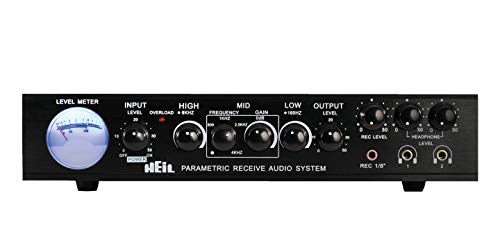
The Heil Parametric Receive Audio System Equalizer is designed to shape received audio for amateur radio, shortwave, commercial, and CB receivers. Its feature list describes adjustable low-, mid-, and high-frequency controls as well as parametric equalization. These controls let an operator tailor the audio profile instead of relying only on general noise-reduction settings.
Best for: Operators who want to adjust the tonal balance of received speech, including listeners trying to make weak or difficult voice signals easier to follow. It is selected because the listing specifically describes frequency controls and receive-audio tuning.
Better for: Audio shaping than a device whose stated purpose is primarily digital noise reduction. Limitation: The listed information does not provide connection details or specific frequency ranges. Check the product’s connection requirements and confirm they suit your radio before purchase.
AudioFor DNR Digital Filter

The AudioFor Noise Reducer is listed for SSB amateur radio and radio-receiver audio. It uses a digital signal processor and offers 10 DNR levels plus 10 FLT filter levels. The stated filtering includes different low-pass options and a direct-pass selection. A spectrum display is also listed, though the product information does not specify its display measurements or operating details.
Best for: SSB listeners looking for a dedicated external noise-reduction and filter device with several adjustment levels. It is selected because its stated purpose and controls directly match receive-audio processing for ham radio.
Choose this if: You want to compare different DNR and filter settings while listening to receiver audio. Check before buying: The listing describes a “5mm” audio interface, which may be a typographical or connector-description issue. Verify the actual connector, power requirements, and intended signal path with the seller.
goodstumbler Amateur Radio Audio Interface
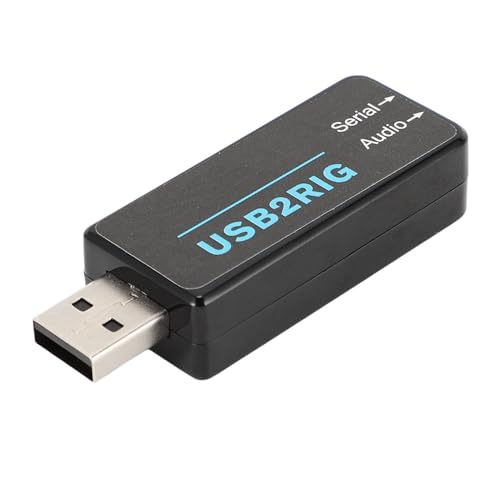
This product is an audio interface for connecting a radio and computer, rather than a conventional speaker-side noise reducer. The listing describes a built-in sound codec, serial-port and CAT-control functions, and a single USB connection for sound codec, CAT control, and switching. Listed digital-mode applications include FT8, FT4, JS8Call, RTTY, SSTV, WinLink, APRS, VaraHF, VaraFM, and Soundmodem.
Best for: Operators who want to send and receive computer-based digital modes or connect a transceiver to software. It is selected because it processes radio audio as part of a computer interface and supports a broad set of named modes.
Different from a DNR unit: Its listed purpose is computer interfacing and digital-mode operation, not adjustable receive-noise reduction for ordinary listening. The listing names operating systems and radio cable options, but buyers should verify that their specific radio, cable, computer, and software setup are supported.
TWINPOINT BB2 Bandit Echo Board

The TWINPOINT BB2 Bandit Echo Board is listed as an echo board, but the supplied product details only state package quantity and general quality language. They do not explain its controls, connections, supported equipment, or specific audio-processing behavior. For that reason, it is not directly comparable to the products above, which have described noise-reduction, equalization, or computer-interface features.
Best for: Buyers specifically researching this named echo board who can confirm its function and fit from the complete product information. It is included as an audio-related accessory, not as a verified substitute for a receive-audio processor.
Important limitation: The available features are too limited to establish what radios it works with or how it processes audio. Avoid choosing it as a ham radio noise reducer or equalizer unless the manufacturer’s full documentation confirms that use.
Buying Guide: How To Choose A Ham Radio Audio Processor
Do you need noise reduction, equalization, or a computer interface?
Start by identifying the audio problem. A DNR device is intended to reduce noise in receiver audio and may provide selectable digital filters. An equalizer changes the balance of audio frequencies, which can help tailor how received speech sounds. A computer audio interface connects radio audio and control functions to software for digital modes. These categories do different jobs, so a product labeled “audio” is not automatically a replacement for a noise reducer.
- Choose a DNR filter when your main goal is trying different noise-reduction or low-pass settings while listening.
- Choose an equalizer when you want to adjust low, middle, and high audio frequencies.
- Choose a computer interface when you need a sound connection or CAT control for digital-mode software.
- Research an echo board carefully because the name alone does not establish its functions or radio compatibility.
Which audio connections and power options should you verify?
Check the input and output connectors on both the processor and radio. Product descriptions can be inconsistent: the Hosrivae listing, for example, refers to different audio-jack sizes in its name and features. Do not assume that a physical connector fits just because a product is described as compatible with radio receivers. Confirm whether your setup needs a particular cable, an external amplifier connection, or a computer connection.
Also check how the unit is powered. The Hosrivae listing specifies Type-C power, while the other product descriptions do not provide the same level of power detail. A USB connector may supply power, carry data, or perform both functions depending on the device; verify the manufacturer’s instructions rather than assuming how it works.
How many adjustment options do you need?
More settings can provide flexibility, but the right choice depends on how much control you want. The Hosrivae and AudioFor products each list 10 DNR levels and 10 FLT levels. Their features describe selectable noise reduction and digital filtering, including low-pass and direct-pass options. The Heil PRAS EQ instead emphasizes parametric and low-, mid-, and high-frequency adjustment. Compare the type of control, not just the number of settings.
When comparing processors, consider whether you want to reduce noise, alter the tone of a signal, or perform both tasks. Product listings do not guarantee that a particular setting will improve every signal. Radio mode, interference, signal strength, receiver output, and personal listening preferences can affect the result.
Is your goal regular listening or digital-mode operation?
For regular listening, focus on the signal path from the receiver’s audio output to the processor and then to the speaker or headphones. For computer-based modes, look for explicit sound-card, CAT-control, operating-system, and mode support. The goodstumbler listing names multiple digital modes and operating systems, but buyers should still check the exact radio and cable arrangement.
A DNR box and a digital-mode interface should not be treated as interchangeable. One is described as processing receiver audio for listening; the other connects a radio with computer software. Decide which problem you are solving before comparing features.
What should you confirm before ordering?
- Confirm the product’s exact audio connectors and whether the required cables are included.
- Check the stated power method and whether it suits your station or portable setup.
- Verify that the product is intended for receive audio, transmit audio, computer modes, or another use.
- For computer interfaces, confirm radio, operating-system, software, and cable requirements.
- Look for complete instructions when the listing provides sparse feature details, as with the TWINPOINT echo board.
These checks are especially important when a listing uses unclear connector terminology or provides only generic feature descriptions. Product names can suggest a use, but the full specifications should support that use before you buy.
Frequently Asked Questions
What does a ham radio audio processor do?
A ham radio audio processor changes or manages audio from a radio. Depending on the device, it may reduce noise, filter frequencies, equalize received speech, or connect radio audio to a computer for digital modes. Check the product’s stated function because these processor types are not interchangeable.
Is a DNR noise reducer the same as an equalizer?
No. A DNR device is described as reducing noise through digital processing, often with selectable filter settings. An equalizer adjusts the balance of audio frequencies. A listener may choose either based on the sound issue they want to address.
Can I connect an external processor to any ham radio?
Do not assume universal compatibility. Confirm the radio’s audio output, the processor’s input and output connectors, required cables, and any stated receiver limitations. The product information for the models in this article does not establish compatibility with every radio.
Which listed product is for FT8 and other computer modes?
The goodstumbler Audio Interface lists FT8, FT4, JS8Call, RTTY, SSTV, WinLink, APRS, VaraHF, VaraFM, and Soundmodem. It is intended as a computer-oriented interface, so verify the specific radio, cable, operating system, and software setup.
Should I choose a processor with more filter levels?
Not necessarily. More selectable levels may provide more ways to adjust processing, but the best fit depends on whether you need DNR, frequency equalization, or computer connectivity. Compare the actual controls and connection requirements with your intended use.