
The right USB-to-mini-jack adapter depends on which way you need audio to travel. For adding a 3.5mm headset connection to a computer or console, choose a USB-A external sound card such as the MOSWAG, the grey USB sound card, or the Fidioto. For playing files from a USB flash drive through a compatible car AUX input, consider the Eanetf or Oxsubor instead—but only if the car’s 3.5mm port supports MP3 decoding.
| Product | Best suited for | Key distinction |
|---|---|---|
| MOSWAG USB to 3.5mm Adapter | Headphones and headsets | Mic support; braided cable |
| Grey USB to 3.5mm Adapter | Headsets and portable use | TRRS microphone and audio |
| Fidioto USB to 3.5mm Adapter | TRRS headset users | Specifies support for four-pole TRRS only |
| Eanetf USB to Aux Adapter | USB flash drives in compatible cars | Requires MP3 decoding at the AUX port |
| Oxsubor AUX to USB Adapter | USB flash drives in specific car systems | Reverse direction; stated USB and file limits |
MOSWAG USB To 3.5mm Adapter

Best for: Buyers who want to connect a 3.5mm headset or audio device to a USB-equipped computer or console. The product listing describes it as an external stereo sound card with microphone support and a TRRS jack.
The MOSWAG adapter is listed for Windows PCs, laptops, Macs, Linux systems, speakers, and PS4. Its name also specifies a nylon-braided cable and a length of 7.84 inches. The listing says no driver is required, which may suit buyers looking for a straightforward USB-A-to-headphone connection.
Why it stands out: It combines headphone audio and microphone support in one compact adapter. That makes it a relevant choice for users who need both listening and speaking through a compatible 3.5mm headset.
Limitation: The provided product information does not specify detailed operating-system versions or explain headset-jack wiring. Confirm your device has a suitable USB port and your headset uses a compatible 3.5mm connection before buying.
Grey USB To 3.5mm Sound Card

Best for: People who want a USB-A adapter for a headset that supports both listening and microphone input. The listing identifies a 3.5mm TRRS four-pole port with an integrated audio-out and microphone-in interface.
This external sound card is described as plug and play, with no driver download, app, or external power required. It is listed for Windows PCs, laptops, desktops, Macs, Linux, and PS4. The product description also cites a DAC smart chip, high-definition audio, and noise reduction as design features.
Why it stands out: It clearly describes the combined microphone-and-audio function and highlights simple setup. Its compact design is presented as suitable for carrying between home, an office, or a conference room.
Limitation: The listed connector is USB-A, so it is not a direct USB-C adapter. Check your device’s port and headset requirements; the product information does not establish compatibility with every model or operating-system version.
Fidioto USB To 3.5mm Headset Adapter
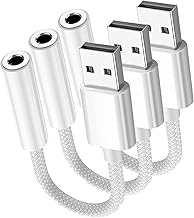
Best for: Buyers with a four-pole TRRS headset who need both headphone output and microphone input through USB. The product is described as an external sound card for Mac, PS4, PCs, laptops, and desktops.
The listing says the adapter supports listening and speaking through an integrated microphone-in and audio-out jack. It describes a smart sound chip for audio decoding and an enameled copper core intended to shield against electromagnetic interference. These features make it a headset-focused alternative to adapters that only provide headphone output.
Why it stands out: The product explicitly identifies the supported connector type, making it easier to compare against a headset’s plug. It is a better fit for buyers who already know they have a TRRS headset and need microphone functionality.
Limitation: The listing says it does not support TS or TRS plugs. Avoid this option if your headset or audio device uses one of those connector types rather than the specified four-pole TRRS connection.
Eanetf USB Flash Drive To Aux Adapter

Best for: Drivers who want to play MP3 files from a USB flash drive through a car audio system or 3.5mm speaker that can decode music from USB. This product is not the same type of adapter as a USB sound card for connecting a computer to ordinary headphones.
The listing describes a two-piece set and plug-and-play operation, but its compatibility depends on the connected AUX equipment. It specifically says the car’s 3.5mm AUX port must have an MP3 decoding function capable of reading music from a USB drive. Without that feature, the adapter will not work as intended.
Why it stands out: It addresses a specialized use: sending USB-drive music to an audio system with the required decoding capability. Choose it only after confirming that capability in the vehicle or speaker documentation.
Limitation: It is not a general-purpose USB-to-headphone adapter. The product listing warns that it only supports a USB flash drive with MP3 decoding and requires a compatible AUX port.
Oxsubor Car AUX To USB Adapter

Best for: Owners of a car stereo with a 3.5mm AUX-in port and built-in MP3 decoding who want to play MP3 files from a USB flash drive. Its listed connector direction is 3.5mm male to USB 2.0 female, so it is not a standard USB-to-headphone sound adapter.
Oxsubor states that the adapter is intended only for compatible car AUX-in systems. The product information specifies USB 2.0 flash drives, capacity under 8GB, and MP3 files. It says the drive should not contain videos, folders, or other file types for this stated use.
Why it stands out: Its listing gives specific requirements for the car input, USB drive, and audio format. That can help buyers check whether their setup matches before ordering.
Limitation: The product description explicitly excludes headsets, speakers, phones, computers, cameras, microphones, monitors, and game consoles. Avoid it if your goal is to connect a computer’s USB port to ordinary 3.5mm headphones.
Buying Guide: How To Choose A USB To Mini Jack Adapter
Do you need USB audio output or USB-drive playback?
Start by identifying what you are connecting. A USB-A-to-3.5mm external sound card takes a USB connection from a computer or supported device and provides a headphone-style audio jack. The MOSWAG, grey sound card, and Fidioto products fit this category.
The Eanetf and Oxsubor adapters serve a different purpose: they are described for playing music stored on a USB flash drive through a compatible car AUX system. They depend on decoding functions in the car or speaker. They are not substitutes for a USB sound card, and they should not be selected simply because their names contain “USB” and “3.5mm.”
Do you need microphone support?
If you plan to make calls, join meetings, or use voice chat, check that the adapter supports microphone input as well as audio output. The MOSWAG listing specifies mic support and TRRS, the grey adapter specifies a four-pole TRRS port with microphone-in, and Fidioto describes listening and speaking through a TRRS jack.
Connector type matters. Fidioto explicitly says it does not support TS or TRS plugs. If your headset has a separate microphone and headphone plug, or its connector type is unknown, verify the plug design and product requirements before choosing an adapter.
Will it connect to your device’s USB port?
Check whether the device has the connector the adapter uses. The grey product specifically describes a USB-A connection. The product information supplied for these choices does not identify a USB-C version, so do not assume that a USB-A adapter will plug directly into a USB-C port. If an additional converter is required, confirm that the full setup is suitable for your device.
Also check the intended device category. The computer-oriented adapters are listed for several computer operating systems and, in some cases, PS4. A list of supported categories does not guarantee compatibility with every model or software version.
Is your car AUX port able to decode files from a USB drive?
For Eanetf or Oxsubor, the key question is whether the car’s 3.5mm AUX input can decode MP3 files from a USB flash drive. A standard AUX input usually receives an audio signal; the product listings here require a special decoding capability. Check the car’s documentation or confirm the feature with the manufacturer before purchase.
Compare the file and drive requirements, too. Oxsubor specifies USB 2.0, a capacity under 8GB, and MP3 files only. Eanetf says it supports a USB flash drive with MP3 decoding but also emphasizes that the AUX port must be able to read the files. These are specialized requirements, not general USB audio specifications.
Which features should matter most?
- For headset use: Prioritize the correct USB connector, a compatible 3.5mm plug, and microphone support if you need voice input.
- For plug-and-play setup: MOSWAG and the grey adapter are described as requiring no driver; the grey adapter also states that it needs no external power.
- For car playback: Confirm MP3 decoding at the AUX input and check the exact USB-drive requirements.
- For noise-related features: The grey adapter cites a DAC and noise reduction; Fidioto describes shielding and a smart sound chip. Treat these as stated product features, not a guarantee of performance in every setup.
- For portability: The grey adapter is described as compact, while MOSWAG lists a 7.84-inch braided cable.
Frequently Asked Questions
Is a USB-to-3.5mm adapter the same as a USB-to-AUX adapter?
Not always. A USB sound card can add a 3.5mm headset connection to a USB-equipped device. Some USB-to-AUX products are instead intended to play files from a USB flash drive through a car system with MP3 decoding. Check the connector direction and intended use.
Can I use the Eanetf adapter with any car AUX port?
No. Its listing says the car’s 3.5mm AUX port must have an MP3 decoding function that can read music from a USB flash drive.
Which listed adapters support a headset microphone?
MOSWAG, the grey USB sound card, and Fidioto are described as supporting microphone input. Fidioto specifies a four-pole TRRS connection and says it does not support TS or TRS plugs.
Can I use the Oxsubor adapter with headphones or a computer?
No. Its listing says it is for compatible car AUX-in systems and explicitly excludes headphones, speakers, computers, phones, and other listed devices.
What should I check before buying a USB audio adapter?
Confirm the USB port type, the 3.5mm plug type, whether microphone support is needed, and the adapter’s intended direction. For car USB-drive adapters, verify the AUX input’s MP3 decoding capability and the stated file and drive requirements.