
The best HDMI-to-optical audio converter depends on which device sends the audio. For a TV with ARC or eARC, choose an ARC-to-optical converter; for an HDMI source such as a media player, choose an HDMI audio extractor. The YEUGICEO adapter is a strong fit for TVs and powered speakers, while the VPFET extractor is intended for HDMI source devices, not TV audio return. Check the direction, audio format, and connection ports before choosing.
| Product | Best for | Key detail |
|---|---|---|
| 192KHz eARC/ARC to Optical Converter | TV-to-soundbar connections | CEC volume control; PCM 2.0, Dolby 5.1, DTS 5.1 listed |
| YEUGICEO eARC to Optical Converter | TVs and powered speakers | ARC/eARC input; 24-bit/192kHz sampling listed |
| VPFET HDMI Audio Extractor | HDMI source devices | Optical and 3.5mm outputs; not for ARC/eARC |
| TUOLNK HDMI/Optical Adapter | Buyers considering an ARC connection | Product title describes multiple directions; verify before buying |
| 192KHz eARC/ARC Converter, 3.4ft | TV-to-home-theater audio | PCM, Dolby, and DTS 5.1 listed |
192KHz eARC/ARC To Optical Converter

This converter is best for a TV with an HDMI ARC or eARC port that needs to send audio to an optical-equipped soundbar or other audio system. Its listed features include a 5-foot length, optical and coaxial audio outputs, CEC volume control, and support for PCM 2.0, Dolby 5.1, and DTS 5.1.
Choose this model if you want a TV-to-audio-system connection and need the listed CEC volume-control feature. The stated format support is useful when checking whether the converter’s audio capabilities match the TV and sound system. Confirm that the TV uses its ARC/eARC port as the audio output; this is not the same setup as extracting audio from a separate HDMI source.
Limitation: The supplied product information does not specify which audio formats are available through each output. Check the product details and your equipment’s settings before purchase, especially if you plan to use coaxial rather than optical audio.
YEUGICEO eARC To Optical Converter

The YEUGICEO converter is best for connecting a TV’s ARC or eARC port to an optical input on a soundbar, amplifier, or powered speaker. The listed features describe conversion of the TV’s ARC audio channel to digital optical output and support for a 24-bit/192kHz sampling rate.
Choose this product if your TV has ARC or eARC but your audio device relies on optical input. The product information names Samsung, LG, and Sony among compatible TV brands, while also describing compatibility with most ARC/eARC TVs. It is selected for its clearly stated TV-to-audio direction and its specific optical output purpose.
Limitation: The product information does not list detailed channel-format support, such as whether a particular Dolby or DTS format will pass through. Confirm the TV’s audio-output settings and the soundbar or speaker’s supported formats before relying on surround sound.
VPFET HDMI Audio Extractor
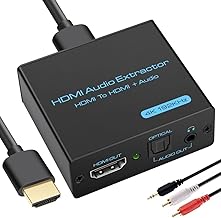
The VPFET is best for extracting audio from an HDMI source device and sending it to an audio system through optical or 3.5mm output. It offers 2.0-channel, 5.1-channel, and pass modes. The listed specifications include HDMI 1.4, HDCP 1.4, and video support up to 4K at 30Hz under specified conditions.
Choose this model when a device such as a media player or game console sends HDMI to a display, and you need a separate audio output. The product specifies optical output for DTS 5.1 and 3.5mm output for PCM 2.0. Its mode choices may help match the output to the connected audio equipment.
Limitation: This extractor does not support ARC or eARC, and its listing says a TV is not supported as the input source. It also does not support 7.1-channel audio. The product notes that some listed devices are limited to 1080p with this extractor, so check the source-device and resolution requirements carefully.
TUOLNK HDMI And Optical Audio Adapter

The TUOLNK listing describes a 6.6-foot adapter and references optical-to-HDMI ARC conversion, a soundbar-to-TV connection, PCM 2.0 support, and no audio lag. Its title also uses the phrase “HDMI to Optical Audio Adapter,” which makes the stated signal direction difficult to determine from the supplied product information alone.
Consider this product only if the complete listing and port labels confirm that its input and output match your setup. It may be relevant to buyers connecting a soundbar and TV through an ARC-related arrangement, but the direction must be verified before purchase. A converter that sends optical audio to HDMI ARC is not automatically interchangeable with a TV ARC-to-optical converter.
Limitation: The supplied details do not clearly establish the exact conversion direction or provide a full format list beyond PCM 2.0. Avoid choosing it based on the product title alone; check the manufacturer’s connection diagram and your device ports.
192KHz eARC/ARC Converter With 3.4-Foot Cable

This converter is best for a TV-to-sound-system setup where the TV provides audio through ARC or eARC and the receiving system needs a compatible audio connection. The product title identifies a 3.4-foot cable, plug-and-play operation, and support for PCM, Dolby, and DTS 5.1.
Choose this model if the stated cable length suits the distance between your TV and audio equipment, and if its ARC/eARC-to-optical function matches your connection plan. The listed format support makes it relevant to buyers comparing stereo PCM with common 5.1-channel formats. It is selected as a dedicated TV-to-home-theater option rather than a general HDMI source extractor.
Limitation: The supplied information does not specify additional ports, volume-control features, or detailed format conditions. Verify the exact input and output connectors and confirm that the TV and receiver or soundbar use a supported audio format.
Buying Guide: How To Choose An HDMI-To-Optical Converter
Does the audio come from the TV or an HDMI device?
This is the most important distinction. A TV-to-soundbar converter generally uses the TV’s HDMI ARC or eARC port as the audio source and sends sound to an optical input. An HDMI audio extractor instead takes an HDMI signal from a separate source device and separates its audio. These devices are not interchangeable just because both mention HDMI and optical audio.
For TV audio, look for explicit ARC or eARC support and a clear diagram showing the TV’s ARC/eARC port connected to the converter. For a streaming box, console, or other HDMI source, look for an extractor that identifies HDMI input and optical output. Do not assume a regular HDMI input can receive audio from a TV’s ARC port.
Which ports do your TV and audio system have?
Check both ends of the connection before ordering. The TV needs the appropriate HDMI ARC/eARC port for an ARC converter. The soundbar, receiver, or powered speaker needs an optical input if you plan to use Toslink. Some products also list coaxial or 3.5mm outputs, but those are different connectors and should not be confused with optical.
Also check whether the TV has an optical output already. If it does, a separate converter may not be necessary for a basic TV-to-soundbar connection. If the TV lacks optical but supports ARC or eARC, an ARC-to-optical converter may address the port mismatch.
What audio formats and channel count do you need?
Match the converter’s stated format support to the source and destination equipment. PCM 2.0 refers to stereo output, while Dolby 5.1 and DTS 5.1 indicate listed support for those surround formats. A product’s sampling-rate figure alone does not establish which surround formats it can pass, so check format details separately.
Set the TV or source device to an audio format the converter and sound system both support. If audio is missing or the channel selection is wrong, consult the product instructions and test an available PCM setting. For an extractor with multiple modes, use the mode specified for the output type, as the VPFET listing distinguishes its stereo, 5.1, and pass modes.
How much cable length is appropriate?
Measure the route between the TV and the audio equipment, allowing enough slack for the actual placement. The products listed here specify different lengths: 3.4 feet, 5 feet, or 6.6 feet. A shorter cable may suit equipment placed close together, while a longer one can offer more routing flexibility. Choose based on your layout rather than assuming a longer cable means broader compatibility.
What should you verify before buying?
- Identify the audio source: TV ARC/eARC or a separate HDMI device.
- Confirm the converter’s signal direction and the labels for its input and output ports.
- Check that the receiving soundbar, receiver, or speaker has the required optical input.
- Compare supported formats and channel counts with both connected devices.
- Review video requirements if using an HDMI extractor, including resolution and HDCP details.
- Check cable length and any stated controls, such as CEC volume support, against your needs.
When the listing does not clearly describe conversion direction or format support, verify those details before ordering. A product name that includes both “HDMI” and “optical” is not enough to establish that it will work in a particular signal path.
Frequently Asked Questions
Can I connect a TV’s HDMI ARC port to an optical soundbar?
Yes, if the converter specifically accepts TV ARC or eARC audio and provides optical output. Confirm that the soundbar has an optical input and that the converter supports the audio format selected on the TV.
Is an HDMI audio extractor the same as an ARC-to-optical converter?
No. An HDMI audio extractor typically takes audio from a separate HDMI source device. An ARC-to-optical converter takes audio from a TV’s ARC/eARC connection. Check the supported signal direction before buying.
Does a 192kHz rating guarantee Dolby or DTS 5.1?
No. A sampling-rate figure does not by itself confirm surround-format support. Look for explicit PCM, Dolby, or DTS format details in the product listing and compare them with your devices.
Will an optical connection carry 7.1-channel audio?
Do not assume that it will. The VPFET product information explicitly says it does not support 7.1 channels. Check the specific converter’s supported formats and channel count before purchase.
Why is there no sound after connecting the converter?
First confirm that the converter’s input and output match the intended direction and that the TV is connected to its ARC/eARC port when required. Then check the selected TV audio output, the converter’s mode, the optical connection, and whether the chosen format is supported by both ends.
Do I need an ARC converter if my TV already has optical output?
Not necessarily. If the TV’s optical output connects directly to the sound system’s optical input, a converter may not be needed. Consider an ARC-to-optical converter when the TV-to-audio connection requires ARC conversion or the TV lacks a usable optical output.