
A DC-to-AC car inverter lets you power a laptop from a vehicle’s 12-volt outlet when you do not have access to a wall outlet. The BESTEK 300W model is a straightforward choice for a laptop and USB devices, while the Pro Chaser 400W models offer more stated AC capacity and different USB charging options. The PiSFAU 200W inverter suits buyers prioritizing a compact design. Check your laptop’s power requirements and your vehicle’s outlet limits before choosing.
| Product | Best For | Listed Output |
|---|---|---|
| BESTEK 300W | Basic laptop and USB charging | 300W; dual USB |
| Pro Chaser 400W, dual USB-A | Two AC devices and USB charging | 400W; dual AC, dual USB |
| Pro Chaser 400W, USB-C PD | USB-C charging alongside AC | 400W; PD 65W USB-C |
| PiSFAU 200W | Compact travel setup | 200W; two AC outlets, four USB ports |
| vansoet 400W | Multiple devices and controlled AC outlets | 400W; two AC outlets, four USB ports |
BESTEK 300W Car Power Inverter

The BESTEK is a 12–17V DC-to-110V AC inverter rated at 300W in its product name. It has a vehicle cigarette-lighter plug, one AC outlet, and two USB charging ports with a stated combined 4.8A output. The product description also identifies an aluminum housing.
Best for: A driver who wants a conventional AC outlet for a laptop’s power adapter and separate USB ports for smaller devices. Its listed 300W capacity makes it a middle-ground option among these five products, below the 400W models and above the 200W PiSFAU.
Choose this if your laptop’s adapter and any other connected equipment stay within the inverter and vehicle outlet’s limits. Limitation: The supplied product details do not specify USB-C charging or multiple AC outlets, so it is less suited to a setup that needs those features.
Pro Chaser 400W With Dual AC Outlets

This Pro Chaser model is described as a DC 12V-to-110V AC vehicle inverter with a stated 400W output. Its listed connections include two AC outlets and two USB charging ports with a stated 6.2A output. The product name calls out use with laptops and an air compressor.
Best for: Laptop users who want two AC outlets for connecting more than one AC device, subject to the inverter’s total capacity and the vehicle outlet’s limits. It offers more listed wattage than the BESTEK 300W and PiSFAU 200W models.
Better for buyers who prefer a pair of USB-A ports and do not require a listed USB-C PD port. Limitation: The product details provided do not state USB-C output or describe the AC waveform. Check the laptop adapter’s input requirements and the manufacturer’s complete specifications before purchase.
Pro Chaser 400W With 65W USB-C PD

This Pro Chaser inverter is identified as a 12V DC-to-110V AC vehicle converter with a 400W rating. Its product name lists two AC outlets, a USB-A port, and a USB-C PD port rated at 65W. The listing also names laptops and air compressors among intended device types.
Best for: Buyers whose laptop supports charging through USB-C and whose required USB-C input is compatible with the listed 65W PD output. It also has AC outlets for devices that use a standard wall-style power adapter.
Choose this if you want both AC power and a specified USB-C PD port in the same inverter. USB-C charging can provide an alternative to using a laptop’s AC adapter, when the laptop supports it. Limitation: A 65W USB-C rating does not establish that it will meet every laptop’s charging needs. Compare the laptop maker’s required charger output with the port specification.
PiSFAU 200W Compact Car Inverter
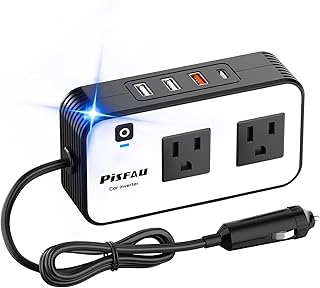
The PiSFAU converts 12V DC to 110V AC and lists a 200W capacity. Its stated connections are two standard US AC outlets and four USB charging ports, including USB-A and USB-C. The product description says the unit measures 2.7 by 1.4 by 5 inches and weighs 8.5 ounces. It also describes a high-efficiency circuit design, heat-dissipation design, and compact form.
Best for: Travelers who want a small inverter for a laptop with modest power needs and several USB devices. Its compact dimensions and four USB ports distinguish it from the other listed options.
Choose this if portability and a mix of AC and USB connections matter more than a higher stated wattage. Limitation: At 200W, its listed capacity is lower than the 300W and 400W alternatives. Confirm that the laptop adapter’s wattage, plus any other connected load, stays within the inverter’s rating.
vansoet 400W Inverter With Multiple USB Ports

The vansoet is described as a 12V DC-to-110V AC inverter rated at 400W. It has two US AC outlets, a 30W USB-C PD port, a 15W USB-C port, and two 15W USB-A ports. The listing also specifies a dedicated switch for the AC outlets and an intelligent temperature-controlled cooling fan.
Best for: A passenger or road-trip setup that needs several USB connections alongside AC outlets. The dedicated AC switch allows the AC outlets to be switched off without unplugging the vehicle adapter, according to the product description.
Better for buyers who value multiple charging ports and a stated 30W PD USB-C connection. Limitation: The 30W USB-C output may not meet the charging requirements of every laptop. The product’s 400W rating should also be checked against the vehicle outlet’s own limits, not treated as a guarantee that the outlet can supply that much power.
Buying Guide: How to Choose a Car Inverter for a Laptop
Should you use an AC outlet or USB-C to charge the laptop?
An AC outlet is the more direct choice when you have a laptop’s standard power adapter and the adapter’s input is compatible with the inverter’s output. Plug the adapter into the inverter and check the laptop adapter label for its wattage or input requirements. Include any other devices drawing power when considering the inverter’s stated capacity.
USB-C can reduce the need for a separate AC adapter if the laptop supports USB-C charging. Check the laptop documentation for its required USB-C Power Delivery input, then compare it with the inverter’s listed port output. Among these options, one Pro Chaser model lists 65W USB-C PD, and the vansoet lists 30W USB-C PD. Those figures are not interchangeable with the inverter’s total AC wattage.
How much inverter wattage does a laptop need?
Start with the power rating printed on the laptop’s charger or specified by the manufacturer. The inverter’s available capacity must accommodate the laptop adapter and any additional equipment connected at the same time. The product names list ratings of 200W, 300W, or 400W, but those numbers alone do not establish compatibility with a particular laptop or vehicle.
Also verify whether the rating applies to the exact connection method you plan to use. A model’s overall inverter rating and the output rating of an individual USB port describe different limits. When using more than one outlet or port, follow the product’s instructions for combined output.
Will a car’s 12-volt outlet support the inverter?
Check the vehicle owner’s manual and inverter instructions before connecting a high-output device. The inverter rating does not prove that a particular car outlet can supply the full rated load. Vehicle outlets and circuits have limits, and those limits vary. If the manual does not clearly establish suitability, consult the vehicle or inverter manufacturer rather than assuming a 400W model can draw 400W through any cigarette-lighter socket.
Use the inverter in the manner described by its manufacturer. Keep ventilation and placement requirements in mind, and do not cover the device while it is operating. If the vehicle or inverter instructions warn against a particular use, follow that guidance.
How many outlets and USB ports do you need?
For one laptop using its AC adapter, a single AC outlet may be sufficient. Two AC outlets can help if you also plan to connect another AC device, but you still need to stay within the total output and vehicle limits. More ports are useful only when the power requirements of all connected devices are compatible.
USB-A ports suit devices that charge through USB-A cables. USB-C ports are useful for compatible devices, but port presence alone does not confirm fast charging or laptop support. Compare the stated output—such as the listed 65W PD, 30W PD, or 15W port—with the connected device’s requirements.
What should you compare before buying?
- Input voltage: Confirm the inverter’s stated DC input matches the vehicle connection. The products here are described as 12V models, while the BESTEK name lists a 12–17V input range.
- AC output and capacity: Compare the inverter’s stated output with the laptop adapter and other intended loads.
- USB charging: Check port type and individual power ratings, especially if you plan to charge a laptop through USB-C.
- Portability: Look at dimensions and weight when the inverter will be carried between vehicles or stored in a travel bag. The PiSFAU listing provides size and weight details.
- Controls and cooling: Consider listed features such as the vansoet’s AC switch and temperature-controlled fan if those details matter for your setup.
- Complete specifications: Review the manufacturer’s instructions for output limits, operation, and any restrictions not included in a short product description.
Frequently Asked Questions
Can I charge a laptop with a DC-to-AC car inverter?
Yes, when the laptop’s AC adapter is compatible with the inverter’s AC output and the inverter and vehicle outlet can support the load. Check the adapter label, product instructions, and vehicle manual before use.
Is a 200W inverter enough for a laptop?
It may be enough for a laptop whose adapter and other connected devices remain within the inverter’s available capacity. Compare the laptop charger’s stated wattage with the inverter rating; do not assume all laptops draw the same power.
Can I charge a laptop through an inverter’s USB-C port?
Only if the laptop supports USB-C charging and the port supplies the power the laptop requires. Compare the laptop’s USB-C charging specifications with the inverter’s stated USB-C PD output.
Is a 400W inverter always better than a 300W model?
No. A higher stated rating offers more listed capacity, but it does not automatically make the inverter compatible with a laptop or suitable for a particular vehicle outlet. Port selection, USB-C output, size, and vehicle limits also matter.
Can I run a laptop and charge a phone at the same time?
That depends on the inverter’s combined output limits, the laptop’s power draw, and the phone port’s specifications. Check the product instructions and make sure the total connected load stays within the inverter and vehicle limits.