
The best car DVD player for moving road trips depends on whether you need one screen, two screens, or a portable battery-powered option. The MEGATEK is best for a single viewer who wants a swivel screen and up to six hours of playback. The FANGOR dual-screen models are better for backseat viewing, with one offering a rechargeable battery and the other supporting separate movies but requiring car power. The other two products are not full car video DVD players, so check their limitations before choosing.
| Product | Best suited for | Key consideration |
|---|---|---|
| MEGATEK Portable DVD Player | One viewer; car and travel use | Single 10.5-inch screen; up to six hours of battery life |
| FANGOR 7.5-Inch Dual Player With Battery | Two viewers watching the same movie | About 2.5 hours when both screens are connected |
| FANGOR Dual Player Without Battery | Two children who want separate movies | Car use only; requires vehicle power |
| DESOBRY Mini DVD Player | Compact home DVD playback | Not designed as a car screen player |
| Jupiter USB CD Player | Playing audio CDs through a compatible car stereo | Plays CDs as audio, not DVD movies |
MEGATEK Portable DVD Player With 10.5-Inch Screen
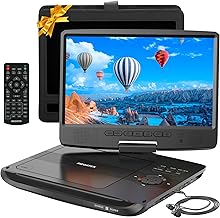
Best for: One passenger who wants a self-contained screen for movies in the car or while traveling. The 10.5-inch display has a stated resolution of 1024 × 600, and the screen swivels 270 degrees and flips 180 degrees for different viewing positions.
The built-in rechargeable battery provides up to six hours of playback, according to the product information. That makes this a more flexible choice than a player that depends entirely on the car charger. It supports DVD and CD formats, including DVD±R/RW, VCD, Audio CD, MP3 CD, and JPEG discs. The listing also identifies it as region-free.
Why it was selected: It combines a built-in screen, battery playback, and car-and-travel use in one portable unit. Choose it if one viewer needs an adjustable screen and a break from continuous car power.
Limitation: It has one screen, so it is less suitable than a dual-screen setup when multiple backseat passengers need their own display. It does not support Blu-ray discs.
FANGOR 7.5-Inch Dual Player With Rechargeable Battery

Best for: Two passengers who want to watch the same movie on separate screens. This set includes one main player and one secondary screen, with connections that let the screens play the same content. The product description says the main player uses chip technology intended to reduce skipping during bumpy rides.
The main player has a built-in rechargeable battery rated for about five hours on a full charge. When the second screen is connected, the stated playback time is about 2.5 hours. An AC adapter and car charger are included. The system also has AV input and output; the AV output can connect playback to a larger TV or projector, according to the listing.
Why it was selected: The two-screen arrangement is useful when passengers sit apart or need a screen at each headrest. It is a better fit than a single-screen portable player when both viewers want to follow the same film.
Limitation: Battery time is shorter when both displays are in use. The supplied information describes synchronized viewing, not separate movies on each screen.
FANGOR Dual Screens For Separate Or Shared Movies

Best for: Families whose passengers may want different movies. The product is described as two 7.5-inch car DVD players that can play different movies independently or sync to show the same movie using an AV cable connection.
Both screens have stereo speakers and individual volume adjustment. Each screen also has a headphone jack for wired earphones. The system supports all-region DVD formats listed by the manufacturer, as well as USB 2.0 and SD/MMC cards up to 32GB using FAT32. The listing specifies support for several video and audio formats, including AVI, VOB, MP3, and WMA.
Why it was selected: Separate playback makes this more flexible than a paired-screen system limited to one shared film. Choose it if passengers have different viewing preferences and you can power the units in the car.
Limitation: This model has no built-in battery and is identified as being for car use only. It does not support Blu-ray discs, MP4 files, or Bluetooth, and the listed maximum resolution is 720 × 576.
DESOBRY Mini DVD Player For Compact Home Use

Best for: A buyer seeking a small DVD player for a TV, rather than a complete car entertainment system. The listing describes a compact unit measuring 6.1 × 5.9 × 1.2 inches and weighing 1.1 pounds. It includes a full-function remote and features breakpoint memory, which resumes playback where it stopped.
The product information also lists a drive designed for quick reading, noise cancellation, error correction for scratched discs, and anti-shock protection. Its title mentions HDMI, region-free playback, and 1080p upscaling. These features may suit a compact home setup, but they do not make it a portable car screen player.
Why it was selected: It may suit someone searching broadly for a compact DVD player who actually needs a small unit for a television. Its low listed weight and small dimensions make it easier to carry than a conventional-size player.
Limitation: The listing says it is not a Blu-ray player and cannot connect to a computer as an external disc drive. The supplied information does not describe a built-in screen or a car-specific setup, so choose a dedicated portable car model for backseat video.
Jupiter USB CD Player For Car Stereo Audio

Best for: Drivers who want to play audio CDs through a compatible car stereo that lacks a built-in CD player. This device connects to a car stereo’s USB port, and the manufacturer says the stereo must support WAV music files. The included USB extension cable provides options for placing the unit in the car.
The described setup is to connect the player, insert a CD, find the USB drive on the stereo, and select a track. The package includes a USB-A to USB-C adapter, and the listing says the player can connect to either type of port. It is described as compatible with Android and non-Android car stereos when they meet the stated file-playback requirement.
Why it was selected: It addresses a related car-disc need for people who want CD audio, not movie playback. Choose it only when the goal is listening to music through the vehicle’s stereo.
Limitation: This is not a car DVD player for video. A USB port alone may not be enough; the stereo also needs to support WAV playback as specified by the listing.
Buying Guide: How To Choose A Car DVD Player
Do you need one screen or two?
A single-screen portable DVD player is generally the simpler choice when one passenger needs a personal display. Look for a built-in screen and, if you expect to watch away from the vehicle, a stated battery runtime. The MEGATEK option offers one 10.5-inch screen and up to six hours of battery playback according to its product information.
Dual-screen models are designed to give two passengers a display. Check whether the screens can show different movies or only the same content. The FANGOR model with two players states that each can play a different movie, while the battery-equipped FANGOR set is described as syncing the same movie across its screens.
How important is battery life?
Battery runtime matters during stops, travel outside the car, or when you do not want to depend on a vehicle power connection. Compare the stated runtime for the exact setup you plan to use. In the rechargeable FANGOR set, the listed runtime changes from about five hours for the main player to about 2.5 hours with the second screen connected.
Do not assume that every portable-looking DVD player has a battery. The other FANGOR dual-screen model explicitly has no built-in battery and is described as for car use only. Check whether a car charger, AC adapter, or other power source is included and appropriate for your planned use.
Will it work with your discs and media?
Check the supported disc types before buying. The listed products support different combinations of DVD, CD, recordable discs, and digital media. Region-free support is identified for several options, but it does not mean that every disc format will work. None of the described DVD players supports Blu-ray.
If you plan to use a USB drive or memory card, confirm the specific file types and capacity limits. For example, the FANGOR dual-player listing identifies USB 2.0 and SD/MMC cards up to 32GB in FAT32 and excludes MP4 files. These details matter when building a movie library from files instead of discs.
What screen size and adjustment do you need?
A larger screen may be easier for one passenger to view, while a dual-screen set can make viewing more convenient for two backseat passengers. Screen adjustment also affects placement: the MEGATEK screen swivels and flips, while the FANGOR dual-player products are described with headrest-oriented use. Consider seating position and available space before choosing.
Are you shopping for video or audio?
Confirm that the product is a video DVD player if you want movies. The Jupiter USB CD player is for audio CDs through a compatible car stereo; it does not provide a movie screen. The DESOBRY unit is a compact DVD player for TV use according to its description, not a complete car video setup. For backseat movies, prioritize a model that specifically includes a screen and car-use features.
How should you compare sound options?
Built-in speakers can make setup simpler, while headphone jacks can help passengers listen without using the vehicle’s speakers. The FANGOR models list stereo speakers, and the dual-player model without a battery also lists a headphone jack on each player. Check the exact product features if private listening is important; do not assume every model has the same audio connections.
Frequently Asked Questions
Can I use a portable DVD player while the car is moving?
The product listings describe car and travel use, but passengers should use screens safely and follow the vehicle manufacturer’s guidance and local laws. The driver should not watch or operate a video screen while driving.
Which listed player has the longest stated battery life?
The MEGATEK portable player lists up to six hours of playback. The battery-equipped FANGOR lists about five hours for the main player and about 2.5 hours when the second screen is connected.
Can the dual-screen FANGOR players show different movies?
The FANGOR model at B0C2Z78TJ1 is described as able to play different movies on its two players or sync the same movie. The other battery-equipped FANGOR listing describes playing the same movie on both screens.
Do any of these DVD players support Blu-ray?
No. The supplied product information says the DESOBRY and MEGATEK players do not support Blu-ray, and the other FANGOR listing also specifies no Blu-ray support.
Is the Jupiter USB CD player suitable for movie DVDs?
No. It is described as a USB CD player for playing audio through a compatible car stereo. It is not a video DVD player and does not include a movie screen.
What should I check before connecting a USB CD player to a car stereo?
Check that the stereo has a USB port and supports WAV music files, as the Jupiter product information requires. Having a USB port by itself does not confirm compatibility.