
If you need a car stereo with a rear-mounted USB port, none of the five products below is confirmed by the supplied product details to have one. The Pioneer MVH-S110BT is specifically described as having a front USB input; the other listings mention USB without specifying its location. The options below are useful alternatives to compare, but verify the port position in the product’s current specifications or installation manual before buying. The AINAVIGO is best for wireless phone integration, while the Pioneer models suit simpler Bluetooth setups.
| Product | Best for | USB location in supplied details |
|---|---|---|
| Pioneer MVH-S110BT | Bluetooth and compressed or lossless USB music | Front |
| Leadfan 7-inch Double Din | Touchscreen features and phone mirroring | Not specified |
| BOSS Audio Systems 616UAB | Basic Bluetooth calling and music | Not specified |
| AINAVIGO 6.36-inch Single DIN | Wireless CarPlay and Android Auto | Not specified |
| Pioneer MVH-S230BT | Bluetooth, radio, and USB playback | Not specified |
Pioneer MVH-S110BT Bluetooth Receiver
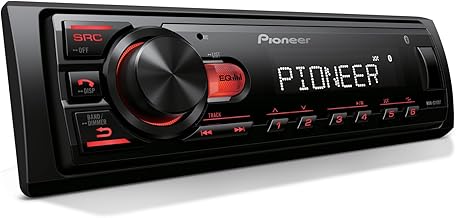
The Pioneer MVH-S110BT is a single-DIN digital media receiver with Bluetooth for hands-free calling and wireless music streaming from iPhone and Android devices. Its listed USB input supports FLAC, MP3, and WMA playback. The product details specifically call this a front USB input, so it does not satisfy a requirement for a rear USB port based on the information provided.
Best for: Drivers who want Bluetooth plus music playback from a USB device and do not require the USB connection to be behind the receiver. Its built-in MOSFET amplifier is listed as delivering up to 50 watts per channel to four speakers.
Why it was selected: It combines common digital-audio features with a clearly stated USB location, making it a useful reference point when comparing front-access and rear-access designs.
Limitation: The USB port is specified as front-facing. Choose another model if a concealed rear connection is essential.
Leadfan 7-Inch Double-DIN Touchscreen Stereo

The Leadfan is a double-DIN receiver with a 7-inch, 1024-by-600 touchscreen. Its listed features include Bluetooth 5.0, FM radio, USB, auxiliary input, and phone mirror link. The supplied details do not say whether the USB port is on the front or connected by a rear cable, so confirm this before purchasing if port placement is the deciding factor.
Best for: Drivers seeking a larger touchscreen and wired phone mirroring. The listing says the unit can display phone content such as music, video, and GPS navigation when connected by a smartphone data cable. It also says navigation depends on the connected phone; the stereo itself is not a GPS unit.
Why it was selected: Its touchscreen and phone-link features offer a different setup from basic single-DIN receivers, and USB is among its listed connections.
Limitation: The listed dimensions are 7.01 by 3.94 by 2.56 inches. Check the vehicle’s radio opening and confirm USB placement before ordering.
BOSS Audio Systems 616UAB Bluetooth Stereo

The BOSS Audio Systems 616UAB is a single-DIN Bluetooth receiver without a DVD player. Its listed features include hands-free calling through a built-in microphone, wireless music and app playback, and push-to-talk access to a smartphone assistant. The product name includes USB, but the supplied feature description does not identify the USB port’s position or explain its connection layout.
Best for: Drivers who prioritize Bluetooth calls, wireless audio, and straightforward access to a phone assistant. The listing also describes a switchable tuner for receiving radio broadcasts in the United States and Europe.
Why it was selected: It is a compact, non-touchscreen alternative for buyers comparing basic Bluetooth receivers that also advertise USB.
Limitation: Rear USB is not confirmed in the supplied information. Do not assume the USB connection is rear-mounted based on the product name alone.
AINAVIGO 6.36-Inch Single-DIN Touchscreen

The AINAVIGO combines a single-DIN format with a 6.36-inch IPS touchscreen and a Linux system. Its listed functions include wireless CarPlay and Android Auto, Bluetooth, FM radio, USB, AV-in, RCA output, backup-camera input, and steering-wheel-control support. The product information does not state whether its USB port is rear-mounted, so verify the hardware layout before buying for a rear USB installation.
Best for: Drivers who want wireless CarPlay or Android Auto in a single-DIN receiver. The listing describes using a paired smartphone for navigation, calls, notifications, music, and voice control.
Why it was selected: It offers a touchscreen and wireless smartphone integration while listing USB among its connections. The product details also identify a CVBS backup-camera input.
Limitation: The supplied information does not confirm USB location. It also does not establish vehicle-specific fitment, so check the opening and installation requirements for your car.
Pioneer MVH-S230BT Bluetooth USB Receiver

The Pioneer MVH-S230BT is a single-DIN car stereo with Bluetooth, USB, and AM/FM radio. Its listed USB playback supports MP3, WMA, AAC, and WAV files, and the feature description says the port can connect portable devices or USB drives. The provided details do not specify whether the USB port is on the front or rear.
Best for: Drivers who want Bluetooth calling and a USB connection for music playback without the larger display of a touchscreen receiver.
Why it was selected: Its format support and combination of Bluetooth, USB, and radio make it a relevant basic receiver to compare with the other listed options.
Limitation: Rear USB is not verified by the supplied description. Confirm the location and whether the connection suits your planned cable routing.
Buying Guide: How to Choose a Car Stereo With Rear USB
A rear USB connection is useful when you want to route a cable into a glove box, center console, or another accessible area while keeping the stereo’s face uncluttered. But a listing that says “USB” does not necessarily mean the port is on the rear. Check a product diagram, installation manual, or manufacturer specification that identifies the port location before ordering.
How can you tell whether USB is rear-mounted?
Look for exact wording such as “rear USB port,” “rear USB input,” or “USB extension cable included,” and check product images for the receiver’s back panel. A front USB port is visible on the stereo face. If the listing does not identify the location, ask the seller or manufacturer rather than treating an unspecified USB connection as rear-mounted.
Which DIN size fits your vehicle?
Single-DIN and double-DIN describe receiver form factors, but the product label alone does not confirm fit in a specific car. Check the opening dimensions, dash design, wiring, and any installation parts required for your vehicle. The Leadfan listing gives its stated dimensions; the Pioneer and AINAVIGO product names identify single-DIN formats. Vehicle fitment should still be verified separately.
Do you need a touchscreen or smartphone integration?
Choose a touchscreen receiver if you want a larger display or the phone-link functions described in the product listing. Leadfan offers wired phone mirroring, while AINAVIGO lists wireless CarPlay and Android Auto. The Pioneer and BOSS options focus more on Bluetooth, radio, and audio playback. Compare the connection method you actually want rather than assuming every receiver offers the same navigation or app features.
What should you check for USB music playback?
Review supported file formats and how you plan to use the port. The MVH-S110BT lists FLAC, MP3, and WMA support; the MVH-S230BT lists MP3, WMA, AAC, and WAV. The provided details do not establish that every USB port supports charging, data, or all phone functions. Confirm the intended use in the full specifications.
Which other connections matter?
Consider Bluetooth calling, auxiliary input, camera input, RCA output, and steering-wheel-control support if you need them. These features vary across the listed receivers. For example, the Leadfan lists an auxiliary input, and the AINAVIGO lists RCA output and a backup-camera input. Verify each function and the required connections before purchase.
What if the listing does not confirm rear USB?
Treat the port location as unknown. A front USB connection may still work for a buyer who can access the stereo face, but it may not meet a clean-cable-routing requirement. If rear access is essential, choose only a receiver whose documentation clearly confirms a rear port or rear USB extension lead.
Frequently Asked Questions
Does the Pioneer MVH-S110BT have rear USB?
No. The supplied product details identify its USB input as front-mounted, so it is not a confirmed rear-USB model.
Which product in this list is confirmed to have rear USB?
None of the five products is confirmed to have rear USB by the supplied descriptions. Four mention USB without stating its location, and the MVH-S110BT is specified as front USB.
Can a front USB port be routed into a glove box?
That depends on the receiver’s design and installation arrangement. Check its manual for a rear extension cable or approved routing method; do not assume a front port can be relocated.
Does the Leadfan stereo provide built-in GPS navigation?
The listing says it is not a GPS unit. It can display navigation through a connected smartphone using the described phone-link function.
Which listed receiver has wireless CarPlay and Android Auto?
The AINAVIGO product description lists wireless CarPlay and Android Auto. It does not confirm that its USB port is rear-mounted.
What is the safest way to confirm USB placement before buying?
Check the manufacturer’s specifications or installation manual for a clear port diagram. If the documentation is unclear, ask the seller or manufacturer to confirm whether the USB connection is on the front panel or at the rear.