
The best headphones with a microphone and USB connection depend on the port your device has. Choose the Logitech H390 for a straightforward USB-A headset, the Lenovo 115 for USB-A and USB-C flexibility, or the JIAMQISHI headset if you want both USB and 3.5mm connection options. If you already own a wired headset, the MOSWAG or SABRENT adapter can add USB audio connections, but their jack requirements differ.
| Product | Best For | Connection |
|---|---|---|
| Logitech H390 | Calls and everyday computer use | USB-A headset |
| Lenovo 115 | Switching between USB-A and USB-C | USB-A and USB-C |
| JIAMQISHI USB Headset | Comfort and adjustable mic positioning | USB and 3.5mm |
| MOSWAG USB Adapter | One-plug TRRS headsets | USB to 3.5mm TRRS |
| SABRENT USB Adapter | Separate headphone and mic plugs | USB-A with two 3.5mm jacks |
Logitech H390: Best Simple USB-A Headset

The Logitech H390 is a practical choice for people who want a headset with a microphone that connects directly to a USB-A port. It is designed for PC and laptop use and avoids the need to connect a separate headset adapter when the computer has a compatible USB-A port.
Its listed features include fine-tuned drivers for digital stereo sound, a rotating noise-canceling microphone, and in-line controls for volume and muting. The boom arm can be rotated out of the way when it is not needed. These controls make it suitable for calls, meetings, and general audio use.
- Best for: Buyers seeking a simple wired USB-A headset for calls and everyday listening.
- Why it was selected: It combines headphones, microphone, and USB-A connection in one product.
- Limitation: It uses USB-A, so buyers with only USB-C ports may need a compatible port adapter.
Lenovo 115: Best for USB-A and USB-C
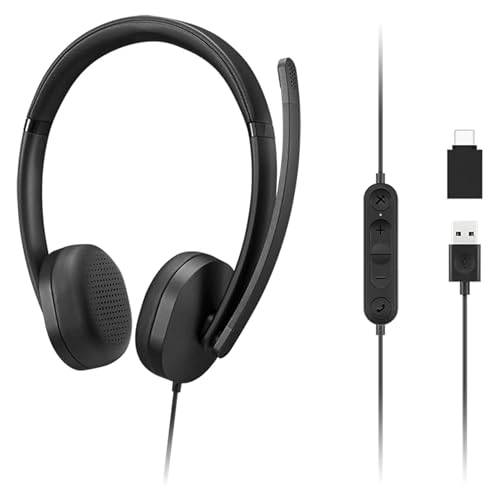
The Lenovo 115 is the better fit for buyers who move between computers with USB-A and USB-C ports. The listed USB-A-to-USB-C adapter provides connection flexibility, while the headset’s in-line control box handles volume, mute, and calls.
This is a wired stereo headset with an over-ear design and a microphone. Its unified connection design is intended to make setup straightforward, and LED indicators are included on the control box. It is worth considering for work or study when a single headset may be used with different laptop or PC port types.
- Best for: People who need a headset connection option for both USB-A and USB-C devices.
- Why it was selected: It includes a USB-A-to-USB-C adapter and microphone controls as part of the headset setup.
- Limitation: The provided details do not specify 3.5mm connectivity, so it is not the choice for a device that requires an analog headset plug.
JIAMQISHI USB Headset: Best for Mic Flexibility
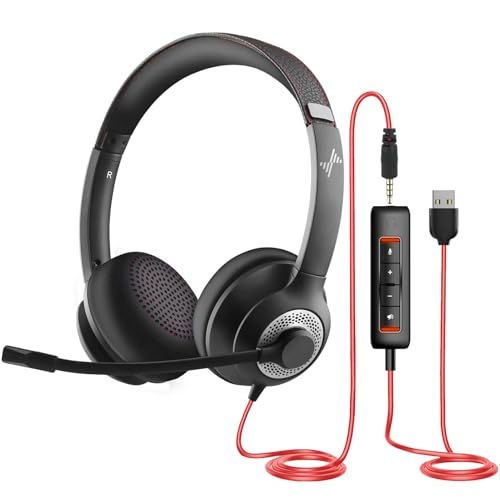
The JIAMQISHI headset suits buyers looking for a microphone-equipped computer headset with an adjustable boom and comfort-focused features. The product name lists USB and 3.5mm connections, offering more connection options than a USB-only headset; check the connection details for your intended device before buying.
Its listed features include a unidirectional microphone with 270-degree adjustment, which can be positioned on the left or right. The headset also has adjustable headband sizing, breathable protein memory-foam earpads, a built-in audio sound card, and 40mm audio drivers. The product description identifies it for conversations, music, movies, and gaming.
- Best for: Buyers who want an adjustable microphone and a headset described as supporting USB and 3.5mm.
- Why it was selected: It pairs a flexible boom mic with comfort and connection features.
- Limitation: The supplied details do not clarify the exact plug arrangement or control functions; confirm these against your device setup.
MOSWAG Adapter: Best for One-Plug TRRS Headsets

The MOSWAG adapter is for people who already have a wired headset and want to connect its microphone and headphone audio through USB. It adds a 3.5mm TRRS port with integrated microphone input and audio output. The listing says it supports CTIA and OMTP standards and includes a built-in DAC.
Its stated audio specification is 16-bit/48kHz output, with noise reduction. The manufacturer lists operating system and device compatibility that includes Windows, Linux, Mac OS X, Chromebook, Raspberry Pi, PS4, and PS5. Compatibility can depend on the particular device and port, so check the device’s audio settings after connecting.
- Best for: Owners of a headset with a single compatible TRRS plug who need a USB audio connection.
- Why it was selected: It supports both listening and speaking through one 3.5mm headset port.
- Limitation: The listed 3.5mm male microphone jack does not support TS or TRS connectors. Verify your headset plug standard before purchase.
SABRENT Adapter: Best for Separate Audio Plugs

The SABRENT adapter is designed for headsets or audio accessories with separate 3.5mm headphone and microphone plugs. It connects to a USB-A port and provides a green stereo headphone output and a pink mono microphone input. It is USB bus-powered and the listing describes it as plug-and-play without separate drivers or external power.
The product is listed for Windows, Mac, and Linux systems that support class-compliant USB audio. After connecting it, users may need to select it as the sound input and output device. This is a basic stereo adapter rather than a surround-sound upgrade.
- Best for: Buyers whose headset has separate headphone-out and microphone-in plugs.
- Why it was selected: Its two-jack layout clearly separates headphone output from microphone input.
- Limitation: It does not support a single 4-pole headset plug, passive speakers, or surround sound.
Buying Guide: How to Choose a Headset or USB Adapter
Do you need a complete headset or just an adapter?
Choose a complete headset if you do not already own headphones with a microphone. A USB headset such as the Logitech H390 combines both audio functions and the USB connection in one product. Choose an adapter if your current wired headset works well and you only need to connect it to a USB port.
Adapters do not all convert the same plug arrangement. The MOSWAG model has one TRRS headset port, while the SABRENT model has separate microphone and headphone jacks. Check the cable end on your headset before choosing between them.
Which USB port does your computer have?
USB-A and USB-C are different connector shapes. Check the available port on the computer or device where you plan to use the headset. The Logitech H390 is a USB-A headset. The Lenovo 115 listing includes USB-A and USB-C connection options, making it a more flexible choice when port types vary.
If you choose a USB-A product but your device only has USB-C, you may need a separate compatible USB adapter. Do not assume that a USB-A-to-USB-C connector is included unless the product details say so.
Does the microphone need to be adjustable?
A boom microphone can be moved closer to the mouth or repositioned when it is not in use. The Logitech H390 has a rotating boom arm, and the JIAMQISHI model lists a 270-degree adjustable microphone. If you prefer a headset for calls, compare microphone positioning and mute controls as well as the connection type.
Noise-canceling descriptions refer to the microphone’s handling of unwanted background sound in the listed product details. They do not establish that the headphones block room noise for the wearer. Consider microphone placement and your environment when selecting a headset for meetings or classes.
What should you check about sound and controls?
For calls and online meetings, convenient mute and volume controls can reduce the need to reach for the computer. The Logitech H390 and Lenovo 115 list in-line controls. The Lenovo control box includes LED indicators, while the H390’s controls are on the cable.
For an adapter, sound features and plug layout matter more than headset fit. MOSWAG lists a built-in DAC and 16-bit/48kHz output. SABRENT specifies two separate 3.5mm jacks and stereo audio. These descriptions do not mean the adapters have the same microphone connection, so match the adapter to your headset cable.
How can you avoid a connection mismatch?
- Identify whether your device has USB-A, USB-C, or both.
- Check whether your headset uses USB, a single 3.5mm TRRS plug, or separate headphone and microphone plugs.
- Confirm that the adapter’s jack type matches the headset plug standard.
- After connecting, select the headset or USB audio adapter as the input and output device if needed.
- For consoles and specialized devices, confirm the device is named in the product’s compatibility details rather than assuming every USB audio product works with every port.
Frequently Asked Questions
Can I use a USB headset without a separate adapter?
Yes, if the headset’s USB connector matches an available port on your device. A USB-A headset needs a USB-A connection or an appropriate port adapter. The Logitech H390 is listed as USB-A.
Can a USB-to-3.5mm adapter carry microphone audio?
Some can. The MOSWAG adapter is listed with an integrated microphone input and audio output through a TRRS port. The SABRENT adapter uses separate headphone and microphone jacks instead.
Will the SABRENT adapter work with a headset that has one 3.5mm plug?
The listing says it does not support a single 4-pole headset plug. It is intended for separate 3.5mm headphone and microphone plugs.
Which option is better for a USB-C laptop?
The Lenovo 115 is listed with USB-A and USB-C connection options. Check the product details and your laptop’s available ports to confirm the intended connection method.
Do USB headset adapters require software?
The SABRENT listing describes its adapter as driverless and plug-and-play. Setup can still require selecting the USB audio device as the computer’s microphone or sound output.