
The best CD player or recorder with USB depends on whether you want to burn computer files to discs or play CDs through a home audio system. For computer-based reading and burning, the Amicool is a straightforward choice, while the BPAKDU and ORIGBEL add card slots or USB ports. The Supersonic is better suited to listening to CDs and other audio at home, but its listed features do not confirm CD recording.
| Product | Best for | Key distinction |
|---|---|---|
| Amicool External DVD Drive | Computer users who need a simple reader and burner | USB 3.0 and USB-C; supports CD and DVD reading and writing |
| BPAKDU 8-in-1 External Drive | Users transferring files from memory cards | USB ports, USB-C, and SD/TF card reader |
| ORIGBEL External Drive | Buyers who want multiple ports and card slots | Four USB ports and two SD/TF slots, according to the product name |
| ROOFULL External Drive | Users who want a compact drive with a carrying case | USB hub, SD card reader, and case, according to the product name |
| Supersonic SC-2121BT | Home listeners who want a CD player and cassette recorder | CD playback, USB input, radio, and double cassette recorder |
Amicool External DVD Drive

Best for: People who need a computer-connected drive to read or burn common CD and DVD formats. Its stated functions include CD/DVD reading and writing, making it a stronger match for the word “recorder” than a player-only stereo.
The Amicool has USB 3.0 and Type-C connections and is described as plug-and-play on supported computers. The listed operating systems include Windows 11, 10, 8.1, and 7, Linux, and macOS, including Intel and Apple Silicon Macs. The product information specifies maximum DVD read speed of 8x and maximum CD read/write speed of 24x.
It supports formats such as DVD+R, DVD-R, CD-R, and CD-RW. Connect it directly to a computer for stable operation; the manufacturer advises against USB hubs and extension cables. Limitation: It does not support Blu-ray, DVD-RAM, or certain proprietary formats, and it is not intended for TVs, tablets, game consoles, or car stereos.
BPAKDU 8-in-1 External Drive

Best for: Laptop and desktop users who want an optical drive alongside card-reading and extra USB connections. It is selected for its combination of CD/DVD reading and burning with a card reader and several ports.
The listed 8-in-1 configuration includes a USB 3.0 hub port, three USB 2.0 ports, a USB-C port, and an SD/TF card reader. The card reader is positioned for transferring photo and video files from camera cards to a computer. The product description says the SD and TF slots cannot be used at the same time.
The drive is described as powered through USB 3.0 and plug-and-play, with compatibility listed for Windows 11, 10, 8, and 7, Mac, and Linux. Limitation: The product information warns that some Windows 10 or 11 laptops may not recognize the drive if power is insufficient. It suggests connecting the extra power cable in that situation, so buyers should be prepared to troubleshoot if needed.
ORIGBEL External CD/DVD Drive

Best for: Buyers looking for a computer optical drive with several built-in connection options. The product name lists four USB ports and two SD/TF slots, which may suit someone who wants a drive and a small port expansion in one device.
The listing describes it as a portable CD/DVD reader and writer with USB 3.0 and Type-C connections. Its stated operating-system compatibility includes Windows 11, 10, 8, and 7, Linux, and Mac OS. The product name also identifies it as a DVD player and burner, making it relevant for people who need to access or write optical discs from a computer.
Choose this model if the additional USB ports and memory-card slots are important to your setup. Limitation: The supplied product information does not specify supported disc formats, read/write speeds, or detailed power requirements. Check the current listing for those details before choosing it for a particular disc or computer setup.
ROOFULL External CD/DVD Drive

Best for: Computer users who want an external optical drive with a card reader and a carrying case. The product name describes a five-in-one setup with a USB 3.0 port hub, SD card reader, and case, alongside CD/DVD reading and writing.
This model is presented as a portable USB Type-C drive for laptops and desktop computers. Its listed operating systems include Windows 11, 10, and 7, Mac, and Linux. The combination of disc access and an SD card reader can be useful for someone who works with both optical media and files stored on memory cards.
Choose it if you value the included case and a more compact accessory arrangement. Limitation: The supplied details do not identify supported disc formats, transfer speeds, or the number of ports included in its hub. Confirm these specifications in the product listing if those details affect your workflow.
Supersonic SC-2121BT Audio System
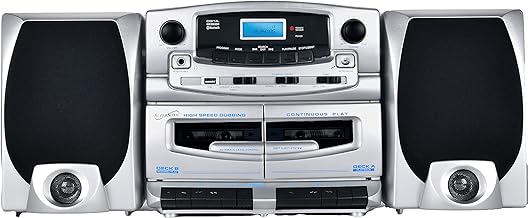
Best for: Home listeners who want a standalone audio system for CDs, radio, Bluetooth, and cassette playback or recording. Unlike the external computer drives above, this product is an audio system with detachable speakers rather than a computer optical drive.
The product name lists a CD player, AM/FM radio, Bluetooth 5.0, USB input, and a double cassette recorder. It also identifies AC/DC power and detachable speakers. These features make it a fit for people seeking multiple ways to listen to audio in one system.
Limitation: The listed details do not say that this system burns or records CDs, and a USB input does not by itself establish USB recording capability. Choose it for the stated CD playback and cassette recording features, not as a confirmed CD burner.
Buying Guide: How To Choose A CD Player Or Recorder With USB
Do you need a computer drive or a standalone stereo?
Start by deciding where you want to use the device. External drives such as the Amicool, BPAKDU, ORIGBEL, and ROOFULL connect to a computer and are intended for reading or writing optical discs. A home audio system such as the Supersonic is designed for listening to audio through speakers and does not function as a computer-connected disc burner based on the supplied details.
If your goal is to burn music, files, or backups to a CD from a computer, select a drive whose listing explicitly states CD writing or burning. If you mainly want to play CDs without using a computer, look for a standalone player. Do not treat “USB” as proof that a product can record to a USB drive or burn CDs.
Which USB connection should you check?
Compare the drive’s connector with the available ports on your computer. The Amicool lists both USB 3.0 and Type-C connections, while the other external drive names also identify USB connections. A connector type does not guarantee that every cable, adapter, or hub will work reliably. The Amicool instructions specifically recommend a direct connection to the computer and advise against hubs and extension cables.
For desktop computers, check whether the drive needs a direct port or an additional power connection. The BPAKDU listing notes that insufficient power can prevent recognition on some Windows laptops and recommends using its extra power cable if that occurs.
What disc formats and tasks matter?
Check whether you need to read discs, write discs, or both. Also verify the exact formats before buying. The Amicool’s listed support includes DVD+R, DVD-R, CD-R, and CD-RW, but excludes Blu-ray and DVD-RAM. The other products’ supplied descriptions do not give a complete format list, so confirm compatibility with your discs before purchase.
For computer use, consider whether you need a drive for installing software, accessing archived files, playing media, or making disc backups. These tasks can have different software requirements. The Amicool listing, for example, recommends VLC for Mac media playback and says Apple DVD Player is not supported.
Would extra ports or a card reader be useful?
Choose a model with built-in expansion only if you expect to use it. The BPAKDU lists USB ports and an SD/TF card reader, while ORIGBEL names four USB ports and two card slots. ROOFULL lists a USB hub, an SD card reader, and a case. These additions may reduce the need to carry separate accessories, but check the exact port count, card support, and simultaneous-use limitations in the individual listing.
For camera file transfers, verify whether the reader supports the card type you use. BPAKDU specifically says SD and TF cards cannot be used at the same time. Do not assume that a product’s card slots support every memory-card format.
How should you compare portability and setup?
For travel or occasional use, compare the device’s stated size, included case, and connection requirements. ROOFULL names a case, while the external drives are described as portable. A portable design still needs a compatible computer, available port, and any required power connection. For a fixed home listening area, a standalone system with speakers may be more appropriate than a computer accessory.
Frequently Asked Questions
Can an external USB CD drive burn discs?
Some can. Look for explicit terms such as “CD burner,” “writer,” or “CD/DVD +/-RW.” The Amicool and BPAKDU descriptions identify burning or writing functions. Verify the supported disc formats before buying.
Does a USB input mean a CD player can record to USB?
No. A USB input may support a particular connection or playback function, but it does not confirm recording. The Supersonic listing names USB input and a double cassette recorder but does not state that it records CDs or saves audio to USB.
Can these external drives connect directly to a TV?
The Amicool listing says it is designed for computers and is not compatible with TVs. Check each product’s compatibility information before connecting an external drive to a television or other device.
Do USB optical drives play Blu-ray discs?
Not necessarily. The Amicool listing specifically excludes Blu-ray discs. Check for explicit Blu-ray support if you need to read or play BD media.
What should I do if my laptop does not recognize an external drive?
Check that the connection is secure and connect directly to the computer where the instructions recommend it. The BPAKDU listing suggests using the extra power cable if insufficient power causes recognition problems. Follow the specific product’s troubleshooting directions.