
The most practical way to dub cassette tapes to CD is to convert the tape audio to digital files, then use a computer with a CD burner to create a disc. The TEAC AD-850 is best for buyers who also want a cassette and CD player, while the Pyle PT659DU combines cassette dubbing with USB transfer. The DIGITNOW and Burtowic portable players are better for straightforward tape-to-computer conversion. None of the listed products is described as directly recording a cassette onto a CD without an intermediate device or step.
| Product | Best suited for | Transfer approach |
|---|---|---|
| TEAC AD-850 | Home audio and multiple recording formats | Cassette to USB as MP3; CD playback and recording functions |
| Pyle PT659DU | Dual-deck dubbing and computer transfer | Cassette to cassette or USB-connected computer |
| Pyle B09MSPCPRT | Basic dual-cassette copying | Normal- or high-speed cassette dubbing |
| DIGITNOW cassette converter | Portable, simple tape digitizing | Cassette to computer as MP3 |
| Burtowic cassette converter | Portable playback and digitizing | Cassette to computer as MP3 |
TEAC AD-850 Cassette and CD System
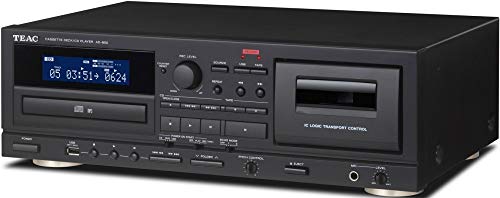
Best for: Buyers who want one home audio unit for cassette playback, CD playback, and USB recording. The AD-850 records cassette tapes to a USB flash drive as MP3 files, which gives you a digital file to transfer to a computer and burn to CD.
Its listed features include recording from CDs, cassette tapes, microphone input, and external devices to USB. It also supports recording from CDs, USB drives, microphone input, and external devices to cassette. The unit plays MP3 files from supported USB drives and CD-R/RW discs, and it offers adjustable recording levels when dubbing.
Why it was selected: It offers the most flexible set of playback and recording functions among these options, including both cassette and CD capability. It is a useful choice when digitizing tapes is part of a broader home audio setup.
Limitation: The listed features describe cassette-to-USB recording, not direct cassette-to-CD recording. The product information also says recording levels are not adjustable for CD-to-USB recording.
Pyle PT659DU Dual Cassette Deck

Best for: Buyers who want a dual cassette deck that can copy tapes and transfer tape audio to a computer. The PT659DU supports normal- and high-speed cassette dubbing, and its included USB cable connects the deck to a computer for MP3 transfer.
Both decks can play tapes, but the listed features specify that only deck B records or dubs. A CrO2 selector, recorder-level control, gain control, and auto-stop function provide additional control for tape playback, duplication, and computer transfer. The product information states that the USB conversion works with PC and Mac computers.
Why it was selected: This model covers two useful parts of a cassette-to-CD workflow: making cassette copies and creating MP3 files on a computer. Those files can then be used with a computer CD-burning process.
Limitation: USB transfer creates MP3 files on a computer; the listed features do not describe a built-in CD burner. Only deck B is identified for recording and dubbing.
Pyle Dual Cassette Deck With High-Speed Dubbing

Best for: Buyers focused on copying tapes from one cassette to another. This deck provides normal- and high-speed dubbing, making it a relevant option when cassette duplication is the main task rather than creating a CD directly.
Its listed controls include a three-digit tape counter, a CrO2 tape selector, an auto tape selector, and recording-level control. RCA line inputs and outputs support connection to compatible audio equipment. The product also lists a digital link interface for a Pyle PT600A amplifier, which is not included.
Why it was selected: It is a dedicated dual-cassette option with explicit dubbing features and connection choices. It may suit a buyer who wants to make a tape copy before using a separate conversion or CD-burning setup.
Limitation: The provided features do not list USB conversion or an integrated CD recorder. For cassette-to-CD archiving, plan on using other equipment to digitize the audio and burn a disc.
DIGITNOW Portable Cassette-to-MP3 Converter
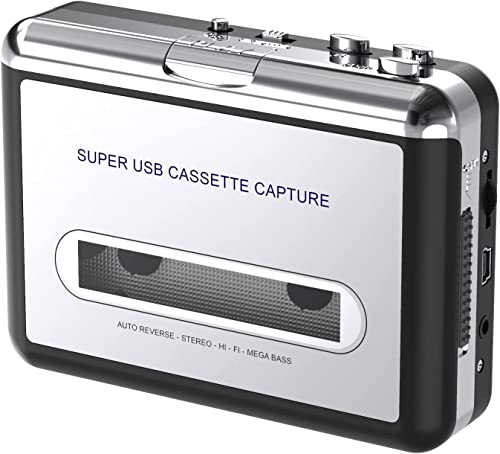
Best for: Buyers who want a compact cassette player for transferring tapes to a computer. The DIGITNOW device connects by USB and converts cassette audio to MP3 files, which can be organized on a computer and burned to CD using a separate CD-burning drive and software.
The listed features include Audacity software for converting cassette audio, a 3.5 mm headphone output, and included earphones. The product information says no installation or drivers are required. Its portable design also allows cassette playback through the headphone jack or another speaker system.
Why it was selected: Its stated purpose directly matches the first stage of cassette-to-CD dubbing: converting tape audio into a digital format. It is a compact alternative to a full-size cassette deck when computer transfer is the priority.
Limitation: This is a cassette-to-MP3 converter, not a CD recorder. The listed information does not specify a built-in CD drive or direct disc-burning function.
Burtowic Auto-Reverse Cassette Converter

Best for: Buyers who want a portable cassette player with auto-reverse and USB conversion. It transfers cassette audio to MP3 through a USB cable, so a computer can serve as the next step for organizing files and burning a CD.
The listed features include fast-forward and rewind, stereo playback, a DIR button for reversing tape direction, and a play-mode function for auto-reverse. The device can be powered by a USB power cord or AA battery, according to the product name and supplied details. The listing also describes included tape-converter software.
Why it was selected: It combines tape playback controls with cassette-to-MP3 conversion. Auto-reverse can be useful when transferring both sides of a tape, although the supplied information does not explain the exact software workflow.
Limitation: The product creates digital MP3 files rather than CDs. A computer and a separate CD-burning method are needed to make a physical disc.
Buying Guide: How to Choose a Cassette-to-CD Setup
Do you need direct cassette-to-CD recording?
Check the product’s recording destinations before buying. In this selection, the TEAC AD-850 records cassette audio to a USB flash drive, while the DIGITNOW, Burtowic, and Pyle PT659DU options describe transferring cassette audio to a computer as MP3. The two dual-cassette decks focus on tape-to-tape dubbing. None of the listed feature sets confirms direct cassette-to-CD recording in one step.
A common workflow is to play the cassette through a converter or compatible deck, save the recording as a digital file, then use a computer with a CD burner to create an audio CD. Confirm that the computer and disc-burning equipment you plan to use are available and suitable for your needs.
Should you choose a portable converter or a full-size deck?
Choose a portable converter if your main goal is to digitize tapes and you do not need dual-cassette copying. DIGITNOW and Burtowic are described as portable players with USB conversion. Choose a full-size dual deck if you also need cassette-to-cassette dubbing. The Pyle models offer that function, and the PT659DU additionally lists USB-to-computer conversion.
The TEAC AD-850 is a broader home audio choice. It supports cassette and CD playback, USB recording, and several recording sources. It may be a better fit for buyers who want more than a basic tape converter, but it still does not replace a computer CD-burning step based on the listed features.
Do you want to make cassette copies as well?
For cassette-to-cassette copying, compare the Pyle dual-deck models. The PT659DU explicitly offers normal- and high-speed dubbing and says deck B is the recording deck. The other Pyle deck also provides normal- and high-speed dubbing, along with a tape counter, tape selectors, and RCA connections. These features are relevant to tape duplication, but they do not establish that either deck can write CDs.
What connections and controls matter?
For computer transfers, look for an explicitly listed USB connection and a stated digital file format. The DIGITNOW and Burtowic products list MP3 conversion; the Pyle PT659DU lists USB transfer to a computer. For connecting a cassette deck to separate audio equipment, the other Pyle model lists RCA inputs and outputs. Check the product details and manuals for the connection workflow you intend to use.
Recording-level controls can help manage the input level during a transfer. The TEAC lists adjustable recording levels for dubbing, and the Pyle PT659DU lists recorder-level and gain controls. These features do not guarantee a particular sound result, so careful setup and checking a short test recording are sensible steps before transferring a full tape.
How should you prepare tapes for conversion?
Inspect tapes and cassette shells before playback. If a tape is damaged, tangled, or does not move smoothly, avoid repeatedly playing it while troubleshooting. Clean handling and a test transfer can help identify playback or connection problems early. Store the resulting digital files in an organized location and keep a backup before using them to create CDs.
Frequently Asked Questions
Can I dub a cassette directly to a CD with these products?
The supplied product information does not confirm direct cassette-to-CD recording for any of these products. Most relevant options create MP3 files on a computer or USB drive; the Pyle dual decks also support cassette-to-cassette dubbing.
What is the basic process for converting a cassette to CD?
Convert the cassette audio to a digital file, such as an MP3, then use a computer and CD-burning equipment to create a disc. Check the file and disc settings required by your intended playback devices before burning.
Which option is best for cassette-to-computer conversion?
The DIGITNOW and Burtowic products are portable cassette players that list USB-based MP3 conversion. The Pyle PT659DU also lists USB transfer to a computer and adds dual-deck cassette dubbing.
Which product is best for copying one cassette to another?
The Pyle PT659DU and the Pyle dual cassette deck with RCA connections both list normal- and high-speed dubbing. The PT659DU specifies that deck B is used for recording and dubbing.
Does the TEAC AD-850 burn CDs from cassette tapes?
The listed features say the TEAC records cassette tapes to USB flash drives as MP3 files and supports CD playback and other recording functions. They do not state that it burns CDs directly from cassette tapes.
Do I need a computer to make an audio CD?
For the products in this selection, a computer-based workflow is the clearest supported route: transfer the cassette audio to a digital file, then use a computer with CD-burning capability. The listed product details do not identify a standalone cassette-to-CD burner.