
The Tascam US-16×08 is the closest fit for recording many microphones and line-level sources directly to a computer, while the Tascam Model 24 combines USB connectivity with a mixer and standalone recorder. The Zoom R16 and R20 are better for portable multitrack projects, and the Mackie ProFX16v3 suits bands that want a straightforward mixer with USB recording. Check the distinction between track playback, simultaneous recording, and USB channel count before choosing.
| Product | Best for | Key distinction |
|---|---|---|
| Tascam US-16×08 | Computer-based multichannel recording | 16 mic and line inputs |
| Mackie ProFX16v3 | Live mixing with USB recording | 16-channel mixer with USB |
| Zoom R16 | Portable recording and playback | 16-channel playback; 8-channel simultaneous recording |
| Zoom R20 | Computer-free recording and editing | 16 tracks; records up to 8 simultaneously |
| Tascam Model 24 | Live mixing and standalone multitrack capture | Up to 24 tracks recorded to SD card |
Tascam US-16×08
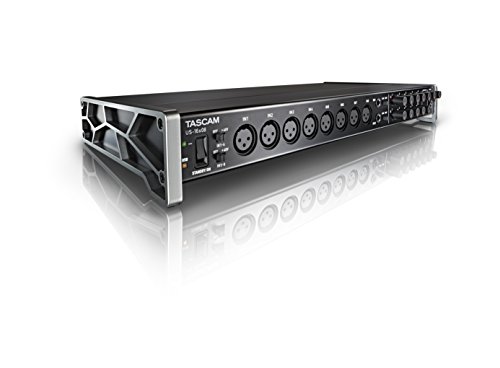
The Tascam US-16×08 is best for computer-based recording sessions that need many microphone and line inputs in one interface. It captures 16 mic and line inputs to a computer, making it a direct match for searches for a 16-track USB interface.
Its eight Ultra-HDDA microphone preamps provide up to 56 dB of gain. Eight additional line inputs expand the available connections, and two of those line inputs can switch to instrument level for direct guitar or bass recording. The unit is rackmountable and includes control software.
- Best for: Bands, drum sessions, or studios recording multiple sources into a computer.
- Why it stands out: It combines 16 mic and line inputs with eight microphone preamps and instrument-level options.
- Consideration: The listed features do not specify that all 16 inputs have microphone preamps; eight are identified as mic preamps.
Choose this if the priority is connecting numerous sources to a computer. Avoid assuming that “16 inputs” means 16 microphone preamps; confirm the input types you need before buying.
Mackie ProFX16v3
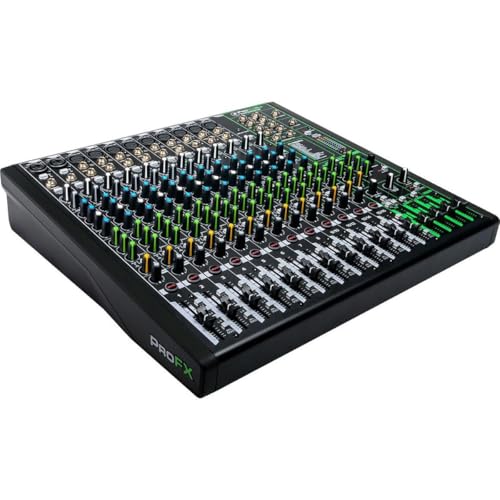
The Mackie ProFX16v3 is best for bands, venues, and operators who need a 16-channel mixer alongside USB recording. Its listed features emphasize managing the room mix and recording multitrack audio at the same time, rather than treating the unit only as a desktop interface.
Onyx preamps provide up to 60 dB of clean gain on every microphone channel. The mixer is described as suitable for users who want 16 channels without a digital learning curve, which makes it a more familiar option for live sound workflows.
- Best for: Live performers and venues that need hands-on mixing plus USB recording.
- Why it stands out: It pairs a 16-channel mixer layout with multitrack recording and mic preamps on every mic channel.
- Consideration: The provided product details do not state the exact number of USB recording channels or supported recording resolution.
Choose this if physical mixer controls and live use are central to the setup. If the exact computer input count is essential, verify the USB routing specifications rather than relying on the 16-channel mixer designation alone.
Zoom R16 Multitrack Recorder

The Zoom R16 is best for musicians who want a portable multitrack recorder that can also serve as a USB audio interface. Its track count needs careful interpretation: the listed specifications provide 16-channel playback and eight-channel simultaneous recording. It is therefore not the same as a device that records 16 separate inputs at once.
The R16 has eight XLR combo inputs and built-in stereo condenser microphones. It also includes 135 types of digital effects for recording, mixing, and mastering. Phantom power is available on two tracks, according to the listed features.
- Best for: Songwriters and small groups recording several sources without a large studio rig.
- Why it stands out: It combines eight simultaneous recording channels, 16-channel playback, onboard microphones, and built-in effects.
- Consideration: It records up to eight channels simultaneously, not 16.
Choose the R16 if portability and standalone multitrack workflow matter more than recording 16 inputs at once. Check the input and phantom-power details against the microphones and instruments in your setup.
Zoom R20 Multitrack Recorder
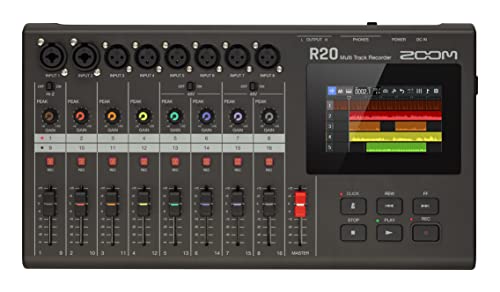
The Zoom R20 is best for musicians who want to record and edit without depending on a computer. Its touchscreen interface supports recording, editing, and mixing directly on the device, with touch controls for arranging and editing audio.
The R20 supports projects of up to 16 tracks and can record up to eight simultaneously. It has six XLR inputs, according to the product name, and multiple XLR and combo inputs are mentioned in the features. Those track and input counts are different: the track capacity does not mean 16 physical inputs or 16 simultaneous recordings.
- Best for: Musicians making demos or projects with a self-contained recording and editing workflow.
- Why it stands out: It offers touchscreen editing and recording without requiring a computer for the core workflow.
- Consideration: Its maximum simultaneous recording count is eight, so it is not a 16-input simultaneous recorder.
Choose this if computer-free operation and direct touch editing are priorities. If you specifically need a USB interface with 16 simultaneous computer inputs, verify that the device’s connection modes meet that requirement before purchase.
Tascam Model 24

The Tascam Model 24 is best for buyers seeking a combined analog-style mixer, standalone recorder, and USB audio interface. It can capture up to 24 tracks simultaneously at 24-bit/48 kHz directly to an SD card, which makes it a strong option for recording live performances or full-band sessions without making a computer the only recording destination.
The unit includes 16 Tascam microphone preamps and stereo line inputs. Its surface-mounted input and output controls, EQ knobs, and auxiliary controls are intended to keep common adjustments accessible without menu navigation.
- Best for: Bands, venues, and studios that want mixer controls and high track-count standalone recording.
- Why it stands out: It supports up to 24 simultaneous SD-card tracks and includes 16 mic preamps.
- Consideration: Its stated SD-card recording resolution is 24-bit/48 kHz; buyers needing a different recording format should verify supported USB specifications.
Choose this if a hands-on mixer and independent SD-card recording are valuable. It offers more recording tracks than a 16-track unit, but its larger feature set may be unnecessary for a simple computer-only interface setup.
Buying Guide: How to Choose a 16-Track USB Interface
Do you need 16 inputs or 16 recorded tracks?
These terms describe different capabilities. Inputs are the physical connections for microphones, instruments, or line-level gear. Tracks are the separate audio paths captured or played back. A product can support 16-track playback but record fewer inputs simultaneously. For example, the Zoom R16 provides 16-channel playback and eight-channel simultaneous recording; the Zoom R20 supports up to 16 tracks and records up to eight at once.
If you need to capture a 16-microphone drum setup or a large band in one pass, check the simultaneous recording count and how many inputs accept microphones. Do not use a track count alone as proof of 16 simultaneous inputs.
Is a computer required for your recording workflow?
A traditional USB audio interface sends audio to a computer for recording and editing. Standalone recorders can capture audio without relying on a computer as the main recording device. The Tascam US-16×08 is described as capturing 16 mic and line inputs to a computer. The Tascam Model 24 and Zoom R20 add standalone recording or editing workflows in their listed features.
Choose a computer-centered interface if you already work in recording software and want to route many sources into it. Choose a standalone recorder if you need to record or edit without keeping a computer at the center of the session.
What connections and preamps should you check?
Count the microphone preamps separately from line and instrument inputs. The Tascam US-16×08 has eight specified microphone preamps and eight additional line inputs, two switchable to instrument level. The Model 24 lists 16 mic preamps. The Mackie ProFX16v3 specifies Onyx preamps on every mic channel, with up to 60 dB of gain.
Also check whether the interface provides the right input type for each source. Condenser microphones may require phantom power, while guitars and basses may need instrument-level inputs. The supplied product details identify phantom power on two R16 tracks and switchable instrument inputs on two US-16×08 line inputs.
Will you use the device for live mixing?
A mixer-oriented product can be more practical for adjusting a room mix, monitor sends, and channel levels during a performance. The Mackie ProFX16v3 is positioned for bands and venues that want 16 channels and USB multitrack recording. The Tascam Model 24 adds hands-on EQ and auxiliary controls, alongside multitrack SD-card recording.
For studio recording where the main task is sending multiple inputs to a computer, prioritize stated input counts and USB recording details. For live work, consider the physical controls and whether the product’s documented routing matches the show setup.
How many sources must record at the same time?
List the sources that need separate tracks during the same take, such as vocals, drums, guitars, and room microphones. Compare that total with the simultaneous recording specification, not the playback track count or project capacity. The Model 24 lists up to 24 simultaneous SD-card tracks, while the R16 and R20 list up to eight simultaneous recording channels.
For USB use specifically, confirm the supported computer recording channels and routing in the manufacturer’s specifications. The product details supplied here do not state every USB channel count, so do not assume that standalone recording capacity equals USB input capacity.
Frequently Asked Questions
What is the closest match for a 16-track USB audio interface?
The Tascam US-16×08 is the clearest match for computer-based capture because it is described as sending 16 mic and line inputs to a computer. It has eight specified microphone preamps and eight additional line inputs.
Does a 16-track recorder record 16 inputs at once?
Not necessarily. Track capacity can refer to playback or the maximum number of tracks in a project. Check the simultaneous recording specification: the Zoom R16 and R20, for example, record up to eight channels simultaneously.
Which option is best for live mixing and recording?
The Mackie ProFX16v3 is intended for 16-channel live mixing with USB multitrack recording. The Tascam Model 24 is another option for hands-on mixing and standalone SD-card multitrack recording.
Which product can record without a computer?
The Zoom R20 provides recording, editing, and mixing directly on the device. The Tascam Model 24 can record up to 24 tracks directly to an SD card.
What should I confirm before buying?
Confirm the number of simultaneous recording channels, the number and type of inputs, phantom-power availability, and the USB channel count if computer recording is essential. Also check whether the product’s standalone recording features match your intended workflow.