
If you need to route digital audio through an optical connection, first check which output your source device has. A TOSLINK cable connects optical ports, a coaxial-to-optical converter changes digital connection types, and a splitter duplicates an existing optical signal. The PROZOR bi-directional converter is the closest match for converting between coaxial and optical digital audio. The PROZOR DAC models go the opposite direction—from digital optical or coaxial audio to analog RCA or 3.5mm—and are not suitable for creating an optical output.
| Product | Best For | What It Does |
|---|---|---|
| PROZOR Bi-Directional Converter | Changing between coaxial and optical digital audio | Converts between digital connection types |
| KabelDirekt TOSLINK Cable | Connecting two optical ports | Carries optical digital audio |
| RIIEYOCA Optical Splitter | Sending one optical input to two outputs | Splits an existing optical signal |
| PROZOR 192KHz DAC | Connecting digital audio to analog equipment | Converts digital audio to RCA and 3.5mm |
| PROZOR DAC With 7-Foot Cable | Digital optical audio to RCA gear | Converts digital audio to RCA |
PROZOR Bi-Directional Optical Converter

Best for: Converting a coaxial digital audio output to optical, or converting optical to coaxial. This is the most direct match for a setup where the source provides one digital connection type and the receiving device requires the other.
The converter supports both coaxial and TOSLINK optical connections. Its input-selection switch lets you select the source connection, and the listed supported formats include LPCM 2.0, DTS, Dolby AC3, and 5.1-channel audio. The listed maximum sampling rate is 192 kHz at 24-bit, with support also stated for 32, 44.1, 48, and 96 kHz.
Why it was selected: Unlike a simple optical cable, this device is designed to convert between two digital connection formats. It can be useful when a TV, player, or other source has a coaxial digital output and the next device accepts optical input.
Limitation: This is a digital-to-digital converter, not a digital-to-analog DAC. Confirm the input and output ports and the audio format your devices use before choosing it.
KabelDirekt TOSLINK Optical Audio Cable

Best for: Connecting a device with an optical digital audio output directly to a soundbar, receiver, amplifier, or other device with an optical input. Choose this cable when both pieces of equipment already have matching TOSLINK ports.
The six-foot cable has TOSLINK connectors at both ends and is intended for equipment marked optical, OPT, or S/PDIF. The listed uses include TVs, game consoles, DVD and Blu-ray players, streaming boxes, soundbars, amplifiers, and digital-to-analog converters. Its fiber-optic transmission is not affected by electromagnetic interference, and it has a flexible PVC jacket.
Why it was selected: A cable is the simplest option when the source already has an optical output. It carries the digital signal without converting it to analog or changing the connector type.
Limitation: This cable cannot convert a coaxial or RCA digital output to optical. Check that both devices have optical ports and that the cable length suits the setup.
RIIEYOCA Optical Audio Splitter

Best for: Sending one optical digital audio source to two optical destinations. This can suit a setup where a single source needs to feed two devices, such as separate listening equipment, provided the devices and audio format work with the same signal.
The splitter has one optical input and two optical outputs. The product description recommends using one input device with two outputs and notes that connecting two inputs may cause interference or noise. It describes light-based signal transmission as resistant to electromagnetic interference.
Why it was selected: It addresses a different common optical-output need: duplicating an existing optical signal rather than converting a connection. Choose it if the source already outputs optical audio and you need two output connections.
Limitation: A splitter does not create an optical output from a coaxial or analog source. The listing describes two outputs, but does not establish that every pair of connected devices will play simultaneously in every setup.
PROZOR 192KHz Digital-To-Analog DAC

Best for: Connecting a digital optical or coaxial audio source to equipment with analog RCA or 3.5mm inputs. This is appropriate when the goal is to get analog sound from a digital output, not to add an optical output to a device.
The DAC converts PCM digital audio from coaxial or TOSLINK inputs to left/right RCA and 3.5mm analog outputs, which can be used simultaneously according to the product description. It supports sampling rates of 32, 44.1, 48, 96, and 192 kHz and a 24-bit S/PDIF input. The listed features also describe an audio amplifier chipset and dual-channel operational amplifier.
Why it was selected: People searching for a digital audio connection may actually need to connect a TV or player to older analog equipment. This model provides that digital-to-analog conversion path.
Limitation: The signal direction is digital to analog, not analog to digital and not analog to optical. The product instructions say to set the TV audio output to PCM; they also note that TV volume may need adjustment in settings.
PROZOR Optical-To-RCA DAC With Cable
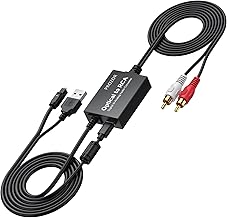
Best for: Connecting an optical digital source to analog RCA equipment when a cable is useful as part of the converter arrangement. It is a better fit for a TV or player with optical output and a stereo amplifier or other device with RCA input.
The product converts SPDIF digital audio to left and right RCA analog output. Its listed features include a 7-foot/2.1-meter cable, an audio amplifier chipset, and support for sampling rates up to 192 kHz, including 32, 44.1, 48, and 96 kHz. The listing states that it accepts 24-bit S/PDIF input.
Why it was selected: This model serves buyers who need an optical-to-analog connection and want a cable included in the setup. The described amplifier circuitry is intended to address low RCA output volume.
Limitation: The product listing explicitly says optical output is not supported. It cannot turn an analog RCA signal into an optical digital signal. Set the source audio format to PCM as instructed in the product information.
Buying Guide: How To Choose A Digital-To-Optical Solution
What Does “Digital Out To Optical” Mean In Your Setup?
The phrase can describe several different connection problems. Identify the source device’s audio output and the receiving device’s audio input before buying anything. A digital output may be optical TOSLINK, coaxial S/PDIF, or another connection. “Optical” means the signal travels through a fiber-optic cable; it does not automatically mean the device converts the audio format.
- If the source has an optical output and the destination has an optical input, use a TOSLINK cable.
- If the source has a coaxial digital output and the destination has an optical input, use a coaxial-to-optical digital converter.
- If one optical source must feed two optical devices, consider an optical splitter.
- If the destination accepts RCA or 3.5mm analog audio, use a DAC that converts digital audio to analog.
Do You Need A Converter, A Cable, Or A Splitter?
A cable connects compatible ports; it does not change signal type. A digital converter changes a signal between connection types, such as coaxial digital to optical digital. A DAC changes digital audio into analog audio. A splitter duplicates a signal for more than one output. These devices are not interchangeable, even when all are used with home audio equipment.
For example, an optical-to-RCA DAC will not solve a coaxial-to-optical connection problem. It produces analog outputs instead of an optical output. Similarly, an optical splitter cannot accept an RCA analog output and transform it into a digital optical signal.
Check The Direction Of Conversion
Direction is one of the most important specifications to verify. Product names may use terms such as “digital to analog,” “optical to RCA,” or “bi-directional.” A digital-to-analog converter accepts a digital audio input and sends analog sound to RCA or 3.5mm outputs. A bi-directional digital converter can support conversion between the stated digital connection types, but confirm how its input selection and outputs are arranged.
Do not assume a device works in reverse just because it has a port that looks right. A DAC usually cannot accept analog audio and produce optical digital audio unless that reverse function is specifically listed.
Which Audio Format Should You Select?
Check the audio format supported by both the source and the converter or receiving device. The PROZOR DAC product information instructs users to set TV audio output to PCM. A source set to an unsupported surround format may not produce sound through a converter intended for PCM input. The bi-directional PROZOR model lists LPCM 2.0, DTS, Dolby AC3, and 5.1-channel support, but buyers should still verify the intended signal path and device settings.
Sampling-rate support is another specification to compare. A listed maximum such as 192 kHz describes a supported input capability; it does not guarantee that every source sends audio at that rate or that every connected device supports it.
How Many Devices Need To Receive Audio?
Use a single optical cable when one source connects to one optical destination. Choose a splitter when one optical input needs to feed two outputs. Keep in mind that a splitter duplicates a connection; it does not independently convert the signal or guarantee that all connected devices handle the same audio format.
If simultaneous listening is important, check the source’s output behavior and the receiving devices’ supported formats. The RIIEYOCA listing advises using one input device with two outputs and warns that connecting two inputs may lead to interference or noise.
What Should You Check Before Ordering?
- Source output: Identify whether the source provides optical, coaxial digital, or analog audio.
- Destination input: Confirm whether the receiving equipment accepts optical, coaxial, RCA, or 3.5mm audio.
- Signal direction: Match the converter’s stated input-to-output direction to the intended connection.
- Audio format: Verify PCM, Dolby, DTS, or other format support against the source and destination.
- Cable length: Choose a cable or converter placement that reaches without putting strain on the ports.
- Power and settings: Follow the product instructions and check the source’s audio-output settings if there is no sound.
Frequently Asked Questions
Can A TOSLINK Cable Convert Coaxial Audio To Optical?
No. A TOSLINK cable connects devices that already have optical ports. A coaxial-to-optical digital converter is needed to change between those digital connection types.
Can A Digital-To-Analog DAC Create An Optical Output?
No. A digital-to-analog DAC converts digital audio into analog output, commonly RCA or 3.5mm. It does not create optical output unless that separate function is specifically stated.
What Does An Optical Audio Splitter Do?
An optical splitter takes one optical input and sends the signal to multiple optical outputs. It does not convert analog audio to digital or change a coaxial connection into optical.
Why Is There No Sound From An Optical-To-RCA Converter?
Check that the converter’s input and output directions match the setup, the optical cable is connected to the source’s output, and the receiving device is connected to the RCA outputs. For the listed PROZOR DACs, the product instructions say to set the TV audio format to PCM.
Is Optical Audio The Same As RCA Audio?
No. Optical carries digital audio through a TOSLINK connection. RCA audio connections commonly carry analog left and right channels. A DAC is required when a digital optical source needs to feed analog RCA equipment.