
The best match for converting HDMI 7.1 audio to analog surround sound is the HDMI LPCM 5.1/7.1 decoder with repeater function. For a computer-based setup, the StarTech 7.1 USB Audio Adapter is the more relevant choice. The other options in this list are primarily 5.1-channel or virtual 5.1 devices, so they may suit older receivers or simpler systems but should not be mistaken for true 7.1 decoding.
| Product | Best For | Channel Fit |
|---|---|---|
| HDMI LPCM 5.1/7.1 Decoder | HDMI sources and analog surround receivers | Analog LPCM 7.1 and 5.1 |
| StarTech 7.1 USB Audio Adapter | PC or laptop audio | Up to 7.1, per product name |
| 5.1CH Digital Sound Decoder | 4K HDMI setups needing virtual surround | Virtual 5.1 |
| Digital Audio Converter 5.1CH DTS Decoder | Basic digital-to-analog conversion | 5.1, per product name |
| SOUTHSKY 5.1/2.1 Audio Decoder | Optical or coaxial sources and older receivers | 5.1 or 2.1 |
HDMI LPCM 5.1/7.1 Analog Surround Decoder

This is the clearest fit for someone searching specifically for a 7.1 surround sound decoder. It converts uncompressed HDMI LPCM 7.1 or 5.1 audio to analog surround through multichannel 3.5 mm outputs, making it suitable for an analog amplifier or receiver with matching inputs.
It can also extract compressed Dolby Digital, AC3, or DTS audio from HDMI and send it through optical output for decoding by another device. EDID dip switches let the user select an audio format for the HDMI source. The listed video support includes resolutions up to 4Kx2K, with output resolution following the input.
- Best for: HDMI devices that provide LPCM 7.1 and an analog receiver that accepts multichannel input.
- Why it was selected: The listed features explicitly include analog LPCM 7.1 output.
- Limitation: The analog output is through multichannel 3.5 mm ports, so check the receiver’s input connections before buying. Compressed formats are sent over optical for downstream decoding rather than described as analog-decoded output.
StarTech 7.1 USB Audio Adapter
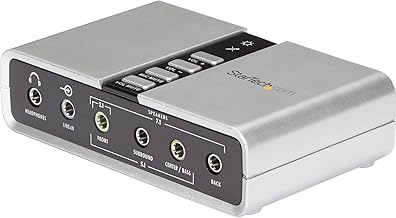
The StarTech adapter is the PC-focused option in this group. Its product name identifies it as an external USB sound card for a laptop or desktop computer, with support for up to 7.1 surround sound, digital S/PDIF, and analog 3.5 mm connections. That makes it a different type of solution from an HDMI decoder: it is intended for computer audio rather than HDMI-source conversion.
- Best for: Buyers seeking up to 7.1-channel audio from a PC or laptop through a USB external sound card.
- Why it was selected: The listing identifies 7.1 surround, USB, S/PDIF, and analog 3.5 mm audio in one device.
- Limitation: The provided product information does not specify supported audio formats, operating-system requirements, or the exact analog output layout. Confirm those details for the intended computer and receiver before purchase.
5.1CH HDMI Digital Sound Decoder

This product is a possible choice for a 4K HDMI installation that needs virtual 5.1 output, not a direct replacement for a true 7.1 decoder. Its listed HDMI 2.0b support includes 4K at 60 Hz, HDR, 3D passthrough, and HDCP 2.3/2.2 compliance. The product also lists HDMI, optical, coaxial, and USB inputs, with virtual 5.1 processing applied to 2.0/2.1 sources.
Its stated format support includes DTS, DTS-ES, Dolby Digital (AC3), FLAC, APE, AAC, MP3, and more. These format claims do not change the channel distinction: the listed surround output is virtual 5.1.
- Best for: Users who want listed 4K/HDR passthrough and virtual 5.1 processing from several digital inputs.
- Why it was selected: It handles multiple input types and named audio formats, making it relevant to digital decoding needs.
- Limitation: Choose another option if discrete 7.1-channel output is essential; this product is described as virtual 5.1.
Digital Audio Converter 5.1CH DTS Decoder

This is a general-purpose 5.1 digital audio converter for buyers looking at digital audio sources such as HD video players or DVD players. The product description emphasizes digital-to-analog conversion, a complete interface, clear labeling, and intuitive controls. It is presented as a 5.1-channel DTS decoder rather than a 7.1 decoder.
- Best for: Buyers who need a straightforward 5.1 conversion option for a compatible digital audio source.
- Why it was selected: Its stated home-cinema and digital-to-analog purpose is relevant to decoder shoppers, especially those whose systems use 5.1.
- Limitation: The supplied details do not list exact inputs, outputs, supported sample rates, or specific decoding formats beyond the product name’s DTS reference. Verify the connection and format requirements before choosing it.
SOUTHSKY 5.1/2.1 Audio Rush Decoder

The SOUTHSKY decoder is aimed at users connecting optical, coaxial, or 3.5 mm audio sources to an older receiver with analog RCA inputs. It converts digital optical or coaxial signals to six RCA outputs for 5.1 sound, and it offers a 2.1 mode with front-left, front-right, and subwoofer output. The listing names LPCM and Dolby, DTS, and AC-3 decoding.
A one-key switch selects 5.1 or 2.1 mode, while another input-selection control switches among two optical inputs, one coaxial input, and a 3.5 mm auxiliary input. The listing also says the selected input is remembered after restart.
- Best for: Older AV receivers with six RCA inputs and digital optical or coaxial sources.
- Why it was selected: Its input and output connections are clearly described for a common 5.1 conversion setup.
- Limitation: This is a 5.1/2.1 decoder, not a 7.1 decoder. Avoid it when the system requires discrete 7.1 output.
Buying Guide: How To Choose A 7.1 Surround Sound Decoder
Do you need true 7.1 or virtual surround?
Start by checking whether the system needs discrete 7.1 channels or whether virtual surround is sufficient. Discrete 7.1 uses separate channel outputs for a 7.1-capable audio path. Virtual 5.1 processing is a different feature and should not be treated as 7.1 output. In this list, the HDMI LPCM decoder explicitly lists analog 7.1, and the StarTech product name says it supports up to 7.1. The remaining products are described as 5.1 or virtual 5.1.
Which connection does the source use?
Match the decoder’s input to the source device. An HDMI-based setup points toward the HDMI LPCM decoder or the 5.1 HDMI model. Optical and coaxial sources fit the SOUTHSKY unit’s listed inputs. For a computer connected by USB, the StarTech adapter is the relevant category. A decoder cannot be assumed to accept every connection just because it supports a particular audio format.
What inputs does the receiver accept?
Check the amplifier or receiver’s audio inputs before selecting a converter. The HDMI LPCM model outputs analog audio through multichannel 3.5 mm ports. SOUTHSKY provides six RCA outputs for 5.1. The StarTech listing names digital S/PDIF and analog 3.5 mm connections. The decoder and receiver must have corresponding connections, and the channel layout must match the intended speaker system.
Does the decoder handle the audio format you use?
Identify whether the source sends uncompressed LPCM or compressed audio such as Dolby Digital, AC3, or DTS. The HDMI LPCM decoder lists analog conversion for LPCM and optical output for certain compressed bitstreams. SOUTHSKY lists support for LPCM, Dolby, DTS, and AC-3. The 5.1 HDMI decoder names several formats, but its surround processing is described as virtual 5.1. Confirm that the exact source output mode is supported.
Will video passthrough requirements affect the choice?
If the decoder sits between a video source and display, compare the stated video capabilities as well as audio support. The HDMI LPCM model lists support through 4Kx2K and says resolution follows the input. The 5.1 HDMI decoder specifies HDMI 2.0b, 4K at 60 Hz, HDR, 3D passthrough, and HDCP compliance. Do not infer identical video support for products that do not list those details.
What should you verify before buying?
- Confirm the required channel count: true 7.1, 5.1, or 2.1.
- Compare the source’s output connector with the decoder’s input connector.
- Check that the decoder’s output matches the receiver’s inputs.
- Verify support for the audio format and channel mode selected on the source.
- For an HDMI chain, check the listed video resolution and passthrough requirements.
- For products with limited specifications, confirm the missing connection or format details before purchase.
Frequently Asked Questions
What is a 7.1 surround sound decoder?
A 7.1 surround sound decoder processes compatible audio into a seven-channel surround arrangement plus a subwoofer channel. The source, decoder, output connections, and receiver must all support the intended channel format.
Is virtual 5.1 the same as true 7.1?
No. Virtual 5.1 processing is not the same as discrete 7.1-channel output. A product described as virtual 5.1 should not be selected when a system requires true 7.1 channels.
Can an HDMI decoder connect to an older analog receiver?
It can if the decoder provides analog outputs that match the receiver’s inputs. The HDMI LPCM decoder listed here provides multichannel 3.5 mm analog outputs, while SOUTHSKY provides six RCA outputs for 5.1.
Does optical audio always carry 7.1 sound?
No. Optical audio does not guarantee 7.1 output. Supported channel count depends on the source format and the capabilities of the source, decoder, and downstream equipment.
Which option is most relevant for computer audio?
The StarTech USB Audio Adapter is the computer-focused option in this list. Its product name identifies it as an external sound card for a laptop or PC with support for up to 7.1 surround sound.
Should I choose a 5.1 decoder for a 7.1 system?
Choose a 5.1 decoder only if 5.1 output meets the system’s needs. If the setup requires discrete 7.1 audio, select a product whose specifications explicitly state 7.1 support and verify that its connections match the receiver.