
For a device with an analog 3.5mm audio output, choose a cable or converter that matches the input on your speaker, soundbar, or amplifier. The TAIKURA cable is best for sending 3.5mm analog audio to an optical input; the JSAUX cable connects RCA equipment to a 3.5mm input; and the DAC converters work in the opposite direction, from digital optical or coaxial audio to analog 3.5mm output. Direction matters: these products are not interchangeable.
| Product | Best For | Signal Direction |
|---|---|---|
| TAIKURA 3.5mm-to-optical cable | Analog source to optical soundbar | 3.5mm analog to optical digital |
| JSAUX RCA-to-3.5mm cable | RCA source to 3.5mm input | RCA analog to 3.5mm analog |
| Hdiwousp DAC converter | Optical or coaxial source to analog output | Digital to 3.5mm/RCA analog |
| OREI digital-to-analog converter | Optical or coaxial source to 3.5mm output | Digital to analog |
| 192kHz optical-to-3.5mm converter | Optical TV output to AUX equipment | Optical digital to 3.5mm analog |
TAIKURA 3.5mm-to-Optical Converter Cable

Best for: Connecting a computer, laptop, or projector with a 3.5mm analog audio output to a soundbar or other device with a Toslink optical input. This product converts analog audio to digital optical audio, which is useful when the source and speaker have different connection types.
It provides two-channel PCM output and uses USB power. The listing describes plug-and-play operation without drivers or setup. Choose it when the source has an analog 3.5mm output and the receiving device accepts optical audio.
Limitation: This converter is one-way. It does not convert optical digital audio into a 3.5mm analog output, and the listed output is stereo PCM rather than a multichannel format.
JSAUX RCA-to-3.5mm Audio Cable

Best for: Sending analog sound from a device with left-and-right RCA outputs to a speaker, portable audio device, or other equipment with a 3.5mm input. The cable has two RCA male connectors at one end and a 3.5mm plug at the other, so it fits common stereo analog connections without a separate digital converter.
The listing specifies a 6.6-foot cable and a nylon-braided exterior. This is a straightforward choice when both devices already use analog audio and the RCA-to-3.5mm direction matches the connection you need.
Limitation: It is a cable, not a digital-to-analog converter. It will not connect an optical or coaxial digital output directly to a 3.5mm input. Check which device has RCA outputs before ordering.
Hdiwousp Optical and Coaxial DAC
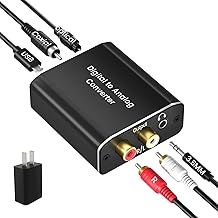
Best for: Connecting a digital audio source, such as a TV or disc player, to equipment that needs analog 3.5mm or left-and-right RCA audio. This is the reverse of a 3.5mm analog output connection: the converter receives optical Toslink or coaxial digital audio and produces analog stereo output.
The listed specifications include PCM/LPCM input, 24-bit S/PDIF, and sampling rates up to 192kHz. It includes an optical cable and a power adapter, and the listing describes plug-and-play setup without an additional driver. Select PCM or LPCM on the source device when required.
Limitation: The converter cannot run in reverse. It will not take a 3.5mm analog output and turn it into optical or coaxial digital audio.
OREI Optical and Coaxial Audio Converter

Best for: A setup that needs a digital optical or coaxial input and analog 3.5mm or RCA output. The product name lists headphone and amplifier support, while the connection options can suit systems where an optical or coaxial source must feed analog audio equipment.
The listing specifies 24-bit PCM and sampling up to 96kHz, plus plug-and-play operation. It is a potential fit when those stated input and output types match your equipment. Because the provided product details are limited, verify the included connections and setup requirements on the product listing before choosing it.
Limitation: This is a digital-to-analog converter, not a 3.5mm-to-optical adapter. The available details do not specify included accessories or further setup information.
192kHz Optical-to-3.5mm Converter

Best for: Connecting a TV, DVD player, or set-top box with an optical audio output to a speaker, mixer, or other device with a 3.5mm AUX input. This converter changes optical digital audio to stereo analog output, so it suits users seeking an analog 3.5mm signal from a digital source.
The listed input sampling rates include 32, 44.1, 48, 96, and 192kHz, with support for 24-bit streams. The listing instructs users to set the source audio output to PCM or stereo. That setting can be important if a TV is sending an unsupported surround format.
Limitation: The converter is not reversible. It cannot convert an analog 3.5mm output into an optical signal.
Buying Guide: Choosing the Right 3.5mm Audio Connection
Does the 3.5mm port send or receive audio?
Start by identifying the role of the 3.5mm jack. An output sends audio from a phone, computer, projector, or other source. An input receives audio at a speaker, amplifier, or recording device. A cable with a 3.5mm plug may physically fit either port, but the equipment must be connected in the correct direction.
Also distinguish an analog 3.5mm connection from an optical connection. A 3.5mm AUX output carries analog audio. Toslink optical and coaxial connections carry digital audio. Moving between these signal types requires an appropriate converter, not just a cable with different-looking plugs.
Which direction should the converter run?
- 3.5mm analog source to optical input: Choose an analog-to-digital converter such as the TAIKURA model.
- Optical or coaxial digital source to 3.5mm analog input: Choose a digital-to-analog converter, such as the Hdiwousp, OREI, or 192kHz model.
- RCA analog output to 3.5mm input: A stereo RCA-to-3.5mm cable such as the JSAUX can connect the matching analog ports.
Converters generally work in one direction only. Confirm the source and destination printed beside each device’s ports before buying. A product titled “optical to 3.5mm” should not be assumed to work as “3.5mm to optical.”
Do you need a DAC or only a cable?
A cable is appropriate when both devices use the same type of analog signal and compatible connectors. For example, an RCA-to-3.5mm cable links analog stereo outputs to an AUX input. A DAC is necessary when the source provides digital audio and the destination requires analog audio. An analog-to-digital converter is needed for the reverse conversion.
Do not choose a converter based only on the 3.5mm connector shown in a product title. Check the listed input, output, and signal direction. A 3.5mm output on a converter may be analog even when its input is optical digital.
What audio format and power details should you check?
For optical-to-analog converters, check whether the product supports the source’s audio format. Several products listed here specify PCM or LPCM, and one listing explicitly advises setting the TV or source to PCM or stereo. If the source sends a surround format rather than stereo PCM, the converter may not produce sound as expected.
Check power requirements as well. Some converters require USB power or a power adapter; the TAIKURA listing specifies USB power, while the Hdiwousp listing includes a power adapter. A passive cable does not perform digital conversion and generally cannot replace a powered DAC.
How should you compare listed sampling rates?
Sampling-rate figures describe supported digital audio input or output formats, but a higher number alone does not prove that a converter will work with a particular device. Match the converter’s listed support with the source settings and use case. For ordinary TV connections, confirming PCM support and the correct optical or coaxial input may be more important than selecting the highest listed rate.
What should you check before placing an order?
- Identify the source output and destination input by connector type.
- Confirm whether each connection is analog or digital.
- Verify the direction of conversion from the product details.
- Check whether the converter needs USB power or a power adapter.
- Set a digital source to PCM or stereo when the converter requires it.
- Choose a cable length that suits the distance between the devices.
Frequently Asked Questions
What does analog audio out 3.5mm mean?
It means a device sends analog audio through a 3.5mm jack, commonly called a headphone or AUX output. The receiving device must have a compatible analog input, or you must use a converter that matches its input type.
Can I connect a 3.5mm output directly to optical?
No. A 3.5mm analog signal and optical digital audio are different signal types. Use an analog-to-digital converter designed to accept 3.5mm input and provide optical output.
Will an optical-to-3.5mm converter work in reverse?
Usually not. Products specified as optical-to-3.5mm convert digital optical input into analog output. They do not automatically convert a 3.5mm analog source into optical digital audio.
Do I need to set my TV to PCM?
Some optical-to-analog converters require PCM or stereo output. Check the converter’s instructions and the TV’s audio settings. If the converter does not support the format sent by the TV, the audio may not work correctly.
Is RCA-to-3.5mm the same as a DAC?
No. An RCA-to-3.5mm cable carries analog audio between compatible analog connections. A DAC converts a digital audio signal, such as optical or coaxial, into analog audio.
Which option is best for connecting a computer to a soundbar?
It depends on the available ports. If the computer has 3.5mm analog output and the soundbar has optical input, use a 3.5mm-to-optical converter. If the computer or TV provides optical output and the soundbar or speaker requires analog 3.5mm input, use a digital-to-analog converter.