
The best keyboard piano for a laptop is usually a USB MIDI controller, which lets you play notes into compatible music software. The Akai MPK Mini MK3 is best for beat-making and hands-on controls, while the Akai LPK25 is a simpler compact controller. Donner’s N-25 is geared toward beginners. The two 61-key options are better suited to learning and standalone keyboard practice; their listed features do not confirm laptop MIDI connectivity.
| Product | Best suited for | Key distinction |
|---|---|---|
| Akai MPK Mini MK3 | Beat-making and production | 25 velocity-sensitive keys, thumbstick, arpeggiator |
| Donner N-25 | Beginners and portable setups | 25 mini keys, programmable banks, teaching courses |
| Akai LPK25 | Simple laptop music input | Compact controller with octave, sustain, and arpeggiator controls |
| RockJam RJ361 | Beginner keyboard practice | 61 keys, sounds, rhythms, and playback features |
| 61-Key Piano Keyboard | Children’s introductory practice | Built-in speaker, tones, rhythms, and record/playback |
Akai Professional MPK Mini MK3

The Akai Professional MPK Mini MK3 is a 25-key USB-powered MIDI controller for producing music with laptop software. Its velocity-sensitive mini keys send expressive note input to virtual instruments, making it a practical choice for melodies, bass lines, and beat production in a compact setup.
It stands out for its control options: a four-way thumbstick handles pitch and modulation, and a built-in arpeggiator offers adjustable resolution, range, and modes. The product listing also identifies Native Kontrol Standard integration, which may be useful for users working with supported Native Instruments software and sounds.
- Best for: Laptop-based producers who want more than basic note entry.
- Why choose it: The thumbstick and adjustable arpeggiator provide performance controls in addition to the keyboard.
- Limitation: It has 25 mini keys, so it provides less physical keyboard range than a 61-key instrument.
Choose this model if beat-making controls and expressive software-instrument input matter more than having a full-size keyboard layout.
Donner Mini MIDI Keyboard N-25
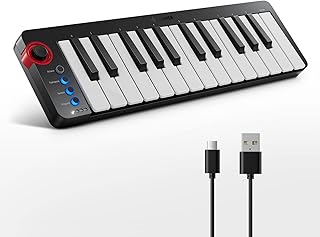
The Donner N-25 is a compact 25-key MIDI controller aimed at beginners who want to play into computer or mobile music apps. It has velocity-sensitive mini keys and a simple control layout. The listed functions include four user-programmable banks, an arpeggiator, sustain, octave control, and tap tempo.
For computer use, the listing says it connects to Mac and PC through USB-MIDI without extra drivers. It also describes smartphone and tablet music-app use with an OTG adapter. The product name mentions 40 teaching courses, which may appeal to a new player seeking learning support alongside music creation.
- Best for: Beginners who want a small controller with basic creative controls.
- Why choose it: It combines velocity response, programmable banks, and common performance functions in a 25-key format.
- Limitation: Its mini keys are scaled down, which may feel cramped to players accustomed to full-size keys.
Choose the N-25 if portability and beginner-friendly controls are priorities. Confirm that your intended app and device connection method fit your setup before buying an OTG adapter or other accessories.
Akai Professional LPK25

The Akai Professional LPK25 is a compact USB MIDI keyboard for controlling software instruments and other sound sources. Its 25 responsive mini keys are designed for playing melodies, bass lines, and musical ideas with dynamics. A single USB cable is listed for connecting the controller to sound sources.
Dedicated octave-up and octave-down buttons let players shift the playable range without needing a longer keyboard. The LPK25 also includes a sustain button, built-in arpeggiator, and clock. These controls make it a straightforward option for laptop users who want a small instrument for entering notes and exploring software sounds.
- Best for: Laptop musicians seeking a simple, space-saving MIDI keyboard.
- Why choose it: Octave buttons, sustain, and an arpeggiator cover useful playing functions without requiring a larger keybed.
- Limitation: The 25-key mini layout is less suitable for two-handed parts that need a wide playing range.
Compared with the MPK Mini MK3, the LPK25 is better suited to straightforward keyboard input than a setup centered on its listed thumbstick controls. Choose it if compact note entry and octave shifting are enough for your workflow.
RockJam RJ361 61-Key Keyboard Piano

The RockJam RJ361 is a 61-key compact keyboard piano designed for beginners. Its larger key range may suit practice and learning more naturally than the 25-key controllers, while its listed 200 sounds and 200 rhythms offer options for playing along and creative exploration.
Other listed features include sustain and vibrato effects, plus record and playback for capturing and reviewing a performance. These features make the RJ361 relevant to people who want a keyboard for practice rather than only a laptop input device.
- Best for: Beginners who want a broader keyboard range and built-in sound choices.
- Why choose it: Its 61 keys, varied sounds and rhythms, and record/playback functions support practice and experimentation.
- Limitation: The provided product details do not specify USB MIDI or laptop connectivity, so do not assume it can control computer software.
Choose this model if standalone keyboard practice is the main goal. If you specifically need to play laptop instruments, verify MIDI connection support in the product documentation before purchasing.
61-Key Piano Keyboard With Microphone

This 61-key electronic piano is positioned as an educational starter keyboard for children and teens. It has a built-in speaker and LED display, with 16 tones and 10 rhythms listed. Those features make its controls and sounds accessible for introductory practice without requiring laptop software for the described functions.
The keyboard also lists eight percussion sounds, chord modes, and record-and-playback functions. Recording a performance gives a learner a way to listen back and review what they played. Its 61-key range offers more room for practice than a 25-key mini controller.
- Best for: Children or teens beginning to explore keyboard playing and basic music creation.
- Why choose it: A built-in speaker, LED display, tones, rhythms, and recording features provide several learning and play options.
- Limitation: The listed features do not confirm USB MIDI or a laptop connection, so it is not a confirmed laptop controller.
Choose this keyboard for introductory instrument practice, not on the assumption that it will operate laptop music software. Check the manufacturer’s connection details if computer control is essential.
Buying Guide: How To Choose A Keyboard Piano For A Laptop
Do you need a MIDI controller or a standalone piano?
A MIDI controller sends performance information, such as notes and velocity, to music software. The laptop and software typically provide the instrument sound. A standalone electronic piano has its own sound-producing features, such as built-in tones or speakers. Some keyboards can do both, but the product details must explicitly confirm the needed connection and functions.
For a laptop-first setup, start with a product described as a USB MIDI controller, such as the Akai MPK Mini MK3, Donner N-25, or Akai LPK25. The two 61-key keyboards in this list describe learning and built-in keyboard features, but do not list laptop MIDI connectivity.
How many keys do you need?
A 25-key controller takes up less desk space and can be adequate for entering short melodies, bass lines, or chords into software. Its smaller range may require frequent octave changes for parts that span several octaves. The Akai and Donner controllers provide octave-related controls or range shifting as listed.
A 61-key keyboard offers a wider physical range for practice and two-handed playing. It takes up more room, and a wider keybed alone does not establish that it can send MIDI to a laptop. Choose key count based on both playing style and confirmed connectivity.
Are mini keys suitable for your playing style?
Mini keys reduce the size of a controller, which can help when desk space or portability matters. They are also physically smaller than standard keys, so players used to a traditional piano layout may prefer a full-size keyboard. Consider whether you will use the device mainly for composing, beat-making, and software control or for extended piano practice.
Which controls are useful for music production?
Extra controls can reduce the need to use a mouse while playing. The MPK Mini MK3 includes a four-way thumbstick and an adjustable arpeggiator. The LPK25 offers octave buttons, sustain, an arpeggiator, and a clock. The Donner N-25 lists programmable banks, sustain, tap tempo, and an arpeggiator. Compare these functions with the controls your music software supports.
What should you check before connecting a keyboard?
- Confirm that the product supports the connection type your laptop and music software require.
- Check whether the listed connection is USB-MIDI, a different MIDI connection, or only a power connection.
- For mobile devices, verify the required adapter and app support; the Donner listing specifically mentions an OTG adapter.
- Check whether the software or sound source you plan to use supports the controller’s extra functions.
- Remember that a MIDI controller may require music software or a virtual instrument to produce sound.
Should you choose a beginner keyboard or a laptop controller?
Choose a MIDI controller if your main goal is entering notes into laptop-based production software. Choose a standalone beginner keyboard if you want the listed built-in sounds, rhythms, speaker, or learning-oriented features. If you need both roles, verify that the product explicitly supports laptop MIDI as well as the standalone features you want.
Frequently Asked Questions
What is the best type of keyboard for making music on a laptop?
A USB MIDI controller is a suitable type when the goal is to play notes into laptop music software. Confirm that the controller and software support the connection and features you need.
Does a MIDI keyboard make sound by itself?
A MIDI controller sends playing information and may not produce sound independently. The laptop software or another compatible sound source usually supplies the instrument sound.
Is a 25-key keyboard enough for a beginner?
A 25-key controller can be enough for basic melodies, bass lines, and software input. Its range is limited compared with a 61-key keyboard, so it may be less convenient for broad piano practice.
Can I use the 61-key keyboards in this list with a laptop?
The listed features for the two 61-key keyboards do not confirm USB MIDI or laptop connectivity. Check the manufacturer’s documentation before choosing one for computer-based music production.
What is the difference between the Akai MPK Mini MK3 and LPK25?
Both are 25-key USB MIDI controllers. The MPK Mini MK3 lists a four-way thumbstick and adjustable arpeggiator, while the LPK25 lists octave buttons, sustain, an arpeggiator, and clock.