
The best conference room phone for a large room depends on how many people need to speak, how far apart they sit, and whether the room uses a traditional phone system or a connected device. The Yealink CP965 is identified for medium and large meeting rooms and has a 13-microphone array; the VTech VCS702 offers two wireless microphones; and the Anker PowerConf is a portable-style speakerphone with 360-degree pickup. Compare room coverage, connection requirements, and microphone placement before choosing.
| Product | Best suited for | Highlighted feature |
|---|---|---|
| Yealink CP965 | Medium and large meeting rooms | 13-microphone array |
| VTech VCS702 ErisStation | Rooms that benefit from two wireless microphones | DECT 6.0 and Orbitlink wireless technology |
| Anker PowerConf | Flexible personal or shared workspaces | Six microphones with 360-degree pickup |
| Polycom RealPresence Trio 8500 | Teams seeking touch controls and device flexibility | USB and Bluetooth built in |
| Yealink CP925 | Buyers considering a touch-sensitive HD IP conference phone | Touch-sensitive HD IP design |
Yealink CP965 HD IP Conference Phone

The Yealink CP965 is the most directly targeted option in this group for a larger meeting room. Its product name identifies it for medium and large meeting rooms, and the listed specifications include a 13-microphone array, Android 9.0, and a touch-sensitive HD IP conference-phone design. Those details make it a relevant choice for buyers seeking a dedicated room phone rather than a basic portable speakerphone.
Best for: Teams comparing dedicated conference phones for medium or large rooms, especially when a multi-microphone array is a priority. It is selected because its listed room-size guidance and 13-microphone array directly address larger-meeting needs.
Check before buying: The supplied product information does not state its exact pickup range, supported calling platforms, network requirements, or included accessories. Confirm those details against your room setup and phone system before ordering; the microphone count alone does not establish coverage at every seat.
VTech VCS702 ErisStation DECT Phone

The VTech VCS702 ErisStation is a DECT 6.0 conference phone with two wireless microphones and Orbitlink wireless technology. Separate wireless microphones can be useful in a room where participants sit away from the central phone, because the microphones can be positioned near speakers instead of relying only on the main unit. The provided product details do not specify the wireless microphones’ operating range or battery duration.
Best for: Meeting spaces where two participants or seating areas may benefit from microphones placed away from the base. It is selected for its two-wireless-microphone configuration, which provides a different placement approach from tabletop units with a fixed microphone array.
Check before buying: Do not assume that DECT wireless coverage will reach every part of a large room. Verify the microphone range, charging arrangements, and the phone’s connection requirements for the intended room. It may be a less suitable choice if your organization needs a stated large-room pickup specification, since none is provided here.
Anker PowerConf 360-Degree Speakerphone
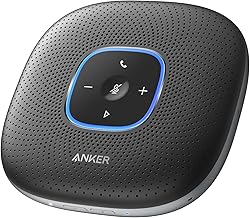
The Anker PowerConf is a speakerphone with six microphones arranged in a 360-degree array. The listed features also include Voice Radar 3.0, described as using AI deep learning to reduce noise, cancel echo, and detect multiple speakers. Automatic voice balancing is intended to compensate for differences in speaker volume and distance from the device. The product name lists 24-hour call time, Bluetooth 5.3, and USB-C.
Best for: Buyers who want a flexible speakerphone for a personal workspace or a smaller shared meeting area, rather than a fixed room-phone installation. It is selected because its microphone array and voice-processing features are clearly stated.
Better for: Teams that value moving or connecting a speakerphone through Bluetooth or USB-C. Check before buying: The supplied details do not identify a maximum room size or pickup distance. For a large room with widely spaced participants, confirm coverage needs rather than treating 360-degree pickup as proof that every seat will be equally clear.
Polycom RealPresence Trio 8500

The Polycom RealPresence Trio 8500 combines a 5-inch color touch display with built-in USB and Bluetooth. Its listed audio features include room-filling audio up to 14 kHz, full duplex, echo cancellation, and noise reduction with intelligent processing. The product information also says video conferencing and content sharing can be added, offering flexibility for teams that may want to use the device with their own equipment.
Best for: Organizations that want a touch-display conference phone with USB and Bluetooth options, plus the possibility of adding video conferencing and content sharing. It is selected for the combination of stated audio processing and device flexibility.
Check before buying: The available information does not specify exact room dimensions, microphone pickup distance, or which additions are included. Confirm the system’s requirements and whether the desired video or content-sharing functions require separate equipment. Avoid choosing it solely from the “room-filling” description if your room needs a defined coverage range.
Yealink CP925 Touch-Sensitive IP Phone

The Yealink CP925 is described as a touch-sensitive HD IP conference phone. That makes it a candidate for buyers who want a dedicated IP conference-phone format with touch controls. The supplied product data does not provide microphone count, room-size guidance, connectivity details, or audio-processing specifications, so it is not possible to compare its coverage directly with the CP965 or the speakerphones listed above.
Best for: Buyers who specifically want to evaluate a touch-sensitive HD IP conference phone and can confirm its requirements with the seller or manufacturer. It is included because it is a dedicated conference-phone model, not simply a standalone speakerphone.
Check before buying: Confirm whether its microphone coverage and IP-phone requirements suit the room and calling setup. The product information provided here does not establish that it is intended for large rooms, so avoid assuming it will cover a large space without additional specifications.
Buying Guide: How To Choose A Conference Room Phone
Large-room performance depends on more than a product’s label. Room shape, seating distance, background noise, and the number of people who speak all affect whether remote participants can hear clearly. Compare stated microphone arrangements and coverage information with the actual layout. If the manufacturer does not publish a pickup range or room-size recommendation, ask for confirmation before purchasing.
How many microphones does the room need?
Microphone design helps explain how a device is intended to collect voices. The CP965 lists a 13-microphone array, while the Anker PowerConf lists six microphones arranged for 360-degree pickup. The VTech VCS702 instead lists two wireless microphones, which can be positioned separately. These arrangements are not directly comparable by microphone count alone: pickup pattern, placement, processing, and room acoustics matter too.
Should you choose wireless microphones or a fixed array?
Wireless microphones can help bring a microphone closer to participants who sit away from the central unit. They also introduce practical questions about wireless range, charging, and where microphones will be placed between meetings. A fixed array keeps microphones together in one device, which can simplify setup, but it may be less adaptable to widely separated seating. Match the design to your table shape and meeting habits.
Does the device need to be an IP conference phone?
A dedicated IP conference phone and a USB or Bluetooth speakerphone may serve different room setups. Before choosing, identify how calls are placed: through an organization’s phone system, through a computer-based meeting service, or through another connected device. Confirm that the product supports the organization’s intended connection method. Product names and general descriptions are not enough to establish compatibility with a particular platform or network.
What audio features should buyers compare?
Look for clearly stated features such as echo cancellation, noise reduction, full-duplex audio, voice processing, and automatic level balancing. These terms describe different aspects of call audio; they do not guarantee that a device will perform equally well in every room. The Anker listing describes noise reduction, echo cancellation, speaker detection, and automatic voice balancing. The Polycom listing specifies full duplex, echo cancellation, and noise reduction.
How should you assess a large room before ordering?
- Estimate the distance between the phone or microphones and the farthest participants.
- Note whether people sit around one table or in multiple seating areas.
- Consider background noise, reflective surfaces, and other sources of sound.
- Check the manufacturer’s published room-size guidance and microphone pickup range.
- Confirm power, network, USB, Bluetooth, and phone-system requirements for the chosen model.
- Ask whether additional microphones or video equipment are included or sold separately.
When a room is unusually large, divided, or noisy, a single tabletop unit may not meet every need. Do not infer that a phone covers an entire room because it has several microphones or a 360-degree pickup description. Obtain explicit coverage guidance, and consider whether the room needs additional microphones or a different conferencing setup.
Which choice is better for different meeting styles?
For a dedicated phone aimed at medium and large rooms, the CP965 has the clearest stated room-size positioning in this selection. For participants who may need microphones placed away from a base, the VTech’s two wireless microphones are a relevant design feature. For a flexible speakerphone with a 360-degree array and stated voice processing, consider the Anker. The Polycom emphasizes touch controls, USB and Bluetooth, and stated audio processing. The CP925 requires more specification checking because the provided details are limited.
Frequently Asked Questions
What is the best conference phone for a large room?
The Yealink CP965 is the clearest match in this selection because its product description specifies medium and large meeting rooms and a 13-microphone array. Confirm its coverage and connection requirements for your specific room before buying.
Is a 360-degree microphone enough for a large conference room?
Not necessarily. A 360-degree arrangement describes pickup direction, not a guaranteed room size or maximum distance. Check the manufacturer’s coverage guidance and compare it with the distance between the device and the farthest speaker.
Are wireless microphones useful in a large meeting room?
They can be useful when participants sit away from the main phone, because microphones may be placed closer to speakers. Verify wireless range, charging needs, and microphone placement requirements for the specific model.
What is the difference between a conference speakerphone and an IP conference phone?
A speakerphone is generally used as an audio device connected to another device, while an IP conference phone is a dedicated phone format intended for network-based calling. Confirm the exact connection and calling requirements for each model before purchase.
Can a conference phone also support video meetings?
Some products offer video-related flexibility, but the details vary. The Polycom RealPresence Trio 8500 listing says video conferencing and content sharing can be added. Confirm what equipment or services are required, since the listing does not establish that every video function is included.
What should I verify before buying a conference room phone?
Check microphone coverage, room-size guidance, supported connection methods, phone-system or meeting-platform requirements, power needs, and included accessories. For a large or noisy room, confirm coverage directly rather than relying only on microphone count or broad audio descriptions.