
The best professional condenser microphone set depends on whether you need a simple computer connection, an all-in-one recording bundle, or controls for more than one host. The MAONO A04 Gen2 is a flexible choice for USB or XLR recording, while the Dejasound DJM5 suits buyers who want USB convenience and built-in monitoring controls. MorTime and J.I.Y include more production accessories, and the V8s bundle is designed for two-person recording.
| Microphone set | Best for | Key distinction |
|---|---|---|
| MAONO A04 Gen2 | Flexible home recording | USB and XLR connectivity |
| Dejasound DJM5 | Simple computer recording | USB, mute, and headphone monitoring |
| MorTime bundle | New creators who want accessories | Sound card, boom arm, filters, and more |
| J.I.Y podcast bundle | Streaming with sound effects | DSP processing and voice presets |
| V8s for 2 bundle | Two-person shows | Two microphones and a voice-effects sound card |
MAONO A04 Gen2 USB/XLR Microphone Kit

Best for: Home creators who want a microphone that can connect directly to a computer or be used with an audio interface or mixer. Its dual USB and XLR connections make it the most adaptable option in this selection.
The A04 Gen2 has a cardioid pickup pattern and a stated 192kHz/24-bit sampling rate, with a 30Hz–16kHz frequency response. In USB mode, MAONO Link software provides gain adjustment, noise-reduction settings, scene EQ presets, compression, and limiting. The kit is suitable for podcasting, streaming, voice-over, and other content creation.
Why it was selected: It combines a computer-friendly USB connection with an XLR path for a more configurable recording setup. That makes it a better fit than a USB-only model for buyers who may change their equipment later.
Limitation: XLR use requires a separate audio interface or mixer, and the listing specifies that phantom power is needed for XLR connection. Software controls are available only in USB mode, and it is not compatible with Xbox.
Dejasound DJM5 USB Recording Microphone

Best for: Buyers who want a direct USB connection and convenient controls for podcasting, singing, streaming, or home recording. The listing describes it as plug-and-play for a PC, smartphone, or laptop, without additional hardware.
The DJM5 uses a cardioid pattern and a 16mm diaphragm. Its stated specifications include a 192kHz/24-bit sampling rate and a 30Hz–16kHz frequency response. Built-in controls include echo and volume adjustment, a mute button, and a 3.5mm headphone monitoring jack. An isolation shield and pop filter are included according to the product name.
Why it was selected: It is a better choice than a basic USB microphone for creators who want onboard adjustments and a headphone-monitoring connection without adding a separate interface.
Limitation: The listed connection is USB, so this is not the choice for someone specifically seeking an XLR microphone workflow. The product details do not describe a separate audio interface.
MorTime Condenser Microphone Bundle

Best for: First-time creators who want several recording accessories in one package. The listed bundle includes a microphone, live sound card, adjustable boom arm, shock mount, metal pop filter, sponge pop filter cover, earphone, audio cables, and power cable.
MorTime describes the microphone as using a cardioid pickup pattern for recording, communication, and voice work. Its included filters are intended to help reduce unwanted noise. The bundle is presented for activities such as calls, singing, video creation, and live broadcasting.
Why it was selected: The accessory list makes it a practical all-in-one starting point for buyers who do not already own a boom arm, shock mount, or pop filters. Choose this if having a sound card and several setup components together matters more than choosing each component separately.
Limitation: The product details do not provide a sampling rate, frequency response, or specific computer and phone compatibility information. Check the connection requirements for your intended device before buying.
J.I.Y Podcast Bundle With DSP Effects

Best for: Streamers and podcasters who want sound processing and voice effects built into their setup. The listed components include a condenser microphone, boom arm, and multifunctional sound card with Bluetooth 5.1.
The microphone has a 16mm capsule, while the bundle’s DSP processing is described as supporting low-noise audio and vocal presence. Presets are provided for pop vocals, podcast talk, and karaoke. The listed effects include reverb, pitch adjustment, noise filtering, and voice changing.
Why it was selected: This kit is better suited to creators who want to adjust or stylize audio during a live broadcast rather than relying only on recording software. Its controls and presets distinguish it from simpler microphone-and-accessory bundles.
Limitation: The listing’s name mentions a bundle for one, while its feature text refers to dual-host use. Confirm the included microphone count and package contents before purchasing, especially if you need a two-microphone setup.
V8s Bundle With Two Podcast Microphones
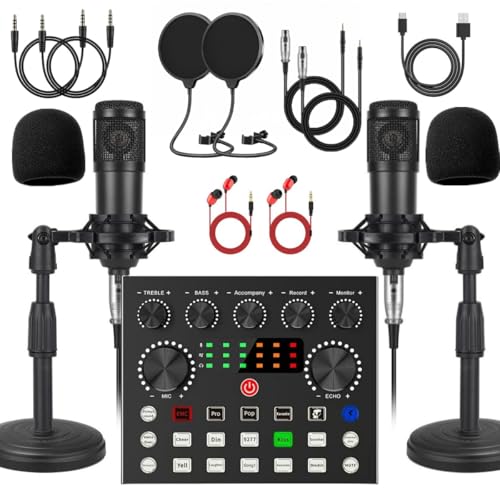
Best for: Two-person podcasts, interviews, or shared streaming setups. The listing specifies two podcast microphones, two desktop microphone stands, and a V8s sound card with controls for audio effects.
The microphones are described as metal-bodied and cardioid, with the pickup pattern intended for podcasts, vocals, and voice work. The sound card includes functions such as reverb, treble and bass adjustment, noise reduction, accompaniment, and voice changing. The product listing also describes multiple sound effects and voice modes.
Why it was selected: It is the clearest fit for buyers who need two microphones in one bundle. Compared with single-microphone kits, it provides a more direct starting point for recording two people at the same time.
Limitation: The listing emphasizes voice effects and live-broadcast features, but does not provide a sampling rate or frequency response. Buyers prioritizing detailed technical specifications should compare those needs with the product information before choosing.
Buying Guide: How To Choose A Professional Condenser Microphone Set
Do you need USB, XLR, or both?
USB microphones connect directly to a compatible computer or device and can simplify a home recording setup. They are useful for podcasting, calls, streaming, and voice-over when you want fewer components. Confirm that the microphone supports your specific device and operating system; a product’s general “plug-and-play” description does not guarantee compatibility with every platform.
XLR microphones connect to an audio interface or mixer rather than directly to most computers. This adds equipment and setup steps, but can suit buyers building a more configurable studio. A dual USB/XLR model offers a choice between direct computer connection and an interface-based setup. Check whether the interface supplies phantom power if the microphone requires it.
What accessories are important for your recording space?
A boom arm or desktop stand positions the microphone near the speaker. A shock mount can help isolate it from some vibrations transferred through a desk or stand, while a pop filter can reduce strong bursts of air from speech. Bundles vary: some include these pieces, while others focus on the microphone and sound card. Make a checklist of the items you already own before paying for a larger kit.
An isolation shield may be useful as part of a recording arrangement, but it does not replace choosing a quiet room or positioning the microphone carefully. Review the included accessory list rather than assuming that a product marketed as a “studio kit” includes every item you need.
How many people will use the setup?
For solo recording, a single microphone kit is usually the simpler choice. For interviews or co-hosted shows, look for the number of microphones and stands stated in the package details. A sound card with multiple effects is not the same as a two-microphone kit. If two people need separate microphones, confirm that the bundle explicitly includes two units and check how they connect.
Should you prioritize effects or straightforward recording?
Onboard effects, echo controls, and voice presets can help creators change audio during streaming or live broadcasts. They may also add controls that beginners need to learn. A simpler USB microphone may be preferable when the goal is clear speech capture with minimal setup. Buyers who want to edit sound later should consider whether the microphone’s connection and software features fit their recording workflow.
Which specifications should you compare?
Look for the pickup pattern, diaphragm or capsule size, frequency response, sampling rate, and bit depth when those details are provided. These specifications help describe the microphone and its recording format, but they do not guarantee that it will sound suitable in every room or for every voice. Also compare available monitoring options, mute and gain controls, and whether software adjustments work over USB, XLR, or both.
What else should you check before ordering?
- Confirm the package contents, including the number of microphones, cables, stands, and filters.
- Check the connection type and whether a sound card, mixer, interface, or phantom power is required.
- Verify compatibility with your intended computer, phone, tablet, or streaming setup.
- Consider desk space and whether a boom arm or desktop stand better suits your recording position.
- Decide whether you need live effects, headphone monitoring, or software controls.
Frequently Asked Questions
What is a condenser microphone set used for?
A condenser microphone set is commonly used for spoken-word recording, podcasts, singing, streaming, video production, and voice-over. The bundle may include accessories such as a stand, pop filter, sound card, or cables.
Is a USB condenser microphone suitable for podcasting?
Yes. A USB condenser microphone can be suitable for podcasting when it connects to the intended device and provides the controls or monitoring options the user needs. Check the product’s stated compatibility before buying.
Do all condenser microphones need an audio interface?
No. USB models can connect directly to compatible devices. XLR models generally require an audio interface or mixer, and some XLR microphone setups also require phantom power.
What does a cardioid pickup pattern mean?
A cardioid pattern is designed to capture sound primarily from the front of the microphone. It is a common choice for voice recording, but microphone placement and room noise still affect the recording.
Is a two-microphone bundle better for a podcast?
A two-microphone bundle can be more convenient when two people need separate microphones. Confirm the listed microphone count and connection setup, since not every podcast bundle includes two microphones.
Do bundled pop filters and sound cards guarantee clean audio?
No. Accessories and sound processing can support a recording setup, but they do not guarantee a particular result. Room noise, microphone distance, speaking technique, and device configuration also affect recorded audio.