
A three-channel 3.5mm cable set is typically three separate male-to-male mini-jack connections used to carry multichannel audio between compatible equipment. The UpperFu and SummitLink cables are the closest matches here: each is described as a color-coded, three-plug replacement for certain Logitech 5.1 speaker systems. The other listed cables are single 3.5mm cords, so they are better for ordinary stereo or headset connections—not a three-connection surround setup.
| Product | Best For | Connection Type |
|---|---|---|
| UpperFu 5FT Replacement Cable | Logitech 5.1 speaker replacement | Three color-coded male plugs to three male plugs |
| SummitLink Audio Cable | Compatible 5.1 speaker systems | Three color-coded male plugs to three male plugs |
| 3-to-3 3.5mm Audio Cable | General audio patching | Single stereo cable |
| UGREEN 4-Pole TRRS Cable | Headsets, microphones, and calls | Single 4-pole cable |
| Syncwire Nylon-Braided AUX Cable | Everyday stereo audio | Single AUX cable |
UpperFu Color-Coded 3-to-3 Cable
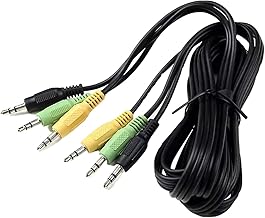
Best for: Replacing the three-cable audio connection on a compatible Logitech 5.1 speaker system. This 5-foot cable has three color-coded 3.5mm male plugs at each end, according to the product details. The listing names Logitech z-5500, z-5450, z-5400, z-5300, z-906, z-680, and x540 among the compatible speaker models.
The three matching connections make this a more relevant choice for a multichannel analog setup than a conventional stereo AUX lead. The listed oxygen-free copper inner wire is intended for signal transmission. Check the speaker and source connection labels before ordering; a three-plug cable does not make an incompatible device support surround sound.
Limitation: The 5-foot length may not suit installations that need a longer cable run. Choose this if you need the listed three-plug replacement format and the length works for your setup.
SummitLink Color-Coded 3-to-3 Cable

Best for: Buyers seeking a three-connection replacement for Logitech 5.1 computer speakers or other speakers with the required mini-jack inputs. The product is described as having three color-coded 3.5mm male plugs on each end. Its stated compatibility includes Logitech 5.1 speaker systems, and the listing also mentions other speakers that use 3.5mm mini jacks.
This cable belongs in the comparison because it has the three-to-three layout needed for certain analog multichannel speaker connections. Match the plug colors to the corresponding jacks on the devices, and confirm that both ends of your setup use the same three-jack arrangement.
Limitation: The supplied product information does not specify a cable length or a detailed list of compatible speaker models. Avoid assuming it will fit a particular system without checking the jacks and required reach.
3-to-3 3.5mm Stereo Audio Cable

Best for: General stereo audio patching over a short distance. This 5-foot cable has 3.5mm male connectors and is described as a male-to-male stereo AUX cable for general audio applications. It may suit a source and speaker or audio input that each accept a standard stereo mini-jack connection.
Despite “3 to 3” in its product name, the listing describes one stereo cable, not three separate cables or a three-channel plug set. That distinction matters: a single stereo lead carries a left-right audio connection and is not a substitute for the three color-coded connections used by some analog 5.1 speaker systems.
Limitation: It is not listed as a multichannel three-cable set. Choose this if your devices need one stereo 3.5mm lead; avoid it if you need three separate analog channels.
UGREEN 4-Pole TRRS Audio Cable

Best for: Headset microphone use, video calls, and compatible external microphones. This 3-foot male-to-male cable has dual 4-pole TRRS connectors, which the product details say make microphone functions available with compatible headsets and devices. Listed construction features include silver-plated copper conductors, three-layer shielding, gold-plated plugs, a nylon-braided jacket, and aluminum-alloy shells.
It is a different type of cable from a three-plug surround connection. The TRRS design places audio and microphone signals in one connector, making it a better match for certain headset and call setups than a multichannel speaker link. Its short length can also help keep a nearby connection tidy.
Limitation: At 3 feet, it may be too short for equipment placed farther apart. Confirm the devices use compatible 4-pole TRRS connections before choosing it.
Syncwire Braided 3.5mm AUX Cable

Best for: Everyday stereo listening between devices with standard 3.5mm AUX ports. This 3.3-foot male-to-male cable is described for use with audio sources and equipment including phones, tablets, laptops, car stereos, headphones, and speakers. The listed features include gold-plated connectors and a tangle-resistant nylon braid. The product information states a bend lifespan of more than 15,000 bends.
This cable is a practical comparison option when the requirement is a conventional AUX connection rather than three analog channels. It is shorter than the 5-foot stereo cable above and is described as compatible with devices that have a 3.5mm AUX port.
Limitation: The listing notes that it is incompatible with LifeProof and OtterBox cases. It is a single AUX cable, not a three-connection surround cable.
Buying Guide: How To Choose A 3-Channel 3.5mm Cable
Does “3 to 3” Mean Three Audio Channels?
Not always. Product titles can use “3 to 3” to describe several different things. A genuine three-connection cable set has three separate 3.5mm male-to-male leads, often color-coded. A standard stereo AUX cable has one plug at each end and carries a stereo connection. A 4-pole TRRS lead also has one plug at each end, but its contacts can carry headset audio and microphone signals.
For an analog multichannel speaker connection, look for wording such as “three male to three male,” “3-plug,” or “color-coded,” then inspect the product image and confirm the exact jack arrangement. Do not rely on “3 to 3” by itself.
What Connections Does Your Speaker System Require?
Check the source device and speaker inputs before selecting a cable. Some computer speakers use three analog mini-jack inputs to receive separate channel groups. Others use a different connection type or a digital input. A cable only links compatible ports; it cannot convert stereo output into surround sound or add multichannel support to a device that lacks it.
For a replacement, compare the existing cable’s plug count, connector size, color coding, and end layout. If the system uses three individual cables, a single stereo AUX cord will not replace them. If it uses just one 3.5mm input, a three-cable set may be unnecessary.
How Long Should The Cable Be?
Measure the route between the devices, including the distance around furniture or along a wall. The listed options include 3-foot, 3.3-foot, and 5-foot cables, but only some product details provide a length. A shorter cable can reduce excess slack when devices sit close together. A longer cable may be needed when the speaker and source are farther apart.
Allow a little extra length for routing, but avoid choosing a cable based on an unverified measurement. The product information provided for the SummitLink cable does not state its length, so check the listing details if reach is important.
When Does TRRS Matter?
TRRS stands for a four-contact connector commonly used for combined headset audio and microphone signals. It is relevant when you need a microphone path for calls, gaming, or recording and the devices support the same wiring arrangement. It is not a synonym for a three-channel speaker cable.
For speaker-only audio, verify whether your equipment expects a standard stereo TRS plug, a TRRS headset plug, or multiple separate plugs. Similar-looking 3.5mm connectors may serve different purposes.
Which Cable Features Are Worth Comparing?
- Connector count: Match the number of plugs and jacks, not just the connector diameter.
- Plug type: Distinguish standard stereo TRS, four-pole TRRS, and a set of three separate leads.
- Length: Compare the stated cable length with the physical distance between devices.
- Color coding: Helpful when the speaker inputs and outputs use matching color labels.
- Jacket and strain relief: Braiding and reinforced joints are listed construction features on some options, but they do not determine whether the cable fits your devices.
- Compatibility details: Check model names and port requirements against the equipment manual or existing cable.
Frequently Asked Questions
Is A 3-To-3 3.5mm Cable The Same As A Stereo AUX Cable?
No. A three-to-three set generally means three separate male-to-male connections, while a standard stereo AUX cable has one connector at each end. Check the product description and connector image to confirm which type is being sold.
Can A Single 3.5mm AUX Cable Carry 5.1 Surround Sound?
A standard stereo AUX cable is not the same as a three-connection analog 5.1 cable set. Whether a particular system can carry multichannel audio over another connection depends on the equipment and its supported input and output formats.
Are The UpperFu And SummitLink Cables The Same Type?
Both are described as color-coded, three-plug male-to-male cables for compatible 5.1 speakers. The UpperFu details specify a 5-foot length and list several Logitech models. The supplied SummitLink details do not state a length or provide the same model-by-model list.
Can I Use A TRRS Cable For A Three-Plug Speaker Setup?
Not as a direct replacement for three separate connections. A TRRS cable has one four-contact plug at each end and is intended for compatible headset or microphone connections. Match the connector type and layout required by the equipment.
What Should I Check Before Ordering A Replacement?
Count the plugs, identify whether they are TRS or TRRS, check the color labels, measure the needed length, and verify the speaker and source port requirements. If replacing an existing cable, compare its ends with the product description and images.