
The best Bluetooth USB transmitter or receiver depends on what you want to connect: a USB dongle adds Bluetooth to a computer, while a 2-in-1 audio adapter sends or receives sound through an audio jack. The TP-Link Bluetooth 5.4 adapter is best for newer Bluetooth support on a PC; UGREEN suits Windows users connecting several device types. For TVs, cars, and travel audio, the Wodgreat and LAICOMEIN adapters offer transmitter and receiver modes. The TP-Link long-range model is another option for a desktop setup.
| Product | Best suited for | Connection type |
|---|---|---|
| TP-Link Bluetooth 5.4 USB Adapter | PC users seeking a newer Bluetooth version | USB computer dongle |
| UGREEN Bluetooth 5.3 Adapter | Windows users connecting multiple device types | USB computer dongle |
| Wodgreat 2-in-1 Adapter | TV, car stereo, or speaker audio | 3.5 mm audio with USB power |
| TP-Link Bluetooth 5.3 Long-Range Adapter | PC users prioritizing listed coverage claims | USB computer dongle |
| LAICOMEIN Bluetooth 6.0 2-in-1 Adapter | Travel and dual-mode audio use | AUX/RCA audio adapter |
TP-Link Bluetooth 5.4 USB Adapter
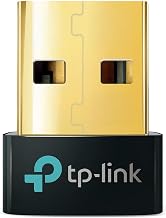
This USB dongle is best for someone who wants to add Bluetooth connectivity to a PC. Its listed Bluetooth 5.4 support and backward compatibility with versions from 5.3 through 1.1 make it a fit for setups that include devices from different Bluetooth generations.
TP-Link lists Enhanced Data Rate (EDR) and Bluetooth Low Energy (BLE), along with claims of up to twice the data-transfer speed and four times the coverage compared with Bluetooth 4.0. Those are manufacturer-stated comparisons, not a guarantee of results in every room or computer setup.
- Best for: PC users who want a USB Bluetooth adapter with a newer listed version and broad backward compatibility.
- Why it stands out: It combines Bluetooth 5.4, EDR, and BLE in a compact computer-dongle category.
- Consider: It is a PC adapter, not a 3.5 mm transmitter/receiver for a TV or car stereo.
UGREEN Bluetooth 5.3 USB Adapter

UGREEN’s Bluetooth 5.3 USB adapter is best for Windows users who want to connect several kinds of Bluetooth devices to a computer. The listed capacity is up to five different types of devices at once, including examples such as a mouse, keyboard, phone, and headphones.
The product information specifies support for Windows 11, Windows 10, and Windows 8.1 without driver installation. It does not support Windows 7, Linux, or macOS, so check the computer’s operating system before choosing it. The listing also notes that only one Bluetooth audio device of the same type can play music at a time when multiple speakers or headphones are connected.
- Best for: Supported Windows computers that need connections to multiple types of peripherals.
- Why it stands out: Its stated five-device support and no-driver setup on specified Windows versions are practical for a multi-device desk.
- Consider: Avoid this model if your computer runs macOS, Linux, or Windows 7.
Wodgreat 2-in-1 USB Audio Adapter

This adapter is best for buyers who need both Bluetooth transmitter and receiver modes for audio equipment. In transmitter mode, it sends audio from a non-Bluetooth source, such as a TV or airplane entertainment system, to Bluetooth headphones or speakers. In receiver mode, it can send audio from a phone or tablet to an older car stereo or speaker system through its 3.5 mm stereo jack.
The product information says its USB-A port supplies power and that the adapter has no internal battery. It also lists a built-in microphone for hands-free calls through a car’s speakers. The separate power requirement matters when choosing it for a travel setup or a location without a convenient USB power source.
- Best for: People connecting TVs, car stereos, or older speakers through a 3.5 mm audio jack.
- Why it stands out: Its TX and RX modes cover both sending audio to Bluetooth headphones and receiving audio from a phone.
- Consider: It requires USB-A power and does not have an internal battery.
TP-Link Bluetooth 5.3 Long-Range Adapter

This TP-Link USB adapter is best for users who want to add Bluetooth to a desktop, laptop, or PC and are comparing products by the maker’s stated coverage claims. It supports Bluetooth 5.3 with EDR and is listed as backward compatible with Bluetooth versions 4.2, 4.0, 3.0, 2.1, 2.0, and 1.1.
TP-Link says the adapter can provide up to twice the speed and four times the coverage compared with Bluetooth 4.0. Actual range depends on the surrounding environment and connected devices; the supplied product details do not establish a guaranteed distance. EDR and BLE are also listed as features.
- Best for: PC users who want a USB dongle and value the product’s stated speed and coverage comparison.
- Why it stands out: It adds Bluetooth 5.3 support and EDR/BLE features to a non-Bluetooth computer.
- Consider: It is a computer adapter, not a dual-mode AUX audio unit for TVs or airplane systems.
LAICOMEIN Bluetooth 6.0 2-in-1 Adapter

This dual-mode adapter is best for travelers and people switching between sending and receiving audio. In TX mode, it connects to an AUX or RCA audio source, including a TV or airplane seatback, and sends sound to Bluetooth headphones. In RX mode, it receives wireless audio from a phone, tablet, or computer and plays it through an audio system without Bluetooth.
The listing describes auto-pairing, saved pairing memory, an integrated microphone, and more than 20 hours of playback. It says the unit recharges over USB-C in about 1.5 hours and can be used while charging. The manufacturer also lists exclusions: it is not compatible with live music, instruments, karaoke, 2.4G-sync devices, or Bluetooth hearing aids.
- Best for: Travelers or households that need a rechargeable adapter for both transmitter and receiver use.
- Why it stands out: It combines two audio modes with listed USB-C charging and a stated 20-plus-hour playback time.
- Consider: Check the stated incompatibilities before selecting it for specialist audio equipment or hearing aids.
Buying Guide: How to Choose a Bluetooth USB Transmitter or Receiver
Do you need a PC dongle or an audio transmitter and receiver?
Start by checking the connection on the source device. A USB Bluetooth dongle, such as the TP-Link and UGREEN models above, adds Bluetooth capability to a computer. These are intended for computer USB ports and are not interchangeable with a 3.5 mm audio adapter.
A 2-in-1 audio adapter connects to an audio output or input, often through AUX. TX means transmitter: it sends audio from a non-Bluetooth source to Bluetooth headphones or speakers. RX means receiver: it accepts audio from a Bluetooth phone or tablet and outputs it to a wired audio system. Choose a dual-mode model if you need both functions.
What should you check for a TV, car stereo, or airplane?
For a TV or airplane seatback, confirm that the source has the audio connection required by the adapter. The Wodgreat listing describes a 3.5 mm stereo jack and USB-A power; it has no internal battery. The LAICOMEIN listing describes AUX/RCA source connections, USB-C charging, and TX mode. Check the audio outputs on your equipment rather than assuming every adapter fits every port.
For a car stereo or older speaker system, look for RX mode and a compatible audio input. The Wodgreat product details specifically describe receiver use with a 3.5 mm jack. Also decide whether you need hands-free calling: both the Wodgreat and LAICOMEIN listings mention an integrated microphone, but feature details alone do not establish performance in a particular car.
Does Bluetooth version determine range and sound quality?
Bluetooth version is one factor, but it does not by itself tell you the exact range or audio quality of a complete setup. The computer adapter and the connected device both matter, as do obstacles and interference. TP-Link lists speed and coverage comparisons for its adapters, but these are not guaranteed distances. Compare the stated features and the devices you plan to connect instead of relying on version number alone.
How many devices do you need to connect?
If you plan to connect a keyboard, mouse, phone, and headphones to one computer, the UGREEN listing specifies support for up to five different device types at once. It also clarifies that only one audio device of the same type can play music when multiple speakers or headphones are connected. For other products, do not assume multi-device support unless the product information states it.
Which operating system and power source are required?
For a USB computer adapter, check operating-system support before buying. UGREEN lists Windows 11, Windows 10, and Windows 8.1, and excludes Windows 7, Linux, and macOS. The supplied details for the TP-Link PC adapters do not specify an operating-system list, so verify the current product information for your computer.
For portable audio adapters, compare power arrangements. Wodgreat requires USB-A power and has no internal battery. LAICOMEIN lists an internal battery, USB-C charging, and use while charging. A battery-powered option may suit travel better, while a powered adapter can work when a USB port or power source is readily available.
Frequently Asked Questions
Can a USB Bluetooth adapter transmit TV audio?
A PC USB Bluetooth dongle is designed to add Bluetooth to a computer, not to connect directly to a TV’s audio output. For TV audio, choose an audio transmitter with a compatible AUX or other supported connection, such as a TX-mode 2-in-1 adapter.
What is the difference between Bluetooth transmitter and receiver mode?
Transmitter mode sends audio from a source without Bluetooth to Bluetooth headphones or speakers. Receiver mode takes audio from a Bluetooth phone or tablet and sends it to a wired stereo or speaker system.
Does a USB Bluetooth dongle work with every computer?
No. Compatibility depends on the adapter’s supported operating systems and the computer’s available USB port. For example, UGREEN lists specific Windows versions and excludes macOS, Linux, and Windows 7.
Can I connect two Bluetooth headphones at the same time?
Do not assume that every adapter supports two headphones playing at once. UGREEN’s product information says only one Bluetooth audio device of the same type can play music when multiple speakers or headphones are connected.
Which option is better for travel?
A rechargeable 2-in-1 audio adapter is generally the relevant category for airplane audio because it can transmit sound from a seatback audio source to Bluetooth headphones. Check the airplane’s audio connection and the adapter’s power and compatibility details before travel.