
The best optical-to-component-audio converter for a stereo system is a digital-to-analog converter, or DAC, that changes a TV’s optical digital signal into left- and right-channel RCA audio. The PROZOR with a volume knob is best if you want output-level adjustment; the AUTOUTLET cable-style option is best for a direct connection; and the eSynic is best for a simple optical-to-RCA setup when the source is set to PCM. These products output analog stereo audio, not component video.
| Product | Best for | Output | Key consideration |
|---|---|---|---|
| PROZOR with volume control | Adjustable listening level | RCA and 3.5mm | PCM audio required |
| AUTOUTLET 7-foot cable | Direct connection to RCA inputs | RCA male | Check cable reach |
| eSynic 7-foot adapter | Simple setup | RCA stereo | PCM only |
| PROZOR multi-output DAC | More output choices | RCA and 3.5mm | Digital-to-analog direction only |
| LiNKFOR optical-to-RCA DAC | Basic stereo conversion | RCA stereo | Verify your device has optical output |
PROZOR DAC With Volume Control
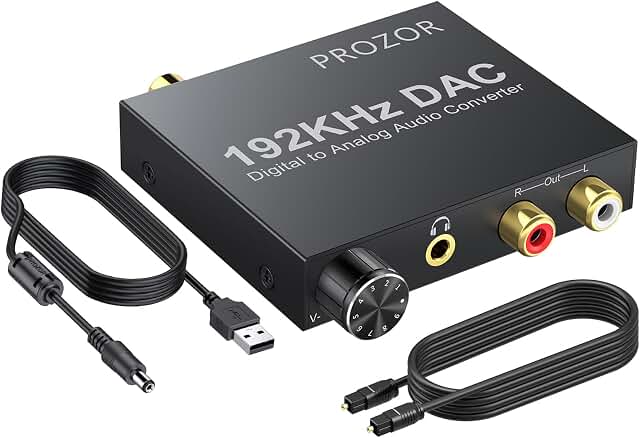
Best for: Listeners who want to adjust the converter’s output level directly, or who need both RCA and 3.5mm analog outputs. This PROZOR DAC converts coaxial or Toslink digital PCM audio to left/right RCA and 3.5mm audio simultaneously.
It supports 24-bit audio and listed sampling rates of 32, 44.1, 48, 96, and 192 kHz. A built-in volume knob provides a physical way to adjust output level. The product information also states that it mutes automatically for non-audio input and helps eliminate noise when no signal is present.
Why it was selected: Its volume control and two output formats give it more adjustment and connection options than the RCA-only adapters in this list. Choose it if your amplifier or powered speakers need analog stereo input and you want a knob on the converter.
Limitation: It does not convert analog audio to digital, and its digital input must be set up for supported PCM audio. Check that the source device provides a compatible digital signal.
AUTOUTLET 7-Foot Optical-To-RCA Cable

Best for: Buyers who want a cable-style converter that connects an optical source to stereo RCA inputs. The listed 7-foot, or 2.1-meter, length can suit setups where the TV and amplifier are separated by a moderate distance.
The product converts Toslink optical digital audio to analog RCA output and is described as plug and play. Its features list a built-in audio amplifier chip, a dual-channel operational amplifier, 24-bit processing, and support for sampling rates up to 192 kHz, including 32, 44.1, 48, 96, and 192 kHz.
Why it was selected: Unlike a compact converter box with separate cables on each side, this listing combines the optical-to-RCA connection in a 7-foot cable format. It is a practical match for a television, Blu-ray player, or game console with optical output connected to a stereo amplifier with RCA inputs.
Limitation: The fixed cable length may not suit every room layout. Measure the route between devices before choosing it, and confirm that your source can output a supported digital format.
eSynic 7-Foot Optical-To-RCA Adapter

Best for: Buyers who want a straightforward optical-to-stereo-RCA connection and can set their source to PCM. The product is described as a 7-foot adapter with an aluminum shell, a 24-bit DAC chip, and a status LED.
It converts optical input to RCA output and lists support for up to 192 kHz and 24-bit audio. The supplied product information says it draws power from the optical port and does not require an external power adapter. It also describes setup as connecting optical input to RCA output.
Why it was selected: Its stated cable length, status indicator, and direct RCA output make it a useful choice for connecting a compatible TV or other optical source to a stereo system. Choose it if you do not need a separate volume knob or 3.5mm output.
Limitation: The listing specifies PCM only and says it does not support Dolby or DTS. Set the source’s digital audio output to PCM; do not assume that a surround-sound bitstream will work.
PROZOR 192 kHz DAC With RCA And 3.5mm

Best for: Buyers who need both RCA and 3.5mm analog connections, or who want a converter that accepts either coaxial or Toslink digital input. The product outputs analog left/right RCA and 3.5mm audio simultaneously.
Its listed specifications include support for 24-bit S/PDIF audio and sampling rates of 32, 44.1, 48, 96, and 192 kHz. The product description also identifies an audio amplifier chipset and dual-channel operational amplifier. It is designed for digital-to-analog conversion, not reverse conversion.
Why it was selected: The combination of coaxial or optical input and two analog output formats gives it flexibility for different stereo connections. Choose this model if your equipment calls for a headphone-style 3.5mm connection as well as, or instead of, RCA.
Limitation: The product information says the TV’s audio output must be set to PCM and notes that volume may need to be adjusted in the TV settings. It does not provide a built-in volume knob in the listed features.
LiNKFOR Optical SPDIF-To-RCA DAC

Best for: Buyers seeking a basic optical-to-stereo-RCA converter for an HDTV, Blu-ray player, DVD player, or other source with Toslink output. The listed output is RCA left/right audio.
The LiNKFOR converts optical SPDIF digital audio into analog stereo. Its features specify a built-in audio amplifier chip and support for 24-bit signals at 32, 44.1, 48, 96, and 192 kHz. An optical cable is included according to the product name.
Why it was selected: It focuses on the common connection needed for older stereo equipment: optical digital input from a modern source and analog RCA output to an amplifier or speakers with RCA inputs. Choose it if you do not require a 3.5mm output or a volume-control knob.
Limitation: The listed output is RCA stereo, so it is not the choice for equipment that accepts only 3.5mm audio. Confirm the source has an optical output and the receiving equipment has matching RCA inputs.
Buying Guide: How To Choose An Optical-To-Component Audio Converter
What does “optical to component audio” mean?
In many searches, “optical to component audio” means converting a TV’s optical digital audio output into analog audio for older stereo equipment. The products here perform that conversion and provide left- and right-channel RCA outputs. They do not convert optical audio to component video, which uses separate video connectors and carries a different type of signal.
Does your source have an optical output?
Check the TV, disc player, or other source for a port labeled Optical, Digital Audio Out, or Toslink. A converter cannot receive optical audio if the source offers only HDMI, coaxial digital, or analog output. Some products accept more than one kind of digital input, but verify the specific model’s listed inputs before buying.
Which output does your stereo need?
RCA stereo uses two analog connectors, typically one for the left channel and one for the right. Select an RCA-output converter if your amplifier or receiver has matching analog inputs. A 3.5mm output can suit equipment with a 3.5mm auxiliary input. The PROZOR models listed above provide both RCA and 3.5mm outputs; the AUTOUTLET, eSynic, and LiNKFOR listings focus on RCA.
Why is PCM important?
Many optical-to-analog DACs expect a two-channel PCM signal. A TV or streaming device may otherwise send a Dolby or DTS bitstream that a particular converter cannot decode. If there is no sound, open the source’s audio settings and select PCM or stereo PCM, if available. The eSynic listing explicitly states PCM-only support and excludes Dolby and DTS.
Do sampling-rate numbers determine compatibility?
A converter’s supported sampling rates describe digital formats it can process; they do not guarantee that every source setting will work automatically. The products here list support up to 192 kHz and include several lower rates. Match the source output settings to the converter’s stated support. For TV audio, begin with PCM and consult the device menus if the signal is silent or distorted.
Do you need a volume control?
A converter with a physical volume knob offers an adjustment at the DAC itself. The PROZOR model with a knob is the direct choice for that feature. Other products may require volume adjustment at the TV, amplifier, or connected equipment. Check the product details and your system’s controls rather than assuming every DAC adjusts output level.
How much cable length do you need?
Measure the distance between the optical source and the analog input, including the route around furniture or equipment. The AUTOUTLET and eSynic listings specify 7-foot cable lengths. A fixed-length cable can simplify a close connection but may be too short for a more distant amplifier. Allow some extra length so the cable is not pulled tight.
What should you check before ordering?
- Confirm the source has the required optical or other supported digital output.
- Confirm the amplifier, receiver, or speakers accept the converter’s analog output.
- Check whether the source can be set to PCM stereo.
- Choose RCA or 3.5mm output based on the receiving device.
- Compare cable length and whether you want a separate volume control.
- Remember that these are digital-to-analog converters, not analog-to-digital adapters.
Frequently Asked Questions
Can an optical-to-RCA converter connect a TV to an older stereo?
Yes, if the TV has an optical digital audio output and the stereo has analog RCA inputs. The converter changes the digital signal into left- and right-channel analog audio. Set the TV’s output format to PCM when the converter requires it.
Will these converters work with Dolby Digital or DTS?
Do not assume so. The eSynic listing specifies PCM-only input and says Dolby and DTS are not supported. Check each converter’s format requirements and set the source to PCM stereo if needed.
Does an optical-to-RCA DAC improve the source audio?
A DAC converts digital audio into analog output; its listed sample-rate support does not establish that it will improve every source. Sound also depends on the source signal, converter, connected equipment, and settings. Choose based on the connections and formats your system needs.
Can I use an RCA-to-optical converter in reverse?
No. These products are described as digital-to-analog converters, meaning optical or other supported digital input becomes analog output. They do not convert analog RCA audio into optical digital audio.
Why is there no sound after connecting the converter?
Check that the optical cable is connected to the source’s output and the converter’s input, and that RCA plugs go to an input on the stereo. Then select PCM or stereo PCM on the source and confirm the stereo is set to the correct input. Also verify that the source is playing audio and that the receiving equipment’s volume is raised.