
The best Android phone dock with a speaker depends on whether you want simple phone positioning, wireless charging, hands-free audio, or a portable speaker stand. The MILOUZ model is best for users who want induction playback and Bluetooth options; the Joymate stand is better for buyers prioritizing a large battery and call support; and the Jteman dock is worth considering when a wireless charging feature is the main draw. Compare the listed features below, then check the product listing for details that are not provided here.
| Product | Best For | Key Listed Feature |
|---|---|---|
| MILOUZ 5-in-1 Speaker | Induction playback and Bluetooth flexibility | Induction sensing, Bluetooth 5.3, RGB modes |
| Joymate Phone Stand Speaker | Long playback and call functions | 5,000mAh battery, microphone, charging port |
| Jteman Charging Station | Wireless charging in a desktop dock | Wireless charger and Bluetooth speaker in product name |
| Induction Speaker with Phone Stand | Basic speaker stand with wired charging | Induction speaker, RGB lighting, USB wired charging |
| DORNLAT Portable Speaker Stand | Phone or tablet viewing with stereo audio | Dual-driver speaker and portable stand design |
MILOUZ 5-in-1 Induction Speaker

Best for: Android users who want a phone stand with both induction-based playback and conventional Bluetooth audio. The listed features describe automatic induction playback when a compatible smartphone is placed on the stand, plus a one-touch switch to Bluetooth mode. Bluetooth mode is listed for smartphones and tablets.
The product listing also describes 360-degree surround stereo, bass and treble tuning, and eight RGB light modes. Its 3,500mAh battery and USB wired charging are useful details for shoppers comparing power options, although the supplied information does not specify battery runtime or charging speed.
- Choose this if: you want two playback approaches and adjustable phone positioning.
- Note: the listing limits induction playback to iPhone and Android smartphones; Bluetooth mode is described more broadly.
This is a strong feature match for shoppers searching specifically for an Android phone dock speaker with flexible playback. Check the listing’s device and operating instructions before relying on induction sensing with a particular phone.
Joymate 360-Degree Phone Stand Speaker

Best for: buyers looking for a rechargeable Bluetooth speaker stand that also lists a microphone and charging port. The product information describes support for listening to music, answering calls, and charging a phone. It also names a 360-degree rotatable, angle-adjustable holder for phones and tablets.
The built-in 5,000mAh battery is listed with up to 40 hours of playback at 50% volume when fully charged. Actual runtime can vary with volume and use, so treat that figure as a listing specification rather than a guaranteed result. The battery indicator light is intended to show remaining power. Silicone pads on the panel and base are described as a non-slip feature.
- Choose this if: battery capacity, call handling, and adjustable positioning matter more than wireless charging.
- Note: charging is described as a charging port, not wireless charging.
Its listed Bluetooth 5.3 connection range is up to 32.80 feet. This makes the Joymate a practical comparison choice for desks or rooms where the phone may not sit directly beside the speaker.
Jteman Wireless Charging Speaker Stand

Best for: shoppers who want a desktop dock combining a phone stand, Bluetooth speaker, and wireless charging according to the product name. This combination can reduce the number of separate accessories on a desk, but the supplied product data does not provide charging speed, supported charging standards, or detailed speaker specifications.
The listing title identifies the product as a wireless phone charger stand speaker for iPhone and Android. Before choosing it, confirm the exact phone support and charging requirements in the current product listing. Wireless charging performance can depend on a phone’s charging capability and how it sits on the charging area, so a stand’s general compatibility wording should not replace model-specific checking.
- Choose this if: you want a single desktop accessory that is described as offering wireless charging and Bluetooth audio.
- Note: the information supplied here does not state battery capacity, sound output, or whether the speaker works while charging.
Jteman is most relevant to buyers who place charging convenience ahead of detailed audio or battery specifications. Compare its current listing information with your phone’s charging needs before purchasing.
Induction Speaker With Phone Stand
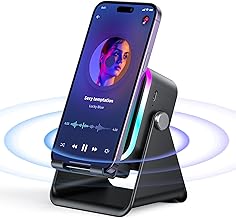
Best for: shoppers considering a phone stand speaker that advertises induction audio, RGB lighting, and USB wired charging. Its product name also describes it as a phone speaker amplifier for iPhone and Android, making it relevant to people who want a compact accessory for desk listening or video viewing.
The supplied product data does not include a detailed feature list, so information such as battery capacity, Bluetooth version, playback time, adjustable angle, and charging speed cannot be confirmed here. Check the listing for how induction playback works and whether it requires a particular phone placement or setting.
- Choose this if: a stand, induction speaker, and USB wired charging are the combination you are seeking.
- Note: the available details do not establish sound specifications or whether the device includes a rechargeable battery.
This model is a relevant option based on its listed product name, but shoppers who need detailed performance information should compare its full listing with products that provide battery and connectivity specifications.
DORNLAT Portable Speaker Stand

Best for: people who want a portable Bluetooth speaker designed to hold a phone or tablet. The product name specifically describes a dual-driver stereo dock speaker for phones and iPads, with use cases that include home, travel, outdoor settings, and parties.
Unlike products whose names emphasize charging, the DORNLAT listing centers on Bluetooth audio and device support. The supplied details do not identify battery capacity, playback time, charging method, stand adjustment range, or specific phone dimensions. Review the current listing for these practical details before deciding whether it suits your setup.
- Choose this if: stereo speaker playback and a stand for either a phone or tablet are your priorities.
- Note: charging features are not specified in the information provided.
This model adds a useful comparison point for buyers who want a speaker dock rather than a charging station. It may be a better fit when viewing support and stereo audio matter more than a built-in charging function.
Buying Guide: How To Choose An Android Phone Dock Speaker
Do you want charging, a stand, or both?
Start by separating three functions that product names often combine: holding a phone, playing audio, and charging. A speaker stand may offer a stable viewing position without charging the phone. A charging dock may charge wirelessly or through a cable. Confirm which functions are explicitly included rather than assuming that every phone dock powers the device.
For wireless charging, check whether the listing names support for your phone and whether it states charging requirements. For wired charging, look for the cable or port details in the full product information. The products compared here do not all provide enough data to confirm charging speed or included accessories.
How does induction playback differ from Bluetooth?
Induction playback is described for the MILOUZ speaker as starting when a phone is placed on the stand and stopping when it is removed. Bluetooth is a separate wireless connection method that pairs a phone or tablet with a speaker. The MILOUZ listing includes both modes, while other products may emphasize Bluetooth or induction in their names without providing complete operating details.
Do not treat induction audio as a substitute for a confirmed Bluetooth connection. If you need to play audio from a tablet, check whether the product specifically supports tablets in the mode you plan to use. The MILOUZ listing names tablet support for Bluetooth mode but limits induction playback to smartphones.
What battery information should you compare?
Battery capacity and playback time answer different questions. A capacity figure, such as the Joymate’s listed 5,000mAh battery, describes the battery specification; an estimated runtime describes how long it may play under stated conditions. The Joymate listing gives up to 40 hours at 50% volume. Other products in this comparison do not provide a runtime in the supplied details.
Consider how you will use the speaker. A desk dock near an outlet may not need a large battery. A speaker intended for travel may benefit from rechargeable power, but you should also confirm its charging method, charging time, and whether it can play while charging.
Which sound and connectivity details matter?
Look for clear specifications on Bluetooth version, connection range, speaker configuration, and supported devices. The Joymate listing names Bluetooth 5.3 and a range of up to 32.80 feet. The MILOUZ listing also names Bluetooth 5.3 and a range of 10 meters. These figures are product claims; real-world range may depend on the surrounding environment and obstacles.
Terms such as “stereo,” “dual driver,” or “subwoofer” can help describe a speaker’s configuration, but they do not provide a complete basis for comparing sound quality. If audio is your main priority, verify the full specifications and consider the speaker’s intended setting, such as a desk, bedroom, or travel use.
Will the stand fit your phone or tablet?
Check the supported device types, holder dimensions, and adjustment details. A product may state that it fits phones and tablets without listing specific size limits. The Joymate names a rotatable, angle-adjustable holder, and the MILOUZ listing names a 360-degree adjustable holder. For other models, the supplied details do not establish the adjustment range.
Also consider how you use the screen. A stand that keeps a phone upright can be useful for calls and video, while a wider tablet may need more support. Confirm that the product’s holder design matches your device and preferred viewing position.
Are lights and controls important?
RGB lighting is an added feature rather than a requirement for charging or audio. The MILOUZ listing specifies eight light modes, and the induction speaker with phone stand mentions RGB lighting. If you prefer a low-distraction bedside or work setup, check whether lighting can be turned off or adjusted; the supplied details do not confirm that control for every product.
Look for clear information about playback controls, mode switching, call controls, and battery indicators. The MILOUZ listing describes one-touch switching between induction and Bluetooth modes. The Joymate listing describes a battery indicator and call support. These details can make everyday operation easier to evaluate.
Frequently Asked Questions
Can an Android phone use a speaker dock?
Yes. Several products in this comparison are described as supporting Android phones. Confirm the exact model’s connection method and any charging requirements in its current product listing.
Does a phone dock speaker always charge the phone?
No. A stand and speaker do not necessarily include phone charging. Check whether the product specifically lists wireless charging or a wired charging port before buying.
Can induction playback work without Bluetooth?
The MILOUZ listing describes automatic induction playback without a Bluetooth connection when a smartphone is placed on the stand. Its listing also provides a separate Bluetooth mode. Check each product’s instructions because the supplied information does not establish the same feature across all models.
Which option lists the longest battery runtime?
The Joymate stand lists up to 40 hours of playback at 50% volume from its 5,000mAh battery. Actual runtime can vary with volume and use.
Can these speaker docks hold tablets?
Some product descriptions mention tablet support. The MILOUZ listing names tablets for Bluetooth mode, and the DORNLAT product name describes a phone and tablet stand. Check the holder’s size limits and support details for your specific tablet.
Should I choose a Bluetooth speaker or an induction speaker?
Choose Bluetooth if you want a conventional wireless connection and broad device pairing, subject to the product’s stated compatibility. Consider induction if you prefer the listed placement-based playback feature, and verify which phones support it.