
The best desktop headphones with a mic depend on your connection, comfort needs, and main use. The Logitech H390 is a straightforward choice for USB-A calls, while the Logitech H391 suits a USB-C setup. The FEABASK emphasizes lightweight wear for meetings, the Wantek offers USB and 3.5mm connection options, and the Ozeino is better suited to desktop gaming. Check your computer’s available ports before choosing.
| Headset | Best For | Connection Highlight |
|---|---|---|
| Logitech H390 | Everyday calls and meetings | USB-A |
| Logitech H391 | USB-C computers | USB-C |
| FEABASK USB Headset | Extended online meetings | USB |
| Wantek USB Computer Headset | Flexible device connections | USB and 3.5mm |
| Ozeino Gaming Headset | Gaming and voice chat | Confirm connection fit for your setup |
Logitech H390 USB-A Headset

The Logitech H390 is best for desktop users who want a simple wired USB-A headset for calls, meetings, and everyday listening. Its fine-tuned drivers are designed to provide digital stereo sound for meetings, music, and other audio. The rotating noise-canceling microphone helps reduce unwanted background noise, and its boom arm can be moved out of the way when it is not needed.
Inline controls on the cable let users adjust volume or mute calls without navigating desktop settings. This makes the H390 a practical choice for people who frequently join video calls and want basic controls close at hand. It was selected for its clearly specified USB-A connection and combination of mic, listening, and cable controls.
Choose this if your computer has a USB-A port and you want a wired headset for general office or home use. Limitation: its listed connection is USB-A, so buyers with only USB-C ports should consider a USB-C model or verify their adapter needs.
Logitech H391 USB-C Headset

The Logitech H391 is best for desktop and laptop users who need a USB-C wired headset for calls, meetings, and music. Like the H390, it features fine-tuned drivers for digital stereo sound and a rotating noise-canceling microphone intended to minimize unwanted background noise. The boom arm can be rotated out of the way when it is not in use.
Its inline controls provide access to volume adjustment and call mute on the headset cable. Those controls can be useful when switching between listening and speaking during a meeting. The H391 was selected as a USB-C alternative to the H390, making the computer’s port type an important distinction between the two models.
Better for buyers whose desktop or laptop has a USB-C port and who want cable-mounted mute and volume controls. Limitation: this model is listed with USB-C, not USB-A, so confirm the port on the computer before ordering.
FEABASK Lightweight USB Headset

The FEABASK USB headset is best for people who spend long stretches in online meetings, remote classes, or other voice-based desktop tasks. Its listed design includes soft memory-foam ear cups, an adjustable headband, and a lightweight build. These features may appeal to users who prioritize a cushioned fit for extended wear.
The headset has a noise-canceling microphone with voice pickup and audio signal processing intended to support clear calls. Its 40 mm dynamic drivers are specified for audio listening and meeting use. The product description names common scenarios such as webinars, online classes, conference calls, and remote work, so it is a practical option for a dedicated computer headset.
Choose this if comfort features and a USB connection are priorities for regular calls. Limitation: the product information says a USB port is required for the microphone to function, so it is not the right pick if you need a headset that connects through a 3.5mm jack alone.
Wantek USB and 3.5mm Headset

The Wantek headset is best for buyers who want more than one wired connection option. It is listed with both a USB plug and a 3.5mm jack, which can be useful when a user switches among computers and other compatible devices. Check the ports and operating requirements of each device before connecting it.
For calls, the headset includes a noise-canceling, unidirectional microphone with an adjustable 330-degree boom. The microphone can be rotated upward when it is not being used. Its padded adjustable headband, memory-foam cushion, and 180-degree rotatable ear cups are intended to support a more flexible fit during longer use.
Better for users who want connection choices and an adjustable boom mic for calls. The listed uses include business, computers, and various mobile devices. Limitation: the product description lists multiple device types, but buyers should verify the specific port and connection behavior required by their desktop rather than assume every feature works identically across devices.
Ozeino Over-Ear Gaming Headset
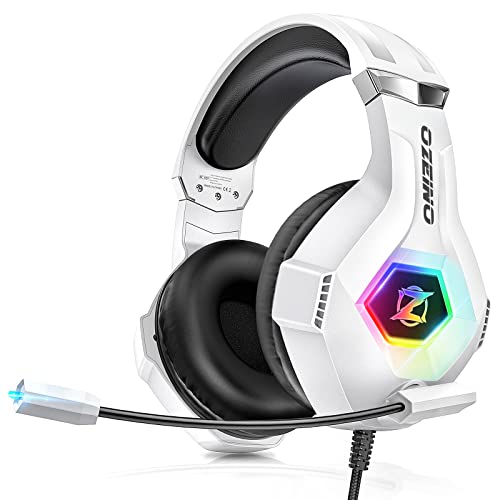
The Ozeino gaming headset is best for desktop users who want a headset oriented toward gaming and teammate voice chat. Its listed sound features include stereo surround sound, crisp treble, punchy bass, and directional audio cues. The over-ear design has breathable protein ear pads and an adjustable headband, features aimed at comfort during longer gaming sessions.
The 360-degree rotatable microphone is described as noise-canceling and designed to capture voice for team communication. This makes the Ozeino a more gaming-focused alternative to the office-oriented USB headsets above. It was selected for readers who use a desktop for games as well as voice chat, rather than only meetings or calls.
Choose this if gaming audio and an adjustable boom microphone matter more than a compact office design. Limitation: the listed features do not specify a single desktop connection type. Check the product’s connection details and your computer’s ports before purchasing.
Buying Guide: How to Choose Desktop Headphones With a Mic
Which connection does your computer use?
Start by checking the ports on the desktop or laptop where you plan to use the headset. USB-A and USB-C are different connector types, and the Logitech H390 and H391 are listed for different ports. A 3.5mm headset requires a compatible audio jack or an appropriate adapter. If your desktop has separate headphone and microphone jacks, confirm whether the headset connection supports that arrangement before buying.
When you use a USB headset, confirm that the USB port is available and that the product’s microphone works through that connection. For a multi-device setup, make a list of the ports on each device. A headset with more than one connection option may offer flexibility, but the product details should still be checked for the exact setup you intend to use.
Do you need a headset mainly for calls or gaming?
For meetings, classes, and calls, prioritize a boom microphone, convenient mute control, and a connection that works with your computer. The H390 and H391 include inline mute and volume controls, while the FEABASK is described for online meetings and remote work. The Wantek adds USB and 3.5mm options according to its product information.
For gaming, sound presentation and microphone positioning may matter more. The Ozeino is the gaming-focused choice among these products, with listed surround sound and a rotatable microphone. Buyers should compare the headset’s actual connection requirements with their gaming computer and any other intended devices.
What comfort features should you compare?
Headsets vary in ear-cup style, padding, headband adjustment, and weight. Over-ear cups may appeal to users who want coverage around the ears, while on-ear designs can be more compact. The FEABASK lists memory-foam ear cups and a lightweight design; the Wantek lists a padded adjustable headband and memory-foam cushion. Product descriptions do not guarantee a comfortable fit for every person, so consider your preferred fit and take breaks during long sessions.
Also consider whether the boom arm can be moved when you are listening without speaking. The Logitech models and Wantek list rotating microphones. A movable boom can keep the mic out of the way between calls, but it does not replace the need to check fit, cable length, and port placement for your desk.
Are noise-canceling features important?
Microphone noise cancellation is intended to reduce unwanted background sound picked up during speech. It is different from active noise cancellation for what the wearer hears. The Logitech, FEABASK, Wantek, and Ozeino product descriptions refer to noise-canceling microphones. They do not establish that the headphones actively cancel surrounding sound for listening, so do not assume that a noise-canceling mic blocks all room noise.
For a busy home office, position the microphone as directed and keep it close enough to pick up your voice clearly. The Amazon Basics model listed among the product options uses a unidirectional microphone and notes that the mic should be pointed in the correct direction. Mic positioning can affect voice pickup even when a headset advertises noise reduction.
Do you need inline controls?
Inline volume and mute controls can make it easier to manage a call without searching through meeting software. The H390 and H391 list controls for volume and muting calls. Before buying any model, check which controls are included and whether they work with the computer and applications you use. A physical mute button can be convenient, but software may still display a separate mute status.
If you prefer to adjust audio through your computer, inline controls may be less important. In that case, focus first on connection type, microphone design, and fit. For users who switch between calls and listening throughout the day, cable controls can be a useful convenience.
Frequently Asked Questions
What is the best connection for desktop headphones with a mic?
The best connection is the one that matches an available port on your computer and supports the headset’s microphone. Check whether your desktop has USB-A, USB-C, or a compatible 3.5mm audio jack before choosing a model.
Are USB headsets better than 3.5mm headsets for calls?
Neither connection is universally better. A USB headset can be a direct choice when the computer has a compatible USB port. A 3.5mm headset may suit a computer with a compatible audio jack. Choose based on your ports and the headset’s stated microphone requirements.
Does a noise-canceling microphone cancel noise for the listener?
Not necessarily. A noise-canceling microphone is intended to reduce background sound picked up during speech. It does not by itself mean the headphones have active noise cancellation for the wearer.
What should I look for in a desktop headset microphone?
Look for a boom mic that can be positioned near your mouth, plus a mute control if you frequently join calls. A unidirectional or noise-canceling mic may help focus voice pickup, but correct positioning and a compatible connection are also important.
Can I use one wired headset for work and gaming?
Possibly, if its connection works with your computer and its microphone and audio features suit both tasks. Office-focused models emphasize call controls, while a gaming headset may emphasize game audio and team chat. Confirm the ports and intended use before purchase.