
The best full-range computer speakers depend on whether you prioritize simple setup, wireless playback, clearer dialogue, or stronger bass. The Logitech Z313 is best for buyers who want a subwoofer and control pod, while the Creative Pebble V3 suits USB-C desktops and spoken-word listening. The Logitech Z207 adds Bluetooth and device switching; Amazon Basics is a straightforward USB-powered option; and OHAYO offers a larger speaker design with listed full-range drivers. Compare the connections and speaker configurations below before choosing.
| Product | Best For | Key Feature |
|---|---|---|
| Logitech Z313 | Subwoofer-style desktop audio | 2.1 system and control pod |
| Logitech Z207 | Wireless and wired listening | Bluetooth and 3.5 mm input |
| Creative Pebble V3 | USB-C setup and dialogue | Full-range drivers and Clear Dialog processing |
| Amazon Basics Stereo 2.0 | Simple PC or laptop setup | USB power and inline volume control |
| OHAYO 60W Computer Speakers | Music and gaming setups | Full-range drivers and multiple inputs |
Logitech Z313 2.1 Multimedia Speaker System

The Logitech Z313 is a 2.1 multimedia speaker system with a compact subwoofer and 25 watts of listed RMS output. Its product description identifies full-range audio and 3.5 mm inputs. A wired control pod provides convenient access to speaker controls.
Best for: Buyers who want a desktop speaker set with a separate subwoofer and a dedicated control pod. It is a relevant choice when full-range sound is a priority but a two-speaker-only setup does not meet the buyer’s needs.
The listed 3.5 mm input makes the system worth considering for devices with that audio connection. The product description names PCs, PS4, Xbox, TVs, smartphones, tablets, and music players as compatible device types.
Limitation: This is not a wireless Bluetooth model, and a subwoofer takes up additional space compared with a compact 2.0 pair. Choose another option if you need Bluetooth connectivity or want to minimize the number of desktop components.
Logitech Z207 Bluetooth Stereo Speakers

The Logitech Z207 is a 2.0 stereo speaker pair with Bluetooth and a 3.5 mm input. Each speaker has one active, powered driver described as delivering full-range audio, plus a passive radiator intended to provide bass extension. The listed peak power is 10 watts.
Best for: People who move between a computer and another audio device and want both Bluetooth and wired connection options. Logitech Easy-Switch technology is designed to let users switch between audio devices by pausing playback on one and starting it on the other.
As a 2.0 system, the Z207 does not include a separate subwoofer. Its passive radiators provide bass extension, but buyers specifically seeking a separate subwoofer should compare it with a 2.1 system such as the Z313.
Limitation: The 10-watt figure is listed as peak power, not RMS output. This is a useful distinction when comparing specifications across speaker models. Choose this set for its connection flexibility rather than assuming its listed power figure is directly comparable to RMS ratings.
Creative Pebble V3 USB-C Desktop Speakers

The Creative Pebble V3 is a 2.0 desktop speaker set with 2.25-inch full-range drivers, Bluetooth 5.0, and USB-C connectivity. Its listed output is 8 watts RMS, with peak power up to 16 watts. The product also includes a USB-C-to-USB-A converter for computers with a USB-A port.
Best for: Buyers who want a compact USB-C speaker setup and place value on spoken-word clarity. Creative’s Clear Dialog processing is designed to make speech easier to understand in videos, movies, and TV series without requiring the listener to turn up the volume unnecessarily.
The product description says the USB-C connection can provide power and audio through one cable. It also describes a built-in gain switch for amplified audio, which requires a 10-watt USB-C or USB-A port. Bluetooth 5.0 provides another connection option.
Limitation: The gain switch’s amplified-audio function depends on the power available from the USB port. Check the computer’s port capability if that feature matters. This 2.0 set does not list a separate subwoofer.
Amazon Basics Stereo 2.0 Speakers

These Amazon Basics speakers are a pair of external 2.0 computer speakers for a PC or laptop. They use USB for power and a 3.5 mm aux input for audio, with an inline volume control for convenient adjustments.
Best for: Buyers looking for a basic wired speaker pair with separate power and audio connections. The straightforward feature set can suit a desktop or laptop user who does not need Bluetooth, multiple input types, or a separate subwoofer.
USB power means the speakers need access to a USB port, while the 3.5 mm connection carries audio. The inline control places volume adjustment within reach rather than requiring the user to rely only on computer settings.
Limitation: The listed features do not specify Bluetooth, full-range driver dimensions, or an output-power rating. Buyers who want those details for comparison may prefer a model with more complete specifications.
OHAYO 60W Computer Speakers
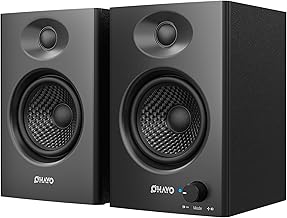
The OHAYO speaker set is a 2.0 desktop pair with Bluetooth 5.3 and listed 3.5 mm aux, RCA, and USB inputs. Its features describe a 0.75-inch carbon fiber silk dome tweeter, a 3-inch carbon fiber full-range driver, and a rear bass port. The product description also specifies an MDF wooden enclosure and a front-panel volume knob.
Best for: Buyers who want a speaker pair with several connection types and a larger driver configuration for a desktop, office, or gaming station. The listed full-range drivers make it directly relevant to shoppers comparing full-range computer speakers.
The listing describes the output as 30 watts by two, while the product name identifies the set as 60W. It also highlights a rear bass port and an integrated independent sound card. These are product claims; the supplied details do not establish performance in a particular room or setup.
Limitation: The speakers have a larger bookshelf-style design than compact desktop models, so check available desk space. The provided features describe a 2.0 pair rather than a separate subwoofer, despite the listing’s reference to “speakers with subwoofer.”
Buying Guide: How To Choose Full-Range Computer Speakers
What does “full-range” mean for computer speakers?
Full-range describes a speaker driver intended to reproduce a broad range of audio rather than handling only a narrow part of the sound. It does not, by itself, tell you how much bass a speaker produces, how loud it will play, or how clearly it will reproduce voices. Look at the complete configuration and the listed features, not just the term “full-range.”
In this selection, Creative Pebble V3 specifies 2.25-inch full-range drivers, while OHAYO lists a 3-inch full-range driver alongside a separate tweeter. The Logitech Z207 describes its active drivers as delivering full-range audio. Logitech Z313 also lists full-range audio, though the supplied details do not give driver dimensions.
Should you choose 2.0 or 2.1 speakers?
A 2.0 system has two speakers and no separately listed subwoofer. It is often the more direct choice when you want a pair of desktop speakers without adding another unit. The Logitech Z207, Creative Pebble V3, Amazon Basics, and OHAYO products in this comparison are listed as 2.0 systems.
A 2.1 system adds a subwoofer to the two main speakers. The Logitech Z313 is the listed 2.1 choice and includes a compact subwoofer. Choose it if a separate bass unit is a priority and you have room for another component. Do not assume that a 2.0 speaker with a passive radiator is the same configuration as a 2.1 system.
Which connection type fits your computer?
Check the available ports on the computer and any other device before choosing. A 3.5 mm input is listed on the Z313, Z207, and Amazon Basics models. The OHAYO set adds RCA and USB inputs, while Creative Pebble V3 offers USB-C and Bluetooth 5.0. The Z207 also supports Bluetooth, and its Easy-Switch feature is intended to help move playback between audio devices.
- Choose USB-powered speakers if you want power from a computer USB port and the model’s audio connection suits your setup.
- Choose Bluetooth if wireless playback is important; confirm that the device you plan to use supports the connection.
- Choose 3.5 mm or RCA when you want a wired audio connection and the source device has the matching output.
How should you compare speaker power ratings?
Read the rating type as well as the number. Creative Pebble V3 lists 8 watts RMS and peak power up to 16 watts. The Logitech Z313 lists 25 watts RMS, while the Logitech Z207 lists 10 watts peak power. OHAYO’s product name says 60W and its features state 30W x 2. These figures are not all presented in the same format, so they should not be treated as directly equivalent.
Power ratings alone do not establish how a speaker will sound in your room. Consider the driver configuration, connection needs, available desk space, and the kind of audio you listen to along with the stated output.
What should you prioritize for calls, videos, music, and gaming?
For dialogue-heavy videos, the Creative Pebble V3 specifically lists Clear Dialog processing. For music or games where a separate subwoofer is wanted, the Logitech Z313 is the only model in this group with that configuration. For switching between computer audio and another device, the Logitech Z207 combines Bluetooth, a 3.5 mm input, and Easy-Switch technology.
For a simple laptop or PC setup, Amazon Basics provides a pair with USB power, a 3.5 mm aux input, and inline volume control. For users comparing a larger driver setup and several input types, OHAYO lists full-range drivers, Bluetooth, aux, RCA, and USB connectivity.
How much desk space do you have?
Measure the space where the speakers will sit, and account for any additional components. Compact 2.0 speakers can be easier to place than a system with a separate subwoofer, but product names and descriptions do not provide complete dimensions for every model here. OHAYO describes its speakers as compact bookshelf-style speakers, while Logitech describes the Z313 subwoofer as compact.
Also consider cable routing. The Creative Pebble V3 is described as using a single USB-C cable for power and audio with compatible USB-C ports. Amazon Basics uses USB for power and a 3.5 mm cable for audio. Connection layouts can affect how tidy a desk feels.
Frequently Asked Questions
Are full-range computer speakers good for everyday listening?
They can suit everyday computer audio, including music, videos, and games, but “full-range” alone does not guarantee a particular sound quality. Compare the driver design, connections, system configuration, and stated features to find a set that fits your use.
Which speaker in this comparison includes a subwoofer?
The Logitech Z313 is the listed 2.1 system and includes a compact subwoofer. The other products are described as 2.0 speaker pairs in the supplied product information.
Which option supports Bluetooth?
The Logitech Z207, Creative Pebble V3, and OHAYO speakers list Bluetooth connectivity. The supplied Amazon Basics and Logitech Z313 features do not list Bluetooth.
Which speakers are suitable for a USB-C desktop?
Creative Pebble V3 is specifically described as a USB-C speaker set. Its product information also includes a USB-C-to-USB-A converter for older computers with a USB-A port.
Do all these speakers have a published RMS power rating?
No. The supplied details list RMS output for the Logitech Z313 and Creative Pebble V3. The Z207 lists peak power, while the Amazon Basics details do not state an output rating. OHAYO lists 30W x 2 in its features and 60W in the product name.
What should I check before buying computer speakers?
Confirm that your computer has the required audio and power connections, check whether you want Bluetooth or wired playback, and decide whether a separate subwoofer is important. Compare rating types carefully and make sure the speaker configuration fits your desk space.