
A Toslink-to-3.5mm converter with a digital-to-analog converter (DAC) turns compatible optical digital audio into analog sound for 3.5mm headphones, speakers, or other stereo equipment. The PROZOR 192kHz DAC is best for a straightforward optical-to-3.5mm connection, while the Rybozen is a practical choice if you also need an optical cable and power adapter. For a converter with both 3.5mm and RCA outputs, consider the second PROZOR, DigitConvert, or EASYCEL models.
| Product | Best for | Notable detail |
|---|---|---|
| PROZOR 192kHz DAC | Optical to 3.5mm audio | Built-in amplifier chip |
| PROZOR RCA and 3.5mm DAC | Two analog output options | Requires PCM or LPCM audio |
| Rybozen 192kHz DAC | A setup needing included accessories | Optical cable and power adapter included |
| DigitConvert 192kHz DAC | Optical or coaxial input | RCA and 3.5mm outputs |
| EASYCEL DAC | Optical or coaxial input below 192kHz | Supports sample rates through 96kHz |
PROZOR 192kHz Optical-to-3.5mm DAC

This PROZOR converter is a direct option for someone who needs to connect a Toslink optical audio source to an analog 3.5mm audio input. It is described as converting digital audio to analog and includes a built-in amplifier chip intended to enhance the output signal.
Best for: Buyers seeking a simple optical-to-3.5mm adapter for a TV, set-top box, DVD or Blu-ray player, or another compatible entertainment device. The listed compatibility with HD TVs and game consoles makes it relevant for common home audio setups.
The advertised sampling rate reaches 192kHz. Choose this model if the main requirement is a 3.5mm analog connection rather than a converter with several specified output formats.
- Strength: Focuses on Toslink/SPDIF-to-3.5mm conversion and lists a built-in amplifier chip.
- Consideration: The supplied product details do not specify whether RCA outputs or an optical cable and power adapter are included. Check the listing and your setup requirements before buying.
PROZOR DAC With RCA And 3.5mm Outputs
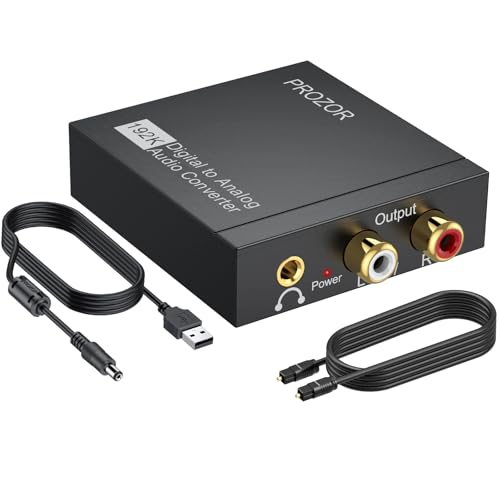
This PROZOR model converts optical Toslink or coaxial SPDIF input to analog left/right RCA and 3.5mm audio. Its outputs can provide more flexibility than a 3.5mm-only converter when a setup includes different types of analog equipment.
Best for: Buyers who want both RCA and 3.5mm analog outputs from one digital audio converter. It supports listed sampling rates of 32, 44.1, 48, 96, and 192kHz, with 24-bit SPDIF input.
Important setup requirement: The product supports uncompressed two-channel LPCM or PCM, not 5.1 decoding or output. Set the TV or source device’s digital audio output to PCM or LPCM to avoid distortion. Its product details also advise adjusting TV volume through the TV settings or output devices.
- Strength: Accepts either Toslink or coaxial digital audio and provides RCA plus 3.5mm analog outputs.
- Limitation: It is not suitable for a source sending 5.1 audio that the converter needs to decode.
Rybozen 192kHz DAC With Cable

The Rybozen DAC converts optical or coaxial digital PCM audio to analog RCA and 3.5mm outputs simultaneously. Its listed accessories include an optical fiber cable and a power adapter, which can reduce the need to source those items separately.
Best for: Buyers assembling a digital-to-analog audio connection who need a converter and an optical cable. It supports sample rates of 32, 44.1, 48, 96, and 192kHz and 24-bit SPDIF input on left and right channels.
This model is designed for uncompressed two-channel PCM or LPCM. Set the DVD player, TV, or other source to PCM or LPCM before troubleshooting the converter if audio is missing or distorted.
- Strength: Includes a listed optical cable and power adapter, accepts optical or coaxial input, and offers RCA and 3.5mm outputs.
- Limitation: It does not support 5.1-channel audio, so it is not the right choice when multichannel decoding is required.
DigitConvert Optical And Coaxial DAC

DigitConvert’s DAC accepts Toslink or coaxial digital PCM audio and converts it to analog left/right RCA and 3.5mm audio simultaneously. The listed sampling rates are 32, 44.1, 48, 96, and 192kHz, with 24-bit SPDIF input on the left and right channels.
Best for: A buyer who wants both digital input choices and both common analog output types. The product description lists use with devices such as PS3, PS4, Xbox, Blu-ray players, HD DVD players, home cinema systems, and AV amplifiers. Confirm that your source provides a supported PCM signal and has the required output connection.
The manufacturer describes the audio as synchronized when connected and the transmission as stable. These are listed product claims, not a guarantee that every source device or setup will behave identically.
- Strength: Combines optical and coaxial inputs with RCA and 3.5mm analog outputs.
- Limitation: It converts digital audio to analog; it does not convert analog signals to digital.
EASYCEL DAC For Up To 96kHz Audio

This EASYCEL converter accepts Toslink or coaxial digital PCM/LPCM audio and provides analog RCA and 3.5mm outputs. It supports listed sample rates of 32, 44.1, 48, and 96kHz, plus 24-bit SPDIF input.
Best for: Buyers who need optical or coaxial input and analog 3.5mm or RCA output, and whose source audio is 96kHz or lower. The listed package includes an optical cable and a 5V/1A power adapter.
The converter gives priority to Toslink when both Toslink and coaxial cables are connected. Its product details specifically say not to use a different power plug and that 192kHz audio is not supported.
- Strength: Offers two digital input types and two analog output types, with an optical cable and specified power adapter listed.
- Limitation: Avoid this model if your source requires 192kHz support or if you cannot use the specified 5V/1A adapter.
Buying Guide: How To Choose A Toslink-to-3.5mm Converter
A Toslink-to-3.5mm converter is typically a DAC: it changes a digital optical signal into analog audio. It is useful when a source, such as a TV, provides optical digital output but the audio equipment you want to connect accepts an analog 3.5mm plug. A simple adapter that only changes connector shape will not perform this digital-to-analog conversion.
Does your device need a DAC or only a connector adapter?
Check the ports and signal types on both devices. If the source has a standard optical Toslink output and the destination has an analog 3.5mm input, choose an active DAC converter. A Toslink-to-mini-Toslink adapter is different: it changes the physical optical connector and does not convert digital audio to analog. Verify which type of 3.5mm port your equipment uses before ordering.
Does the converter support your source audio format?
Match the converter to the digital format sent by the TV, game console, disc player, or other source. Several converters in this comparison specify support for uncompressed two-channel PCM or LPCM. If the source sends Dolby Digital, 5.1-channel audio, or another format the converter does not support, audio may fail or sound distorted.
When a converter requires PCM or LPCM, open the source device’s audio settings and select PCM output. Do not assume that a converter advertising a high sample rate also decodes surround formats. Check format support separately.
Do you need 3.5mm only, or RCA too?
Choose a 3.5mm-focused converter when the destination has a matching analog jack and you do not need another output. Models with RCA and 3.5mm outputs offer more connection choices for stereo equipment. The PROZOR, Rybozen, DigitConvert, and EASYCEL models described above list both RCA and 3.5mm analog outputs.
Before buying, check whether the product provides simultaneous output or requires choosing one output. The product details for several models here describe RCA and 3.5mm audio as available simultaneously, but confirm the exact listing for the version you plan to purchase.
Should you choose optical, coaxial, or both inputs?
If your source has Toslink optical output, a converter with an optical input can meet the basic requirement. A model with coaxial input as well can be useful if you plan to connect another device with a coaxial digital output. Both inputs do not mean the converter accepts analog input; check the direction of conversion and the listed ports.
What should you check about power and accessories?
Some converters require a separate power connection. Check the product details for the required adapter and whether it is included. The Rybozen listing specifies an optical cable and power adapter; EASYCEL specifies a 5V/1A adapter and warns against using other plugs. If accessories are not stated, do not assume they are included.
Also check cable length, available outlet access, and space around the TV or audio equipment. A correct converter still needs a suitable optical cable and power arrangement for the installation.
How do you troubleshoot no sound?
- Confirm the optical cable is connected to the source’s optical output and the converter’s optical input.
- Set the source’s digital audio output to PCM or LPCM if the converter requires it.
- Check that the converter is powered using the specified adapter.
- Make sure the destination is connected to the converter’s analog output, not another digital port.
- Check volume settings on the source, TV, or connected audio equipment as applicable.
Frequently Asked Questions
Can I connect Toslink directly to a 3.5mm headphone jack?
No. Toslink carries digital optical audio, while a standard 3.5mm audio connection carries analog audio. Use a DAC converter that accepts Toslink input and provides analog 3.5mm output.
Will a Toslink-to-3.5mm converter work with every TV?
It can work when the TV has a compatible optical digital output and sends an audio format the converter supports. Check the TV’s available output settings and the converter’s PCM, LPCM, and channel-format requirements.
Why does my optical converter have no sound?
A common issue is an incompatible digital audio format. Set the source to PCM or LPCM if required, verify the optical connection, and confirm the converter has power. Also check the destination device’s input selection and volume.
Does 192kHz support mean the converter handles 5.1 surround sound?
No. A sampling-rate specification and surround decoding are different capabilities. Several 192kHz models listed here support uncompressed two-channel PCM or LPCM and do not support 5.1 output.
What is the difference between Toslink and mini Toslink?
They are optical connector formats with different physical plug shapes. A mini-Toslink adapter changes the connector format; a DAC converter changes digital optical audio into analog sound. Choose according to the ports and signal conversion your setup needs.