
The best conference room computer speaker depends on room size, connection preferences, and how many people need to be heard. The EMEET M0 Plus is best for small groups that may expand, while the Yealink SP96 is suited to buyers seeking wireless operation and a stated 26-hour talk time. The Anker PowerConf emphasizes 360-degree pickup, the EMEET M1A offers a straightforward USB setup, and the Dell SP3022 is a compact choice for a desk or monitor area.
| Speaker | Best For | Standout Listed Features |
|---|---|---|
| EMEET M0 Plus | Small groups with room to expand | Four microphones; daisy-chain support for up to 16 attendees |
| Yealink SP96 | Wireless meetings and longer calls | Bluetooth, 26-hour talk time, six microphones |
| Anker PowerConf | Meetings with participants around the speaker | Six-microphone 360-degree array and AI noise reduction |
| EMEET M1A | USB-connected meetings | Two omnidirectional microphones and nine volume levels |
| Dell SP3022 | Compact desk or monitor setups | Teams and Zoom certification; call and mute controls |
EMEET M0 Plus

The EMEET M0 Plus is best for small conference rooms that need all-around microphone pickup and a way to expand for larger meetings. Its four-microphone array is designed to pick up voices from any direction, while the listed VoiceIA algorithm filters background noise and reduces echo.
The speaker is rated at 3W in the product details, with full-duplex audio intended to let people speak naturally without taking turns. Daisy-chain support allows two compatible EMEET speakerphones to work together, with the listing stating support for up to 16 attendees. The product also lists USB-C, USB-C-to-A adapter, Bluetooth, and compatibility with leading meeting software.
- Best for: Small groups that may need a wider conferencing setup later.
- Why it stands out: Four microphones and stated daisy-chain expansion address both pickup coverage and growth.
- Consider: The product’s stated attendee capacity depends on linking two units; confirm the connection and software requirements for your setup.
Yealink Bluetooth Speakerphone SP96

The Yealink SP96 is best for buyers who want Bluetooth flexibility and a longer stated talk time. Its product name lists 26 hours of talk time, a six-microphone array, smart AI noise cancellation, and a five-meter voice pickup radius. It also lists a 65mm conference speaker and support for daisy-chaining.
For wired connections, the listing names USB-C and USB-A support through a 1.2-meter cable. The product name also states Teams certification and a weight of 400 grams. These details make it a possible fit for teams that alternate between wireless use and a direct computer connection.
- Best for: Teams that value Bluetooth, long calls, and a stated five-meter pickup radius.
- Why it stands out: The combination of six microphones, daisy-chain support, and listed wired connections offers multiple setup options.
- Consider: The supplied product details do not explain daisy-chain setup or which devices and platforms are supported beyond the named certification.
Anker PowerConf Speakerphone
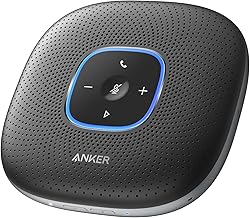
The Anker PowerConf is best for meetings where participants sit around the device rather than directly in front of it. Its six microphones are arranged in a 360-degree array, and the listed Voice Radar 3.0 technology is designed to reduce noise, cancel echo, and detect multiple speakers.
The product details also say that the speakerphone automatically balances voice levels to account for differences in volume and distance. That feature may be useful in a room where people speak from different positions. The listing identifies it as a Zoom Certified conference speakerphone and describes it as suitable for turning home or office spaces into meeting rooms.
- Best for: Small and shared meeting spaces where people speak from different directions.
- Why it stands out: The 360-degree six-microphone array and automatic voice balancing target uneven seating and speaking levels.
- Consider: The supplied feature details do not state a specific room-size or attendee limit, so match coverage to your room rather than assuming a capacity.
EMEET M1A USB Speakerphone

The EMEET M1A is best for buyers who prefer a USB conference speakerphone with simple onboard volume controls. Its two omnidirectional microphones are described as providing 360-degree pickup. The listed VoiceIA technology includes noise reduction, echo cancellation, voice amplification, and full-duplex audio.
The speaker offers nine volume levels, adjusted from the control panel, and a blue LED indicator helps users judge the selected level. The product details name a range of meeting applications, including Skype for Business, Microsoft Lync, Google Hangouts, FaceTime, GoTo Meeting, BlueJeans, and Webex. The listing describes broad office-software compatibility but does not specify every supported computer or operating system.
- Best for: Computer-based meetings where a USB connection and direct volume controls are priorities.
- Why it stands out: Its two microphones, voice-processing features, and nine selectable volume levels are clearly specified.
- Consider: The supplied details emphasize USB use and do not list Bluetooth or daisy-chain expansion.
Dell Speakerphone SP3022

The Dell SP3022 is best for a compact workstation or small meeting area where the speaker can sit on a monitor base or beside a computer. Dell describes it as a desk micro soundbar with a compact style. The listed Teams and Zoom certifications may suit users who organize calls through those services.
Its LED indicators show Teams app status and call controls, including answer or hang-up, volume up or down, and microphone mute or unmute. Dell also lists full-duplex audio and AI noise cancellation, with support for multiple people speaking at once while being heard clearly.
- Best for: Individual workstations and compact conference setups centered on Teams or Zoom.
- Why it stands out: Its small form factor and visible call and mute controls support a tidy, easy-to-monitor setup.
- Consider: The supplied details do not specify microphone count, pickup radius, or room capacity, so it may be less suitable when those measures are essential.
Buying Guide: How To Choose Conference Room Computer Speakers
How many people need to be heard?
Start with the number of people who will speak during a typical meeting and where they sit. A microphone array described as 360-degree can suit a table where participants are distributed around the speaker. For example, the EMEET M0 Plus lists four microphones, while the Anker PowerConf and Yealink SP96 list six each. Microphone count alone does not establish a guaranteed room size or attendee capacity, so use stated pickup radius and expansion details where available.
For a small room, a single speakerphone may be sufficient if everyone can sit within its pickup range. For a larger table or an expanding group, consider an explicitly expandable model. The M0 Plus states that two compatible EMEET speakerphones can be linked to support up to 16 attendees. The SP96 product name also lists daisy-chain support, but the supplied information does not give its attendee capacity.
Should you choose USB, Bluetooth, or both?
USB can be a straightforward choice when the speaker stays near a computer and users want a direct wired connection. The EMEET M1A is listed as a USB speakerphone. The Dell SP3022 is positioned as a compact computer soundbar, but its supplied details do not specify a connection type, so check the product listing before choosing it for a particular computer.
Bluetooth offers a wireless connection option. The EMEET M0 Plus and Yealink SP96 both list Bluetooth, while the Yealink also names USB-C and USB-A connectivity. If a device will move between rooms, wireless operation may be useful; if it will remain installed at one workstation, a wired connection may simplify daily use. Confirm computer ports and connection needs before buying.
Which microphone features matter for clearer calls?
Look for features that address the problems in your room. Noise reduction may help when background sounds are present; echo cancellation is relevant when speaker audio feeds back into the microphone; and full-duplex support is intended to let people speak and hear each other at the same time. The EMEET M0 Plus and M1A list several of these functions. Anker lists noise reduction, echo cancellation, and multiple-speaker detection.
Automatic voice balancing can also help when participants speak at different volumes or sit at different distances. Anker lists this feature for the PowerConf. These processing features do not replace good placement: put the speakerphone where voices can reach it, avoid blocking its microphones, and follow the product’s setup instructions.
Do you need a dedicated meeting-room speaker or a desk speaker?
A compact desk model may be easier to place beside a monitor and can suit one person or a small huddle. The Dell SP3022 is explicitly described as fitting on a monitor base or beside a laptop or desktop. A conference speakerphone with all-around pickup is a more relevant comparison when multiple people sit around a table. Choose based on seating layout, not only the product’s general speaker label.
Also consider the controls people will use during calls. The M1A provides nine volume levels on its control panel, while the Dell lists visible indicators for call status, volume, and microphone mute. Straightforward controls can reduce interruptions when users need to adjust sound or mute quickly.
What should you verify before ordering?
- Computer connection: Check whether your computer needs USB-A, USB-C, or Bluetooth and verify the exact connection supplied.
- Meeting software: Confirm compatibility with the applications your organization uses. A named certification or software list is useful, but should not be treated as proof of compatibility with every device or platform.
- Room coverage: Compare stated pickup radius and microphone arrangement with the size and layout of your room.
- Expansion: If one speakerphone may not cover the room, check whether daisy-chaining is supported and what attendee capacity is stated.
- Controls and indicators: Consider whether users need convenient mute, volume, or call-status controls.
Frequently Asked Questions
What is a conference room computer speaker?
It is a speakerphone or speaker designed to connect to a computer for calls and meetings. Many models combine a speaker for incoming audio with microphones for capturing voices in the room.
Is a 360-degree microphone array useful in a conference room?
It can be useful when participants sit around the device because the microphones are designed to pick up voices from different directions. Actual coverage depends on room layout, placement, and the product’s stated pickup range.
Can a Bluetooth speakerphone also connect by USB?
Some models list both connection options. For example, the Yealink SP96 lists Bluetooth along with USB-C and USB-A support, and the EMEET M0 Plus lists Bluetooth and USB-C with a USB-C-to-A adapter.
What does full-duplex audio mean?
Full-duplex audio supports speaking and hearing at the same time, rather than requiring participants to take turns. Several products in this selection list full-duplex support.
Which speaker is best for expanding to a larger meeting?
The EMEET M0 Plus is the clearest match in this selection because its listing says two compatible units can be linked for up to 16 attendees. The Yealink SP96 also lists daisy-chain support, but the supplied details do not state a specific attendee limit.
Should I choose a Teams- or Zoom-certified speakerphone?
Choose a model with the certification relevant to your workplace if that certification is a purchasing requirement. The Dell SP3022 lists both Teams and Zoom certification, while the Anker PowerConf lists Zoom certification. Verify the exact model and software requirements before ordering.