
To transfer reel-to-reel audio to digital, connect a working reel-to-reel deck’s line output to a USB audio capture device, then record the playback on a computer. DigitPro and DIGITNOW are straightforward options for basic transfers; Wiistar is the choice when higher stated sampling specifications matter; DriverGenius includes capture software. Legacybox is a mail-in option for selected media, but confirm that it accepts open-reel audio tapes before sending them.
| Product | Best suited for | Key distinction |
|---|---|---|
| DigitPro USB Capture Card | Basic computer transfers | 3.5mm and stereo RCA inputs |
| Wiistar USB Capture Card | Higher-spec capture | Supports up to 96 kHz/24-bit |
| DriverGenius AudioXfer | Transfers with editing software | Audacity and USB-C connection |
| DIGITNOW USB Capture Card | Simple recording workflow | Audacity included |
| Legacybox 3 Items | People seeking a mail-in service | Open-reel acceptance needs confirmation |
DigitPro USB Audio Capture Card

Best for: A buyer who wants a basic way to connect a reel-to-reel deck’s analog output to a computer. This USB 2.0 capture card has stereo RCA and 3.5mm inputs, so it can connect to a source with a matching output. It does not need a separate power supply, according to the listed features.
The device is described as supporting recording to a computer and conversion to MP3 or WAV. Its listed operating system support includes Windows versions through Windows 10 and Mac OS 10.7–10.14. The product information specifically says it is not compatible with Mac OS 10.15, so check your computer’s operating system before choosing it.
Why it was selected: Its RCA inputs are a practical match for many audio components with stereo line outputs, while the 3.5mm input offers another connection option. Limitation: The stated Mac support is dated and excludes macOS 10.15; the listing does not establish support for newer versions.
Wiistar USB Audio Capture Card

Best for: Buyers who want a capture device with a stated higher maximum sampling specification. Wiistar lists support for up to 96 kHz/24-bit audio sampling and includes RCA left/right and 3.5mm audio connections. The listed sources include tape, MiniDisc, phono, and CD players, making its input approach relevant to analog audio transfers.
The device connects to a computer through USB and is described as plug-and-play. The features mention WAV and MP3 formats for captured audio. For reel-to-reel use, connect the deck’s suitable audio output to the card’s input; the source and input levels still need to be matched appropriately.
Why it was selected: The stated sampling-rate and bit-depth ceiling makes it a useful comparison choice for people who want to record at higher settings before editing or converting files. Limitation: “Up to” describes the maximum listed capability, not a guarantee that every recording application, computer, or source will use those settings.
DriverGenius AudioXfer Capture Device

Best for: Buyers who want an audio capture device with software mentioned in the product details. DriverGenius lists 3.5mm and stereo RCA inputs, a USB-C audio grabber, an indicator light, and Audacity software. It is described for recording audio from older sources such as cassette decks, LPs, FM radio, and MiniDisc players.
For a reel-to-reel transfer, the key consideration is whether the deck’s output connection matches one of the device’s listed inputs. Captured audio can be saved in digital formats such as MP3 or WAV, and Audacity can be used for recording or editing. The product notes that 64-bit Mac users should use Audacity 2.3.1 or later and update the 64-bit LAME component.
Why it was selected: It combines common analog input types with a named recording and editing application, which can make the workflow easier to plan. Limitation: The Mac software note calls for specific version and component updates, so buyers should check their setup rather than assume every configuration is ready to use.
DIGITNOW USB Audio Capture Card

Best for: Buyers looking for a no-extra-power-supply capture card with bundled recording software. DIGITNOW lists RCA left/right and 3.5mm inputs and describes recording to a computer, with MP3 or WAV conversion. The features also mention Audacity and online updating.
For reel-to-reel audio, connect the deck’s analog output to the capture card’s matching input and use computer software to record playback. The listing describes the device as plug-and-play and also identifies microphone, line-in, and auxiliary input use. Confirm that the connection you plan to use is appropriate for the output on your particular deck.
Why it was selected: It offers the essential connection types and recording workflow needed for a computer-based transfer, with Audacity named in the product details. Limitation: The listed operating system support is older, ending at Windows 10, and the supplied information does not confirm compatibility with newer systems.
Legacybox 3-Item Digitization Service
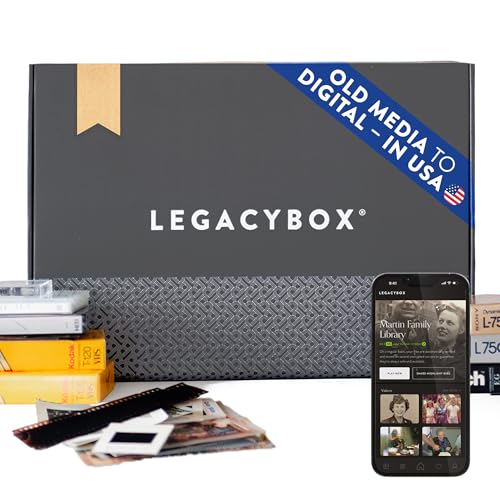
Best for: People who prefer a mail-in digitization process instead of connecting a tape deck and recording at home. The listed package covers three items, with an item defined as one tape, one film reel, or a pack of 25 photos. It includes a USB flash drive and one month of cloud access; the product details say DVD/CD or extended cloud access can be selected as add-ons during activation.
The listed media types include audio cassettes and film reels, and the service says items are tracked during processing. However, the listing does not explicitly confirm acceptance of open-reel audio tapes. Contact the service and verify that your specific reel format is accepted before ordering or shipping anything.
Why it was selected: It gives buyers a service-based alternative when they would rather not operate capture hardware themselves. Limitation: The advertised media descriptions do not clearly establish that reel-to-reel audio is eligible, and activation is required before sending media.
Buying Guide: How To Transfer Reel-To-Reel Audio
What equipment do you need for a computer-based transfer?
A typical home workflow uses a functioning reel-to-reel deck, suitable cables, a USB audio capture device, a computer, and recording software. The capture card converts the deck’s analog output into a signal the computer can record. The products above are capture devices or a digitization service; none is itself a reel-to-reel playback deck.
Before choosing a device, look at the deck’s available outputs and compare them with the capture card’s listed inputs. RCA stereo outputs match RCA left/right inputs. A 3.5mm connection can be useful when the deck or an intermediate component provides that output. Do not assume that a cable or adapter solves a mismatch in signal type or level.
Which capture card is the best fit for your setup?
| Buyer priority | Option to compare | Reason |
|---|---|---|
| Simple RCA or 3.5mm connection | DigitPro or DIGITNOW | Both list these input types and computer recording. |
| Higher stated capture ceiling | Wiistar | Lists support up to 96 kHz/24-bit. |
| Capture software named in the listing | DriverGenius or DIGITNOW | Both product details mention Audacity. |
| Outsourced handling | Legacybox | Offers mail-in digitization, but open-reel acceptance must be confirmed. |
These distinctions describe listed features, not a ranking based on hands-on testing. A higher maximum sampling specification does not automatically mean a better result for every tape. The deck’s condition, tape condition, connection, recording level, and software settings all affect the result.
What recording settings should you consider?
Choose a recording format and quality setting that fit how you plan to use the files. WAV is useful when you want an uncompressed working copy for later editing; MP3 is a compressed format that can be more convenient for everyday listening. Keep an archival-quality master when possible, and make smaller listening copies from it if needed.
Set recording levels so the signal is strong without clipping. A clipped recording can sound distorted, and lowering the volume afterward does not restore the missing detail. Make a short test recording before capturing a full reel. Listen for hum, distortion, channel imbalance, and excessive noise, then adjust the connection or level before continuing.
How can you prepare reels and protect the original recording?
Inspect the tape and reel before playback. If tape is visibly damaged, tangled, or shedding, avoid repeatedly running it through the machine. A deck that needs service can also damage tape or produce unstable playback. Clean and maintain equipment according to its manual, and use a qualified technician when a tape or deck needs specialist attention.
Record the entire reel in a quiet environment and avoid interrupting playback. Name files clearly with information such as the reel identifier, side, date, or contents when known. Keep the original tape after digitizing, and store a second copy of important digital files on a separate device or storage location.
Is a mail-in service right for open-reel audio?
A mail-in service may suit buyers who do not have a working deck, prefer not to manage audio software, or have several kinds of media to digitize. However, product descriptions that mention “film reels” do not necessarily mean the service accepts reel-to-reel audio tapes. Verify the exact format, reel size, and tape type with the provider before placing an order or mailing irreplaceable recordings.
For a home transfer, a capture card gives the user control over recording and file organization, but requires compatible equipment and time. For outsourcing, confirm what digital deliverables are included, how the originals are handled, and whether additional formats or storage options require a separate selection. The available product information should be checked directly for current service terms.
Frequently Asked Questions
Can I transfer reel-to-reel tapes with a USB cassette converter?
Potentially, if the device has an audio input that matches the reel-to-reel deck’s output and the computer recognizes it for recording. The products listed here are audio capture devices, not reel-to-reel players. Confirm input and operating system compatibility before buying.
Do I need a reel-to-reel deck to digitize the tapes?
For a do-it-yourself transfer, yes: the tape must be played by a working, compatible reel-to-reel machine while the audio is recorded. A mail-in service may be an alternative, but confirm that it accepts the specific open-reel audio format.
Should I save reel-to-reel recordings as WAV or MP3?
WAV is a suitable choice for an uncompressed working or archival copy. MP3 is compressed and can be convenient for listening and sharing. If storage allows, retain a WAV master and create MP3 copies for everyday use.
Does 96 kHz/24-bit guarantee better-sounding transfers?
No. That figure is Wiistar’s stated maximum capture capability, not a guarantee of sound quality. Tape condition, deck performance, connection quality, recording levels, and software settings also affect the result.
Will Legacybox digitize open-reel audio tapes?
The supplied product information mentions audio cassettes and film reels but does not clearly state that open-reel audio tapes are accepted. Ask the provider about the exact tape format before ordering or shipping your reel.