
The best MIDI on/off switch depends on whether you need to send MIDI commands, control a device wirelessly, or simply switch electrical power. The Paint Audio MIDI Captain ONE is best for programmable single-switch MIDI control, while the BT MIDI Foot Controller is better for musicians who want four wireless buttons. The other options below are physical power or momentary switches, not MIDI controllers; check their descriptions carefully before choosing.
| Product | Best For | Control Type |
|---|---|---|
| Paint Audio MIDI Captain ONE | Programmable MIDI commands | USB-connected MIDI foot controller |
| BT MIDI Foot Controller | Wireless, multi-button control | Bluetooth MIDI foot controller |
| Gebildet Momentary Foot Switch | Switch replacement or DIY projects | Normally open electrical switch |
| Cable Matters Grounded Outlet Switch | Switching an appliance’s outlet power | Grounded AC outlet adapter |
| ANDTOBO USB Switch Extension Cable | Switching compatible USB power | USB power and data cable |
Paint Audio MIDI Captain ONE

The Paint Audio MIDI Captain ONE is best for musicians who need a single footswitch to send configurable MIDI commands. Its programmable switch can send one or multiple commands per press, making it a more direct fit for a MIDI on/off control task than a basic electrical switch.
- Supports combinations of PC, CC, and NOTE commands.
- Can mix commands across multiple MIDI channels.
- Switch actions can be configured for press, release, hold, or multiple timings.
- Button functions are configured through a USB connection.
Choose this if you want one switch with configurable MIDI behavior and the ability to trigger different command types. It was selected because the product description specifically identifies MIDI commands and adjustable trigger timing. Its single-switch layout is a limitation if you need several independent foot controls.
BT MIDI Foot Controller

This four-button wireless controller is best for performers who want multiple footswitches in a compact setup. The listed features describe Bluetooth MIDI control, smartphone app configuration, and a rechargeable battery, so it offers a different approach from the USB-configured single-switch option.
- Four footswitches in a compact, portable design.
- Settings and assignments are managed through the CubeSuite smartphone app.
- The listed 300mAh battery is specified for up to 12 hours of use per charge, with a 2.5-hour charge time.
Choose this if wireless operation and four buttons are more important than a single, highly configurable switch. It was selected for its stated MIDI function and multi-button design. A practical limitation is that setup relies on the dedicated app, and the product description does not specify which MIDI devices or software it supports; verify compatibility before purchase.
Gebildet Momentary Foot Switch

The Gebildet two-pack is best for repair work or custom projects that need a normally open, momentary footswitch. It is a physical SPST switch, not a standalone MIDI controller. A separate circuit or device would need to translate its electrical switching action into MIDI if that is the intended use.
- Normally open, OFF-(ON), two-pin SPST operation.
- Soft-touch, silent operation, according to the product description.
- 12mm mounting-hole size and solder-lug terminals.
- Listed ratings: 4A at 125VAC and 2A at 250VAC.
Choose this if you need a component to install in a compatible enclosure or circuit. It was selected because it is a foot-operated on/off-style switch, but its momentary action is not the same as a latching toggle: it operates while pressed rather than remaining switched on. Confirm the mounting and electrical requirements for your project.
Cable Matters Grounded Outlet Switch

This three-pack is best for switching power to grounded appliances at a wall outlet. Each adapter adds a physical power button to a single outlet and includes an indicator light that shows when power is being supplied. It does not send MIDI data or control MIDI software.
- Three grounded, single-outlet switches are included.
- The indicator light shows whether the outlet is supplying power.
- Designed to turn connected appliances on or off without unplugging them.
Choose this if “on/off switch” means cutting power to an appliance rather than sending a MIDI command. It was included as a clearly labeled alternative for buyers using the search term broadly. Avoid it if you need a MIDI foot controller, MIDI message, or USB data control; its stated function is outlet power switching.
ANDTOBO USB Switch Extension Cable
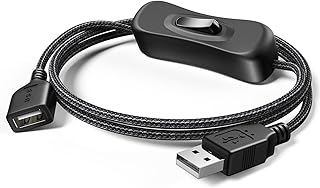
The ANDTOBO cable is best for users who need a physical switch in a USB power connection. The product is described as a USB-A male-to-female extension with a rocker switch, and it supports data transmission as well as power. It is not a MIDI controller and does not itself generate MIDI commands.
- 40-inch (100cm) extension length.
- Listed support for 5V and 3A.
- Designed for USB power and data, including the listed iOS-device use.
- The product description says high-power devices are not supported.
Choose this if the goal is to interrupt compatible USB power while keeping a USB extension in the connection. It was selected as an adjacent on/off switching option, not as a MIDI device. Check the connected device’s power requirements and USB connection needs before use; the listed 5V, 3A support does not make it suitable for every powered device.
Buying Guide: How To Choose A MIDI On/Off Switch
Do you need MIDI commands or electrical power switching?
This is the most important distinction. A MIDI controller sends messages such as PC, CC, or NOTE commands to compatible equipment or software. An outlet adapter, USB cable switch, or bare footswitch changes an electrical connection. Those products do not become MIDI controllers simply because they have an on/off button.
If your goal is to toggle a MIDI-controlled effect, preset, or software function, start with a product that explicitly says it sends MIDI. The Paint Audio controller lists several command types and trigger behaviors. The BT MIDI controller is also described as a MIDI device, but its product information emphasizes Bluetooth operation and app-based setup.
How many footswitches do you need?
A single switch can suit a one-action task, such as sending a configured command from a pedalboard. A four-button controller may be more useful when you need separate foot controls for multiple assignments. More buttons do not automatically mean better compatibility, so check that the controller’s connection method and configuration options fit the equipment you plan to use.
Should the switch be momentary or latching?
A momentary switch changes state only while it is pressed, then returns when released. The Gebildet switch is explicitly described as normally open and OFF-(ON), so it is a momentary component. A latching switch stays in its new position until pressed again. These behaviors are not interchangeable in every circuit or MIDI setup; confirm which action the controlled device expects.
Is a wired or wireless controller a better fit?
A wired controller may suit a fixed setup where a USB connection is convenient. A wireless controller can reduce cable runs, but it adds a wireless connection and, in this example, app-based configuration and battery charging. The BT controller lists up to 12 hours of use per charge, but buyers should still plan around charging and confirm that the target equipment supports the intended Bluetooth MIDI workflow.
What should you check before buying?
- Connection: Confirm whether the device uses USB, Bluetooth MIDI, a direct electrical switch, or an AC outlet.
- Command behavior: Check whether you need a press, release, hold, momentary action, or latching action.
- Configuration: Determine whether assignments require a computer, a smartphone app, or a separate circuit.
- Electrical limits: For power switches and cables, compare the device’s stated voltage and current requirements with the product’s listed ratings.
- Compatibility: Check the controller’s MIDI connection and command support against your specific instrument, effects unit, or software. The supplied product information does not establish universal compatibility.
Frequently Asked Questions
Can a regular on/off switch send MIDI?
No. A regular electrical switch changes a circuit or power connection. It sends MIDI only when it is part of a compatible MIDI controller or connected to electronics that convert its action into MIDI messages.
Which option listed here is specifically a MIDI controller?
The Paint Audio MIDI Captain ONE and the BT MIDI Foot Controller are described as MIDI controllers. The other listed products are outlet, USB power, or component switches.
Is the Gebildet footswitch a latching MIDI switch?
No. The listed description identifies it as a normally open, momentary OFF-(ON) SPST switch. It is a physical component, not a standalone MIDI device.
Can the Cable Matters outlet switch control a MIDI pedal?
It can switch power to a connected appliance through an outlet, but the listing does not describe MIDI control. It does not send MIDI commands to a pedal or software.
What does a MIDI foot controller do?
A MIDI foot controller uses footswitches to send MIDI messages to compatible equipment or software. The receiving device determines what those messages do, such as changing a preset or controlling an assigned function.
What should I choose for a wireless multi-button setup?
The BT MIDI Foot Controller is the listed option with four buttons and Bluetooth MIDI features. Confirm that its connection method and app-based configuration suit the equipment you intend to control.