
The best multi-touch MIDI controller depends on what you mean by “multi-touch”: hands-on keyboard playing, several physical controls, or touch-sensitive faders. The Behringer X-TOUCH is best for DAW mixing with motorized faders, while the Akai MPK Mini MK3 suits compact beat-making. The Arturia KeyLab Essential mk3 and M-AUDIO Keystation 49 MK3 offer 49-key formats, and the MIDI Captain MINI 6 is best for programmable foot control. None of the supplied product details confirms a touchscreen or multitouch surface, so compare the kinds of physical control you need.
| Product | Best For | Key Control Type |
|---|---|---|
| Behringer X-TOUCH | DAW mixing and live control | Nine touch-sensitive motorized faders |
| Akai MPK Mini MK3 | Portable beat-making and synth control | 25 velocity-sensitive mini keys and a thumbstick |
| Arturia KeyLab Essential mk3 | Buyers wanting a 49-key controller with bundled software | 49-key USB MIDI keyboard |
| M-AUDIO Keystation 49 MK3 | Full-size key playing and basic DAW navigation | 49 velocity-sensitive keys and software controls |
| Paint Audio MIDI Captain MINI 6 | Foot-operated MIDI commands | Six programmable switches |
Behringer X-TOUCH
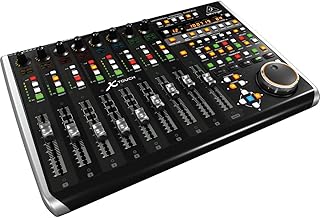
Best for: Producers and live operators who want tactile control of multiple DAW channels rather than a keyboard-focused MIDI controller. The X-TOUCH provides nine touch-sensitive, 100 mm motorized faders, plus LCD scribble strips and Ethernet, USB, and MIDI interfaces according to its product name and listed details.
It supports HUI and Mackie Control protocols for integration with compatible music production software. The motorized faders are useful when a project’s software settings need to be reflected physically on the surface. Touch sensitivity also lets the controller respond to a user contacting a fader during an adjustment.
Why it was selected: It is the clearest fit here for controlling several mix parameters at once. Choose this if your priority is hands-on DAW mixing or live control, not playing notes on a keyboard.
Limitation: The supplied details establish fader touch sensitivity, not a multitouch touchscreen. It is also a larger control-surface-style option than a compact keyboard controller.
Akai Professional MPK Mini MK3

Best for: Beat-makers and mobile-minded producers who want a compact keyboard controller for studio production, virtual synthesizers, and beat production. It has 25 mini velocity-sensitive keys and is USB-powered.
The listed features include a four-way thumbstick for pitch and modulation control and a built-in arpeggiator with adjustable resolution, range, and modes. The product also lists Native Kontrol Standard (NKS) integration. These features make it a more performance-oriented choice than a basic keyboard controller, while keeping the key count and physical format compact.
Why it was selected: It offers several ways to shape a performance without requiring a full-sized keyboard. Choose this if portability and beat-making controls matter more than having 49 keys or motorized mixing faders.
Limitation: Its 25 keys are mini keys, not full-size keys. The supplied information does not describe a multitouch display or touch-sensitive faders.
Arturia KeyLab Essential mk3

Best for: Keyboard players seeking a 49-key USB MIDI controller that includes Analog Lab V software. The product name identifies its 49-key format, USB MIDI connection, and included software, making it a straightforward option for someone who wants a keyboard-based setup with a named software package.
Why it was selected: It gives buyers a middle ground between the compact 25-key Akai and the 49-key M-AUDIO model. Choose this if the included Analog Lab V software is relevant to your workflow and a 49-key range suits your playing.
Limitation: The supplied product information does not specify key action, additional controls, compatibility details, or touchscreen functionality. Check the product listing for those details before choosing it for a particular setup.
M-AUDIO Keystation 49 MK3

Best for: Players who want full-size keys and straightforward control of music software. The Keystation 49 MK3 has 49 full-size velocity-sensitive keys, a volume fader, transport and directional buttons, pitch and modulation wheels, octave buttons, and a sustain-pedal input.
Its listed connection is plug-and-play USB for Mac or PC, with no driver or power supply required. The product information also states compatibility with iOS devices through an Apple to USB Camera Adapter, sold separately. These details make it a practical choice when essential keyboard and software controls matter more than numerous dedicated mixing controls.
Why it was selected: Choose this if you prefer full-size keys and want basic transport and navigation controls alongside performance features. It is better suited to note input than a fader-focused surface.
Limitation: The iOS connection requires a separately sold adapter. The listed feature set does not establish that the unit has a multitouch screen or motorized faders.
Paint Audio MIDI Captain MINI 6

Best for: Musicians who need to trigger MIDI commands with their feet while playing an instrument or operating another setup. Its six programmable switches can send single or multiple commands when pressed, and their functions can be configured through a USB connection to a computer.
The listed features include mixed transmission of MIDI channels and PC, CC, and NOTE commands. Switch timing can be set for press, release, hold, or multiple timings. That flexibility makes the MINI 6 a different kind of multi-control option from a keyboard or DAW fader surface.
Why it was selected: Choose this if hands-free operation and configurable footswitch behavior are central to your setup. It provides multiple programmable triggers rather than keys for playing melodies.
Limitation: It is a foot controller, not a keyboard or touchscreen. The supplied information does not specify the number of simultaneously usable controls beyond its six switches.
Buying Guide: How to Choose a Multi-Control MIDI Controller
Do you mean a multitouch screen or several physical controls?
“Multi-touch MIDI controller” can describe different buyer needs. A multitouch screen registers multiple points of contact on a display, while a controller with multiple physical controls offers several keys, faders, knobs, or switches. The product details provided here do not confirm a multitouch display on any model. If screen-based multitouch is essential, verify that feature in the manufacturer’s specifications before buying.
For tactile control of separate DAW channels, the Behringer X-TOUCH is the most directly relevant choice in this group because it has nine touch-sensitive motorized faders. For multiple playable notes and performance control, compare keyboard formats such as the Akai, Arturia, and M-AUDIO models.
Should you choose a keyboard, fader surface, or foot controller?
- Choose a keyboard controller if entering notes and playing virtual instruments are the main tasks. The Akai has 25 mini keys; the Arturia and M-AUDIO models offer 49 keys.
- Choose a fader surface if the priority is physical control of mix parameters. The X-TOUCH lists nine motorized, touch-sensitive faders and support for HUI and Mackie Control.
- Choose a foot controller if you need to send MIDI commands without using your hands. The MIDI Captain MINI 6 has six programmable switches with configurable trigger timings.
How many keys do you need?
A 25-key controller uses less space and can suit compact production or beat-making workflows, but it gives you a smaller playing range than a 49-key model. The Akai MPK Mini MK3 is the only 25-key option in this selection, and its keys are mini-sized. Both the Arturia KeyLab Essential mk3 and M-AUDIO Keystation 49 MK3 are listed as 49-key controllers. The M-AUDIO model specifically has full-size, velocity-sensitive keys.
Think about both range and key size. If you frequently play parts that span more notes, a 49-key controller may reduce the need to change octaves. If space and portability are more important, a compact controller may be a better fit.
Which controls matter for your workflow?
Match the controller’s physical features to the tasks you perform most. Touch-sensitive motorized faders are relevant to mixing. A thumbstick and arpeggiator can be useful for shaping or generating keyboard performances. Pitch and modulation wheels, transport buttons, and a sustain-pedal input serve different purposes. Programmable switches are useful when you need foot-triggered commands.
Do not assume that a product supports a specific software feature simply because it is a MIDI controller. Check the required protocol, command type, connection, and software compatibility in the product details. For example, the X-TOUCH lists HUI and Mackie Control support, while the MIDI Captain MINI 6 lists PC, CC, and NOTE commands.
What should you check before buying?
- Confirm whether the controller has a touchscreen if multitouch display input is required.
- Check key count and key size against your playing style and available desk space.
- Compare the physical controls with the tasks you want to perform, such as mixing, note entry, or foot-triggered commands.
- Verify the connection and software protocol required for your computer, DAW, or other equipment.
- Look for any separately required accessories. The M-AUDIO listing says its Apple to USB Camera Adapter for iOS use is sold separately.
Frequently Asked Questions
What does “multi-touch MIDI controller” mean?
It may mean a controller with a multitouch display or one with several physical controls for MIDI input. These are different features, so check the product specifications to confirm which type is included.
Does the Behringer X-TOUCH have a multitouch screen?
The supplied features list nine touch-sensitive motorized faders and LCD scribble strips, but do not identify a multitouch screen. Treat it as a fader-based control surface unless the manufacturer’s specifications confirm otherwise.
Which controller in this selection is best for beat-making?
The Akai MPK Mini MK3 is the strongest fit for compact beat-making based on its 25 velocity-sensitive mini keys, thumbstick, built-in arpeggiator, and stated use for beat production.
Which option has full-size keys?
The M-AUDIO Keystation 49 MK3 is explicitly listed with 49 full-size velocity-sensitive keys. The supplied Arturia details list 49 keys but do not specify their size.
Can a MIDI foot controller replace a keyboard?
Not for playing notes across a keyboard range. The MIDI Captain MINI 6 sends programmable commands through six switches, so it is better suited to hands-free triggering than note performance.
Do all MIDI controllers work with every DAW?
No universal compatibility is established by the information provided. Check the controller’s supported protocols and your DAW’s requirements before purchase. The X-TOUCH specifically lists HUI and Mackie Control support.