
An audio transcription foot pedal lets you control playback while keeping your hands on the keyboard. The Infinity IN-USB3 is best for buyers who prioritize a low-profile design, while the IN-USB-1 is suited to hands-free work with broad software compatibility. Express Scribe users can choose the dedicated ECS-FPAE; Philips’ four-pedal control suits buyers seeking toe-operated controls, and the VEC IN-USB-2 adds a mechanical stop to help prevent accidental pedal activation.
| Product | Best For | Key Detail |
|---|---|---|
| Infinity IN-USB3 | Low-profile setup | Large non-slip surface area |
| Infinity IN-USB-1 | General transcription workflows | Broad software compatibility |
| ECS-FPAE | Express Scribe users | Made specifically for Express Scribe |
| Philips ACC2330 | Toe-operated control | Four-pedal design |
| VEC IN-USB-2 | Accidental-trigger prevention | Mechanical stop for center pedal |
Infinity IN-USB3 Foot Control

The Infinity IN-USB3 is a USB digital foot control designed for computer-based audio playback workflows. Its listed features emphasize a low-profile design and a greater non-slip surface area. Those details make it a practical option for a buyer who wants a foot pedal with a broad surface and a less elevated profile.
Best for: Transcribers who value a low-profile pedal and a larger non-slip surface. It is selected because those are the product’s specified design features, which directly relate to placement and foot contact during use.
Consider: The supplied product details do not specify compatible software, pedal functions, or operating systems. Check that the pedal works with your transcription application before choosing it, especially if your workflow relies on a particular program.
Infinity IN-USB-1 Transcription Pedal
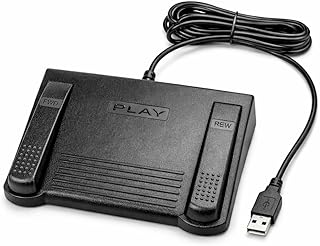
The ECS-IN-USB-1 is intended to provide hands-free audio playback control for transcription and dictation. The listing describes compatibility with most major dictation and transcription software platforms and an ergonomic, contoured layout intended to support natural foot positioning. Software is not included.
Best for: Buyers who want a general-purpose transcription pedal and need broad software compatibility. Its listed compatibility makes it a better starting point than a model explicitly limited to one program, although buyers should still confirm their exact software version and setup.
Consider: “Most major” does not identify every supported application. Verify compatibility with the software you actually use before purchase. The product listing also does not include transcription software, so it is not a complete software-and-hardware package.
ECS-FPAE Express Scribe Foot Pedal

The ECS-FPAE is a dedicated foot pedal for Express Scribe transcription software, including its free and paid versions on Windows and Mac. Its modified internal control board is described as being engineered specifically for that software. The oversized pedal layout provides controls for play, fast-forward, and rewind.
Best for: Transcribers whose workflow is centered on Express Scribe. Its software-specific design makes it a more targeted choice than a pedal advertised for broad compatibility.
Consider: The listing explicitly says this model is not for Case Catalyst or other transcription programs. Avoid it if you need a pedal for software outside Express Scribe. The software is not included.
Philips ACC2330 Four-Pedal Control

The Philips ACC2330 is a four-pedal foot control for digital systems and professional dictation. Its listed design uses toe-touch control, with the foot swinging from the heel. The product information also describes a way to relax the foot during pause time.
Best for: Buyers looking for a four-pedal control with toe-operated actions. The heel-supported movement described in the listing may be relevant to people comparing how a pedal is operated, rather than focusing only on software compatibility.
Consider: The supplied details do not identify compatible software, computer connections, or the function assigned to each of the four pedals. Confirm that the control works with your digital system and supports the actions you need before buying.
VEC IN-USB-2 Infinity Foot Control

The VEC IN-USB-2 is a USB computer foot control with a sloping play pedal and a large operating surface. Its listed features include heavy-duty components, precision switches designed for 2,000,000 depressions, and a mechanical stop intended to prevent accidental activation of the center pedal while stepping on side pedals.
Best for: Buyers who want a pedal with a stated accidental-trigger prevention feature. The mechanical stop is a specific differentiator, while the sloping play pedal and large surface may also matter when comparing physical layouts.
Consider: The listed durability figure describes the switches’ design, not a guarantee of service life under every use condition. The product details do not identify compatible transcription programs, so check software support before choosing it.
Buying Guide: How to Choose an Audio Transcription Foot Pedal
The right transcription pedal depends on the software you use, the playback actions you need, and the physical layout that feels practical for your work area. A pedal can help keep playback control separate from typing, but model features and compatibility vary. Start by checking the software requirement rather than assuming that every USB foot control works with every transcription application.
Does the pedal work with your transcription software?
Compatibility should be the first purchase check. The ECS-FPAE is explicitly made for Express Scribe and is not for Case Catalyst or other transcription programs. The IN-USB-1 is described as working with most major dictation and transcription platforms, but that broad statement is not a complete compatibility list. The supplied details for the IN-USB3, ACC2330, and IN-USB-2 do not name supported programs.
Before ordering, check the product information and your software’s documentation for the exact pedal model, operating system, and connection requirements. If you rely on specialized workplace software, ask your IT department or software provider whether the device is supported. This is especially important when the pedal is designed for a named program or the listing does not provide a compatibility list.
Which playback controls do you need?
Transcription pedals commonly support actions such as play, rewind, and fast-forward, but the available details differ by product. The ECS-FPAE listing names play, fast-forward, and rewind. The other supplied product descriptions do not give a complete control map. Do not infer the precise function of each pedal or switch from the number of pedals alone.
Think about your usual audio workflow. If you frequently replay short sections, confirm that the pedal and software combination can provide the playback actions you need. If you use a dictation system with a particular control scheme, check whether the pedal matches it. A suitable control layout can help keep playback adjustments separate from keyboard work.
How many pedals and what layout suit your workflow?
A multi-pedal layout can make several playback commands available underfoot, but the number of pedals does not by itself establish which commands they perform. The Philips ACC2330 is identified as a four-pedal control with toe-touch operation and heel-supported movement. The ECS-FPAE has an oversized layout with play, fast-forward, and rewind controls. For other models, the supplied product details emphasize surface shape or design rather than a complete pedal map.
Consider the space under your desk and how you position your feet. A low-profile design, a sloping play pedal, or a larger surface may be relevant depending on your preference. If the pedal will be shared between users, prioritize confirming that its layout and supported commands suit everyone’s workflow.
What design features matter for long sessions?
Extended transcription can involve repeated pedal use, so design details are worth comparing. The IN-USB-1 is described as contoured to support natural foot positioning and help reduce strain. The IN-USB3 lists a low profile and greater non-slip surface area. The IN-USB-2 has a sloping play pedal and a large surface. These are distinct design claims, not a guarantee that one shape will suit every user.
Think about where the pedal will sit, whether it may move on your floor, and how easily you can reach the controls from your normal seated position. If possible, compare the product’s dimensions and layout with your available foot space. The supplied details do not include dimensions for these models, so consult the full listing if size is a deciding factor.
Is accidental activation a concern?
The IN-USB-2 specifically lists a mechanical stop intended to prevent accidental triggering of its center pedal while stepping on side pedals. This feature may be useful for a buyer who wants that type of separation between controls. The other product details provided here do not describe a comparable mechanism, so avoid assuming they include one.
Also consider whether a pedal’s controls match your movement habits. A layout that places side controls close together may require more deliberate foot positioning. Product descriptions alone cannot establish how a particular user will interact with a pedal, so review the layout and operating instructions when available.
Should you choose a dedicated or broadly compatible model?
A dedicated model can be the clearest option when you use the software it names. The ECS-FPAE has explicit Express Scribe compatibility, but its stated limitation rules it out for other transcription programs. A pedal advertised for broader software support may offer more flexibility, but buyers still need to check support for their own application.
Choose a dedicated pedal if your software is fixed and the named compatibility matches your setup. Choose a broadly described model only after confirming your software and operating-system requirements. For an office purchase, consider the whole workflow: the pedal, the computer, the transcription application, and any playback shortcuts or settings managed by the software.
Frequently Asked Questions
What does an audio transcription foot pedal do?
An audio transcription foot pedal lets a user operate audio playback with a foot while typing. Depending on the pedal and software, controls may include play, rewind, or fast-forward. Confirm the specific control functions for the model and application you plan to use.
Will any USB transcription pedal work with any software?
No. Compatibility varies by pedal and application. The ECS-FPAE is described as exclusive to Express Scribe and not for other transcription programs. Check the exact pedal and software compatibility before buying.
Does the ECS-FPAE include Express Scribe software?
No. The product information says that software is not included. The pedal is described for use with the free and paid versions of Express Scribe on Windows and Mac.
Which pedal has a feature to help prevent accidental activation?
The VEC IN-USB-2 lists a mechanical stop designed to prevent accidental triggering of the center pedal while stepping on side pedals.
What should I check before ordering a four-pedal control?
Confirm that the pedal is compatible with your digital system and check what action each pedal performs. The Philips ACC2330 is described as a four-pedal, toe-touch control, but the supplied details do not map every pedal to a specific command.