
The best professional digital sound recorder depends on how long you record, how much audio you store, and how much control you need over playback. The Tonfarb 136GB model is best for long sessions, while the EVIDA 128GB recorder offers adjustable voice activation and multiple recording formats. The EVISTR is better for users who want gain adjustment and playback tools; the Tonfarb 64GB and Sunlan models suit buyers who prioritize straightforward controls.
| Recorder | Best For | Standout Feature |
|---|---|---|
| Tonfarb 136GB | Long sessions | Up to 68 hours of recording per charge, according to the listing |
| EVIDA 128GB | Format and voice-activation options | Three listed recording formats and six voice-activation levels |
| EVISTR 64GB | Playback control and gain adjustment | Seven gain levels and variable-speed playback |
| Tonfarb 64GB | Quick-start recording | One-click recording and saving |
| Sunlan 16GB | Simple everyday recording | Dedicated record, stop, and playback controls |
Tonfarb 136GB Digital Voice Recorder

This Tonfarb recorder combines a high stated storage capacity with one-button operation. Its listing describes 8GB of built-in storage and an included 128GB TF card, for 136GB total. It supports PCM recording up to 1536 kbps, automatic noise reduction, and voice-activated recording. The manufacturer also states that it can record continuously for up to 68 hours on one charge.
Best for: Students, journalists, and professionals who need to capture extended meetings, interviews, or classes without frequent charging. Choose this model if fast access matters: its side switch can start recording while the device is powered off, and pushing the switch down saves the recording. USB-C is listed for transferring files to a computer.
Limitation: The stated maximum storage duration depends on recording settings and format. The listed 68-hour battery figure is a manufacturer claim, not a guarantee for every use pattern.
EVIDA 128GB Voice Recorder
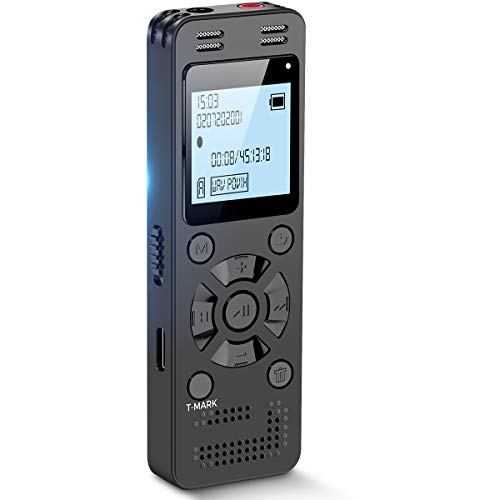
The EVIDA recorder is listed with 128GB of storage and three recording choices: MP3 at 128 kbps, MP3 at 192 kbps, and WAV at 1536 kbps. It includes voice-activated recording with six selectable sound-level settings. The listing also describes a noise-canceling microphone and a maximum continuous recording time of 54 hours with a full battery.
Best for: Buyers who want to choose between file size and recording detail, or adjust voice activation for different environments. The multiple MP3 settings can help conserve storage compared with the listed high-quality WAV mode. It is intended for lectures, meetings, and conversations.
Limitation: Voice activation depends on selecting an appropriate sound threshold. Quiet speech or distant speakers may not trigger recording as expected, so check the recording before relying on it for important material.
EVISTR 64GB Recorder With Playback Controls

The EVISTR L357 offers 64GB of listed storage, WAV and MP3 recording options, and a dynamic noise-reduction microphone. Its features include PCM noise reduction, seven recording-gain levels, A-B repeat, rewind, and variable-speed playback. The listing says it can record continuously for up to 32 hours and play back for up to 35 hours. It has a Type-C USB cable and a metal body.
Best for: Interviewers, students, and writers who need to review, repeat, or adjust the speed of recorded material. The gain settings provide a way to adjust pickup sensitivity, while the playback functions can make it easier to revisit a specific passage. Choose this model if reviewing files on the recorder is important.
Limitation: Its stated continuous recording time is shorter than the maximum listed for some larger-capacity options in this guide. Actual results can vary with settings and use.
Tonfarb 64GB One-Click Recorder

This Tonfarb model lists 64GB of storage and up to 4,600 hours of recording capacity. It supports WAV recording at up to 1536 kbps and includes automatic noise reduction. A side button starts recording, including when the recorder is powered off, and a second movement saves the file. Its 600mAh battery is listed for up to 48 hours of continuous recording at MP3 32 kbps.
Best for: Buyers who want a quick-start recorder with substantial storage and a simple save process. It is positioned for lectures, meetings, interviews, and field work. Choose it if immediate recording is more important than a wide range of playback controls.
Limitation: The 48-hour battery figure is tied to MP3 at 32 kbps. Recording at a higher quality setting may use power and storage differently.
Sunlan 16GB Simple Voice Recorder
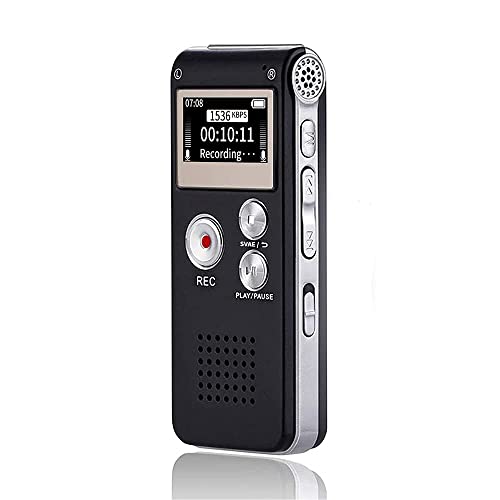
The Sunlan recorder focuses on simple operation. Its controls include record, stop, and play, plus an A-B function for repeating a selected section. The listing describes a sensitive microphone, noise reduction, voice-activated recording, and an internal speaker for playback. Its stated storage capacity is 16GB.
Best for: Buyers who want a basic recorder for lectures, interviews, or meetings and prefer direct physical controls over a longer feature list. Voice activation can reduce recording of silent periods, and A-B repeat can help with reviewing a short passage.
Limitation: The listed capacity is lower than the other featured options. Consider a higher-capacity model if you expect to keep many long recordings on the device before transferring them.
Buying Guide: How To Choose A Professional Digital Sound Recorder
A professional digital recorder should fit the recording task, not just advertise a high storage number or audio bitrate. For interviews, classes, and meetings, prioritize dependable start-and-save controls, useful playback, and settings that suit the recording environment. For long sessions, compare battery claims and storage capacity, while remembering that the results depend on recording format and settings.
How much storage do you need?
Storage determines how many files you can keep on the recorder before transferring or deleting them. The featured models list capacities from 16GB to 136GB. Higher capacity can be useful for frequent recording or long sessions, but a stated maximum number of hours is not universal. Audio format and bitrate affect file size: higher-quality files generally take more space than lower-bitrate MP3 files.
Check whether storage is built in or includes a memory card. The Tonfarb 136GB model lists 8GB built in plus an included 128GB TF card. The EVIDA lists 128GB, while the Sunlan lists 16GB. If your recording workflow depends on removable storage, confirm how the card is included and managed before purchase.
Which recording format and bitrate are appropriate?
WAV at a high bitrate is a useful choice when retaining more audio detail is important, but it creates larger files. MP3 can reduce file size and is often practical for speech notes or routine meeting records. The EVIDA lists WAV at 1536 kbps and MP3 options at 128 or 192 kbps. Several other products list PCM or WAV recording up to 1536 kbps.
Do not treat a high bitrate alone as proof of a professional result. Microphone placement, room noise, distance from the speaker, and the recorder’s settings all affect intelligibility. For clearer speech, place the device near the speaker when practical and make a short test recording before an important session.
Is voice-activated recording useful?
Voice activation can help conserve storage and reduce long stretches of silence. It may be useful in a meeting where speakers pause, or in a lecture where the recorder remains unattended. The EVIDA lists six sound-level settings, while other featured recorders describe voice-activated recording without the same number of adjustment levels.
This feature can miss quiet words if the trigger threshold is not suited to the room. For critical interviews, legal notes, or important presentations, continuous recording is generally the safer choice when available. Review a test file to confirm that speech starts reliably.
How important are battery life and controls?
For day-long events, compare the manufacturer’s stated recording time and consider how you will recharge the device. The Tonfarb 136GB listing claims up to 68 hours, the EVIDA up to 54 hours, and the EVISTR up to 32 hours of continuous recording. These figures are not directly comparable unless the recording settings and test conditions are the same.
Simple controls can prevent missed moments. One-click recording is a notable feature on both Tonfarb models in this guide. The EVISTR adds playback tools, while the Sunlan emphasizes dedicated record, stop, and play controls. Choose based on whether immediate capture or reviewing recordings on the device is more important.
What playback and file-transfer features should you check?
If you plan to review recordings without a computer, look for listed playback features such as an internal speaker, A-B repeat, rewind, or variable-speed playback. The EVISTR provides several of these controls, and the Sunlan lists an internal speaker and A-B repeat. Other models describe playback but provide fewer details about playback navigation.
Also consider how recordings move to your computer or other workflow. The Tonfarb 136GB listing specifies USB-C transfer. Before choosing any recorder, check the connection type and the file formats it creates against the devices or software you already use. The supplied product details do not establish compatibility with every computer, app, or editing program.
What should you check before recording?
Confirm that recording is permitted in the location and that you have any required consent. Laws and policies differ by state, workplace, school, and situation. Use the recorder responsibly, identify the device when appropriate, and follow applicable privacy rules.
Before an important session, charge the recorder, confirm available storage, choose the intended format, and make a short test. Check that the microphone captures the speaker clearly from the planned position. After recording, verify that the file saved and transfer a backup when the audio is important.
Frequently Asked Questions
What makes a digital sound recorder suitable for professional use?
Useful professional features include clear recording options, practical controls, adequate storage, dependable battery capacity, and playback or transfer functions that match the user’s workflow. Microphone placement and a test recording are also important for intelligible audio.
Is WAV better than MP3 for voice recording?
WAV at a high bitrate can preserve more audio detail but uses more storage. MP3 creates smaller files and may be sufficient for routine speech recordings. Choose based on the importance of audio detail and the available storage.
Does voice activation record every word?
Not necessarily. Voice activation starts recording when sound reaches the selected trigger level, so quiet speech or distant voices may not activate it. Test the setting in the actual recording environment before relying on it.
How much storage is enough for lectures and meetings?
It depends on recording length, file format, and bitrate. A 16GB recorder may suit occasional short sessions, while larger capacities can better accommodate frequent or extended recording. Higher-quality files use more space than low-bitrate files.
Should I use a recorder’s advertised maximum battery life as a guarantee?
No. Maximum battery figures are manufacturer claims and can vary with settings and use. Compare them as general guidance, then charge the device before important sessions and test your expected recording setup.
Where should I place a recorder for clearer speech?
Place it as close to the primary speaker as is practical, with the microphone unobstructed. Reduce distance and avoid placing it beside noisy equipment. Make a test recording to check clarity before the main session.